
Aigital ZQ-JPWN532b01
Manual d'usuari del repetidor WiFi Aigital N300
Model: ZQ-JPWN532b01
Producte acabatview
The Aigital N300 WiFi Repeater is a versatile networking device designed to extend your existing Wi-Fi coverage and enhance signal strength. It supports multiple operating modes including Repeater, Access Point, and Router, making it suitable for various network setups. Equipped with two high-gain external antennas, it aims to eliminate Wi-Fi dead zones and provide stable internet access throughout your home or office.

Figure 1: Aigital N300 WiFi Repeater, showing its compact design and indicator lights.
This device offers a Wi-Fi transmission speed of up to 300Mbps on the 2.4GHz frequency band, ensuring smooth web browsing and streaming. Its universal compatibility allows it to work with all internet boxes and Wi-Fi routers. Additionally, it features LAN/WAN ports for connecting wired devices, providing a more stable network environment for devices like smart TVs, game consoles, and PCs.

Figure 2: The repeater supports 2.4GHz and up to 300Mbps data transfer speeds.
Característiques clau
- High-Speed Signal: Achieves Wi-Fi transmission speeds of up to 300Mbps on the 2.4GHz band, ideal for seamless internet use.
- 360° WiFi Coverage: Features 2 high-gain external antennas to effectively penetrate walls and obstacles, minimizing data loss and eliminating Wi-Fi dead zones.
- Configuració fàcil: Supports one-button setup via the WPS button or a quick 1-minute configuration through a web browser interface, compatible with iOS and Android mobile platforms.
- Compatibilitat universal: Works with all standard internet boxes and Wi-Fi routers. Includes LAN/WAN ports for connecting wired devices.
- Múltiples modes de funcionament: Configurable as a Repeater, Access Point, or Router to suit different networking needs.

Figure 3: Two high-gain antennas improve signal coverage and stability.
Guia de configuració
1. Contingut del paquet
Abans de començar, assegureu-vos que hi hagi tots els components:
- Aigital N300 WiFi Repeater
- Cable Ethernet
- Guia d'instal·lació ràpida
2. Encès
Plug the Aigital N300 WiFi Repeater into a standard electrical outlet. Wait for the Power LED indicator to light up, indicating the device is powered on.

Figure 4: The repeater plugged into a power outlet.
3. WPS (Wi-Fi Protected Setup) Configuration
WPS offers a quick and easy way to extend your Wi-Fi network without manual configuration.
- Plug the Aigital N300 WiFi Repeater into an electrical outlet near your existing router.
- Press the WPS button on the Aigital Repeater (refer to Figure 6 for location). The WPS LED will start blinking.
- Within 2 minutes, press the WPS button on your main Wi-Fi router.
- Wait for the WPS LED on the repeater to become solid, indicating a successful connection. You can now unplug the repeater and move it to a desired location within your router's Wi-Fi range.

Figure 5: Easy setup using the WPS button on both the repeater and your main router.

Figure 6: Location of the WPS button on the Aigital N300 WiFi Repeater.
4. Web Configuració del navegador
If your router does not support WPS, or for more advanced settings, use the web mètode del navegador.
- Plug the Aigital N300 WiFi Repeater into an electrical outlet.
- Connect your computer or mobile device to the repeater's default Wi-Fi network (e.g., "Aigital_XXXX"). No password is required initially.
- Obre a web browser (Chrome, Firefox, Safari, etc.) and enter the default IP address or domain name (usually found in the Quick Installation Guide, e.g., http://192.168.10.1 or http://aigitalwifi.com).
- Follow the on-screen instructions to select your desired operating mode (Repeater, Access Point, or Router) and configure network settings, including Wi-Fi name (SSID) and password.
- Once configured, the repeater will restart. You can then connect your devices to the new extended Wi-Fi network.
Modes de funcionament
The Aigital N300 WiFi Repeater supports three primary operating modes:
1. Mode repetidor
In Repeater Mode, the device extends the coverage of your existing Wi-Fi network. It receives the wireless signal from your main router and re-transmits it, effectively expanding the range to areas with weak or no signal.

Figure 7: Three-in-one feature diagram, showing Repeater Mode (2).

Figure 8: Visual representation of Repeater Mode in action.
To optimize performance in Repeater Mode, place the device halfway between your router and the area where you need improved Wi-Fi coverage. Ensure the signal strength indicator on the repeater shows a strong or medium signal from your main router.

Figure 9: Signal strength indicators (WLAN LED) on the repeater.
2. Access Point (AP) Mode
In AP Mode, the device transforms a wired network connection into a wireless one. Connect the repeater to your router or modem using an Ethernet cable, and it will broadcast a new Wi-Fi network.

Figure 10: Wired LAN cable connection for Access Point mode.
This mode is useful for adding Wi-Fi capability to a wired-only network or for creating a separate Wi-Fi network in a specific area.
3. Router Mode
In Router Mode, the device acts as a primary router, creating a new private wireless network from a modem connection. This is suitable for small homes or offices that need a basic router function.
Connect the modem's Ethernet cable to the WAN/LAN port of the Aigital N300, and it will establish a new Wi-Fi network for your devices.
Connexió de dispositius amb cable
The Aigital N300 WiFi Repeater is equipped with two Ethernet ports (LAN/WAN) that allow you to connect wired devices directly to your network. This provides a stable and high-speed connection for devices that benefit from a wired link, such as desktop computers, gaming consoles, smart TVs, and network printers.
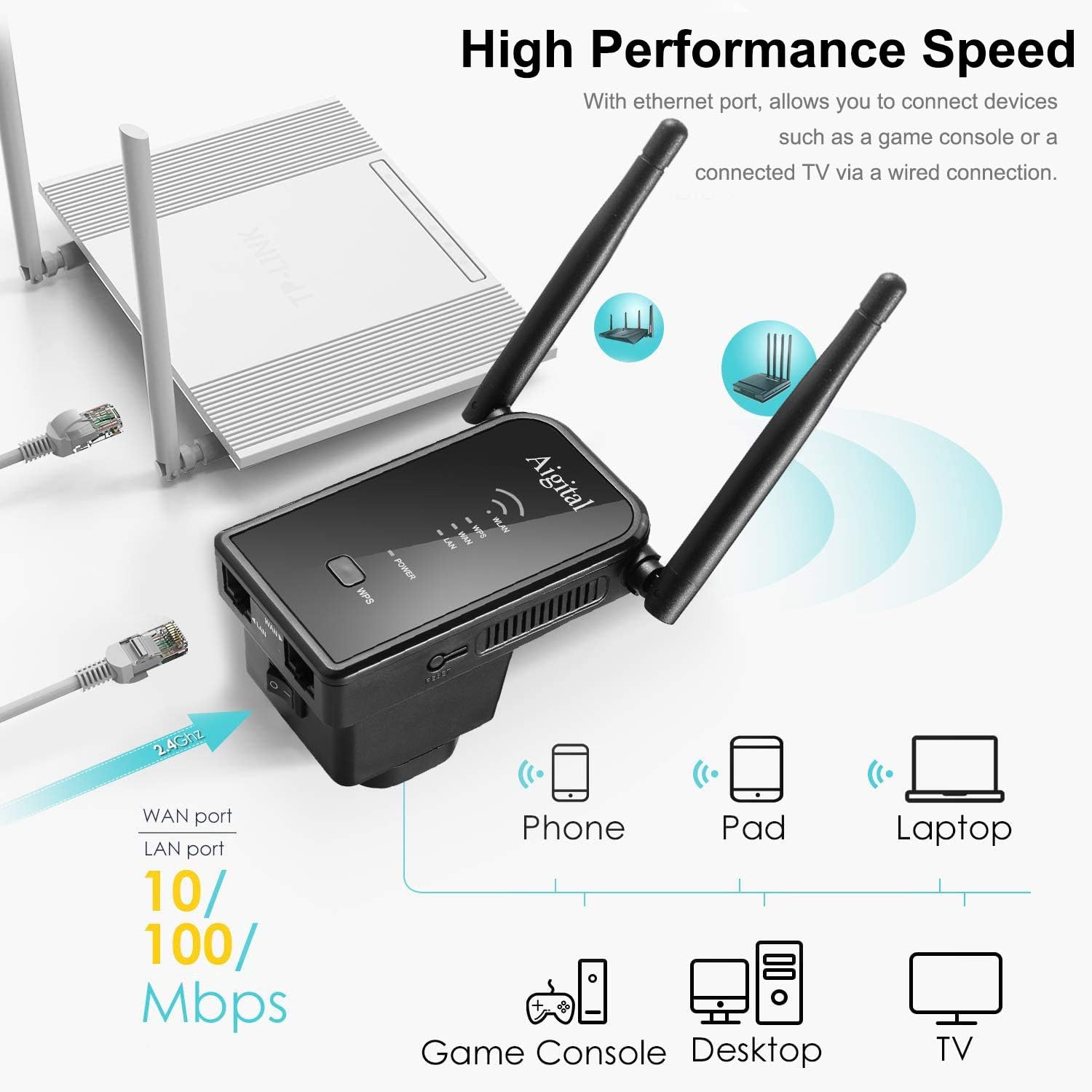
Figure 11: Connecting various devices via Ethernet ports.

Figura 12: Detallada view of LAN/WAN ports and compatible devices.
Manteniment
To ensure optimal performance and longevity of your Aigital N300 WiFi Repeater, follow these maintenance guidelines:
- Col·locació: Place the repeater in an open area, away from large metal objects, concrete walls, and other electronic devices that may cause interference.
- Neteja: Netegeu suaument el dispositiu amb un drap suau i sec. No utilitzeu netejadors líquids ni aerosols.
- Ventilació: Assegureu-vos que els forats de ventilació no estiguin bloquejats per evitar el sobreescalfament.
- Actualitzacions de firmware: Reviseu periòdicament el fabricant website for firmware updates to ensure the best performance and security.
Resolució de problemes
If you encounter issues with your Aigital N300 WiFi Repeater, refer to the following common problems and solutions:
| Problema | Causa possible | Solució |
|---|---|---|
| Sense LED d'alimentació | Device not plugged in or power outlet issue. | Ensure the repeater is securely plugged into a working electrical outlet. Try a different outlet. |
| Cannot connect to the repeater's Wi-Fi | Incorrect Wi-Fi password or repeater not broadcasting. | Verify the Wi-Fi password. If newly set up, ensure the repeater has restarted. Try resetting the repeater and reconfiguring. |
| Senyal prolongat feble o inestable | Repeater placed too far from the main router or too close to interference sources. | Relocate the repeater closer to your main router, ideally halfway between the router and the desired coverage area. Avoid placing near large metal objects or appliances. |
| No es pot accedir a web pàgina de gestió | Incorrect IP address, device not connected to repeater's Wi-Fi, or IP conflict. | Ensure your device is connected to the repeater's Wi-Fi. Double-check the IP address (http://192.168.10.1) o nom de domini (http://aigitalwifi.com). Try clearing your browser's cache. |
| Internet connection drops frequently | Interference, channel overlap, or outdated firmware. | Try changing the Wi-Fi channel on your main router. Ensure the repeater has the latest firmware. Check for physical obstructions. |
Si aquestes solucions no resolen el problema, poseu-vos en contacte amb l'atenció al client.
Especificacions
| Marca | Adigital |
| Número de model | ZQ-JPWN532b01 |
| Color | Negre |
| Característiques especials | WiFi Amplifier, 2 Ethernet Ports, Access Point Mode, 360° Coverage, Universal Compatibility |
| Dispositius compatibles | Any device capable of connecting to a WiFi network |
| Connectivitat | RJ45 (Ethernet) |
| Estàndard sense fils | 802.11n (N300) |
| Banda de freqüència | 2.4 GHz |
| Màx. Velocitat de dades | 300 Mbps |
| Antenes | 2 x 3dBi High Gain External Antennas |
Garantia i Suport
Aigital provides technical support for its products. According to product features, 24/7 technical support is available.
For warranty information, please refer to the documentation included with your purchase or visit the official Aigital website. Information regarding spare parts availability and software updates is not explicitly provided in the product details.
For further assistance, please contact Aigital customer support through their official channels.
Ask a question about this manual
Ask about setup, troubleshooting, compatibility, parts, safety, or missing instructions. Manuals+ will review the question and use this page’s manual context to help answer it.