
1. Introducció
1.1 Producte acabatview
The Renkforce RF-HC-100 is a compact 16-megapixel trail camera designed for outdoor monitoring. It features a time-lapse function, night vision capabilities, and a durable, camouflage brown housing. This camera is suitable for wildlife observation, property surveillance, and other outdoor recording needs.
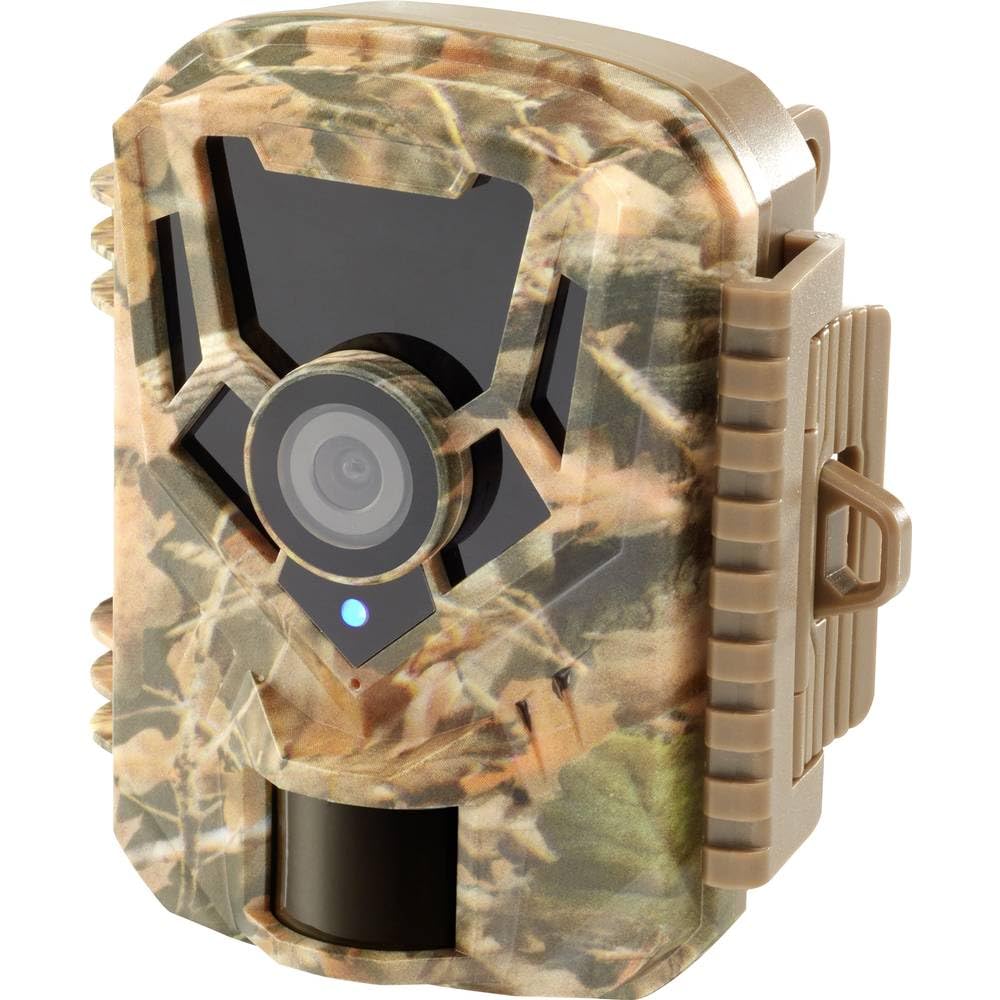
Imatge: Anvers view of the Renkforce RF-HC-100 Trail Camera, showcasing its compact design and camouflage pattern.

Imatge: Frontal view of the Renkforce RF-HC-100 Trail Camera, highlighting the main lens and motion sensor.
1.2 Contingut del paquet
- 1 x Renkforce RF-HC-100 Trail Camera Unit
- Note: Additional accessories such as mounting straps, USB cables, or user manuals may be included depending on the specific package.
2. Informació de seguretat
- Llegiu atentament totes les instruccions abans d'utilitzar el dispositiu.
- Do not expose the camera to extreme temperatures, direct sunlight for prolonged periods, or corrosive liquids.
- Ensure the battery compartment is properly sealed to maintain the IP65 weather resistance.
- Desfeu-vos de les piles d'acord amb la normativa local. No barregeu piles velles i noves ni piles de diferents tipus.
- Mantingueu el dispositiu fora de l'abast dels nens.
- Do not attempt to disassemble or modify the camera, as this will void the warranty and may cause damage.
3. Característiques del producte
The Renkforce RF-HC-100 Trail Camera offers the following key features:
- Imatges d'alta resolució: 16 Megapixel effective capture resolution for clear photos and 1080p video recording.
- Visió nocturna: Equipped with color night vision for monitoring in low-light conditions.
- Funció Time-Lapse: Capture images at set intervals to observe long-term events.
- Ranura per a targeta SD: Supports external SD cards for ample storage of photos and videos.
- Resistència a la intempèrie: IP65 international protection rating ensures durability in various outdoor environments.
- Disseny compacte: Miniature form factor with a camouflage brown finish for discreet placement.
- Gran Angular View: 90-degree angle of view to cover a broad area.
- Connectivitat: Features wired connectivity (USB, AV ports) and Wi-Fi protocol for data transfer and control via application.
- Opcions de muntatge: Includes support for wall mounting.
4. Configuració
4.1 Instal·lació de la bateria
- Obriu la carcassa de la càmera desenganxant els clips laterals.
- Localitzeu el compartiment de la bateria.
- Insert the required number of AA batteries (not included) according to the polarity markings (+/-).
- Tanqueu el compartiment de la bateria de manera segura.
4.2 Instal·lació de la targeta SD
- Amb la carcassa de la càmera oberta, localitzeu la ranura per a la targeta SD.
- Insert a compatible SD card (up to 32GB, Class 10 recommended) into the slot with the metal contacts facing down until it clicks into place.
- To remove, push the SD card in again until it springs out.

Image: The Renkforce RF-HC-100 Trail Camera with its housing open, revealing the control panel, USB, AV, and DC ports, and the ON/SETUP/OFF switch.
4.3 Muntatge de la càmera
The camera can be mounted using a strap or a wall mount bracket (if included or purchased separately).
- Muntatge de la corretja: Thread a mounting strap through the slots on the back of the camera and secure it to a tree or pole.
- Muntatge a la paret: Use the integrated mounting points or a compatible wall mount bracket to attach the camera to a flat surface. Ensure the camera is stable and pointed in the desired direction.
5. Instruccions de funcionament
5.1 Engegada/Apagada i Selecció de Mode
Locate the ON/SETUP/OFF switch inside the camera housing.
- DESACTIVAT: Apaga la càmera.
- CONFIGURACIÓ: Enters setup mode, allowing you to configure settings via the internal display.
- ACTIVITAT: Activates the camera for recording based on the configured settings.
5.2 Configuring Settings
In SETUP mode, use the navigation buttons (if available) to access the menu and adjust parameters such as:
- Resolució foto/vídeo
- Sensibilitat del sensor PIR
- Retard de detecció
- Interval de lapse de temps
- Data i hora
- Recording Mode (Photo, Video, Photo+Video, Time-Lapse)
5.3 Recuperació de dades
Per accedir gravat files:
- Per USB: Connect the camera to a computer using a USB cable. The camera will appear as a removable disk.
- Mitjançant targeta SD: Remove the SD card from the camera and insert it into a computer's card reader.
6. Manteniment
- Neteja: Use a soft, dry cloth to clean the camera lens and housing. For stubborn dirt, a slightly damp Es pot fer servir un drap, però assegureu-vos que no entri humitat a l'aparell.
- Substitució de la bateria: Replace batteries when the low battery indicator appears or when performance degrades.
- Gestió de la targeta SD: Regularly format the SD card (after backing up important data) to maintain optimal performance and prevent errors.
- Emmagatzematge: Quan no la feu servir durant períodes prolongats, traieu les piles i guardeu la càmera en un lloc fresc i sec, allunyat de la llum solar directa.
7. Solució De Problemes
| Problema | Causa possible | Solució |
|---|---|---|
| La càmera no s'encén. | Low or dead batteries; incorrect battery installation; power switch in OFF position. | Replace batteries; ensure correct polarity; set switch to ON or SETUP. |
| Mala qualitat d'imatge/vídeo. | Lent bruta; condicions de poca llum; configuració de resolució incorrecta. | Clean the lens; ensure adequate lighting or use night vision; adjust resolution settings. |
| La càmera no grava. | SD card full or faulty; incorrect mode selected; PIR sensor blocked. | Format or replace SD card; select appropriate recording mode; clear sensor path. |
| No es pot connectar a l'ordinador. | Faulty USB cable; camera not in correct mode; driver issues. | Try a different USB cable; ensure camera is in connection mode (if applicable); try another computer or card reader. |
8. Especificacions
| Nom del model | RF-HC-100 (RF-4466574) |
| Effective Capture Resolution | 16 megapíxels |
| Resolució de vídeo | 1080p |
| Dimensions (L x A x A) | 21 x 12 x 9 cm (8.27 x 4.72 x 3.54 polzades) |
| Pes | 186 grams (0.41 lliures) |
| Tecnologia de connectivitat | Wired (USB, AV), Wi-Fi Protocol (for control/transfer) |
| Característiques especials | Local Recording, Night Vision (Color Night Vision) |
| Entorn d'ús | A l'aire lliure |
| Classificació de protecció internacional | IP65 |
| Font d'alimentació | Manual Operation (Battery-powered, batteries not included) |
| Wattage | 1.5 watts |
| View Angle | 90 graus |
| Color | Camouflage Brown |
| Material | Metal (internal) |
| Tipus de muntatge | Suport de muntatge a la paret |
9. Garantia i Suport
Renkforce provides support for its products. Spare parts availability is indicated for 1 year from the date of purchase. For technical assistance, troubleshooting beyond this manual, or warranty claims, please refer to the contact information provided with your product packaging or visit the official Renkforce weblloc.