
1. Introducció
Thank you for choosing the MomMed Digital Non-Contact Infrared Thermometer E-001. This device is designed for safe, hygienic, and accurate temperature measurement of the human body (forehead) and objects. It provides fast results and includes features like a fever alarm and memory function. Please read this manual thoroughly before use to ensure proper operation and maintenance.

Image 1.1: The MomMed Digital Non-Contact Infrared Thermometer E-001 shown alongside its product packaging. The thermometer features a digital display and ergonomic design.
2. Característiques del producte
- Disseny sense contacte: Ensures hygienic and safe temperature measurement.
- Ràpid i precís: Provides reliable readings in approximately 1 second.
- Multifunció: Measures forehead temperature for adults and children, as well as object and room temperatures.
- Alarma de febre: Visual and audible alerts for elevated temperatures.
- Funció de memòria: Stores up to 35 groups of readings for tracking.
- Pantalla LCD: Large, backlit screen for easy reading, even in low light.
- Canvi d'unitat: Canvia fàcilment entre Celsius (°C) i Fahrenheit (°F).
- Mode silenciós: Option to mute sounds for quiet operation.
- Apagat automàtic: Automatically shuts down after 15 seconds of inactivity to conserve battery.

Image 2.1: An infographic highlighting the six main functions of the MomMed thermometer: °C/°F switching, two modes (forehead/object), one-click test, fever alarm, 35 memory groups, and voice on/off (silent mode).
3. Configuració
3.1 Instal·lació de la bateria
- Localitzeu la tapa del compartiment de les piles a la part posterior del termòmetre.
- Feu lliscar la tapa cap avall per obrir el compartiment.
- Introduïu dues piles AAA, assegurant-vos de la polaritat correcta (+ i -).
- Feu lliscar la tapa del compartiment de la bateria fins que faci clic de manera segura.

Image 3.1: The rear of the MomMed thermometer with the battery compartment open, showing two AAA batteries correctly inserted. The image also highlights the infrared sensor.
3.2 Encès inicial
After installing the batteries, press the measurement button (usually labeled "Start" or with a power symbol) to turn on the thermometer. The device will perform a self-test, and the display will show all segments briefly before entering standby mode, ready for measurement.
4. Instruccions de funcionament
4.1 Taking a Forehead Temperature Measurement
- Ensure the thermometer is in Forehead Mode. If not, press the mode button to switch.
- Point the thermometer at the center of the forehead from a distance of 1-5 cm (0.4-2 inches).
- Premeu el botó de mesurament.
- The reading will be displayed on the LCD screen within 1 second.
- The backlight color will indicate the temperature status:
- Verd: Normal temperature (32°C~37.3°C / 89.6°F~99.2°F)
- Taronja: Slightly elevated temperature (37.4°C~37.9°C / 99.3°F~100.3°F)
- Vermell: Fever (38°C~42.9°C / 100.4°F~109.2°F)

Image 4.1: The MomMed thermometer's LCD display illustrating the three backlight colors (green, orange, red) corresponding to normal, slightly elevated, and fever temperatures, respectively.

Image 4.2: A user taking a temperature reading from a sleeping baby using the MomMed thermometer, demonstrating its silent operation feature for nighttime use.
4.2 Taking an Object/Room Temperature Measurement
- Ensure the thermometer is in Object Mode. If not, press the mode button to switch.
- Apunta el termòmetre cap a l'objecte o la zona que vols mesurar.
- Premeu el botó de mesurament.
- La lectura es mostrarà a la pantalla LCD.
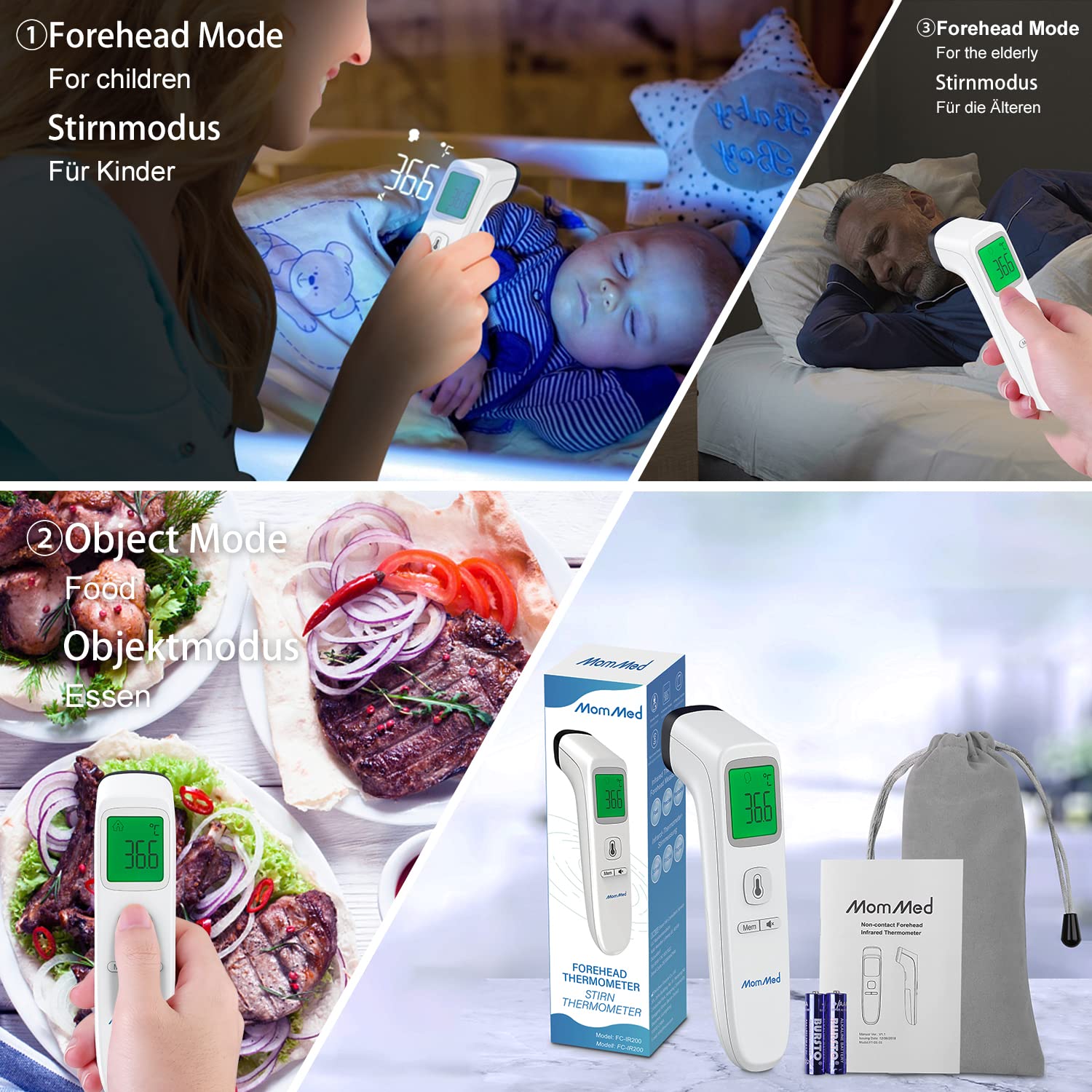
Image 4.3: A composite image demonstrating the versatility of the MomMed thermometer, showing its use for forehead temperature measurement on both children and elderly individuals, as well as for measuring the temperature of food in object mode.
4.3 Canvi entre °C i °F
With the thermometer powered on and in standby mode, press and hold the mode button for a few seconds until the unit changes on the display. Release the button when your desired unit (°C or °F) is shown.
4.4 Funció de memòria
The thermometer automatically stores the last 35 temperature readings. To recall previous measurements, press the "Mem" button. Each press will cycle through the stored readings.
4.5 Mode silenciós
To activate or deactivate silent mode, press the dedicated sound button (often indicated by a speaker icon). This allows for temperature measurement without audible beeps, ideal for use with sleeping individuals.
4.6 Escenaris d'ús
The MomMed Digital Non-Contact Infrared Thermometer is suitable for various environments and users, including:
- Ús domèstic: For monitoring family health.
- Entorns d'oficina: Quick temperature checks.
- Escoles: For student and staff health screening.
- Espais públics: General temperature monitoring.

Image 4.4: A collage depicting the MomMed thermometer in use across different environments, including a home, an office, a school classroom, and a restaurant, highlighting its versatility.
5. Manteniment
5.1 Neteja del termòmetre
- Use a soft, dry cloth to clean the body of the thermometer.
- For the probe and lens, gently wipe with an alcohol swab or a cotton swab moistened with alcohol.
- Do not immerse the thermometer in water or any cleaning solutions.
- Assegureu-vos que el termòmetre estigui completament sec abans de guardar-lo o utilitzar-lo el proper cop.
5.2 Emmagatzematge
Store the thermometer in a cool, dry place, away from direct sunlight, dust, and extreme temperatures. If the thermometer will not be used for an extended period, remove the batteries to prevent leakage.
6. Solució De Problemes
- Sense energia:
Check if batteries are inserted correctly with the right polarity. Replace with new AAA batteries if necessary.
- Pantalla "Lo" o "Hi":
"Lo" indicates a temperature below the measurable range, and "Hi" indicates a temperature above the measurable range. Ensure proper measurement technique and distance.
- Lectures inexactes:
Ensure the sensor lens is clean. Avoid taking measurements immediately after strenuous activity, bathing, or exposure to extreme temperatures. Allow the thermometer to acclimatize to room temperature for at least 30 minutes before use.
- Missatge d'error a la pantalla:
Refer to the specific error code in the full user manual (if available) or try removing and reinserting the batteries to reset the device.
7. Especificacions
| Característica | Detall |
|---|---|
| Nom del model | E-001 |
| Marca | MOMMED |
| Mètode de mesura | Infrarojos sense contacte |
| Temps de resposta | 1 segons |
| Unitats de temperatura | Celsius (°C) / Fahrenheit (°F) |
| Emmagatzematge de memòria | 35 lectures |
| Tipus de visualització | LCD digital amb retroiluminació |
| Font d'alimentació | 2 x piles AAA |
| Apagat automàtic | Després de 15 segons d’inactivitat |
| Pes de l'article | 140 g |
| UPC | 619793536056 |
8. Garantia i Suport
8.1 Informació de la garantia
The MomMed Digital Non-Contact Infrared Thermometer E-001 comes with a 1 any de garantia. This warranty covers manufacturing defects and ensures product replacement or repair under normal use conditions. Please retain your purchase receipt as proof of purchase.
8.2 Atenció al client
For any questions, technical assistance, or warranty claims, please contact MomMed customer support. You can find more information and contact details by visiting the official MomMed store on Amazon: Visit MOMMED Store.