
Introducció
This manual provides comprehensive instructions for the Lexmark MS431dw Monochrome Laser Printer. It covers setup, operation, maintenance, and troubleshooting to ensure optimal performance and longevity of your device. The Lexmark MS431dw is designed for efficient monochrome printing, offering speeds up to 40 pages per minute and automatic duplex printing.

Imatge: Davant dret view of the Lexmark MS431dw Monochrome Laser Printer.
Configuració
1. Desembalatge de la impressora
Traieu amb cura la impressora del seu embalatge. Assegureu-vos que tots els materials d'embalatge, les cintes i les pel·lícules protectores s'han eliminat de l'exterior i l'interior de la impressora. Conserveu l'embalatge per a futurs transports si cal.
2. Instal·lació del cartutx de tòner
- Obriu la coberta frontal de la impressora.
- Traieu el nou cartutx de tòner del seu embalatge i sacsegeu-lo suaument per distribuir el tòner.
- Introduïu el cartutx de tòner a la ranura designada fins que encaixi al seu lloc.
- Tanqueu la coberta frontal.
3. Carregant paper
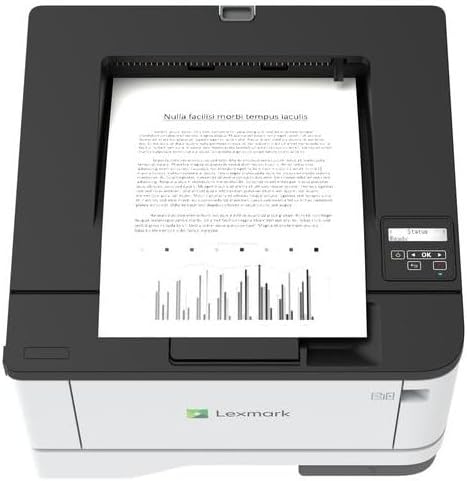
Imatge: Superior view of the Lexmark MS431dw with paper loaded in the input tray.
Open the paper tray and adjust the paper guides to fit the size of your paper. Load the paper stack into the tray, ensuring it is flat and below the maximum fill line. Close the paper tray. The printer supports various media types, including card stock.
4. Potència de connexió
Connecteu el cable d'alimentació a l'entrada d'alimentació de la impressora i després a una presa de corrent amb connexió a terra.
5. Connecting to a Network/Computer
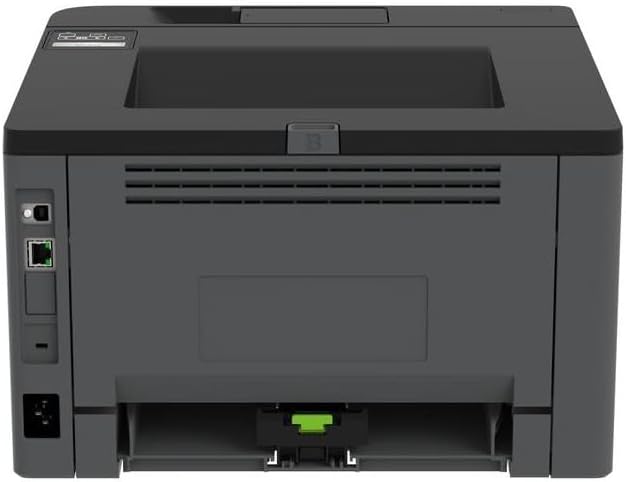
Imatge: Part posterior view of the Lexmark MS431dw, highlighting the Ethernet and power connection ports.
The Lexmark MS431dw supports Ethernet connectivity. Connect an Ethernet cable from your network router or switch to the Ethernet port on the back of the printer. For direct connection to a computer, use a USB cable (not included) if available, or configure network printing.
6. Instal·lació del controlador
Turn on the printer. Insert the driver CD (if provided) into your computer, or download the latest drivers from the official Lexmark support weblloc. Seguiu les instruccions que apareixen a la pantalla per completar la instal·lació del controlador.
Instruccions de funcionament
1. Tauler de control acabatview

Imatge: Superior view of the Lexmark MS431dw, showing the printer's control panel with display and buttons.
The control panel features a display screen and navigation buttons (Up, Down, OK, Back) to access printer settings, status, and functions. Refer to the on-screen menus for specific options.
2. Impressió bàsica
- Assegureu-vos que la impressora estigui engegada i connectada a l'ordinador o a la xarxa.
- Obriu el document que voleu imprimir a l'ordinador.
- Seleccioneu Imprimeix des del menú de l'aplicació (per exemple, File > Imprimeix).
- Choose the Lexmark MS431dw from the list of available printers.
- Adjust print settings as desired (e.g., number of copies, paper size).
- Feu clic Imprimeix.
3. Automatic Duplex Printing
The MS431dw supports automatic two-sided (duplex) printing. To enable this feature:
- In the print dialog box on your computer, navigate to the printer properties or preferences.
- Look for an option related to "Two-sided printing" or "Duplex printing."
- Seleccioneu l'opció d'impressió a doble cara desitjada (per exemple, enquadernació de la vora llarga, enquadernació de la vora curta).
- Confirmeu la vostra selecció i continueu amb la impressió.
Manteniment
1. Substitució del cartutx de tòner
When the toner level is low, the printer's display will indicate a warning. To replace the cartridge:
- Assegureu-vos que la impressora estigui engegada.
- Obriu la coberta frontal.
- Traieu el cartutx de tòner antic estirant-lo cap enfora.
- Unpack a new Lexmark-compatible toner cartridge and gently shake it.
- Introduïu el cartutx nou fins que encaixi al seu lloc.
- Tanqueu la coberta frontal.
2. Neteja de la impressora
Una neteja regular ajuda a mantenir la qualitat d'impressió i allarga la vida útil de la impressora.
- Exterior: Netegeu les superfícies exteriors amb un damp, drap sense borrissol. No utilitzeu productes de neteja abrasius ni dissolvents.
- Interior: Periodically open the front cover and gently remove any dust or paper debris from accessible areas using a dry, lint-free cloth. Avoid touching the fuser unit.
Resolució de problemes
This section addresses common issues you might encounter. For more detailed troubleshooting, refer to the Lexmark support weblloc.
1. Embussos de paper
- If a paper jam occurs, the printer display will show an error message indicating the location of the jam.
- Carefully open the indicated covers or trays.
- Estireu suaument el paper encallat en la direcció del camí del paper. Eviteu esquinçar el paper.
- Close all covers and trays. The printer should resume printing.
2. Mala qualitat d'impressió
- Faded Prints: The toner cartridge may be low. Replace it if necessary.
- Ratlles o taques: Clean the printer's interior as described in the Maintenance section. Ensure the toner cartridge is properly seated.
- Pàgines en blanc: Verify the toner cartridge is installed correctly and has toner. Check printer drivers and print settings.
3. Problemes de connectivitat
- Impressora no trobada: Ensure the Ethernet cable is securely connected to both the printer and the network. Verify network settings on the printer and computer.
- Estat fora de línia: Check the printer's power and network connection. Restart both the printer and your computer.
Especificacions
| Característica | Detall |
|---|---|
| Número de model | 29S0110 |
| Tecnologia d'impressió | Làser |
| Sortida de la impressora | Monocrom |
| Velocitat màxima d'impressió (monocrom) | Fins a 40 ppm (pàgines per minut) |
| Tecnologia de connectivitat | Ethernet |
| Característica especial | Auto-Duplex (Automatic Two-sided Printing) |
| Capacitat màxima del full d'entrada | 900 fulls |
| Suport a mitjans impresos | Card stock, Plain paper |
| Pes de l'article | 9300 grams (aprox. 20.5 lliures) |
| Wattage | 570 watts |
| UPC | 734646695558 |
Nota: Les especificacions estan subjectes a canvis sense previ avís.
Garantia i Suport
Informació de la garantia
Your Lexmark MS431dw printer is covered by a standard manufacturer's warranty. For specific terms, conditions, and duration of your warranty, please refer to the documentation included with your product or visit the official Lexmark weblloc web. Conserveu el comprovant de compra per a reclamacions de garantia.
Atenció al client
For technical assistance, driver downloads, or further support, please visit the official Lexmark support portal.
Visit the Lexmark Store for Support