
Introducció
Gràcies per la compraasing the Leelbox T2 DVB-T2 Digital Terrestrial Decoder. This device is designed to receive digital terrestrial television broadcasts, converting them for display on your analog or digital television. It supports Full HD 1080p resolution, HEVC 10-bit H.265 decoding, and offers various multimedia functions including PVR recording and USB media playback. Please read this manual carefully before operating the device to ensure proper use and to maximize its features.
Característiques clau
- DVB-T2 Digital TV Reception: Receives free local digital TV channels, supporting channels 100 and 200.
- Sortida Full HD 1080p: Delivers high-definition video output for a clear viewexperiència.
- HEVC 10-bit H.265 Decoding: Advanced video compression support for efficient broadcasting.
- PVR (Personal Video Recorder) Function: Allows recording of TV programs to a USB storage device.
- Reproducció de mitjans USB: Supports playback of photos, MP3 music files, and recorded videos from a USB drive.
- EPG (Guia electrònica de programes): Provides program information for upcoming broadcasts.
- Suport multi-idioma: Includes support for various languages and subtitles.
- Time Shift Function: Pause live TV and resume later.
- Aprenentatge del control remot: A remote control with learning capabilities for convenience.
- Serveis d'Internet: Compatible with YouTube via network connection (USB Wi-Fi or Ethernet).
Contingut del paquet
Marqueu la casella per als elements següents:
- Leelbox T2 DVB-T2 Digital Terrestrial Decoder
- Control remot
- Manual d'usuari
- Cable d'alimentació
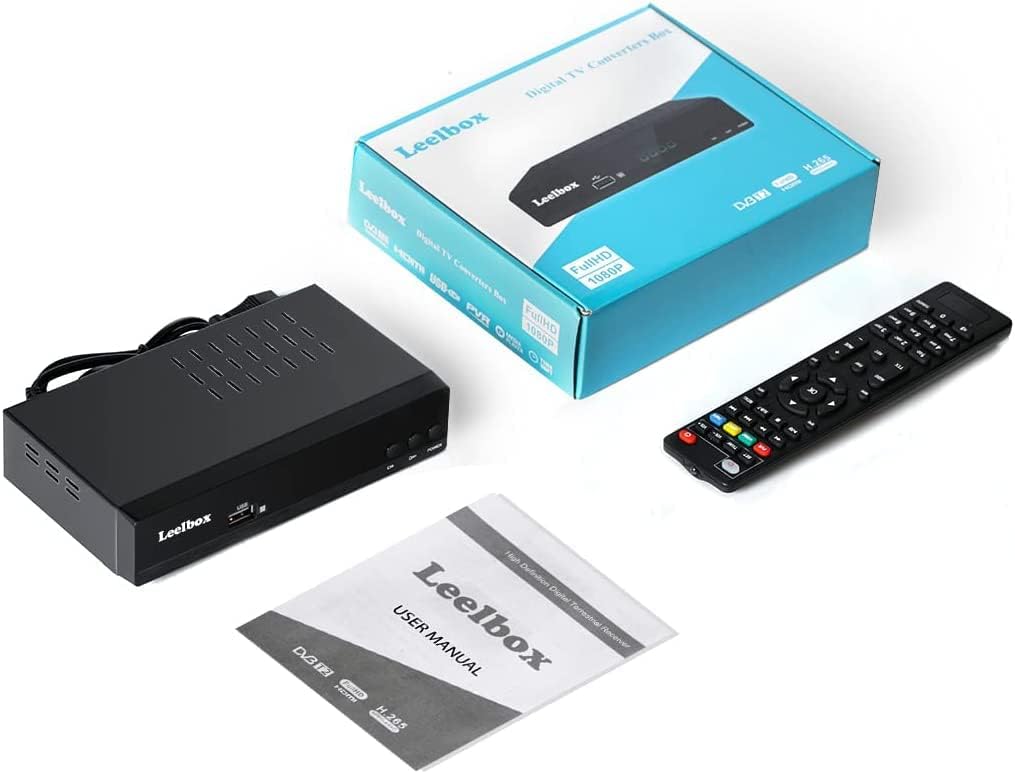
Image: Leelbox T2 package contents, showing the decoder unit, remote control, user manual, and product box.
Guia de configuració
1. Connexió del descodificador
Ensure your television and the decoder are powered off before making any connections.
- Connexió d'antena: Connect your terrestrial antenna cable to the FORMIGA EN port on the back of the Leelbox T2 decoder.
- Connexió de TV:
- Per Televisors HD, connect an HDMI cable from the HDMI port on the decoder to an HDMI input on your TV.
- Per Analog TVs or TVs without HDMI, connect a SCART cable from the TV (SCART) port on the decoder to the SCART input on your TV.
- For audio output to an external sound system, use the COAXIAL or S/PDIF port.
- Connexió d'alimentació: Connecteu el cable d'alimentació al CABLE DE CORRENT input on the decoder and then plug it into a power outlet.
- Connexió de xarxa (opcional):
- For wired internet, connect an Ethernet cable to the ETHERNET port.
- For wireless internet, insert a compatible USB Wi-Fi dongle (not included) into the USB port.

Image: Rear panel of the Leelbox T2 decoder, highlighting various connection ports including antenna input, HDMI, Ethernet, and SCART.

Image: Detailed connection diagram for the Leelbox T2, illustrating how to connect the antenna, TV (via HDMI or SCART), and network (via LAN or optional USB Wi-Fi).
2. Engegada inicial i escaneig de canals
- Power on your television and select the correct input source (HDMI or AV/SCART) corresponding to the connection you made with the decoder.
- Power on the Leelbox T2 decoder using the POWER button on the front panel or the remote control.
- Upon first use, the decoder will guide you through an initial setup wizard. Follow the on-screen prompts to select your language, country, and perform an automatic channel scan.
- The channel scan process may take several minutes. Once complete, the decoder will save the found channels, and you can begin watching TV.

Image: Signal flow diagram showing how digital broadcast signals are received by the Leelbox T2 converter box and then output to an analog television, demonstrating HEVC Main10 compatibility.
Instruccions de funcionament
Televisió bàsica Viewing
- Utilitza el CH+ i CH- buttons on the remote control or the front panel to change channels.
- Premeu el botó OK botó per view the channel list and select a channel directly.
- Premeu el botó INFO button to display current program information.
- Premeu el botó EPG button to access the Electronic Program Guide for detailed program schedules.
PVR (Recording) Function
The PVR function allows you to record live TV programs to an external USB storage device (e.g., USB hard drive). USB flash drives are generally not recommended for recording due to potential performance limitations.
- Connect a formatted USB hard drive to the USB port on the front of the decoder.
- To record instantly, press the REC button on the remote control while watching a program. Press REC de nou per aturar la gravació.
- To schedule a recording, go to the EPG, select the desired program, and press the REC button to set a timer.
- To play back recorded programs, press the PVR button or access the multimedia menu and navigate to the recorded files.

Image: Illustration of the PVR function, demonstrating how to record TV programs to a USB drive for later viewing.
Reproducció de suports USB
The Leelbox T2 supports playback of various media files des d'un dispositiu d'emmagatzematge USB.
- Insert a USB drive containing your media files (photos, music, videos) into the USB port.
- Access the multimedia menu (usually via a dedicated button or through the main menu).
- Select the type of media you wish to play (Photo, Music, Movie) and browse your files.

Image: The Leelbox T2 connected to a USB drive, demonstrating its capability to play back various media files directly on your television.
Internet Services (YouTube)
If connected to the internet via Ethernet or USB Wi-Fi, the decoder supports certain internet services, such as YouTube.
- Ensure your decoder is connected to a stable internet connection.
- Navigate to the "Internet" or "Applications" section in the main menu.
- Select the YouTube application to access its content.
Control remot
The included remote control provides full functionality for the Leelbox T2. It also features a learning function, allowing you to program certain buttons to control your TV (e.g., Power, Volume, Input).
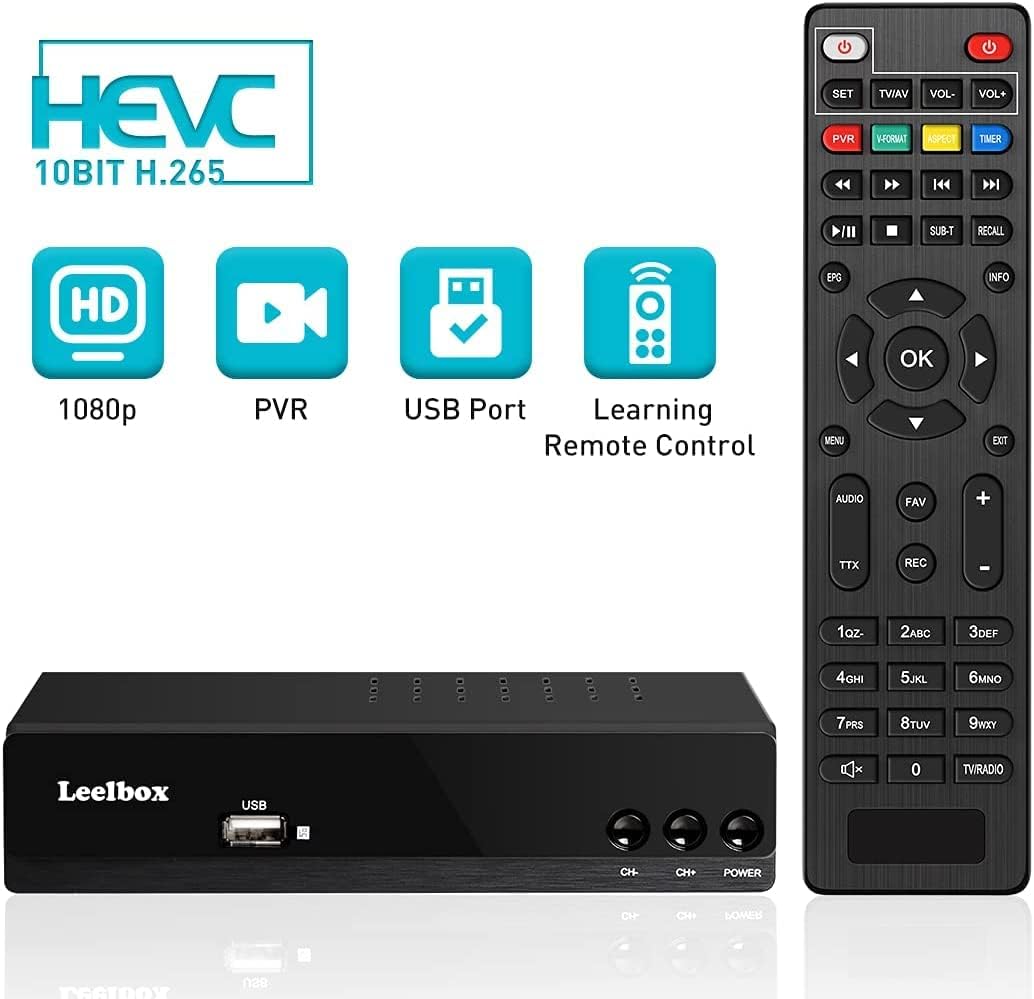
Image: The Leelbox T2 decoder alongside its remote control, illustrating the device's main capabilities.
Manteniment
To ensure the longevity and optimal performance of your Leelbox T2 decoder, follow these maintenance guidelines:
- Neteja: Feu servir un drap suau i sec per netejar l'exterior del dispositiu. No utilitzeu netejadors líquids ni materials abrasius.
- Ventilació: Ensure the decoder is placed in a well-ventilated area. Do not block the ventilation holes on the top or sides of the unit.
- Medi ambient: Mantingueu el dispositiu allunyat de la llum solar directa, de fonts de calor i d'humitat excessiva.
- Apagar: Si no heu d'utilitzar el dispositiu durant un període prolongat, desendolleu-lo de la presa de corrent.
Resolució de problemes
If you encounter issues with your Leelbox T2 decoder, please refer to the following common problems and solutions:
| Problema | Causa possible | Solució |
|---|---|---|
| Sense imatge ni so | Incorrect TV input selected; loose cables; decoder not powered on. | Check TV input source (HDMI/AV). Ensure all cables are securely connected. Verify decoder is powered on. |
| Missatge "Sense senyal" | Antenna not connected or poor signal; no channels scanned. | Check antenna connection. Adjust antenna position. Perform a new channel scan. |
| El comandament a distància no funciona | Batteries are dead or inserted incorrectly; obstruction between remote and decoder. | Replace batteries. Ensure correct polarity. Remove any obstructions. Point remote directly at the decoder. |
| No es pot gravar a USB | USB drive not formatted correctly; insufficient space; USB drive not compatible. | Ensure USB drive is formatted to FAT32 or NTFS. Check available space. Try a different USB hard drive (flash drives may not be suitable). |
| Internet services not working | No network connection; incorrect network settings. | Verify Ethernet cable is connected or USB Wi-Fi dongle is inserted. Check network settings in the decoder menu. Ensure your router is working. |
Especificacions
| Característica | Detall |
|---|---|
| Marca | Leelbox |
| Número de model | T2 |
| Color | Negre |
| Tecnologia de connectivitat | USB, Wi-Fi (via dongle), Ethernet |
| Dispositius compatibles | Televisió |
| Ports HDMI | 1 |
| Mode de sortida d'àudio | Stereo, 5.1 Surround Sound (via Coaxial/S/PDIF) |
| Potència de sortida | 5 watts |
| Serveis d'Internet compatibles | YouTube |
| Descodificació de vídeo | HEVC 10-bit H.265, MPEG-2/4 |
| Resolució de sortida | Fins a 1080p Full HD |
Garantia i Suport
For information regarding warranty, technical support, or service, please refer to the official Leelbox website or contact their customer support directly. Details can typically be found on the product packaging or the manufacturer's official online resources.


