
1. Introducció
This manual provides detailed instructions for the proper use and maintenance of your LEAP PC3860 Stopwatch. Please read this manual thoroughly before operating the device to ensure optimal performance and longevity. This stopwatch is designed for accurate timekeeping in various activities, including sports, laboratory work, and other events requiring precise timing.
2. Producte acabatview
The LEAP PC3860 Stopwatch features a clear digital display and multiple functions for versatile time measurement. It is equipped with a durable casing and a lanyard for convenient portability.

Imatge 1: Frontal view of the LEAP PC3860 Stopwatch, showing the digital display and control buttons. A black lanyard is attached to the bottom.
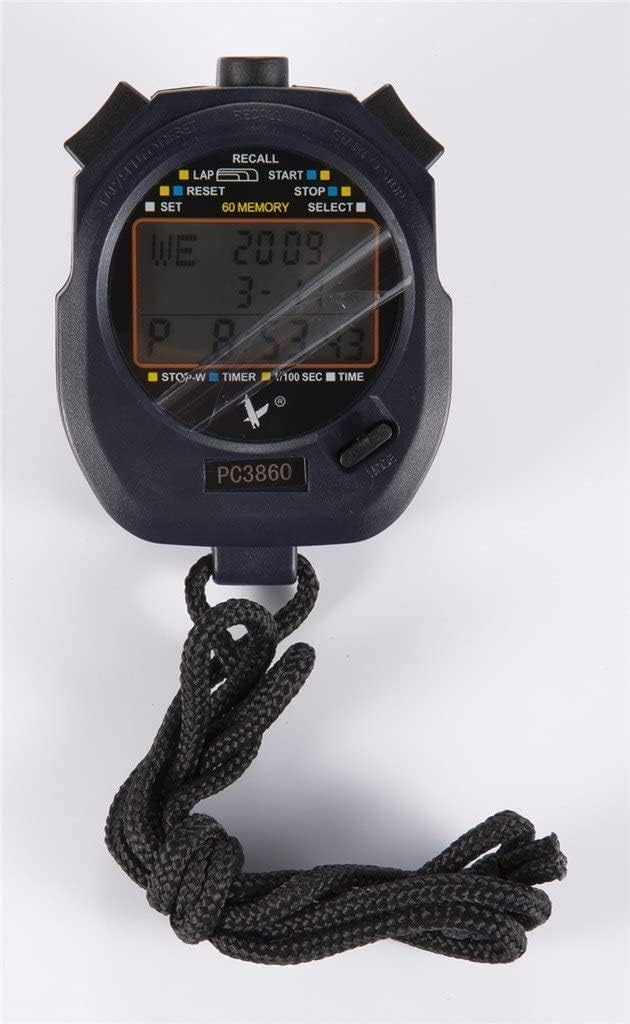
Imatge 2: Primer pla view of the LEAP PC3860 Stopwatch display, highlighting the various indicators for LAP, START, STOP, RESET, SELECT, SET, and 60 MEMORY functions.
Components clau:
- Visualització: Digital screen showing time, lap, split, and other mode information.
- Botó START/STOP: Initiates and pauses timing.
- LAP/RESET Button: Records lap times and resets the stopwatch.
- MODE/SELECT Button: Switches between different operating modes and selects settings.
- Botó SET: Used for adjusting time and date in Mode horari.
- Botó RECALL: Accesses stored memory records.
- Cordó: For secure carrying.
3. Configuració
3.1 Engegada inicial
Upon first use, or after a battery replacement, the stopwatch may require initial setup. Remove any protective film from the display.
3.2 Configuració de l'hora i la data
- Premeu el botó MODE/SELECT button repeatedly until the stopwatch is in Mode horari (displaying the current time).
- Manteniu premut el botó SET fins que els dígits de l'hora comencin a parpellejar.
- Utilitza el INICI/PARA botó per ajustar el dígit intermitent (hores, minuts, segons).
- Utilitza el VOLTA/RESET per passar al següent dígit o configuració (per exemple, mes, dia, any).
- Repeat steps 3 and 4 until all desired settings are configured.
- Premeu el botó SET botó de nou per sortir del mode de configuració.
4. Instruccions de funcionament
4.1 Canvi de modes
Premeu el botó MODE/SELECT botó per anar canviant pels modes disponibles: Mode horari, Mode de cronòmetre, i Mode temporitzador.
4.2 Stopwatch Mode (Timing Events)
- Ensure the stopwatch is in Mode de cronòmetre. The display will typically show '00:00:00'.
- Premeu el botó INICI/PARA botó per començar a cronometrar.
- To pause the timing, press the INICI/PARA button again. The time will freeze on the display.
- To resume timing from the paused point, press the INICI/PARA botó una vegada més.
- To stop and finalize the timing, press the INICI/PARA botó.
- Per posar el cronòmetre a zero, premeu la tecla VOLTA/RESET botó mentre el cronòmetre està aturat.
4.3 Lap and Split Timing
The PC3860 stopwatch supports lap and split timing, allowing you to record intermediate times during an event.
- In Mode de cronòmetre, premeu INICI/PARA botó per començar a cronometrar.
- Per registrar un temps per volta, premeu la tecla VOLTA/RESET button while the stopwatch is running. The lap time will be displayed briefly, and the main timer will continue running in the background.
- Repeat step 2 for subsequent laps. The stopwatch can store up to 60 lap/split records.
- Per aturar el cronometratge general, premeu la tecla INICI/PARA botó.
- A view recorded lap and split times, press the RECORDA botó. Utilitza el INICI/PARA i VOLTA/RESET botons per navegar pels registres emmagatzemats.
- Premeu el botó RECORDA button again to exit memory recall mode.
- To clear all stored memory, ensure the stopwatch is stopped and not in recall mode, then press and hold the VOLTA/RESET botó.
4.4 Timer Mode (Countdown)
- Premeu el botó MODE/SELECT button until you reach Mode temporitzador. The display will show a countdown time, or '00:00:00' if not set.
- Per configurar el temps de compte enrere, premeu i manteniu premut el botó SET botó fins que els dígits parpellegin.
- Utilitza el INICI/PARA botó per ajustar el dígit intermitent (hores, minuts, segons).
- Utilitza el VOLTA/RESET botó per passar al dígit següent.
- Premeu el botó SET button again to confirm the countdown time.
- Premeu el botó INICI/PARA botó per iniciar el compte enrere.
- Per aturar el compte enrere, premeu la tecla INICI/PARA botó. Premeu-lo de nou per reprendre.
- When the countdown reaches zero, an alarm will sound (if enabled).
- To reset the timer to the preset time, press the VOLTA/RESET button while the timer is stopped.
5. Manteniment
5.1 Neteja
To clean the stopwatch, use a soft, dry cloth. For stubborn dirt, a slightly damp cloth with mild soap can be used, followed by immediate drying. Avoid using abrasive cleaners, solvents, or harsh chemicals, as these can damage the display or casing.
5.2 Emmagatzematge
Store the stopwatch in a cool, dry place away from direct sunlight and extreme temperatures. If storing for an extended period, consider removing the battery to prevent leakage, although specific battery type information is not provided.
5.3 Substitució de la bateria
When the display becomes dim or unresponsive, the battery may need replacement. This typically requires opening the back casing of the stopwatch. It is recommended to have battery replacement performed by a qualified technician to avoid damaging the internal components or compromising water resistance (if applicable).
6. Solució De Problemes
- La pantalla està en blanc o té poca llum:
Check the battery. If the battery is low, replace it. Ensure the stopwatch is not exposed to extreme cold, which can temporarily affect LCD performance. - Els botons no responen:
Try resetting the stopwatch by removing and reinserting the battery (if accessible). Ensure no debris is lodged around the buttons. - Hora/data incorrecta:
Seguiu les instruccions de la secció 3.2 per restablir la data i l'hora. - El cronòmetre no marca el temps amb precisió:
Ensure the stopwatch is in Mode de cronòmetre and has been reset before starting a new timing session. If issues persist, contact customer support.
7. Especificacions
| Característica | Detall |
|---|---|
| Marca | SALT |
| Número de model | PC3860 (19280086-101) |
| Tipus de visualització | Digital |
| Material | Fiber, Metal |
| Pes | 0.09 quilos |
| Dimensions del paquet | 17.78 x 10.16 x 3.05 cm |
| Característica especial | Stopwatch, 60 Memory |
| UPC | 748079196933 |
8. Garantia i Suport
LEAP products are manufactured to high-quality standards. For information regarding warranty coverage, please refer to the warranty card included with your purchase or contact the retailer where the product was acquired. For technical support or further assistance, please reach out to the official LEAP customer service channels, typically found on the product packaging or the brand's official weblloc.