
1. Introducció
This manual provides comprehensive instructions for the ALLIMITY RU-M116 remote control. This remote is designed as a replacement or secondary control unit for the NEC Projector Monitor 24WMGX3. It offers full functionality to manage your device effectively.
Compatibilitat: This remote control is specifically compatible with the NEC Projector Monitor 24WMGX3.
2. Configuració
2.1 Instal·lació de la bateria
The ALLIMITY RU-M116 remote control requires no complex setup or programming. Simply install two new alkaline batteries to begin operation.
- Localitzeu el compartiment de la bateria a la part posterior del comandament a distància.
- Feu lliscar la tapa del compartiment de la bateria cap avall o en la direcció indicada per una fletxa per obrir-la.
- Insert two new alkaline batteries, ensuring the positive (+) and negative (-) terminals match the diagrams inside the compartment.
- Torneu a col·locar la tapa del compartiment de la bateria fent-la lliscar de nou fins que faci clic de manera segura.
Once batteries are installed, the remote control is ready for use with your compatible NEC Projector Monitor 24WMGX3.

Figura 2.1: Frontal view of the ALLIMITY RU-M116 remote control, illustrating the layout of all control buttons.
3. Instruccions de funcionament
The ALLIMITY RU-M116 remote control provides direct access to various functions of your NEC Projector Monitor 24WMGX3. Ensure there is a clear line of sight between the remote control and the projector/monitor's infrared receiver.
3.1 Funcions dels botons
- POTÈNCIA: Turns the projector/monitor on or off.
- D-SUB / DVI-D / HDMI1 / HDMI2 / VIDEO1 / VIDEO2: Selects the corresponding input source.
- SELECCIÓ D'ENTRADA: Passa ciclicament per les fonts d'entrada disponibles.
- MENU / EXIT: Opens or closes the on-screen display (OSD) menu.
- Botons de navegació (amunt, avall, esquerra, dreta): Navega per les opcions del menú.
- SELECCIONAR: Confirma una selecció dins del menú.
- AJUSTE AUTOMÀTIC: Automatically optimizes the display settings for the current input.
- MOSTRA: Adjusts display modes or information.
- RESET: Resets current settings to default.
- BRIGHTNESS VOLUME (+/-): Adjusts brightness or volume levels.
- MP MODE: Activates or deactivates a specific picture mode (e.g., Movie, Photo).
- MODE DV: Activates or deactivates a specific video mode.
- ON/OFF INPUT: Toggles input power.
- SIZE / POSITION / PIP: Controls image size, position, or Picture-in-Picture function.
- SWAP INPUT: Swaps between two active input sources.
- MUT: Silencia o activa l'àudio.
- ÀUDIO: Accesses audio settings.
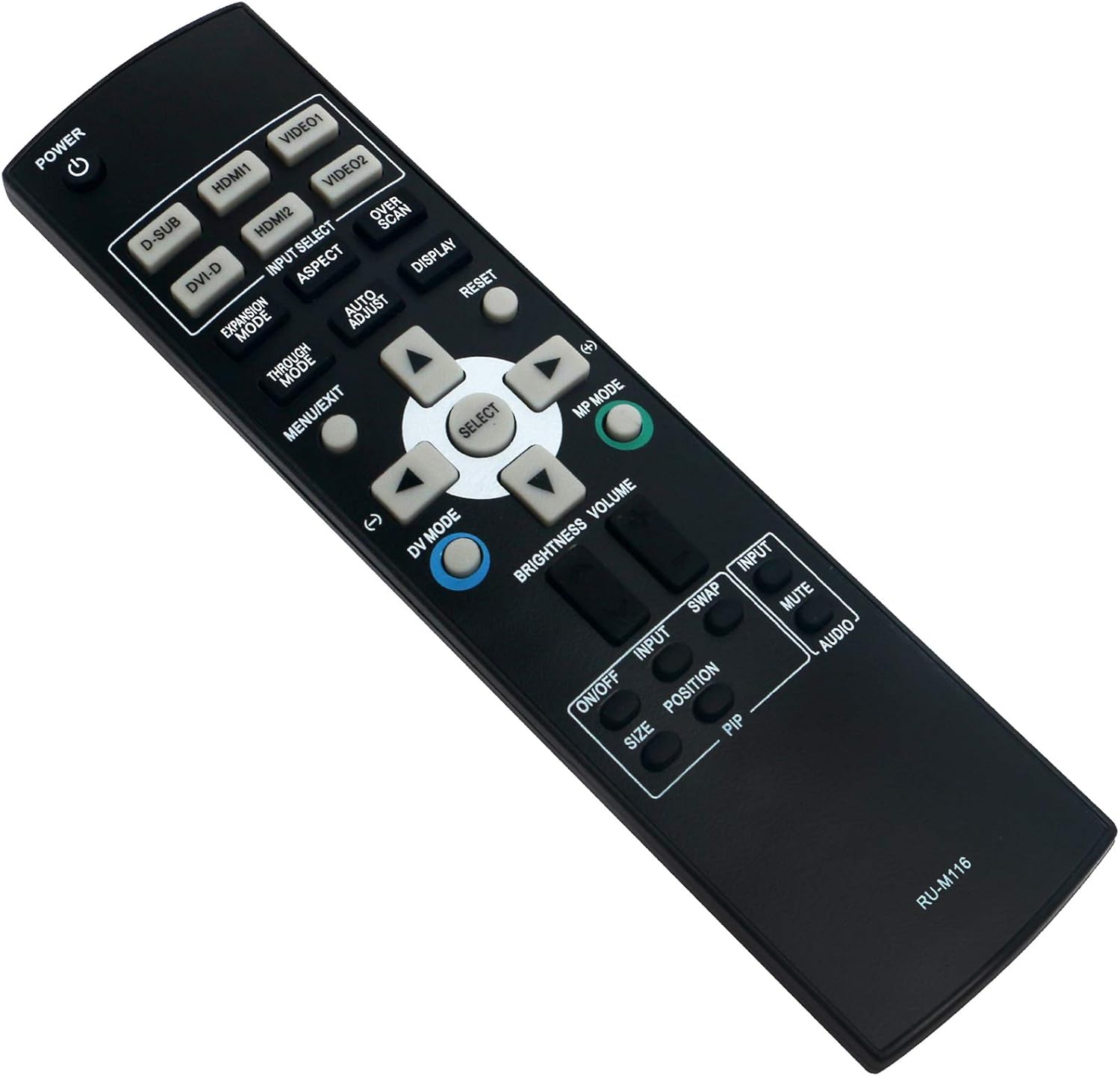
Figura 3.1: Angle view of the ALLIMITY RU-M116 remote control, showing button groupings for various functions.
4. Manteniment
4.1 Neteja del comandament a distància
Per mantenir l'aspecte i la funcionalitat del comandament a distància, netegeu-lo regularment.
- Feu servir un drap suau i sec per netejar la superfície del comandament a distància.
- Per a la brutícia persistent, lleugerament dampen the cloth with water or a mild cleaning solution, then wipe dry immediately.
- Do not use abrasive cleaners, alcohol, or solvents, as these can damage the remote's surface or internal components.
4.2 Substitució de la bateria
Replace batteries when the remote control's range decreases or it stops responding. Always replace both batteries at the same time with new alkaline batteries of the same type.
- Seguiu els passos d'instal·lació de la bateria que s'indiquen a la secció 2.1.
- Eliminar les bateries usades d'acord amb la normativa local.
5. Solució De Problemes
If you experience issues with your ALLIMITY RU-M116 remote control, refer to the following common problems and solutions:
- El comandament a distància no respon:
- Check if the batteries are correctly inserted with the correct polarity (+/-).
- Replace old batteries with new alkaline batteries.
- Ensure there are no obstructions between the remote control and the projector/monitor's infrared receiver.
- Assegureu-vos que esteu dins del rang de funcionament efectiu (fins a 10 metres).
- Buttons are not working correctly:
- Clean the remote control's surface and buttons as described in Section 4.1.
- Ensure the remote is pointed directly at the device's IR sensor.
- Rang limitat o resposta intermitent:
- Substituïu les piles.
- Reduce the distance between the remote and the device.
- Remove any potential sources of infrared interference (e.g., strong lights, other IR devices).
6. Especificacions
Below are the technical specifications for the ALLIMITY RU-M116 remote control:
| Característica | Especificació |
|---|---|
| Marca | ALLIMITAT |
| Número de model | RU-M116 |
| Dispositius compatibles | NEC Projector Monitor 24WMGX3 |
| Tecnologia de connectivitat | infrarojos |
| Tipus de controlador | Control de botons |
| Dispositius màxims compatibles | 1 |
| Interval màxim | 10 metres |
| Descripció de la bateria | Alcalí |
7. Garantia i Suport
Specific warranty information for the ALLIMITY RU-M116 remote control is not provided in this manual. For details regarding warranty coverage, technical support, or replacement parts, please refer to the product packaging or contact the manufacturer directly.