
Lixada OVS6258358204085VR
Lixada Wireless Bicycle Computer OVS6258358204085VR User Manual
Model: OVS6258358204085VR
Introducció
This manual provides essential information for the proper installation, operation, and maintenance of your Lixada Wireless Bicycle Computer. Please read these instructions carefully before use to ensure optimal performance and longevity of the device. This bicycle computer is designed to track various cycling metrics, offering a clear display and robust construction for diverse riding conditions.
Característiques clau
- Lightweight and Easy Installation: Compact design for convenient setup and use.
- 2.8-inch HD LCD Backlit Screen: Provides clear data readability in various lighting conditions, including night.
- Comprehensive Data Tracking: Records current speed, maximum speed, average speed, distance, total distance, temperature, calories burned, stopwatch, and cycling time.
- Classificació impermeable IPX6: Designed to withstand rain, ensuring functionality in wet weather. Avoid prolonged exposure to heavy rain.
- Compatibilitat universal: Suitable for all types of bicycles, including road bikes, mountain bikes, and folding bikes.


Components inclosos
El paquet inclou els articles següents:
- 1 x Bicycle Computer Unit
- 1 x Extension Bracket
- 1 x Nou
- 1 x Base for mounting
- 1 x transmissor sense fil
- 1 x Magnetic Screw (for wheel spoke)
- 4 x Zip Ties for secure attachment
- 1 x Rubber Pad for mounting

Configuració i instal·lació
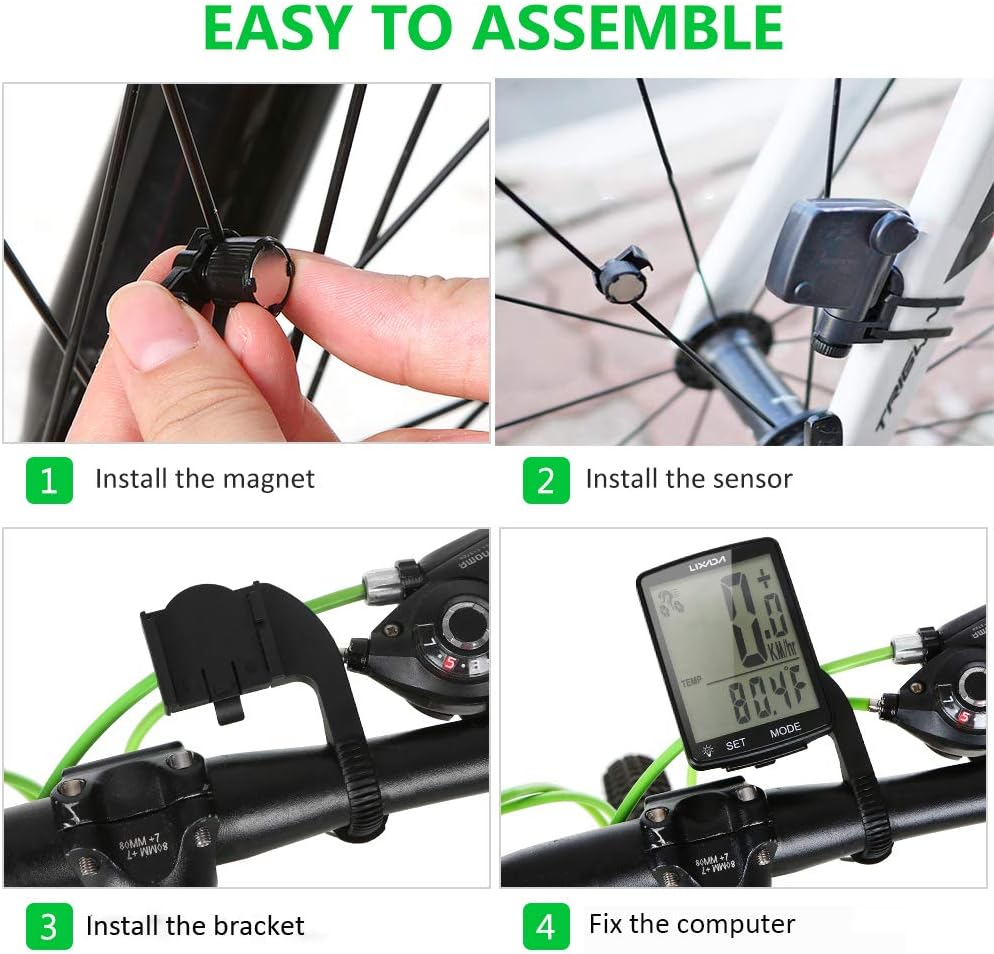
Follow these steps to correctly install your bicycle computer:
- Install the Magnet: Securely attach the magnetic screw to a spoke on your bicycle's front wheel. Ensure it is positioned to pass closely by the sensor.
- Instal·leu el sensor: Mount the wireless transmitter (sensor) on the front fork of your bicycle. Adjust its position so that the magnet passes within 3mm of the sensor when the wheel rotates.
- Instal·leu el suport: Attach the extension bracket to your bicycle's handlebar. Use the provided zip ties and rubber pad to ensure a firm and stable mount.
- Fix the Computer: Slide the bicycle computer unit onto the installed bracket until it clicks into place. Ensure it is securely fastened and facing the rider for easy viewing.

Instruccions de funcionament
Your Lixada Wireless Bicycle Computer features a user-friendly interface with two main buttons: SET i MODE.
Funcions bàsiques
- Encès/apagat: The device typically powers on automatically when motion is detected or a button is pressed. It will enter sleep mode after a period of inactivity to conserve battery.
- Botó MODE: Press the MODE button to cycle through different display modes and view various cycling data (e.g., current speed, distance, time, temperature).
- Botó SET: Use the SET button to enter settings menus or confirm selections. Refer to the detailed manual for specific setting adjustments like wheel circumference.
Viewing Data
The computer allows for quick switching between 24 cycling data points. Simply press the MODE button to navigate through the available metrics.

Manteniment
Neteja
Wipe the computer's screen and body with a soft, damp drap. Eviteu utilitzar netejadors o dissolvents abrasius, ja que poden danyar la pantalla o la casing.
Resistència a l'aigua
The device has an IPX6 waterproof rating, meaning it is protected against powerful water jets. It can be used in rainy conditions. However, it is not designed for submersion. Avoid exposing it to heavy rain for extended periods or submerging it in water.

Canvi de bateria
The bicycle computer uses a lithium button battery. When the display becomes dim or unresponsive, it may be time to replace the battery. Refer to the specific instructions in the included detailed manual for battery compartment access and replacement procedures.
Resolució de problemes
- Sense pantalla/pantalla en blanc:
- Comproveu si cal canviar la bateria.
- Ensure the computer is securely seated in its bracket.
- Lectures de velocitat/distància inexactes:
- Verify that the magnet and sensor are correctly aligned and the gap is within 3mm.
- Ensure the wheel circumference setting is accurate for your bicycle.
- Check for any obstructions or interference between the sensor and the computer.
- Botons que no responen:
- Ensure the device is not in a locked mode (if applicable).
- Try removing and reinserting the battery to reset the device.
If you encounter issues not covered here, please refer to the comprehensive manual included with your product or contact customer support.
Especificacions
| Característica | Detall |
|---|---|
| Número de model | OVS6258358204085VR |
| Marca | Lixada |
| Mida de la pantalla | 2.8 polzades |
| Tipus de visualització | LCD |
| Classificació impermeable | IPX6 |
| Dimensions (L x A x A) | 13 x 8 x 4.4 cm |
| Pes | 65 grams |
| Composició de la bateria | Lithium (Button Battery) |
| Tecnologia de connectivitat | Wireless (ANT, Bluetooth for sensor communication) |
Garantia i Suport
For warranty information or technical support, please refer to the specific warranty card included with your product or contact the manufacturer directly. Keep your purchase receipt as proof of purchase for any warranty claims.
Ask a question about this manual
Ask about setup, troubleshooting, compatibility, parts, safety, or missing instructions. Manuals+ will review the question and use this page’s manual context to help answer it.