
ROCCAT ROC-11-751
Manual d'usuari del ratolí per a jocs ROCCAT Burst Core
Model: ROC-11-751
Introducció
This manual provides essential information for setting up, operating, maintaining, and troubleshooting your ROCCAT Burst Core Extreme Lightweight Optical Gaming Mouse. Designed for performance, this mouse features an 8,500 DPI optical sensor and a lightweight 68g design for optimal gaming experience.
Contingut del paquet
- ROCCAT Burst Core Gaming Mouse
- Guia d'inici ràpid (si escau)
Configuració
1. Connectar el ratolí
The ROCCAT Burst Core mouse connects via a standard USB cable. Follow these steps:
- Localitzeu un port USB disponible al vostre ordinador.
- Plug the USB connector of the ROCCAT Burst Core mouse into the USB port.
- El sistema operatiu detectarà i instal·larà automàticament els controladors necessaris. Aquest procés pot trigar uns instants.
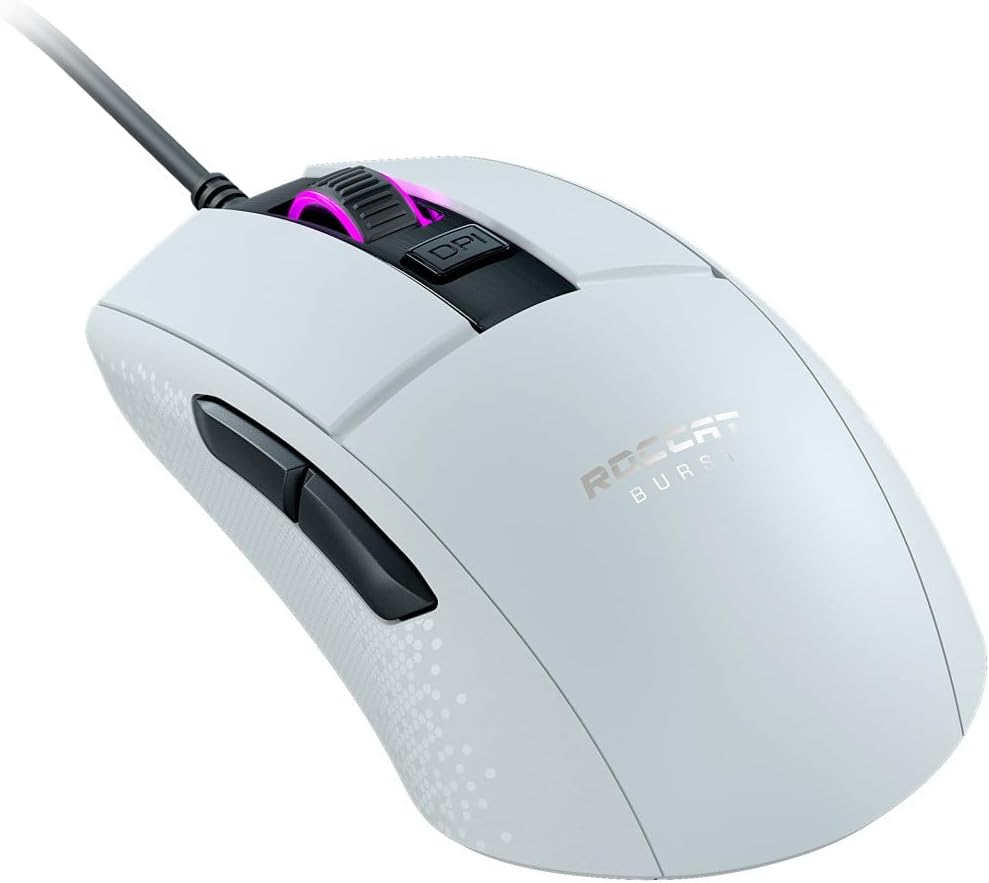
Imatge: The ROCCAT Burst Core Gaming Mouse, a white wired mouse with a black cable, shown from a three-quarter angle, highlighting its ergonomic shape and the illuminated scroll wheel. This image illustrates the mouse ready for connection.
2. Software Installation (ROCCAT Swarm)
For advanced customization and optimal performance, it is recommended to install the ROCCAT Swarm software. This software allows you to configure DPI settings, button assignments, and RGB lighting effects.
- Visit the official ROCCAT weblloc (www.roccat.com) to download the latest version of the ROCCAT Swarm software.
- Seguiu les instruccions a la pantalla per instal·lar el programari.
- Once installed, launch ROCCAT Swarm to customize your mouse settings.
Instruccions de funcionament
Funcions bàsiques
- Clic esquerre: Botó d'acció principal.
- Clic dret: Botó d'acció secundària, normalment per a menús contextuals.
- Roda de desplaçament: S'utilitza per desplaçar-se pels documents i web pages. Can also be pressed for a middle-click function.
- Botó DPI: Located behind the scroll wheel, this button cycles through pre-set DPI (Dots Per Inch) sensitivity levels.
- Botons laterals: Two programmable buttons located on the left side of the mouse, typically used for forward and backward navigation in web browsers or custom in-game actions.

Imatge: Un costat view of the white ROCCAT Burst Core Gaming Mouse, clearly showing the two black side buttons positioned for thumb access. This highlights the additional programmable controls.
Customization with ROCCAT Swarm
The ROCCAT Swarm software provides extensive options to personalize your mouse:
- Configuració de DPI: Adjust the mouse sensitivity to your preference, with up to 8,500 DPI. You can set multiple DPI stages and switch between them using the dedicated DPI button.
- Assignació de botons: Reassign functions to any of the mouse buttons, including macros and multimedia controls.
- Il·luminació RGB: Customize the illumination of the scroll wheel with various colors and effects.
- Taxa de votació: Adjust the polling rate for faster response times.
- Profile Gestió: Create and save different profiles for various applications or games.
Manteniment
Instruccions de neteja
To ensure the longevity and optimal performance of your mouse, regular cleaning is recommended:
- Desconnecteu el ratolí de l'ordinador abans de netejar-lo.
- Utilitzeu un drap suau i sense pelusa dampEsbandiu amb aigua o una solució netejadora suau per netejar la superfície del ratolí.
- For crevices and around buttons, use a cotton swab or compressed air to remove dust and debris.
- Eviteu utilitzar productes químics agressius, netejadors abrasius o humitat excessiva, ja que poden danyar el ratolí.
Gestió de cables
Proper cable management can prevent wear and tear on the mouse cable. Avoid sharp bends or kinks in the cable, and ensure it is not under tension during use.
Resolució de problemes
If you encounter issues with your ROCCAT Burst Core mouse, refer to the following common solutions:
- El ratolí no respon:
- Assegureu-vos que el cable USB estigui ben connectat a un port USB que funcioni. Proveu-ho amb un altre port USB.
- Reinicieu l'ordinador.
- Comproveu si el ratolí funciona en un altre ordinador per descartar un problema específic del sistema.
- Tracking Issues / Erratic Cursor Movement:
- Clean the optical sensor on the underside of the mouse with a cotton swab.
- Ensure you are using the mouse on a clean, uniform surface or a high-quality mouse pad. Avoid reflective or transparent surfaces.
- Adjust DPI settings in ROCCAT Swarm or using the DPI button.
- Botons que no funcionen correctament:
- Check button assignments in the ROCCAT Swarm software.
- Assegureu-vos que no hi hagi restes enganxades sota els botons.
- ROCCAT Swarm Software Issues:
- Ensure you have the latest version of ROCCAT Swarm installed.
- Proveu de tornar a instal·lar el programari.
- Comproveu si hi ha programari o controladors en conflicte al vostre sistema.
Especificacions
| Característica | Detall |
|---|---|
| Nom del model | ROCCAT Burst Core Gaming Mouse |
| Número de model | ROC-11-751 |
| Sensor | Optical, up to 8,500 DPI |
| Interruptors | TITAN Switch Optical |
| Pes | 68g (excluding cable) |
| Connectivitat | USB per cable |
| Longitud del cable | Not specified, standard length |
| Dimensions (L x A x A) | Aproximadament 1.6 x 17 x 13.4 cm |
| Orientació de la mà | Destra |
| Material | Plàstic |
| Compatibilitat de sistemes operatius | PC, Windows |
| Característiques especials | Extreme Lightweight, Solid Honeycomb Shell, Optical Switches |
Garantia i Suport
ROCCAT products are manufactured to high quality standards. For information regarding warranty coverage, terms, and conditions, please refer to the warranty card included with your product or visit the official ROCCAT support weblloc.
For technical assistance, driver downloads, or frequently asked questions, please visit the ROCCAT support page:
Ask a question about this manual
Ask about setup, troubleshooting, compatibility, parts, safety, or missing instructions. Manuals+ will review the question and use this page’s manual context to help answer it.