
FxyxGyc T10
FxyxGyc T10 Language Translator Device User Manual
Model: T10
Portable Instant Translator Device Supports WiFi/Bluetooth/Offline Two-Way Real-Time Online 137 Languages
1. Introducció
The FxyxGyc T10 Language Translator Device is a portable, smart translation tool designed to facilitate communication across language barriers. It supports real-time two-way translation for 137 online languages, 12 offline languages, and 45 languages for photo translation. Equipped with Google/Microsoft translation engines, it offers high accuracy and fast response times.
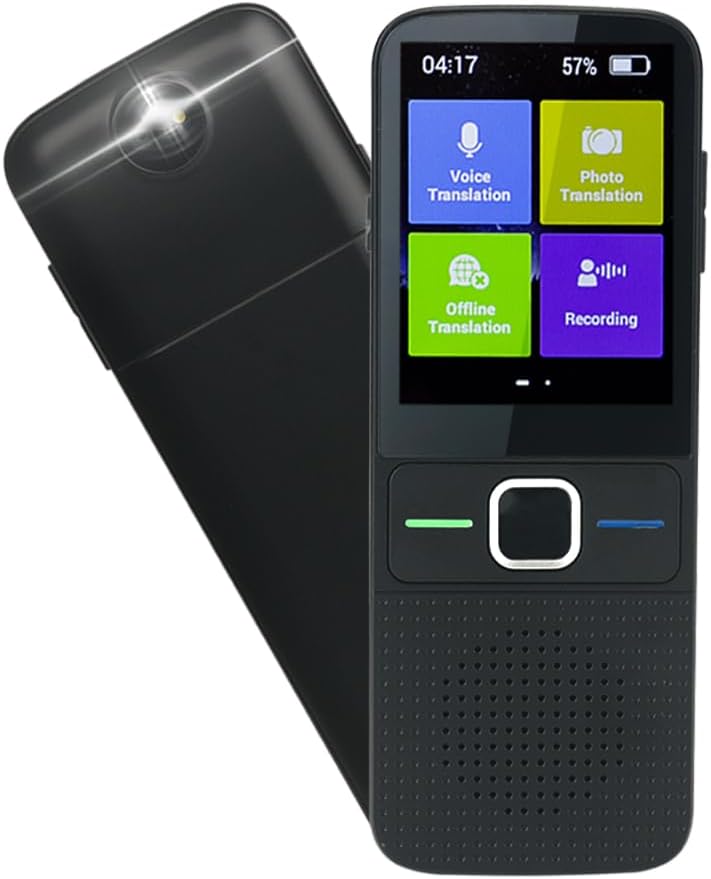
Figura 1.1: Davant i darrere view of the FxyxGyc T10 Language Translator Device, showcasing its compact design and camera lens.

Figure 1.2: The FxyxGyc T10 device, highlighting its role as a global translator with intelligent voice translation capabilities.
2. Què hi ha a la caixa
Upon unboxing your FxyxGyc T10 Language Translator Device, please ensure all the following items are present:
- FxyxGyc T10 Language Translator Device (main unit)
- Carregador USB
- Manual d'instruccions
3. Configuració
3.1 Càrrega inicial
Before first use, fully charge the device using the provided USB charger. Connect the USB charger to the device's Type-C port and plug it into a standard USB power adapter (not included). A full charge typically takes approximately 250 minutes (4 hours and 10 minutes).
Important: Use a regular charger. The device does not support PD fast charging.
3.2 Engegada/apagada
- Per encendre: Press and hold the power button (usually located on the side) until the screen illuminates.
- Per apagar: Press and hold the power button until a power-off menu appears on the screen, then select "Power Off".
3.3 Connexió de xarxa (Wi-Fi)
For online translation and updates, the device requires a Wi-Fi connection.
- From the main screen, navigate to Configuració.
- Seleccioneu Wi-Fi.
- Activa/desactiva el Wi-Fi On.
- Seleccioneu la xarxa Wi-Fi que vulgueu de la llista.
- Enter the Wi-Fi password if prompted, then tap Connecta't.

Figure 3.1: The device screen displaying the Wi-Fi connection icon, indicating successful network access.
3.4 Selecció de la llengua
To set the device's interface language and default translation languages:
- From the main screen, tap the Configuració icona.
- Desplaceu-vos cap avall i seleccioneu Llengua.
- Choose your preferred interface language from the list.
- For translation, select the source and target languages within the translation application.

Figure 3.2: Steps to access and change language settings on the device, showing the settings menu and language list.
4. Instruccions de funcionament
4.1 Voice Translation (Online)
The device supports two-way real-time voice translation for 137 languages when connected to Wi-Fi.
- Des de la pantalla principal, toqueu Traducció de veu.
- Select the two languages for translation (e.g., Language A to Language B).
- Manteniu premut el botó botó verd to speak in Language A. Release the button to hear the translation in Language B.
- Manteniu premut el botó botó blau to speak in Language B. Release the button to hear the translation in Language A.

Figure 4.1: Illustration of the one-click operation for voice translation, showing the green and blue buttons for respective language inputs.

Figure 4.2: A visual representation of the 137 languages supported by the device, categorized by region, including dialect support for Cantonese.
4.2 Traducció fora de línia
The device supports offline translation for 12 languages (English, Chinese, Japanese, Russian, Korean, German, Spanish, French, Italian, Dutch, Portuguese). To use this feature, you must pre-download the language packs.
- Assegureu-vos que el dispositiu estigui connectat a la Wi-Fi.
- Des de la pantalla principal, toqueu Traducció fora de línia.
- Select the language packs you wish to download.
- Once downloaded, you can use voice translation for these languages without an internet connection.
4.3 Traducció de fotos
The built-in camera allows for translation of text from images in up to 45 languages. This is useful for menus, signs, and labels.
- Des de la pantalla principal, toqueu Traducció fotogràfica.
- Position the device's camera over the text you wish to translate.
- Tap the screen to capture the image.
- The device will process the image and display the translated text.
4.4 Funció d'enregistrament
The device can record audio for up to 60 minutes in English, Mandarin, or Cantonese, and then export the translated text to a computer.
- Des de la pantalla principal, toqueu Gravació.
- Select the recording language.
- Tap the record button to start/stop recording.
- To export, connect the device to your PC via USB and access the recorded files.
5. Manteniment
5.1 Neteja
- Feu servir un drap suau, sec i sense borrissol per netejar la pantalla i la carcassa del dispositiu.
- No utilitzeu netejadors abrasius, dissolvents ni aerosols.
- Eviteu que entri humitat a les obertures.
5.2 Actualitzacions de programari
The device supports online automatic upgrades. When a new system update is available, the device will automatically update in the background when connected to Wi-Fi.

Figure 5.1: The device illustrating the automatic online upgrade feature, ensuring the system is always up-to-date.
5.3 Cura de la bateria
The device is equipped with a 1500mAh Lithium Polymer battery. To maximize battery life:
- Eviteu temperatures extremes.
- No descarregueu completament la bateria amb freqüència.
- Store the device with a partial charge if not used for extended periods.

Figure 5.2: Details on the 1500mAh battery, including continuous use time (approx. 1560 minutes) and standby duration (approx. 125 hours).
6. Solució De Problemes
| Problema | Causa possible | Solució |
|---|---|---|
| El dispositiu no s'encén. | Bateria baixa; dispositiu bloquejat. | Charge the device for at least 30 minutes. If still unresponsive, perform a hard reset (refer to device manual for specific button combination, usually holding power button for 10-15 seconds). |
| La traducció és inexacta o lenta. | Poor Wi-Fi connection; unclear speech; language mismatch. | Ensure a stable Wi-Fi connection. Speak clearly and directly into the microphone. Verify that the correct source and target languages are selected. |
| Offline translation not working. | Language packs not downloaded or corrupted. | Connect to Wi-Fi and re-download the necessary offline language packs. |
| Photo translation fails. | Poor lighting; blurry image; text not clear. | Ensure adequate lighting. Hold the device steady to avoid blur. Make sure the text is clearly visible and within the camera's focus. |
| La bateria s'esgota ràpidament. | High screen brightness; continuous use; background apps. | Reduce screen brightness. Close unused applications. Limit continuous online translation sessions. |
7. Especificacions
| Característica | Detall |
|---|---|
| Nom del producte | Traductor |
| Model de producte | T10 |
| Sistema operatiu | Android |
| Mode de xarxa | Wi-Fi |
| Mida de la pantalla | Pantalla tàctil IPS de 2.4 polzades |
| Capacitat de la bateria | Polímer de liti de 1500 mAh (inclòs) |
| Temps d'ús continu | 8-12 hours (approx. 1560 minutes) |
| Temps d'espera | 7 days (approx. 125 hours) |
| Temps de càrrega | Aprox. 250 minuts |
| Interfície de dades | Tipus C USB |
| Translation Engine | Google / Microsoft |
| Sortida de la parla | Microsoft SR |
| Supported Online Languages | 137 idiomes |
| Supported Offline Languages | 12 languages (English, Chinese, Japanese, Russian, Korean, German, Spanish, French, Italian, Dutch, Portuguese) |
| Supported Photo Translation Languages | 45 idiomes |
| Dimensions del producte | 5.12 x 1.97 x 0.59 polzades (130 mm x 50 mm x 15 mm aprox.) |
| Pes de l'article | 6.7 unces (190 g) |
| Fabricant | Shenzhen Intelligent Voice Technology Co.,Ltd |
| Data de primera disponibilitat | 1 de gener de 2021 |

Figure 7.1: Detailed product parameters including dimensions, screen size, battery capacity, and operating system.
8. Garantia i Suport
For warranty information and technical support, please refer to the contact details provided in the physical instruction manual included with your device or visit the official FxyxGyc weblloc web. Conserveu el rebut de compra com a comprovant de compra per a reclamacions de garantia.
Typical warranty periods for electronic devices range from 12 to 24 months from the date of purchase, covering manufacturing defects. Damage caused by misuse, accidents, or unauthorized modifications is generally not covered.
Ask a question about this manual
Ask about setup, troubleshooting, compatibility, parts, safety, or missing instructions. Manuals+ will review the question and use this page’s manual context to help answer it.