
1. Introducció
This user manual provides comprehensive instructions for the UNIWA E1801 Senior Mobile Phone. Designed with large buttons and a clear display, this phone is ideal for users seeking simplicity and essential communication features. Please read this manual carefully before using your device to ensure proper operation and longevity.
2. Contingut del paquet
En obrir el paquet, comproveu que hi hagi tots els elements següents:
- 1 x UNIWA E1801 Mobile Phone
- 1 x BL-5C 800 mAh Battery
- 1 x Carregador
- 1 x Manual d'usuari (aquest document)
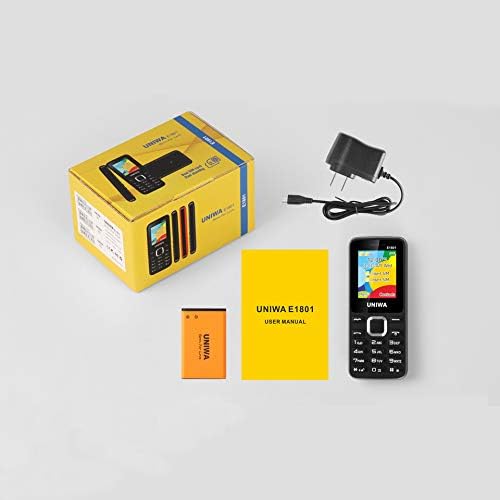
Image: Contents of the UNIWA E1801 package, including the phone, battery, charger, and user manual.
3. Dispositiu acabatview
The UNIWA E1801 features a user-friendly design with large, easy-to-press buttons and a non-slip frame for comfortable handling. It includes an ergonomic keypad with plating navigation keys for intuitive operation.
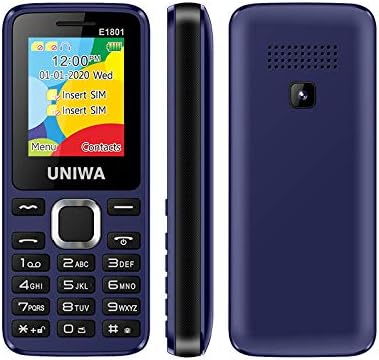
Imatge: frontal, lateral i posterior views of the UNIWA E1801 phone, highlighting its compact design.

Image: Detail showing the non-slip frame of the UNIWA E1801, designed for secure grip.

Image: Close-up of the ergonomic keypad and plating navigation keys on the UNIWA E1801.
4. Configuració
4.1. Instal·lació de la bateria
- Traieu la tapa posterior del telèfon fent palanca suaument per obrir-la des de l'osca.
- Align the gold contacts of the BL-5C 800 mAh battery with the contacts in the battery compartment.
- Gently press the battery down until it clicks into place.
- Replace the back cover, ensuring it snaps securely.
4.2. Instal·lació de la targeta SIM
The UNIWA E1801 supports Dual SIM cards, allowing for two active phone numbers simultaneously.
- With the back cover removed and battery out (if necessary), locate the SIM card slots.
- Insert your SIM card(s) into the designated slot(s) with the gold contacts facing down and the cut corner aligned correctly.
- Gently push the SIM card until it is fully seated.
- Torneu a instal·lar la bateria i la coberta posterior.

Image: The dual SIM card slots of the UNIWA E1801, illustrating how SIM cards are inserted.
4.3. Càrrega del dispositiu
Abans del primer ús, carregueu completament la bateria del telèfon.
- Connect the charger cable to the charging port on the phone.
- Connecteu el carregador a una presa de corrent estàndard.
- L'indicador de bateria a la pantalla mostrarà l'estat de càrrega.
- Un cop estigui completament carregat, desconnecteu el carregador.
5. Instruccions de funcionament
5.1. Encendre/apagar
- Per encendre: Premeu i manteniu premut el botó d'engegada/finalització de trucada fins que la pantalla s'il·lumini.
- Per apagar: Press and hold the Power/End Call button until the power-off options appear, then confirm.
5.2. Realització de trucades
- Des de la pantalla inactiva, introduïu el número de telèfon amb el teclat numèric.
- Press the Call button (usually green) to initiate the call.
- To end a call, press the End Call button (usually red).
5.3. Enviament de missatges
- Navegueu fins al menú "Missatges" des de la pantalla principal.
- Select 'Write Message' or 'New SMS'.
- Introduïu el vostre missatge amb el teclat numèric.
- Introduïu el número del destinatari o seleccioneu-lo dels contactes.
- Envieu el missatge.
5.4. Contactes
La llibreta telefònica pot emmagatzemar fins a 300 contactes.
- Afegir un contacte: Go to 'Contacts' > 'Add New Contact', then enter the name and number.
- Cercant un contacte: From the 'Contacts' menu, use the navigation keys to scroll or search by name.
5.5. Ràdio FM
The UNIWA E1801 features a wireless FM radio, allowing you to listen to your favorite stations without needing headphones as an antenna.
- Navigate to the 'FM Radio' application from the main menu.
- Use the navigation keys to scan for available stations or manually tune to a frequency.
- Adjust the volume using the side keys (if available) or navigation keys.

Image: The UNIWA E1801 showcasing its wireless FM radio feature.
5.6. Multimedia (MP3/MP4)
The phone supports MP3 audio and MP4 video playback.
- Ensure you have a TF card (up to 16GB) inserted with your media files.
- Navigate to the 'Multimedia' or 'File Manager' menu.
- Select 'MP3 Player' or 'Video Player' to browse and play your files.

Image: Illustration of the 2030 Box Speaker on the UNIWA E1801, indicating its audio capabilities.
5.7. Càmera
The phone is equipped with a 0.08 MP rear camera.
- Al menú principal, seleccioneu "Càmera".
- Enquadra la teva foto utilitzant la pantalla com a viewcercador.
- Press the designated button (usually the center navigation key) to take a photo.
5.8. Llanterna
The built-in flashlight can be useful in low-light conditions.
- Refer to your phone's specific shortcut key or menu option to activate/deactivate the flashlight. This is often a long press on a specific number key or a dedicated button.

Image: The UNIWA E1801 demonstrating its integrated flashlight function.
5.9. Altres funcions
The UNIWA E1801 includes several utility functions:
- Jocs: Simple pre-installed games.
- Calendari: To keep track of dates and events.
- Despertador: Configura diverses alarmes.
- Calculadora: Funcions aritmètiques bàsiques.
- Rellotge mundial: View time in different time zones.
- Llibre electrònic: Basic text file lector.
- WAP: Basic internet browsing (requires GPRS data plan).
- Gravadora: Voice recording function.
6. Manteniment
- Neteja: Feu servir un drap suau i sec per netejar la superfície del telèfon. Eviteu netejadors líquids o materials abrasius.
- Cura de la bateria: To prolong battery life, avoid extreme temperatures. Do not leave the phone charging for excessively long periods after it is full.
- Emmagatzematge: If storing the phone for an extended period, ensure the battery is partially charged (around 50%) and store it in a cool, dry place.
7. Solució De Problemes
| Problema | Possible causa/solució |
|---|---|
| El telèfon no s'encén. | Battery is depleted. Charge the phone for at least 30 minutes. Ensure battery is correctly installed. |
| No es poden fer ni rebre trucades. | No network signal. Move to an area with better reception. SIM card not properly inserted. Reinsert SIM card. |
| La bateria s'esgota ràpidament. | Background applications running. Close unused applications. Battery may be old and require replacement. |
| No sento la persona que truca / La persona que truca no em sent. | Volume too low. Adjust call volume. Microphone/speaker blocked. Ensure no obstructions. |
Si el problema persisteix després de provar aquestes solucions, poseu-vos en contacte amb l'atenció al client.
8. Especificacions
| Característica | Detall |
|---|---|
| Número de model | ECON E1801 |
| Dimensions | 108 x 45 x 14 mm |
| Pes | 68 g |
| CPU | SC6531E |
| Xarxa de banda | 2G: GSM850/900/1800/1900 MHz, GPRS |
| Targeta SIM | Dual-SIM, Dual-Standby |
| Capacitat de l'agenda | 300 números |
| To de trucada | 64 chords, supports MP3, Midi ringtones |
| Altaveu | 2030 Ponent |
| Ràdio FM | Ràdio FM sense fil |
| Pantalla | 1.77 inch QQVGA Display, 160 x 128 pixels |
| Càmera | 0.08 MP Rear Camera, 640 x 480 pixels |
| Multimèdia | MP3, MP4 |
| Memòria | Supports TF cards up to 16 GB max |
| Bluetooth | V2.1 |
| Vibrador | Sí |
| Temps de conversa | Fins a 240 minuts |
| Temps d'espera | Fins a 200 hores |
| Idiomes | English, Russian, Hebrew, Arabic, French, Spanish, Polish, German, Italian, Portuguese, Chinese |
9. Garantia i Suport
For warranty information and technical support, please refer to the warranty card included with your product or contact the retailer where you purchased the UNIWA E1801. You may also visit the official UNIWA website for further assistance and updated support information.