
UNIWA E1801
Manual d'usuari del telèfon mòbil UNIWA E1801 per a gent gran
Model: E1801
1. Introducció
The UNIWA E1801 is a user-friendly mobile phone designed with large buttons and a clear display, making it ideal for seniors. It features essential functions such as calling, messaging, FM radio, MP3/MP4 playback, and a built-in flashlight. This manual provides comprehensive instructions for setting up, operating, and maintaining your device.
2. Informació de seguretat
- No desmunteu ni modifiqueu el dispositiu.
- Use only original or approved batteries and chargers.
- Eviteu exposar el telèfon a temperatures extremes, llum solar directa o humitat.
- Keep the phone away from medical devices to prevent interference.
- Dispose of the phone and battery responsibly according to local regulations.
3. Contingut del paquet
Si us plau, comproveu el contingut del paquet en desembalar-lo. Si falta algun article o hi ha algun dany, poseu-vos en contacte amb el vostre distribuïdor.
- UNIWA E1801 Mobile Phone
- BL-5C 800mAh Battery
- Carregador
- Manual d'usuari (aquest document)
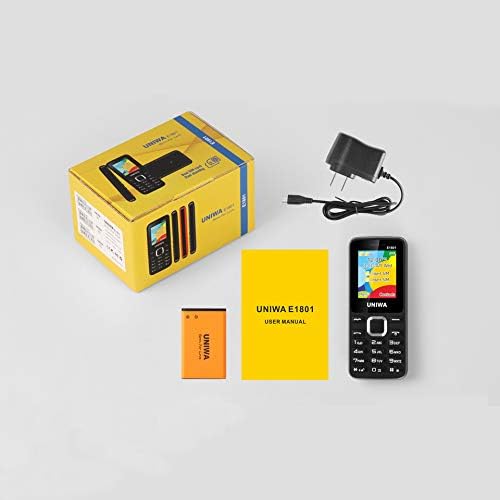
Image: Contents of the UNIWA E1801 package, showing the phone, battery, charger, and user manual neatly arranged next to the product box.
4. Producte acabatview
Familiarize yourself with the physical components of your UNIWA E1801 phone.

Image: The UNIWA E1801 mobile phone held in a hand, showcasing its compact size, large keypad, and clear color display with the UNIWA logo.
- Visualització: 1.77-inch QQVGA screen (160 x 128 pixels) for clear visibility.
- Teclat: Large, ergonomic buttons with clear numbering for easy dialing and navigation.
- Tecles de navegació: Plated navigation keys for intuitive menu control.
- Càmera posterior: 0.08 MP camera for basic photo capture.
- Ponent: Integrated 2030 box speaker for loud and clear audio.
- Llanterna: Built-in LED flashlight for convenience.
- Non-slip Frame: Textured frame design for a secure grip.

Imatge: Un primer pla view of the UNIWA E1801's keypad, highlighting the ergonomic design and the metallic finish of the central navigation keys.

Image: The UNIWA E1801 phone with an inset showing the detailed texture of its non-slip frame, designed for a secure grip.

Image: The rear of the UNIWA E1801 phone, with an overlay illustrating the powerful 2030 box speaker and its sound projection.
5. Configuració
5.1. Installing SIM Cards
The UNIWA E1801 supports dual SIM cards, allowing you to use two different numbers simultaneously.
- Traieu la coberta posterior del telèfon.
- Localitza les ranures de la targeta SIM.
- Carefully insert your SIM cards into the designated slots with the gold contacts facing down.
- Assegureu-vos que les targetes SIM estiguin ben col·locades.

Image: The back of the UNIWA E1801 phone with the cover removed, clearly showing the two SIM card slots and an illustration of two SIM cards.
5.2. Instal·lació de la bateria
- After inserting the SIM cards, place the BL-5C 800mAh battery into the battery compartment, aligning the gold contacts.
- Gently press down until the battery is securely in place.
- Torneu a col·locar la coberta posterior, assegurant-vos que encaixi en el seu lloc amb un clic.
5.3. Carregant el telèfon
Abans del primer ús, carregueu completament la bateria del telèfon.
- Connect the charger to the charging port on the phone.
- Connecteu el carregador a una presa de corrent.
- L'indicador de bateria a la pantalla mostrarà l'estat de càrrega.
- Un cop estigui completament carregat, desconnecteu el carregador.
6. Instruccions de funcionament
6.1. Encendre/apagar
- Per encendre: Premeu i manteniu premut el botó d'engegada/finalització de trucada fins que la pantalla s'il·lumini.
- Per apagar: Mantingueu premut el botó d'engegada/finalització de trucada fins que apareguin les opcions d'apagada i, a continuació, seleccioneu "Apagar".
6.2. Realització de trucades
- Des de la pantalla inactiva, introduïu el número de telèfon amb el teclat numèric.
- Premeu el botó verd de trucada per iniciar la trucada.
- Per finalitzar una trucada, premeu el botó vermell Finalitzar trucada.
6.3. Enviament de missatges
- Go to "Menu" > "Messages" > "Write message".
- Introduïu el vostre missatge amb el teclat numèric.
- Introduïu el número de telèfon del destinatari o seleccioneu-lo dels contactes.
- Premeu "Enviar".
6.4. Ús de la ràdio FM
The phone features a wireless FM radio.
- Go to "Menu" > "FM Radio".
- Select "Auto search" to find available stations.
- Use the navigation keys to switch between stations.

Image: The UNIWA E1801 phone displaying its FM radio interface, showing a frequency of 142.2 MHz, with musical notes and a classic radio in the background, indicating its wireless FM capability.
6.5. Ús de la llanterna
The built-in flashlight can be easily activated.
- Typically, a dedicated button or a long press on a specific key (refer to your phone's quick guide) activates the flashlight.
- Alternatively, access it via "Menu" > "Tools" > "Flashlight".

Image: The UNIWA E1801 phone with a bright beam of light emanating from its top, illustrating the built-in flashlight function.
6.6. Altres característiques
- MP3/MP4 Playback: Supports multimedia playback. Transfer files to a TF card (up to 16GB, not included) and access them via the "Multimedia" menu.
- Guia telefònica: Emmagatzema fins a 300 contactes.
- Eines: Includes games, calendar, alarm clock, calculator, world clock, and recorder.
7. Manteniment
- Neteja: Use a soft, dry cloth to clean the phone's surface. Do not use liquid cleaners or aerosols.
- Emmagatzematge: Guardeu el telèfon en un lloc fresc i sec, allunyat de la llum solar directa i de temperatures extremes.
- Cura de la bateria: Avoid fully discharging the battery frequently. Charge it regularly to prolong its lifespan.
8. Solució De Problemes
| Problema | Causa possible | Solució |
|---|---|---|
| El telèfon no s'encén. | La bateria està baixa o no està instal·lada correctament. | Carregueu la bateria. Assegureu-vos que la bateria estigui inserida correctament. |
| No es poden fer ni rebre trucades. | No SIM card, SIM card not inserted correctly, or no network signal. | Ensure SIM card is inserted. Check network signal strength. Contact your service provider. |
| Mala qualitat d'àudio. | Low volume, poor network signal, or speaker/microphone obstruction. | Adjust volume. Move to an area with better signal. Clean speaker/microphone openings. |
| La bateria s'esgota ràpidament. | Frequent use, background applications, or old battery. | Redueix la brillantor de la pantalla. Tanca les aplicacions que no fas servir. Considera substituir la bateria si és antiga. |
9. Especificacions
| Característica | Detall |
|---|---|
| Número de model | E1801 |
| Dimensions | 108 x 45 x 14 mm |
| Pes | 68 g |
| CPU | SC6531E |
| Xarxa de banda | 2G: GSM850/900/1800/1900 MHz, GPRS |
| Targeta SIM | Dual SIM, Dual Standby |
| Capacitat de l'agenda | 300 entrades |
| Mostra | 1.77 inch QQVGA, 160 x 128 pixels |
| Càmera | 0.08 MP Rear Camera, 640 x 480 pixels |
| Multimèdia | MP3, MP4 |
| Memòria | Supports TF card up to 16 GB (max) |
| Bluetooth | V2.1 |
| Bateria | BL-5C 800mAh |
| Temps de conversa | Fins a 240 minuts |
| Temps d'espera | Fins a 200 hores |
| Idiomes | English, Russian, Hebrew, Arabic, French, Spanish, Polish, German, Italian, Portuguese, Chinese |
| Característiques | Games, Calendar, Alarm Clock, Calculator, World Clock, Flashlight, E-book, WAP, Recorder |
10. Garantia i Suport
Your UNIWA E1801 mobile phone comes with a standard manufacturer's warranty. Please refer to the warranty card included in your package for specific terms and conditions.
For technical support, troubleshooting assistance, or warranty claims, please contact your point of purchase or the official UNIWA customer service. Keep your purchase receipt as proof of purchase.
For more information, visit the official UNIWA weblloc web o contacteu amb els seus canals d'assistència.