
EVGA 141-U1-CB10-LR
EVGA XR1 Capture Card User Manual
Model: 141-U1-CB10-LR
1. Producte acabatview
The EVGA XR1 Capture Card is a high-performance USB 3.0 capture device designed for streaming and recording gameplay from PCs and consoles, including PS5, PS4, Xbox Series X|S, Xbox One, and Nintendo Switch. It features 4K pass-through capabilities, ARGB lighting, and an integrated audio mixer, making it a versatile tool for content creators. It is also certified for OBS (Open Broadcaster Software).
Característiques principals:
- Record at 1080P/60FPS while gaming at 4K/60FPS.
- Advanced Pass Through Mode supporting up to 1440p at 144Hz refresh rate with HDR (no capture).
- Built-in Audio Mixer via Control Dial for adjusting microphone input and game volume.
- USB 3.0 connectivity for low-latency capturing/streaming.
- Can be connected to a DSLR camera for a high-quality webopció de càmera.
- First device certified for OBS.

Image: The EVGA XR1 Capture Card shown alongside its retail packaging, highlighting its design and key features like 4K 60fps pass-through and 1080p 60fps capture.
2. Contingut del paquet
Verify that all items listed below are included in your EVGA XR1 Capture Card package:
- EVGA XR1 Capture Card
- Cable USB 3.0 tipus C a tipus A
- Cable HDMI
- Cable d'àudio de 3.5 mm
- Guia ràpida

Image: The EVGA XR1 Quick Guide and the three included cables: an HDMI cable, a USB 3.0 Type-C to Type-A cable, and a 3.5mm audio cable.
3. Guia de configuració
Follow these steps to set up your EVGA XR1 Capture Card:
- Connexió al PC: Connect the EVGA XR1 Capture Card to your computer using the supplied USB 3.0 Type-C to Type-A cable. Ensure you use a USB 3.0 port on your PC for optimal performance and low latency.
- Entrada HDMI: Connect your gaming console (e.g., PS5, Xbox, Nintendo Switch) or PC's HDMI output to the HDMI IN port on the EVGA XR1 Capture Card using an HDMI cable.
- Sortida HDMI: Connect the HDMI OUT port of the EVGA XR1 Capture Card to your display (TV or monitor) using another HDMI cable. This allows for pass-through video to your screen.
- Connexió d'àudio (opcional): If you wish to use the 3.5mm audio input for a microphone or other audio source, connect it to the appropriate audio input port on the XR1.
- Instal·lació de programari: Download and install the necessary drivers and software (e.g., OBS Studio) from the official EVGA website or OBS website. The XR1 is certified for OBS, ensuring seamless integration.

Imatge: Un costat view of the EVGA XR1 Capture Card, clearly showing the HDMI IN port and the USB Type-C port for connecting to your computer.
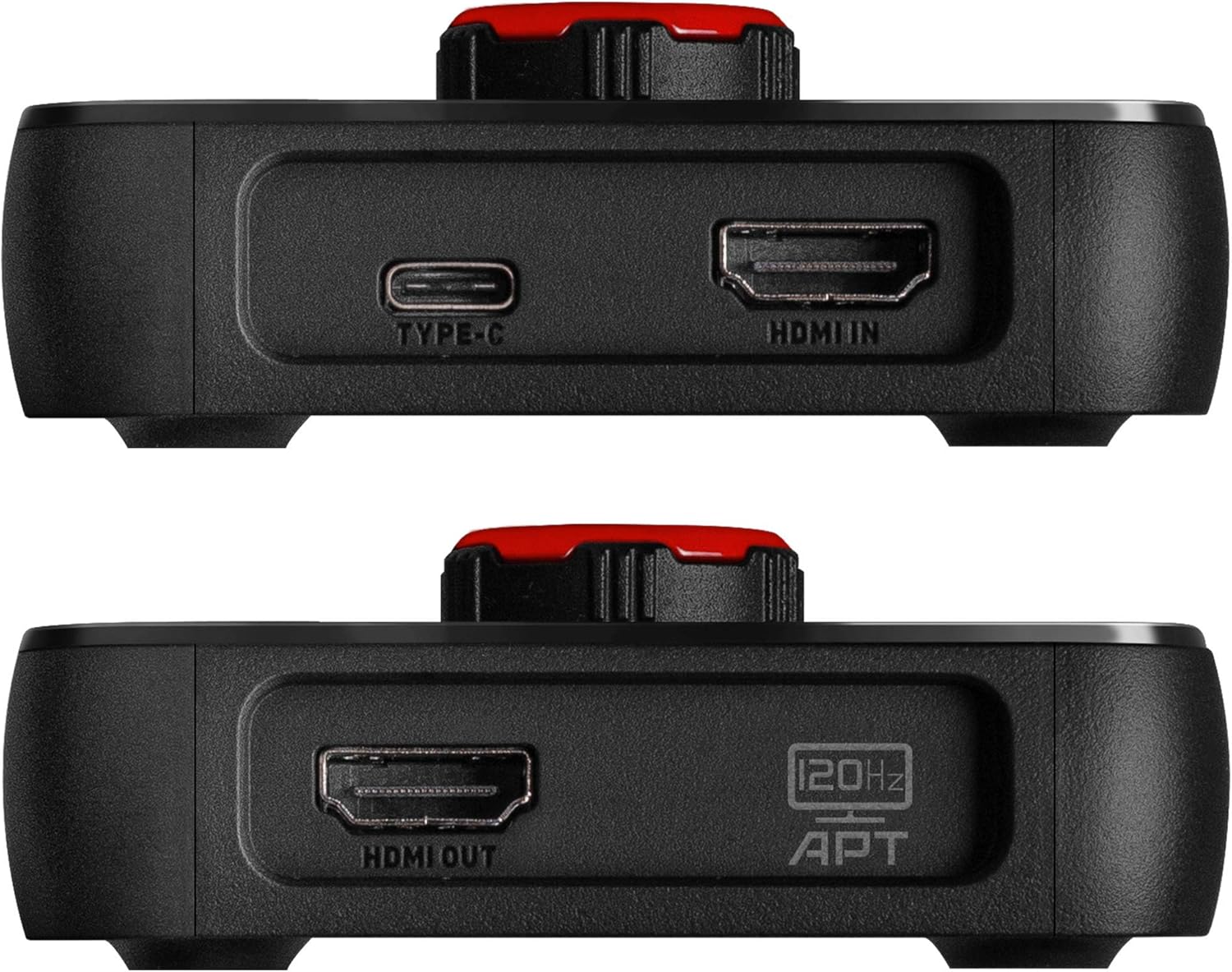
Imatge: Una altra cara view of the EVGA XR1 Capture Card, highlighting the HDMI OUT port, which connects to your display for video pass-through.
4. Instruccions de funcionament
The EVGA XR1 Capture Card is designed for intuitive operation, especially with OBS Studio.
Marcatge de control:
The prominent control dial on the top of the XR1 allows for quick adjustments. This dial functions as an audio mixer, enabling you to adjust microphone input levels and game volume directly on the device. Pressing the knob can also switch between capture and pass-through modes, or adjust settings depending on the software configuration.

Imatge: Vista de dalt a baix view of the EVGA XR1 Capture Card, showcasing its vibrant ARGB lighting and the central control dial used for audio mixing and mode switching.
Il·luminació ARGB:
The integrated ARGB lighting provides visual feedback and can be customized through compatible software, enhancing your setup's aesthetics.
OBS Certification:
As the first device certified for OBS, the XR1 offers optimized performance and compatibility with OBS Studio. Ensure you select the EVGA XR1 as your video and audio input device within OBS for recording or streaming.

Imatge: Un angle view of the EVGA XR1 Capture Card, highlighting its dynamic ARGB lighting and the "Certified for OBS" logo, indicating its optimized compatibility.
5. Manteniment
To ensure the longevity and optimal performance of your EVGA XR1 Capture Card, follow these simple maintenance guidelines:
- Neteja: Use a soft, dry cloth to gently wipe the exterior of the device. Avoid using liquid cleaners or abrasive materials, as they may damage the surface or internal components.
- Emmagatzematge: When not in use, store the capture card in a cool, dry place away from direct sunlight and extreme temperatures.
- Gestió de cables: Assegureu-vos que els cables no estiguin excessivament doblegats o tensats, ja que això pot fer-los malbé amb el temps.
6. Solució De Problemes
If you encounter issues with your EVGA XR1 Capture Card, refer to the following common troubleshooting steps:
- Sense senyal/Pantalla negra:
- Ensure all HDMI cables are securely connected to the correct IN and OUT ports.
- Verify that your source device (console/PC) is powered on and outputting video.
- Check your display's input source.
- Prova un altre cable HDMI.
- Ensure your PC's USB 3.0 port is providing sufficient power; some front panel USB ports may not provide full power. Try connecting to a rear motherboard USB 3.0 port.
- Sense àudio:
- Check audio settings in your streaming/recording software (e.g., OBS). Ensure the XR1's audio input is selected and not muted.
- Adjust the audio mixer dial on the XR1.
- Verifiqueu la configuració de sortida d'àudio al dispositiu font.
- Lag/Stuttering:
- Ensure the XR1 is connected to a USB 3.0 (or higher) port. USB 2.0 ports are not sufficient for optimal performance.
- Close unnecessary applications on your PC to free up system resources.
- Update your graphics drivers and capture card drivers.
- Dispositiu no reconegut:
- Try connecting the XR1 to a different USB 3.0 port.
- Reinicieu l'ordinador.
- Reinstall the device drivers.
7. Especificacions tècniques
| Especificació | Detall |
|---|---|
| Número de model | 141-U1-CB10-LR |
| Plataforma de maquinari | PC, Gaming Consoles (PS5, PS4, Xbox Series X|S, Xbox One, Nintendo Switch) |
| Compatibilitat de sistemes operatius | PC |
| Interfície | USB 3.0 |
| Resolució màxima de captura | 1080p a 60 FPS |
| Resolució màxima de transmissió | 4K @ 60FPS (with HDR), 1440p @ 144Hz (with HDR) |
| Mode de sortida d'àudio | Envoltant |
| Pes de l'article | 5.6 unces |
| Dimensions del producte (LxWxH) | 7 x 5.3 x 3.6 polzades |
| Fabricant | EVGA |
| Data de primera disponibilitat | 15 de setembre de 2020 |

Image: The underside of the EVGA XR1 Capture Card, displaying the model number (P/N: 141-U1-CB10-LR), power input specifications, and various certifications.
8. Garantia i Suport
EVGA products are backed by a manufacturer's warranty. For detailed warranty information, product registration, technical support, and driver downloads, please visit the official EVGA weblloc:
You can also find support resources and frequently asked questions on the EVGA support page. When contacting support, please have your product model number (141-U1-CB10-LR) and serial number ready.