
1. Introducció
The 3M PELTOR LiteCom FRS Headset MT53H7P3E4602-NA is a hard hat attached communication and hearing protection device designed for use in noisy environments. It integrates a two-way radio for short-range communication (FRS channels) with hearing protection, allowing users to communicate effectively while protecting their hearing. This manual provides essential information for the safe and efficient use of your headset.
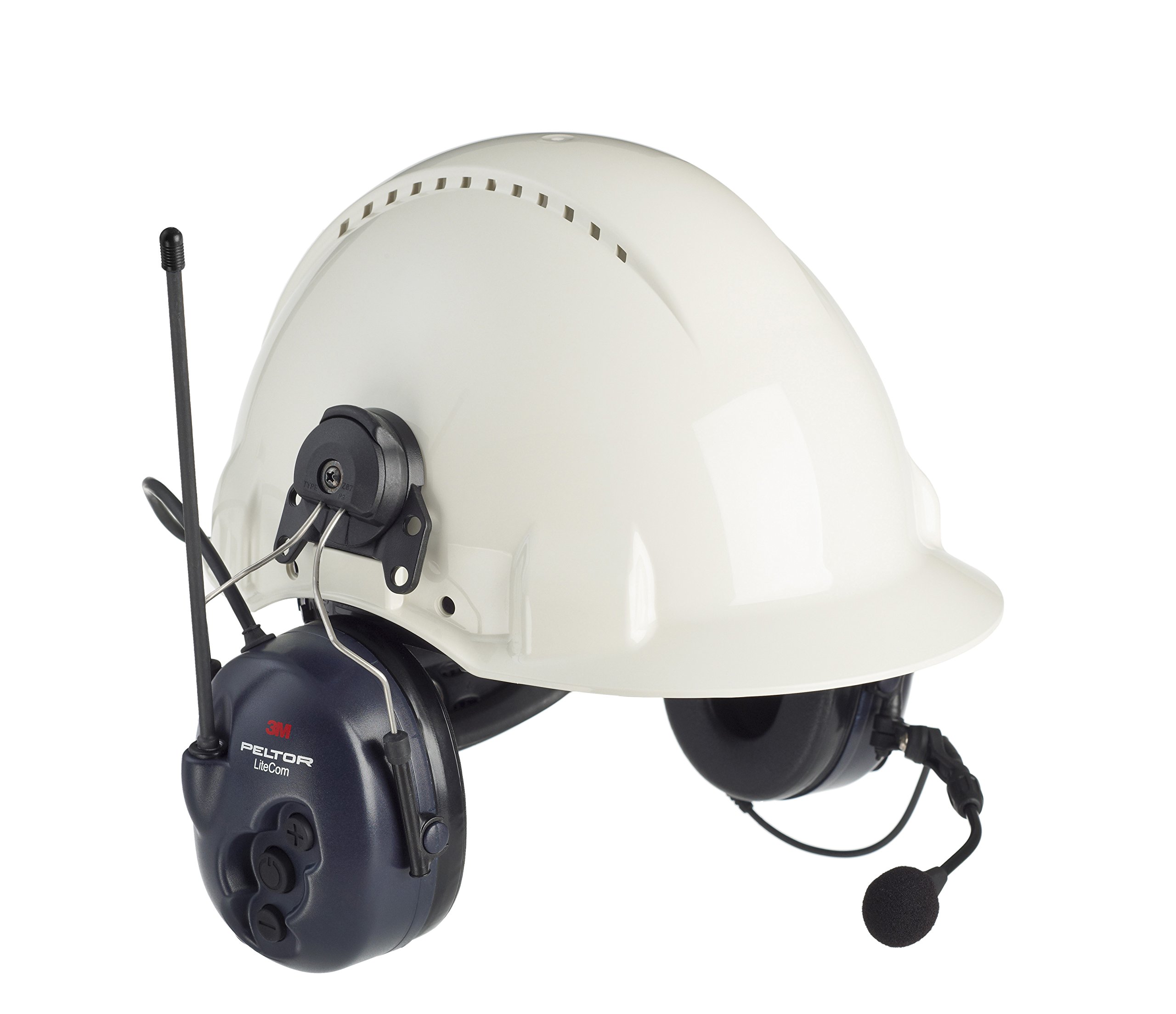
Image 1: The 3M PELTOR LiteCom FRS Headset MT53H7P3E4602-NA, shown attached to a hard hat, illustrating its design for integrated communication and hearing protection.
2. Informació de seguretat
Read all safety warnings and instructions before using this product. Failure to follow these instructions may result in serious injury or damage to the device.
- Protecció auditiva: This device provides hearing protection. Ensure it is worn correctly to achieve the stated Noise Reduction Rating (NRR).
- Seguretat de la bateria: Use only recommended batteries. Do not mix old and new batteries, or different types of batteries. Dispose of batteries according to local regulations.
- Atmosferes explosives: Do not use the headset in potentially explosive atmospheres unless specifically certified for such use.
- Neteja: Clean the headset regularly as described in the Maintenance section. Do not immerse the headset in water.
- Modificacions: Do not modify the headset. Unauthorized modifications may impair its safety and performance.
3. Components
The package for the 3M PELTOR LiteCom FRS Headset MT53H7P3E4602-NA typically includes:
- 3M PELTOR LiteCom FRS Headset (Hard Hat Attached)
- Manual d'usuari (aquest document)
- Batteries (may be included or sold separately)
4. Configuració
4.1. Instal·lació de la bateria
- Localitza el compartiment de la bateria en un dels auriculars.
- Obriu la tapa del compartiment de la bateria.
- Insert the specified batteries (e.g., AA batteries) according to the polarity markings (+/-).
- Tanqueu bé la tapa del compartiment de la bateria.
4.2. Hard Hat Attachment
This headset model is designed for hard hat attachment. Follow these steps to correctly mount it:
- Ensure your hard hat has universal accessory slots (30mm).
- Align the headset's attachment arms with the slots on the hard hat.
- Push the arms firmly into the slots until they click into place, ensuring a secure fit.
- Adjust the ear cups to fit comfortably over your ears, ensuring a tight seal for optimal hearing protection.
5. Instruccions de funcionament
5.1. Encendre/apagar
- Per engegar: premeu i manteniu premut el botó Botó d'encesa until you hear an audible confirmation or see an indicator light.
- Per apagar: premeu i manteniu premut el botó Botó d'encesa de nou fins que el dispositiu s'apagui.
5.2. Ajust de volum
Utilitza el Puja el volum (+) i Baixar el volum (-) buttons located on the ear cup to adjust the listening volume.
5.3. FRS Channel Selection
The headset operates on Family Radio Service (FRS) channels. To select a channel:
- Premeu el botó Botó de canal to enter channel selection mode.
- Utilitza el Puja el volum (+) i Baixar el volum (-) buttons to cycle through available FRS channels.
- Premeu el botó Botó de canal again to confirm your selection or wait a few seconds for it to automatically set.
5.4. Transmitting (Push-to-Talk)
Per transmetre la teva veu:
- Ensure the microphone is positioned correctly near your mouth.
- Manteniu premut el botó Botó PTT (Prem per parlar). situat a l'orella.
- Parleu clarament al micròfon.
- Allibera el Botó PTT to stop transmitting and listen for replies.
6. Manteniment
6.1. Neteja
- Wipe the exterior of the headset with a soft, damp cloth. Use mild soap if necessary.
- No utilitzeu netejadors abrasius ni dissolvents.
- Regularly inspect the ear cushions and foam inserts for wear and tear. Replace them if damaged to maintain hearing protection effectiveness.
6.2. Emmagatzematge
Store the headset in a clean, dry place away from extreme temperatures and direct sunlight when not in use. Remove batteries if storing for extended periods.
7. Solució De Problemes
| Problema | Causa possible | Solució |
|---|---|---|
| Sense poder | Piles gastades o incorrectament inserides. | Check battery polarity. Replace batteries. |
| Cannot hear communication | Volume too low; incorrect channel; out of range. | Increase volume. Verify FRS channel. Move closer to other users. |
| No es pot transmetre | PTT button not pressed; microphone not active; out of range. | Ensure PTT is pressed. Check microphone connection/position. Move closer to other users. |
| Mala qualitat del so | Weak signal; dirty ear cushions/microphone. | Move to a clearer area. Clean headset components. |
8. Especificacions
- Model: MT53H7P3E4602-NA
- Marca: PELTOR 3M
- Tipus: Hard Hat Attached Headset
- Comunicació: FRS (Servei de ràdio familiar)
- Material: Plàstic, metall
- Tipus de tancament: Buckle (for hard hat attachment)
- GTIN: 07318640069688
- País d'origen: SUÈCIA
- Components inclosos: MT53H7P3E4602-NA (headset unit)
9. Garantia i Suport
For warranty information and technical support, please refer to the official 3M PELTOR website or contact 3M customer service directly. Keep your purchase receipt as proof of purchase for warranty claims.
Oficial de 3M Weblloc: www.3m.com/peltor