
Introducció
The ANTOP HD Smart Boost Antenna Amplifier SBS-602B is designed to enhance the reception of over-the-air (OTA) television signals. This amplifier boosts both VHF and UHF signals, improving signal strength and channel availability for passive TV antennas. It features a Smart Boost dial for adjustable reception power and dual outputs for connecting multiple devices.
Components del producte
Familiarize yourself with the components of your ANTOP HD Smart Boost Antenna Ampmés viu:
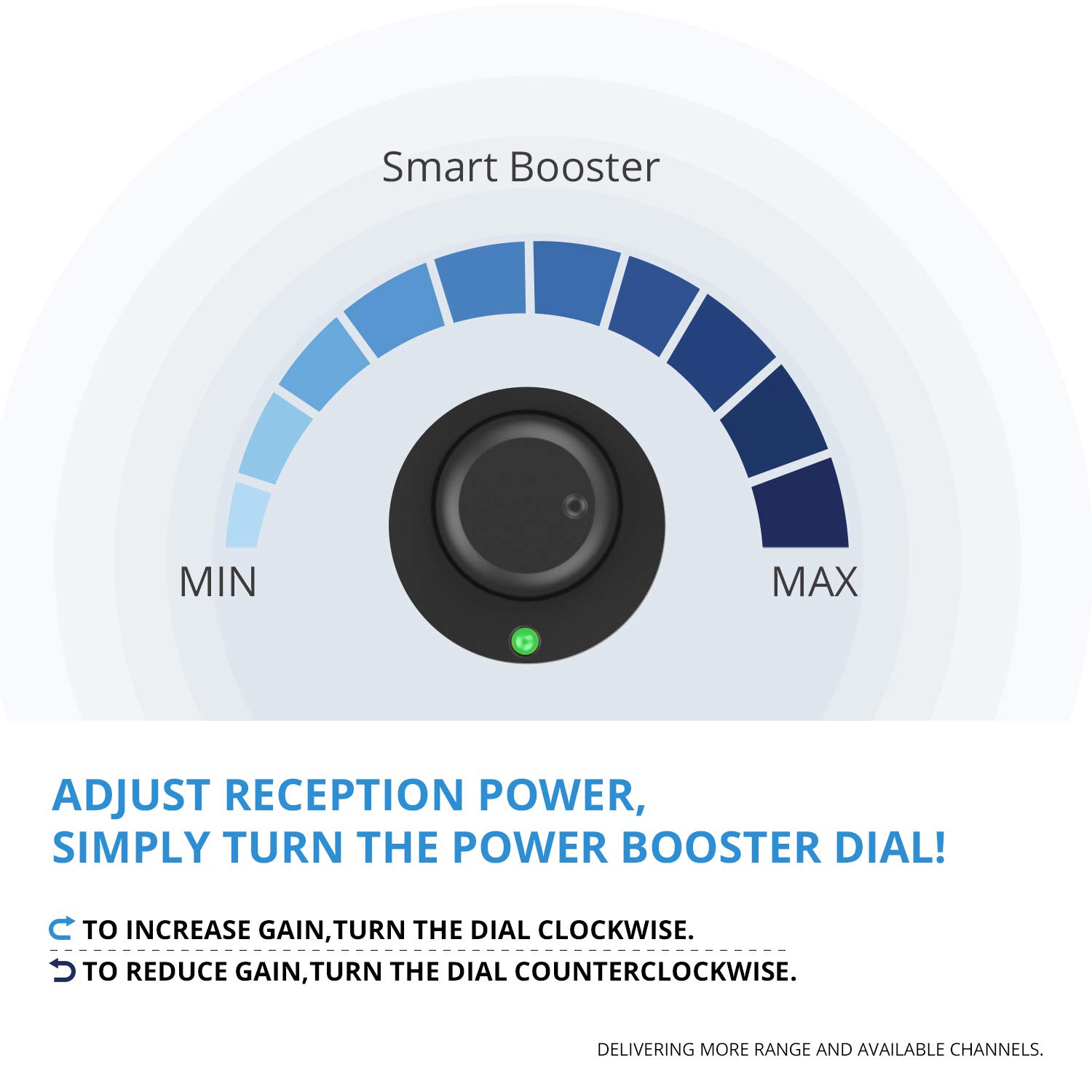
- Power Booster Dial: Ajusta el ampnivell de lificació.
- Indicador LED: Illuminates green when powered on.
- ANT. IN: Input for connecting your passive antenna.
- CC 12V: Power input jack.
- Sortida de TV: Output for connecting to your primary television.
- TV/FM/Device Output: Secondary output for connecting to another TV, FM stereo, or OTA-ready streaming device.

Instruccions de configuració
Follow these steps to set up your ANTOP HD Smart Boost Antenna Ampmés viu:
- Connectar l'antena: Connect your passive TV antenna to the "ANT. IN" port on the ampmés viu.
- Connectar-se al televisor: Use a coaxial cable to connect the "TV Output" port on the amplifier to the antenna input on your primary television.
- Connect Secondary Device (Optional): If desired, use a second coaxial cable to connect the "TV/FM/Device Output" port to another TV, FM stereo, or OTA-ready streaming device.
- Encès: Connecteu l'adaptador de corrent CC de 12 V proporcionat a amplifier's "DC 12V" jack and plug it into a power outlet. The LED indicator should illuminate green.
- Escaneig de canals: Perform a channel scan on your television. Refer to your TV's instruction manual for how to perform a channel scan.

Instruccions de funcionament
The ANTOP HD Smart Boost Antenna Amplifier features an adjustable power booster dial to optimize signal reception.
- Increase Gain: To increase the signal amplification (gain), turn the Power Booster Dial clockwise towards "MAX".
- Reduce Gain: To reduce the signal amplification, turn the Power Booster Dial counter-clockwise towards "MIN".
After each adjustment of the Smart Boost dial, it is recommended to re-scan the channels on your television to find all available channels and ensure optimal reception.
Característiques clau
- Smart Boost Technology: Allows adjustment of antenna reception power for VHF and UHF signals, delivering more range and available channels.
- Compatibilitat universal: Designed to work with any non-amplified/passive TV antenna.
- Sortides duals: Connects to a primary TV and a second device (FM stereo, second TV, or OTA-ready streaming device) simultaneously.
- Built-in 4G LTE Filter: Blocks 3G and 4G wireless signals to ensure noise-free digital TV reception, preventing interference from mobile phone signals.

Notes i consells importants
- Re-scan channels after each adjustment of the Smart Boost dial.
- Scan channels monthly to discover all available channels, including newly added or changed ones.
- Do not place or conceal your antenna or the amplifier inside or behind any metallic objects, as this can impede signal reception.
- Keep your antenna away from high-power consumption devices to avoid signal interference.
- Utilitzant un amplifier strengthens the signal of available channels but does not guarantee more TV channels.
- The number of channels and reception quality depend on factors such as distance from broadcast towers, local signal strength, building materials, antenna placement, and interference from other electronics.
- If the signal is already very strong, using this amplifier is not recommended. The amplifier may cause self-oscillations and result in fewer signals received. In such cases, try moving your antenna to a different location for a more stable signal.
- For optimal reception, experiment with moving and rotating the antenna to different locations.
- The Smart Boost Amplifier should not be used with an antenna that already has a built-in ampmés viu.

Resolució de problemes
If you experience issues with your ANTOP HD Smart Boost Antenna Amplifier, tingueu en compte el següent:
- Sense senyal/Recepció deficient:
- Ensure all connections are secure between the antenna, ampvidador i televisió.
- Verifiqueu el amplifier is powered on (green LED indicator).
- Adjust the Smart Boost dial and perform a channel scan after each adjustment.
- Reposition your antenna. Try different locations and orientations.
- Check for potential interference from other electronic devices or metallic objects.
- If your antenna is already amplified, remove the ANTOP ampmés viu.
- Fewer Channels After Installation:
- Ensure you performed a full channel scan after installation.
- If you live in an area with very strong signals, the amplifier might be over-amplifying. Try reducing the gain with the dial or removing the amplifier to see if reception improves.
- Sense energia:
- Check that the power adapter is securely plugged into both the amplifier and a working electrical outlet.
- Ensure the outlet is functional.
Especificacions
| Característica | Detall |
|---|---|
| Model | SBS-602B |
| Dimensions de l'article (L x A x A) | 2.76 x 2.76 x 0.79 polzades |
| Volum de subministrament màximtage | 12 volts (CC) |
| Potència de sortida | 98 Volts |
| Tipus de muntatge | Autònom |
| Nombre de canals | 1 (entrada) |
| UPC | 677222506094 |
Garantia i Suport
For warranty information or technical support, please refer to the documentation included with your product packaging or visit the official ANTOP weblloc. Conserveu el rebut de compra per a reclamacions de garantia.