
1. Introducció
Thank you for choosing the Beelink GK55 Mini PC. This compact and versatile computer is designed for various applications, including business, home entertainment, and specialized networking tasks. Equipped with an Intel Celeron J4125 processor, 8GB LPDDR4 RAM, and a 256GB SSD, it offers reliable performance in a small form factor. This manual provides essential information for setting up, operating, maintaining, and troubleshooting your device.
2. Producte acabatview
The Beelink GK55 Mini PC features a robust design with multiple connectivity options and efficient cooling. Its compact size allows for flexible placement, including VESA mounting behind a monitor.
2.1 Característiques clau
- Processador: Intel Celeron J4125 (up to 2.7GHz, 4C/4T)
- Sistema operatiu: Pre-installed Windows 11 Pro
- Memòria: 8GB LPDDR4 RAM
- Emmagatzematge: 256GB M.2 SATA SSD (expandable with 2.5-inch HDD)
- Gràfics: Intel UHD Graphics 600, supporting 4K UHD resolution at 60FPS
- Connectivitat: Dual Band 2.4G/5G WiFi, Bluetooth 4.0, Dual Gigabit Ethernet
- Sortida de vídeo: Dual HDMI ports for simultaneous dual monitor display
- Funcions especials: Auto Power On, Wake On LAN, PXE Boot, RTC Wake
- Refrigeració: All-copper heat sink with silent fan
2.2 Ports and Components
Familiarize yourself with the various ports and components of your Beelink GK55 Mini PC:

Figura 2.2.1: frontal i lateral view of the Beelink GK55 Mini PC. This image shows the compact design and accessible front ports.

Figura 2.2.2: posterior view of the Beelink GK55 Mini PC. This image highlights the power input, HDMI ports, and Gigabit Ethernet ports.
- Panell frontal: Power Button, 2x USB 3.0 ports, 1x Type-C port, Audio Jack
- Panell posterior: DC Power Input, 2x HDMI ports, 2x Gigabit Ethernet ports, 2x USB 2.0 ports

Figure 2.2.3: Summary of key features including processor, display support, cooling, storage, and display outputs.
3. Configuració
Follow these steps to set up your Beelink GK55 Mini PC for the first time.
3.1 Contingut del paquet
Abans de continuar, assegureu-vos que tots els elements estiguin presents al paquet:
- Mini PC Beelink GK55
- Adaptador d'alimentació
- 2x cables HDMI
- VESA Mount with screws
- Manual d'usuari (aquest document)
3.2 Connexió de perifèrics
- Connecta la pantalla: Use one of the provided HDMI cables to connect your monitor(s) to the HDMI port(s) on the rear of the Mini PC. The GK55 supports dual displays.
- Connecteu el teclat i el ratolí: Plug your USB keyboard and mouse into the available USB ports (USB 3.0 on the front, USB 2.0 on the rear).
- Connecta la xarxa (opcional): For a wired connection, connect an Ethernet cable from your router or modem to one of the Gigabit Ethernet ports on the rear. For wireless, refer to Section 4.2.
- Connectar l'alimentació: Plug the power adapter into the DC Power Input port on the rear of the Mini PC, then plug the adapter into a power outlet.
3.3 Instal·lació del suport VESA (opcional)
The included VESA mount allows you to attach the Mini PC to the back of a compatible monitor or to a wall, saving desk space.
- Attach the VESA bracket to the back of your monitor using the provided screws. Ensure the monitor has standard VESA mounting holes.
- Slide the Beelink GK55 Mini PC onto the mounted bracket until it clicks securely into place.

Figure 3.3.1: Beelink Mini PC set up on a desk, demonstrating its compact footprint.
4. Instruccions de funcionament
4.1 Encès/Apagat
- Encès: Premeu el botó d'engegada situat al panell frontal. L'indicador lluminós d'engegada s'il·luminarà.
- Apagar: From Windows, click the Start button, then Power > Shut down. Alternatively, you can press and hold the power button for 5-7 seconds to force a shutdown (not recommended for regular use).
4.2 Connectivitat de xarxa
- Connexió per cable: If an Ethernet cable is connected (as per Section 3.2), the system should automatically detect and connect to the network.
- Connexió sense fil: In Windows, click the Wi-Fi icon in the taskbar, select your desired network, enter the password, and click Connect. The GK55 supports both 2.4GHz and 5GHz Wi-Fi bands.
4.3 Configuració de pantalla dual
The Beelink GK55 supports connecting two monitors simultaneously via its dual HDMI ports, enhancing productivity.
- Connect both monitors to the HDMI ports on the Mini PC.
- Once Windows loads, right-click on the desktop and select "Display settings."
- Under "Multiple displays," you can choose to extend or duplicate your desktop across the two screens. Adjust resolution and orientation as needed.

Figure 4.3.1: The Beelink GK55 Mini PC configured for a dual monitor setup.

Figure 4.3.2: Visual representation of the dual screen display capability.
4.4 Funcions avançades
- Soft Router Functionality: The dual Gigabit Ethernet interfaces allow the GK55 to be configured as a soft router. This requires specific software installation and network configuration, typically performed by advanced users.
- Auto Power On, Wake On LAN, PXE Boot, RTC Wake: These features can be enabled and configured within the BIOS settings. To access BIOS, press the DEL or F7 key repeatedly during startup.
5. Manteniment
Un manteniment adequat garanteix la longevitat i el rendiment òptim del vostre Mini PC.
5.1 Neteja
- Regularly wipe the exterior of the Mini PC with a soft, dry cloth.
- Ensure ventilation openings are free from dust and obstructions to maintain proper airflow. Do not use liquid cleaners directly on the device.
5.2 Expansió d'emmagatzematge
The Beelink GK55 supports storage expansion to meet your needs.
- M.2 SATA SSD: The device comes with an M.2 SATA 2280 SSD. This can be upgraded up to 1TB.
- 2.5-inch HDD/SSD: An additional 2.5-inch SATA HDD or SSD (up to 2TB) can be installed for expanded storage. Refer to the internal layout for the mounting bracket and SATA connector.

Figura 5.2.1: Intern view showing the M.2 SATA SSD slot and space for a 2.5-inch HDD.
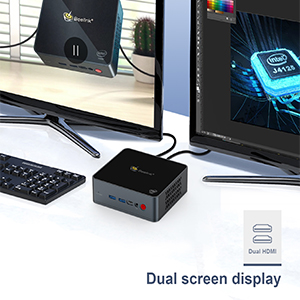
Figure 5.2.2: Diagram illustrating the M.2 SATA SSD and 2.5-inch HDD expansion capabilities.
5.3 Sistema de refrigeració
The GK55 features an all-copper heat sink and a silent fan for efficient heat dissipation. Ensure the device is placed in a well-ventilated area to prevent overheating.

Figura 5.3.1: Intern view of the Beelink GK55 Mini PC's cooling system, featuring a copper heat sink and fan.
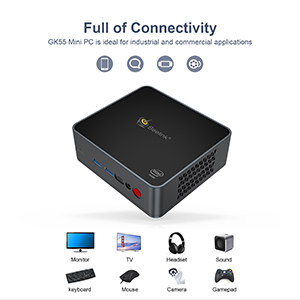
Figure 5.3.2: Diagram showing the heat dissipation path within the Mini PC.
6. Solució De Problemes
This section addresses common issues you might encounter with your Beelink GK55 Mini PC.
6.1 Sense poder
- Assegureu-vos que l'adaptador de corrent estigui connectat correctament tant al Mini PC com a una presa de corrent que funcioni.
- Verifiqueu que la presa de corrent funciona connectant-hi un altre dispositiu.
- Comproveu si l'indicador lluminós de l'adaptador de corrent (si n'hi ha) està encès.
6.2 Sense pantalla
- Confirm that the HDMI cable(s) are securely connected to both the Mini PC and the monitor(s).
- Ensure your monitor is powered on and set to the correct input source (e.g., HDMI1, HDMI2).
- Try connecting to a different monitor or using a different HDMI cable to rule out faulty components.
6.3 Problemes de connectivitat de xarxa
- Amb cable: Check the Ethernet cable connection. Ensure your router/modem is working correctly.
- Sense fil: Verify that Wi-Fi is enabled in Windows settings. Ensure you are connecting to the correct network and entering the password accurately. Restart your router/modem if necessary.
6.4 System Instability or Crashing
- Ensure the Mini PC is placed in a well-ventilated area to prevent overheating. Avoid blocking the air vents.
- Tanqueu les aplicacions innecessàries per alliberar recursos del sistema.
- Ensure Windows and all drivers are up to date.
- If issues persist, consider performing a system restore or reinstalling Windows (back up your data first).
7. Especificacions
Detailed technical specifications for the Beelink GK55 Mini PC.
| Característica | Especificació |
|---|---|
| Marca | Beelink |
| Nom del model | GK55 |
| Sistema operatiu | Windows 11 Pro |
| Model de CPU | Intel Celeron J4125 |
| Velocitat de la CPU | 2.2 GHz (up to 2.7 GHz burst) |
| Recompte de processadors | 4 |
| Coprocessador gràfic | Intel UHD Graphics 600 |
| Mida instal·lada de la memòria RAM | 8 GB DDR4 |
| Velocitat de rellotge de memòria | 2133 MHz |
| Capacitat d'emmagatzematge de memòria | 256 GB SSD (M.2 SATA 2280) |
| Descripció del disc dur | SSD (expandable with 2.5-inch HDD/SSD) |
| Ports USB totals | 4 (2 USB 3.0, 2 USB 2.0) |
| Total Number of HDMI Ports | 2 |
| Altres ports | 1x Type-C, 2x Gigabit Ethernet, Audio Jack |
| Connectivitat sense fil | 2.4G/5G WiFi, Bluetooth 4.0 |
| Resolució de pantalla màxima | 3840 x 2160 píxels (4K) |
| Consum d'energia | 24 watts |
| Dimensions de l'article | 4.88 x 4.45 x 1.61 polzades |
| Mètode de refrigeració | Ventilador |
8. Garantia i Suport
Beelink is committed to providing excellent customer service and support for your GK55 Mini PC.
8.1 Informació de la garantia
Your Beelink GK55 Mini PC comes with a 1 any de garantia gratuïta des de la data de compra. Aquesta garantia cobreix defectes de fabricació i avaries de maquinari en condicions d'ús normal. Conserveu el comprovant de compra per a reclamacions de garantia.
8.2 Suport tècnic
Beelink offers Suport tècnic de per vida i 24/7 After-Sales Service. If you encounter any issues or have questions regarding your Mini PC, please do not hesitate to contact our support team. Contact information can typically be found on the official Beelink weblloc web o a través de la vostra plataforma de compra.