
1. Introducció
Thank you for choosing the Dasaita 10.2" Android 10.0 Car Stereo. This manual provides essential information for the proper installation, operation, and maintenance of your new car multimedia system. Please read this manual thoroughly before use to ensure optimal performance and to prevent damage.
2. Compatibilitat
This Dasaita 1 DIN car stereo is designed for specific Peugeot models and years:
- Peugeot 208: 2012, 2013, 2014, 2015, 2016
- Peugeot 2008: 2012, 2013, 2014, 2015, 2016
The unit is compatible with several original vehicle features, including:
- Original reverse camera
- Original ampmés viu
- Original parking sensors
- Original USB ports
- Comandaments al volant
3. Característiques clau
The Dasaita car stereo offers a range of advanced features for an enhanced in-car experience:
- Sistema operatiu: Android 10.0
- Processador: Rockchip PX6 64-bit (Quad-Core 1.4G + Dual-Core 1.8G)
- Memòria: 4 GB de RAM + 64 GB de ROM
- Visualització: 10.2-inch IPS Touch Screen (1280*720 pixels, 2.5D curved glass)
- Connectivitat: Built-in Wi-Fi, Bluetooth 5.0
- Navegació: GPS with support for offline and online maps (Asia, Europe, Roads)
- Integració del telèfon intel·ligent: Built-in Wireless/Wired Apple CarPlay, Wired Android Auto, Mirror Link
- Àudio: 15-band DSP (Digital Sound Processor), AM/FM Radio, Stereo audio output
- Funcions addicionals: Split screen, Google Play Store access, YouTube, 4G internet support (via external dongle, not included)
Imatge: Més deview of the Dasaita car stereo's main features and display capabilities.
4. Configuració i instal·lació
Installation of the Dasaita car stereo requires technical knowledge and should ideally be performed by a qualified professional. Incorrect installation can lead to damage to the unit or your vehicle's electrical system.
4.1 Contingut del paquet
Verifiqueu que tots els components siguin presents al paquet:
- Dasaita 10.2" Android Car Stereo Unit
- Micròfon extern
- Arnesos de cablejat (específics per a vehicles)
- Antena GPS
- Cables USB
- Installation Brackets/Tools (may vary)
Nota important: Some users have reported missing specific wiring harnesses (e.g., CB006) for certain vehicle models. If you find any parts missing or encounter difficulties with vehicle-specific wiring, please contact Dasaita customer support directly for assistance and correct cabling.
4.2 Passos generals d'instal·lació
- Desconnecta la bateria: Abans d'arrencar, desconnecteu el terminal negatiu de la bateria del vehicle per evitar curtcircuits.
- Eliminar la ràdio original: Carefully remove the existing car radio and trim panels. Refer to your vehicle's service manual for specific instructions.
- Connecteu el cablejat: Connect the provided wiring harnesses to the car stereo and the vehicle's wiring. Ensure all connections are secure.
- Connecteu els perifèrics: Connect the GPS antenna, external microphone, and any other accessories (e.g., reverse camera, USB devices).
- Funcionalitat de prova: Before fully reassembling the dashboard, reconnect the battery and power on the unit to test basic functions (power, audio, touchscreen, steering wheel controls).
- Unitat segura: Mount the Dasaita stereo securely into the dashboard using the provided brackets.
- Remunta el tauler de control: Carefully reattach all trim panels.

Image: Dasaita car stereo installed in a Peugeot 208/2008 dashboard, showing the integrated appearance.
5. Instruccions de funcionament
5.1 Encès/Apagat
The unit powers on automatically when the vehicle's ignition is turned to the ACC or ON position. There is no dedicated physical power button on the unit itself; it relies on the vehicle's ignition system for power control.
5.2 Funcionament de la pantalla tàctil
The 10.2-inch IPS display is a capacitive touchscreen. Use light touches and swipes to navigate menus, select applications, and control functions. The 2.5D curved glass provides a smooth tactile experience.
5.3 Navegació
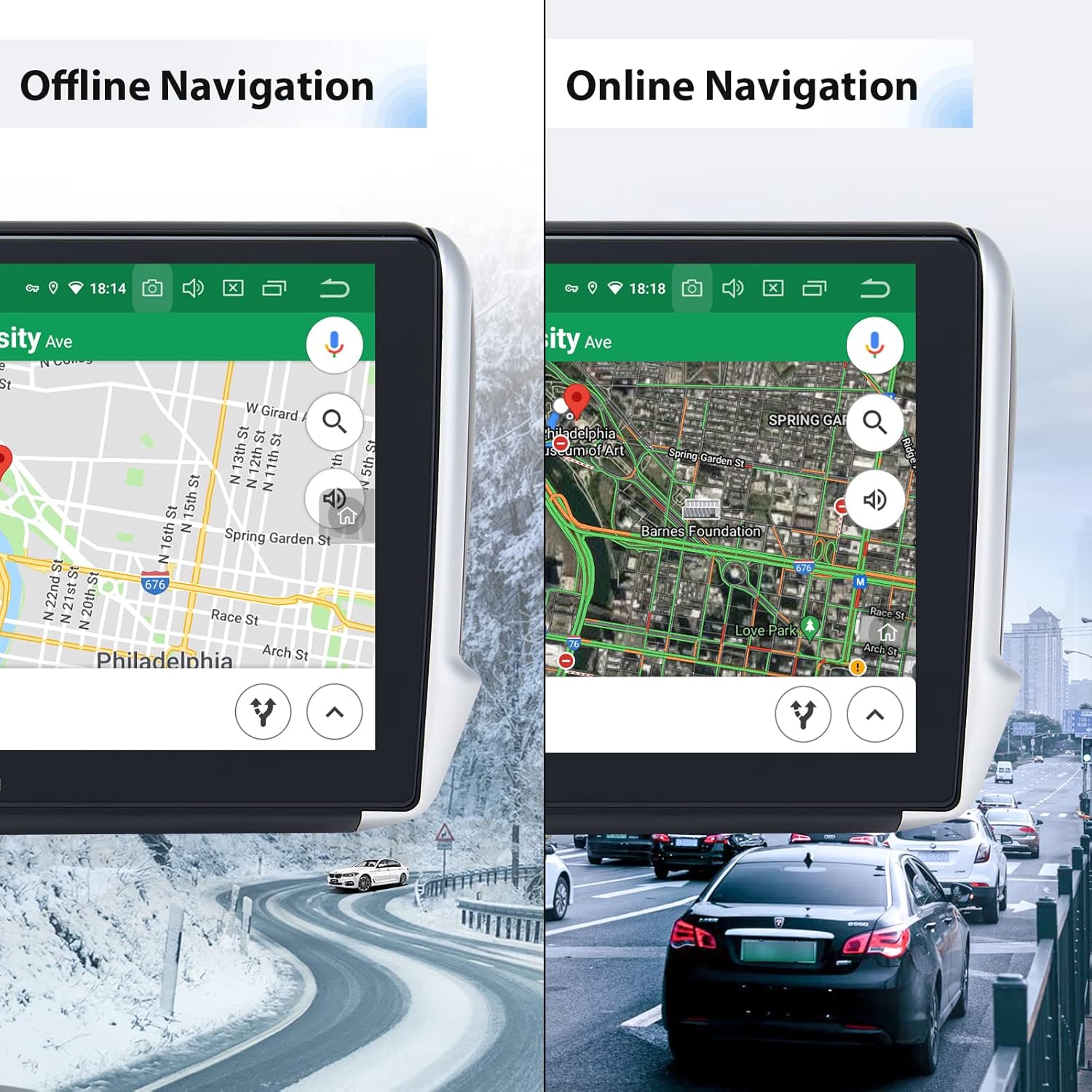
The unit supports both offline and online GPS navigation. Pre-installed maps for Asia and Europe are available. For online navigation, ensure the unit is connected to Wi-Fi or a 4G network (via an optional dongle).

Image: Dasaita car stereo displaying both offline and online navigation modes.
5.4 Bluetooth 5.0
Pair your smartphone via Bluetooth for hands-free calling, music streaming, and shared network access.
- Maridatge: Go to Bluetooth settings on the stereo and your phone, search for available devices, and select the Dasaita unit. Enter the PIN (usually 0000) if prompted.
- Trucades mans lliures: Make and receive calls directly from the stereo interface. The external microphone ensures clear communication.
- Transmissió de música: Reprodueix àudio del telèfon a través dels altaveus del cotxe.

Image: Bluetooth interface for calls, network sharing, and music on the Dasaita car stereo.
5.5 Apple CarPlay i Android Auto
Connect your smartphone to access CarPlay (wireless/wired) or Android Auto (wired) for a seamless integration of phone features like navigation, music, and messaging.

Image: Apple CarPlay interface on the Dasaita car stereo.

Image: Android Auto interface on the Dasaita car stereo.
5.6 Wi-Fi and Google Play Store
Connect to a Wi-Fi hotspot (e.g., from your phone) to access the internet. Once connected, you can download and install various applications from the Google Play Store, similar to a tablet device.

Image: Google Play Store and other applications accessible on the Dasaita car stereo.
5.7 Radio (AM/FM)
Access the built-in AM/FM tuner to listen to radio stations. Use the touchscreen to scan for stations, save presets, and adjust settings.
5.8 DSP (processador de so digital)
Utilize the 15-band DSP to fine-tune your audio experience. Adjust equalizer settings, balance, fader, and subwoofer output to match your preferences and vehicle acoustics.
5.9 Comandaments al volant
The unit supports your vehicle's original steering wheel controls. These can be configured in the system settings to control volume, track skipping, mode switching, and other functions.
5.10 Pantalla dividida
The split-screen function allows you to run two applications simultaneously on the display, such as navigation on one side and music on the other.
6. Manteniment
6.1 Neteja de la pantalla
To clean the touchscreen, power off the unit and gently wipe the screen with a soft, lint-free cloth. For stubborn smudges, use a screen cleaner specifically designed for electronic displays. Avoid harsh chemicals or abrasive materials.
6.2 Actualitzacions de programari
Dasaita may release software updates to improve performance, add features, or fix bugs. Check the official Dasaita website or contact customer support for information on available updates and installation instructions. Regular updates can enhance the unit's stability and functionality.
7. Solució De Problemes
If you encounter issues with your Dasaita car stereo, refer to the following common problems and solutions:
- La unitat no s'encén:
Ensure all power cables are correctly connected. Check the vehicle's fuse box for any blown fuses. Verify the ignition is in the ACC or ON position. - Sense so o àudio distorsionat:
Check speaker connections. Verify volume levels and DSP settings. Ensure the original amplifier (if applicable) is correctly integrated. - Problemes de connectivitat Bluetooth:
Ensure Bluetooth is enabled on both the stereo and your phone. Delete previous pairings and try re-pairing. Restart both devices. - Mala qualitat del micròfon durant les trucades:
Ensure the external microphone is properly connected and positioned away from air vents or other noise sources. - Screen difficult to see in sunlight:
Adjust screen brightness in the display settings. While the IPS screen offers good viewing angles, direct strong sunlight can still affect visibility. - Wi-Fi connection unstable or not connecting:
Ensure the Wi-Fi hotspot is active and within range. Try forgetting the network and reconnecting. Restart the stereo and the hotspot device. - La recepció de la ràdio és deficient:
Check the antenna connection. Ensure the antenna is properly installed and not obstructed. - Apps not opening or freezing:
Close background applications. Clear app cache or data in Android settings. If the issue persists, a factory reset may be necessary (Note: this will erase all user data and settings). - CarPlay/Android Auto not functioning:
Ensure your phone's operating system is up to date. Use a high-quality USB cable for wired connections. Check app permissions on your phone.
If these steps do not resolve the issue, please contact Dasaita customer support for further assistance.
8. Especificacions
| Característica | Especificació |
|---|---|
| Nom del model | HA5404-MAX10-CP-HD |
| Sistema operatiu | Android 10.0 |
| CPU | Rockchip PX6 64-bit (Quad-Core 1.4G + Dual-Core 1.8G) |
| RAM | 4 GB |
| ROM | 64 GB |
| Mida de la pantalla | 10.2 polzades |
| Tipus de pantalla | IPS LCD, Capacitive Touchscreen, 2.5D Curved |
| Resolució de pantalla | 1280 x 720 píxels |
| Versió Bluetooth | 5.0 |
| Wi-Fi | Integrat |
| GPS | Satellite Navigation Supported |
| Mode de sortida d'àudio | estèreo |
| DSP | EQ de 15 bandes |
| Protocol de connectivitat | Wi-Fi |
| Dispositius compatibles | Smartphone |
| Mètode de control | Aplicació, Toc |
| Components inclosos | Micròfon extern |
Image: Dasaita car stereo dimensions and rear connections.
9. Garantia i Suport
Dasaita products are covered by a standard manufacturer's warranty. Please refer to the warranty card included with your product or visit the official Dasaita weblloc web per obtenir informació detallada sobre els termes i condicions de la garantia.
9.1 Atenció al client
For technical assistance, troubleshooting, or warranty claims, please contact Dasaita customer support. Many users have reported positive experiences with Dasaita's support team, particularly through direct messaging channels on platforms like Amazon. When contacting support, please provide your product model number (HA5404-MAX10-CP-HD) and a detailed description of the issue.