
Introducció
The Wyze Bluetooth 5.0 Headphones are designed to provide a personal and private audio experience with advanced features such as Hybrid Active Noise Cancellation, high-fidelity sound, and Transparency Mode. This manual provides essential information for setting up, operating, and maintaining your headphones.
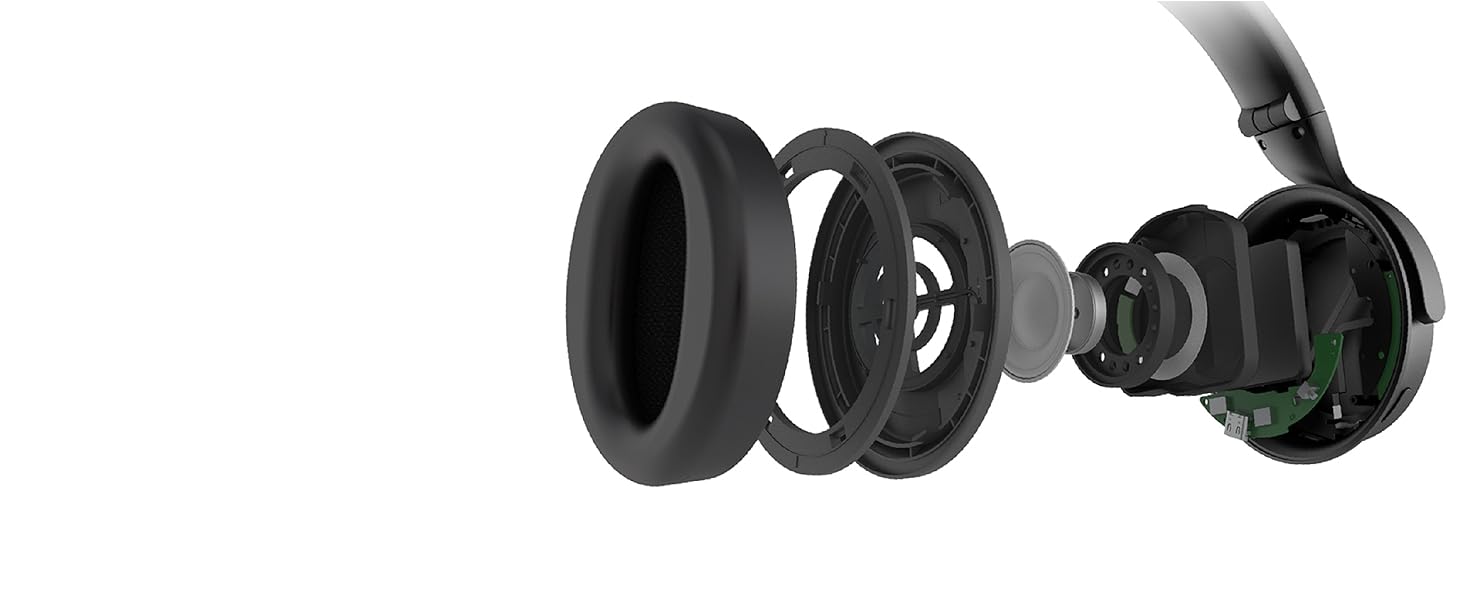
Figure 1: Wyze Bluetooth 5.0 Headphones, showcasing el seu disseny elegant.
Configuració
Què hi ha a la caixa
- Wyze Bluetooth 5.0 Headphones
- Cable de càrrega (USB-C)
- Cable d'àudio (3.5 mm)
Carregant els teus auriculars
Before initial use, fully charge your headphones. A full charge provides up to 20 hours of playback time. A 10-minute quick charge provides 4 hours of battery life.
- Locate the USB-C charging port on the left earcup.
- Connect the provided USB-C charging cable to the headphones and a compatible power source.
- L'indicador LED mostrarà l'estat de càrrega.

Figura 2: lateral view of the headphones, highlighting the USB-C charging port and control buttons.
Emparellament Bluetooth
Your Wyze Headphones support Bluetooth 5.0 and can connect to two devices simultaneously.
- With the headphones powered off, press and hold the power/Bluetooth pairing button (round button on the right earcup) until the LED indicator flashes, indicating pairing mode.
- Al dispositiu (telèfon intel·ligent, tauleta, ordinador), activeu el Bluetooth i cerqueu els dispositius disponibles.
- Select "Wyze Headphones" from the list to connect.
- For dual device connection, connect to the first device, then put the headphones back into pairing mode and connect to the second device. The headphones will remember both connections.
Funcionament dels auriculars
Controls acabatsview
The headphones feature intuitive controls for media playback, calls, and noise control modes.
- Power/Bluetooth Button (Round button on right earcup): Press and hold to power on/off or enter pairing mode.
- Volume Up/Down Buttons (on right earcup): Ajusta el volum de l'àudio.
- Play/Pause/Skip (Middle button on right earcup): Single press to play/pause, double-press to skip forward, triple-press to skip backward.
- Active Noise Cancellation (ANC) Button (Large button on left earcup): Toggle between ANC, Transparency Mode, and normal mode.
- Touch Control (Right earcup surface): Place your right hand over the right earcup to activate Quick Conversation mode (temporarily lowers music and allows ambient sound). Double-tap for voice assistant.
Active Noise Cancellation & Transparency Mode
The Wyze Headphones offer Hybrid Active Noise Cancellation (ANC) to reduce external noise by up to 40dB, and a Transparency Mode to allow ambient sounds through.
- Press the ANC button on the left earcup to cycle through modes: ANC On, Transparency Mode, and Normal (ANC Off).
- ANC activat: Redueix el soroll circumdant per a una experiència d'àudio immersiva.
- Mode de transparència: Allows you to hear your surroundings while still enjoying your audio, useful for conversations or being aware of your environment.
Video 1: Demonstration of Active Noise Cancellation and Transparency Mode features.
Voice Assistant (Alexa Built-in)
With Alexa built-in, you can access information, set reminders, play music, and more using your voice. The headphones are compatible with Android and iPhone native voice assistants.
- Double-tap the right earcup surface to activate your preferred voice assistant (Alexa or your phone's native assistant).
- Use voice commands to control your device without needing to take out your phone.

Figure 3: Alexa built-in feature, allowing voice commands for various tasks.
Voice-Isolating Microphones
Dedicated microphones isolate your voice during calls, ensuring clarity even in noisy environments.

Figure 4: Voice-isolating microphones ensure clear communication during calls.
Auto-Pause Feature
The headphones automatically pause your content when removed from your head and resume when placed back on.
Manteniment
To ensure the longevity and optimal performance of your Wyze Headphones, follow these maintenance guidelines:
- Neteja: Feu servir un drap suau i sec per netejar els auriculars i la diadema. Eviteu utilitzar productes químics agressius o materials abrasius.
- Emmagatzematge: When not in use, store the headphones in the provided carrying pouch to protect them from dust and scratches. The headphones are foldable for compact storage.
- Resistència a l'aigua: The headphones are water-resistant. Avoid submerging them in water or exposing them to heavy rain.

Figure 5: Headphones folded for easy storage in the included pouch.
Resolució de problemes
If you encounter any issues with your Wyze Headphones, try the following steps:
- Sense energia: Assegureu-vos que els auriculars estiguin completament carregats. Connecteu-los a una font d'alimentació amb el cable USB-C.
- No es pot emparellar: Make sure the headphones are in pairing mode (flashing LED). Ensure Bluetooth is enabled on your device and it is within range (10 meters). Try restarting both the headphones and your device.
- Sense so: Check the volume levels on both the headphones and your connected device. Ensure the headphones are correctly paired. If using the audio cable, ensure it is securely connected.
- Qualitat de so baixa: Try adjusting the EQ settings via the Wyze app. Ensure there are no obstructions between the headphones and your device.
- ANC no funciona: Ensure ANC mode is activated using the dedicated button on the left earcup.
Especificacions
| Característica | Especificació |
|---|---|
| Número de model | WNCH1 |
| Tecnologia de connectivitat | Bluetooth 5.0 |
| Control de soroll | Hybrid Active Noise Cancellation (40dB) |
| Durada de la bateria | 20 Hours (with ANC) |
| Temps de càrrega | 2 Hours (10-min quick charge for 4 hours playback) |
| Conector d'auriculars | 3.5 mm Jack |
| Tipus de control | Button, Voice, Touch |
| Micròfon | Voice-Isolating Microphones |
| Pes | 9.9 unces |
| Dimensions | 6.3 x 7.5 x 3.54 polzades |
| Nivell de resistència a l'aigua | Resistent a l'aigua |
Garantia i Suport
For detailed warranty information and customer support, please refer to the official product documentation included with your Wyze Headphones or visit the official WYZE website. This manual provides general operational guidelines and does not replace specific warranty terms or advanced troubleshooting resources.