
DOOGEE S40 Pro
Manual d'usuari del telèfon resistent DOOGEE S40 Pro
Model: S40 Pro
Introducció
The DOOGEE S40 Pro is a rugged smartphone designed for durability and performance in challenging environments. It features a 5.45-inch display, Android 10, a 4650mAh battery, and dual rear cameras. This manual provides essential information for setting up, operating, maintaining, and troubleshooting your device.

Imatge: Anvers i revers view of the DOOGEE S40 Pro rugged phone, showcasing its robust design and camera module.
1. Configuració
1.1 Desembalatge i contingut del paquet
Carefully unbox your DOOGEE S40 Pro. Verify that all standard accessories are included in the package.

Image: Contents of the DOOGEE S40 Pro package, including the phone, power adapter, USB cable, user manual, and warranty information.
- DOOGEE S40 Pro Smartphone
- Adaptador d'alimentació
- Cable USB
- Manual d'usuari
- Targeta de garantia
1.2 Instal·lació de la targeta SIM i la targeta SD
The DOOGEE S40 Pro supports dual SIM cards and an expandable SD card for additional storage. Locate the SIM tray on the side of the device.
- Use the provided SIM ejector tool to open the SIM card tray.
- Carefully place your Nano-SIM cards and/or microSD card into the designated slots on the tray. Ensure the gold contacts are facing down.
- Empenyeu suaument la safata cap a dins del telèfon fins que quedi alineada amb la carcassa del dispositiu.
1.3 Càrrega inicial
Abans del primer ús, es recomana carregar completament el dispositiu.
- Connecteu el cable USB a l'adaptador de corrent.
- Plug the USB cable into the charging port of the phone.
- Connecteu l'adaptador de corrent a una presa de corrent.
- L'indicador de càrrega apareixerà a la pantalla. Deixeu que el telèfon es carregui fins que la icona de la bateria mostri que està plena.
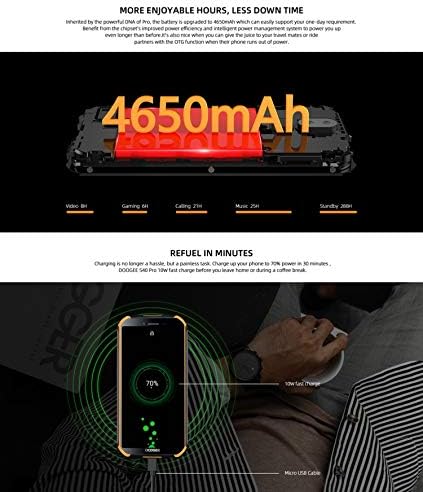
Image: The DOOGEE S40 Pro connected to a charger, showing the charging animation and battery percentage.
1.4 Encès/Apagat
- Per encendre: Press and hold the Power button (located on the right side) until the DOOGEE logo appears.
- Per apagar: Premeu i manteniu premut el botó d'engegada fins que aparegui el menú d'opcions d'engegada. Seleccioneu "Apagar" i confirmeu.
- Per reiniciar: Al menú d'opcions d'energia, seleccioneu "Reiniciar" i confirmeu.
2. Instruccions de funcionament
2.1 Navegació bàsica
The DOOGEE S40 Pro operates on Android 10.0 and uses a touchscreen for navigation.
- Toca: Toqueu la pantalla una vegada per seleccionar un element o obrir una aplicació.
- Llisca: Arrossegueu el dit per la pantalla per desplaçar-vos per pàgines o llistes.
- Pessiga per fer zoom: Col·loca dos dits a la pantalla i separa'ls o ajunta'ls per ampliar o reduir la imatge.
- Premsa llarga: Press and hold an item to access additional options or move icons.
2.2 Trucades i missatges
- Fer trucades: Obriu l'aplicació Telèfon, introduïu el número i toqueu la icona de trucada.
- Recepció de trucades: Swipe up to answer or down to decline an incoming call.
- Enviament de missatges: Obre l'aplicació Missatges, toca la icona de missatge nou, introdueix el destinatari i el missatge i, a continuació, toca Envia.
2.3 Ús de la càmera
The S40 Pro features dual rear cameras (13MP Sony primary sensor + 2MP portrait camera) and a front camera for selfies.

Image: Diagram highlighting the AI Rear Dual Camera setup on the DOOGEE S40 Pro, showing the 13MP Sony sensor and 2MP portrait camera, along with examples fotos.
- Obre l'aplicació Càmera des de la pantalla d'inici o des del calaix d'aplicacions.
- Canvieu entre la càmera frontal i la posterior mitjançant la icona de canvi de càmera.
- Toqueu el botó de l'obturador per fer una foto.
- Explore different modes like Portrait, Video, and Panorama.
2.4 Desbloqueig d'empremta digital
The device includes a rear-mounted fingerprint sensor for quick and secure unlocking.

Image: Illustration of the fingerprint unlock feature on the DOOGEE S40 Pro, showing a finger interacting with the rear-mounted sensor.
- Vés a Configuració > Seguretat i ubicació > empremta digital.
- Seguiu les instruccions a la pantalla per registrar la vostra empremta digital.
- Once registered, simply place your finger on the sensor to unlock the phone.
2.5 NFC i Google Pay
The DOOGEE S40 Pro supports NFC (Near Field Communication) for convenient data transmission and mobile payments like Google Pay.

Image: Visual representation of NFC functionality for Google Pay and data transmission, and the 3.5mm headphone jack on the DOOGEE S40 Pro.
- To enable NFC: Vés a Configuració > Dispositius connectats > NFC and toggle it on.
- Google Pay: Ensure Google Pay is set up with your payment methods. Tap your phone to compatible terminals for contactless payments.
2.6 Connectivitat
- Wi-Fi: Connecteu-vos a xarxes sense fil mitjançant Configuració > Xarxa i Internet > Wi-Fi.
- Bluetooth: Emparella amb dispositius Bluetooth mitjançant Configuració > Dispositius connectats > Bluetooth.
- USB: Connect to a computer using the provided USB cable for file transferència o càrrega.
- Presa d'auriculars de 3.5 mm: Plug in wired headphones for audio.
3. Manteniment
3.1 Rugged Features and Durability
The DOOGEE S40 Pro is built to withstand harsh conditions, featuring IP68 water and dust resistance and MIL-STD-810G certification for drops and extreme temperatures.

Image: The DOOGEE S40 Pro submerged in water, dropped onto concrete, and surviving a fall, illustrating its IP68 and MIL-STD-810G durability.
- Resistència a l'aigua (IP68): Can withstand submersion up to 1.5 meters for 30 minutes. Ensure all port covers are securely closed before exposure to water.
- Dust Resistance (IP68): Totalment protegit contra l'entrada de pols.
- Drop Resistance (MIL-STD-810G): Designed to survive drops from up to 1.2 meters onto hard surfaces.
- Resistència a la temperatura: Operates in extreme temperatures from -55°C to 70°C.

Image: The DOOGEE S40 Pro shown in extreme cold (-55°C) and hot (70°C) environments, highlighting its robust temperature tolerance.
3.2 Neteja del vostre dispositiu
To clean your DOOGEE S40 Pro:
- Netegeu la pantalla i el cos amb un drap suau i sense borrissol.
- Per a la brutícia tossuda, dampEsbandiu lleugerament el drap amb aigua. Eviteu productes químics agressius o materials abrasius.
- If the device has been exposed to saltwater, rinse it thoroughly with fresh water and dry it completely before charging.
3.3 Actualitzacions de programari
Comproveu regularment si hi ha actualitzacions de programari per garantir un rendiment i una seguretat òptims.
- Vés a Configuració > Sistema > Actualització del sistema.
- Follow the on-screen prompts to download and install any available updates. Ensure your device has sufficient battery and a stable internet connection during updates.
4. Solució De Problemes
| Problema | Possible solució |
|---|---|
| El dispositiu no s'encén. | Ensure the battery is charged. Connect to a charger and wait a few minutes before attempting to power on again. If unresponsive, try a forced restart by holding the Power button for 10-15 seconds. |
| La bateria s'esgota ràpidament. | Check for background apps consuming power. Reduce screen brightness. Disable Wi-Fi, Bluetooth, or GPS when not in use. Perform a software update. |
| No es pot connectar a la Wi-Fi. | Ensure Wi-Fi is enabled. Restart your router and the phone. Forget the network and reconnect. |
| El telèfon és lent o no respon. | Close unnecessary background apps. Clear cache. Restart the device. If issues persist, consider a factory reset (back up data first). |
| La càmera no funciona. | Restart the phone. Clear the Camera app's cache and data in Settings > Apps. Ensure no other app is using the camera. |
5. Especificacions
Key technical specifications for the DOOGEE S40 Pro:
- Nom del model: S40 Pro
- Sistema operatiu: Android 10.0
- Visualització: 5.45 inches, LCD, 1440 x 720 resolution
- RAM: 4 GB
- Emmagatzematge intern: 64 GB (ampliable amb microSD)
- Bateria: 4650 mAh
- Càmera posterior: Dual Back Cameras (13MP Sony primary + 2MP portrait)
- Càmera frontal: Sí
- Processador: Octa Core (CPU speed: 1.8 GHz, CPU model: Snapdragon)
- Connectivitat: 4G Cellular, Wi-Fi, Bluetooth, USB, GPS, NFC
- Característiques especials: Touchscreen, Fingerprint Sensor, 3.5mm Headphone Jack
- Durabilitat: IP68 Water & Dust Resistant, MIL-STD-810G Drop Resistant
- Color: Negre
- Què hi ha a la caixa: Adaptador, cable USB
6. Garantia i Suport
For warranty information and customer support, please refer to the warranty card included in your product package or visit the official DOOGEE weblloc web. Conserveu el comprovant de compra per a reclamacions de garantia.
- Oficial Weblloc: www.doogee.cc (Nota: Això és un marcador de posició) URL, refer to your product's specific documentation for the correct support weblloc.)
- Atenció al client: Contact details may be found on the official weblloc web o la targeta de garantia.
Ask a question about this manual
Ask about setup, troubleshooting, compatibility, parts, safety, or missing instructions. Manuals+ will review the question and use this page’s manual context to help answer it.