
1. Introducció
Thank you for choosing the iClever GK08 Wireless Keyboard and Mouse Combo. This full-size keyboard with a numeric keypad and a silent mouse offers a stable 2.4 GHz connection, USB-C recharging, and dual-layout compatibility for Mac and Windows systems. This manual provides detailed instructions to help you set up, operate, and maintain your new device.
2. Informació de seguretat
- Mantingueu el dispositiu allunyat de l'aigua, el foc i les altes temperatures.
- No intenteu desmuntar o modificar el dispositiu.
- Feu servir només el cable USB-C proporcionat per carregar.
- Eviteu deixar caure o sotmetre el dispositiu a forts impactes.
- Elimineu les piles i els components electrònics de manera responsable d'acord amb la normativa local.
3. Guia de configuració
3.1 Contingut del paquet
- Teclat sense fil iClever GK08
- Ratolí sense fil iClever
- USB-A Nano Receiver (stored inside the mouse)
- Cable de càrrega USB-C
- Funda antipols rentable
- Manual d'usuari
3.2 Càrrega inicial
Before first use, ensure both the keyboard and mouse are fully charged.
- Connect the provided USB-C charging cable to the keyboard's USB-C port (located on the top edge).
- Connecteu l'altre extrem del cable a una font d'alimentació USB (per exemple, un port USB de l'ordinador o un adaptador de paret USB).
- The charging indicator light on the keyboard will illuminate during charging and turn off when fully charged.
- For the mouse, connect the USB-C cable to its charging port. The mouse also has an indicator light.
- A full charge takes approximately 2 hours and provides up to 45 days of use for the keyboard.
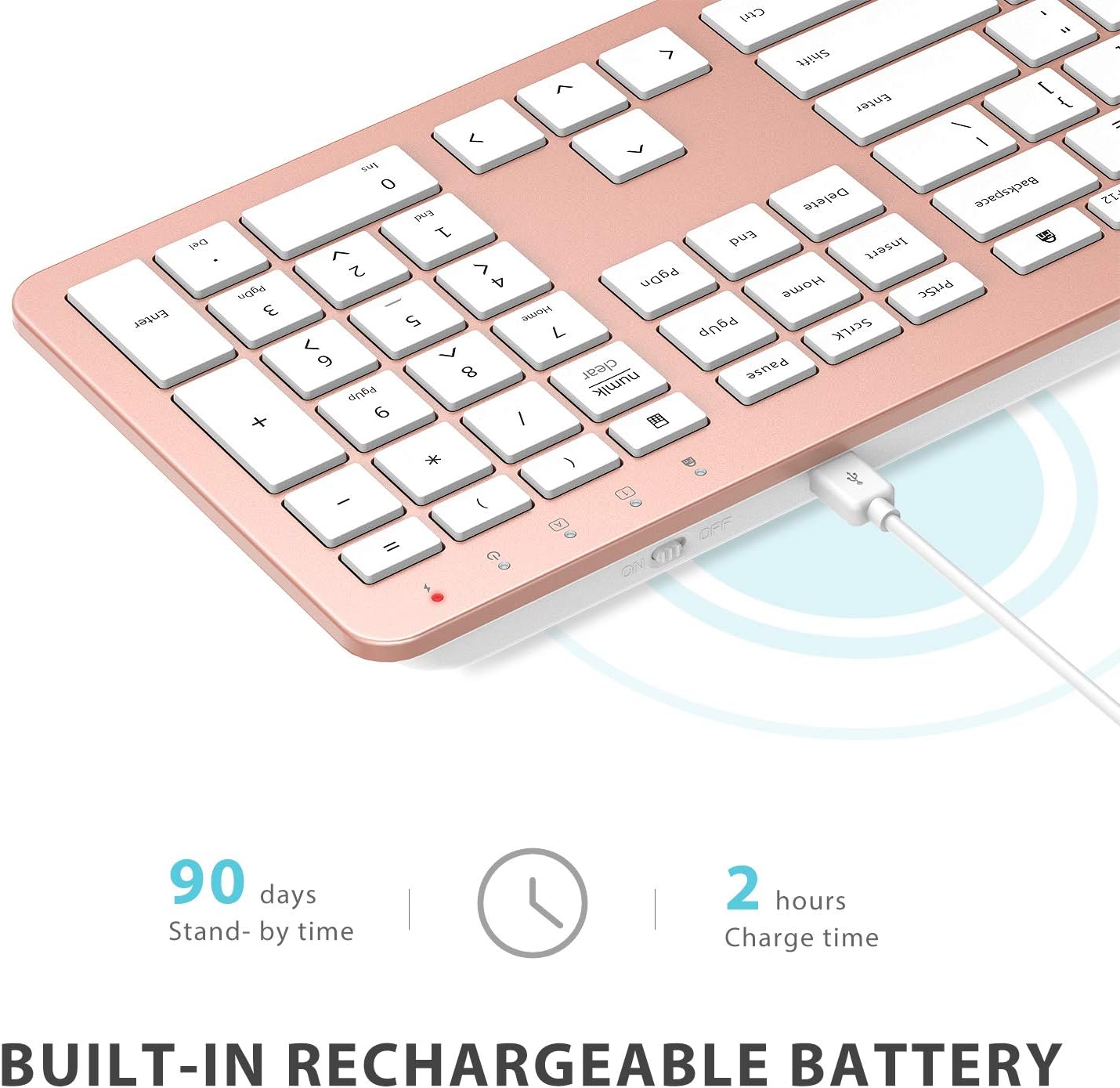
Image: The iClever GK08 keyboard connected to a USB-C charging cable, illustrating the charging process and battery life indicators.
3.3 Connecting to Your Computer (2.4 GHz Wireless)
The keyboard and mouse connect via a single 2.4 GHz USB-A nano receiver.
- Locate the USB-A nano receiver. It is typically stored in a compartment on the underside of the mouse.
- Connecteu el nanoreceptor a un port USB-A disponible de l'ordinador.
- Turn on the keyboard using the ON/OFF switch (usually on the top edge).
- Turn on the mouse using the ON/OFF switch (located on the underside).
- Your computer should automatically detect and install the necessary drivers. The devices are ready for use once recognized.
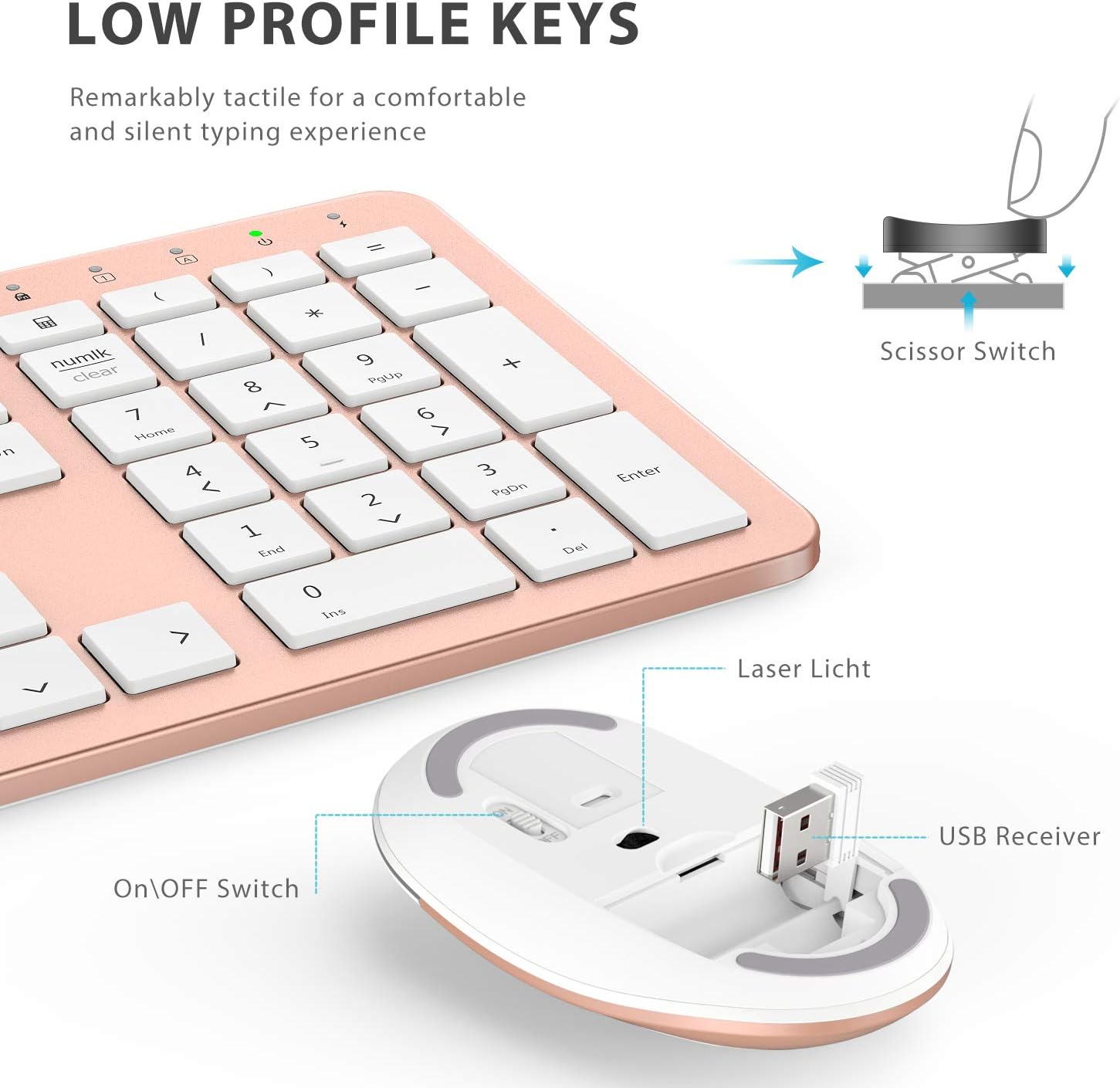
Imatge: Un primer pla view of the iClever mouse, highlighting the compartment where the USB nano receiver is stored for convenience.
3.4 Comprovació de compatibilitat
This combo requires an available USB-A port for the nano receiver. For newer Macs with only USB-C ports, a USB-C to USB-A adapter (not included) is required. It is compatible with:
- Windows 10/11 PC & laptop
- macOS desktops / notebooks with USB-A port (e.g., iMac Retina 4K/5K, MacBook Air/Pro ≤ 2017)
- Chrome OS

Image: A visual representation emphasizing the requirement of a USB-A port for the 2.4G wireless receiver, with a note about USB-C adapters for newer devices.
4. Instruccions de funcionament
4.1 Funcions del teclat
- Disseny a mida completa: The keyboard features a 110-key layout with a dedicated numeric keypad for efficient data entry.
- Quiet Scissor-Switch Keys: Enjoy a comfortable and quiet typing experience with low-profile keys that produce less than 50 dB of sound.
- Media Shortcuts: Access common media functions directly from the keyboard.
- Dual-Layout Compatibility: The keyboard has clearly printed Mac and PC legends.
Switching Between Mac and Windows Layouts:
- Per Windows: Premeu Fn + W to activate Win, Alt, NumLK functions.
- Per Mac OS: Premeu Fn + Q to activate Alt (Option), Cmd, Clear functions.

Image: The iClever GK08 keyboard displaying the dual Mac and Windows key legends, with instructions for switching between operating system layouts using the Fn key combinations.
4.2 Funcions del ratolí
- Clic silenciós: The mouse is designed for quiet operation, minimizing distractions.
- DPI ajustable: The mouse features 3 adjustable DPI levels (800/1200/1600) to customize cursor sensitivity. Press the DPI button (usually located near the scroll wheel) to cycle through the settings.

Image: A visual demonstrating the quiet operation of the iClever mouse and the three adjustable DPI settings (800, 1200, 1600) for varied precision needs.
4.3 Funció de suspensió automàtica
To conserve battery life, both the keyboard and mouse will enter an auto-sleep mode after 10 minutes of inactivity. To wake them up, simply press any key on the keyboard or move the mouse.
Video: A seller-provided video demonstrating the plug-and-play functionality and long battery life of the iClever Wireless Keyboard and Mouse. This video highlights the ease of setup and extended usage between charges.
5. Manteniment
- Neteja: Utilitzeu un suau, damp cloth to clean the surfaces of the keyboard and mouse. Avoid harsh chemicals.
- Funda antipols: Utilize the included washable dust cover to protect the keyboard from dust and spills when not in use.
- Emmagatzematge: When not in use for extended periods, turn off both devices to conserve battery. Store the USB receiver inside the mouse.
6. Solució De Problemes
- Sense conexió:
- Ensure both keyboard and mouse are turned ON.
- Verify the USB nano receiver is securely plugged into a working USB-A port on your computer.
- Prova de connectar el receptor a un port USB-A diferent.
- Check if the devices are charged.
- Connexió endarrerida o intermitent:
- Ensure the devices are within the 33 ft / 10 m operating range of the receiver.
- Eviteu col·locar el receptor a prop de fonts d'interferència fortes (per exemple, altres dispositius sense fil, objectes metàl·lics grans).
- Re-pair the devices by unplugging and re-plugging the receiver.
- Keyboard Not Typing Correctly (Mac/Windows):
- Ensure you have selected the correct operating system layout using Fn + W per a Windows o Fn + Q per a Mac.
- El cursor del ratolí salta o és inexacte:
- Ajusteu la configuració de DPI amb el botó DPI del ratolí.
- Ensure the mouse sensor is clean and free from obstructions.
- Feu servir el ratolí sobre una superfície adequada (no gaire reflectant ni transparent).
7. Especificacions
| Característica | Detall |
|---|---|
| Marca | iClever |
| Número de model | GK08 |
| Color | Or rosa |
| Tecnologia de connectivitat | 2.4 GHz wireless (USB-A nano receiver) |
| abast sense fils | Fins a 33 peus / 10 m |
| Disposició del teclat | QWERTY, Full-size 110-key with Numpad |
| Tipus de clau | Scissor Switch (Quiet typing < 50 dB) |
| Font d'alimentació | Rechargeable Lithium Ion Battery (Keyboard) |
| Port de càrrega | USB-C |
| Temps de càrrega | Aprox. 2 hores |
| Battery Life (Keyboard) | Up to 45 days (typical use) |
| Configuració de DPI del ratolí | 800/1200/1600 DPI |
| Sistemes operatius compatibles | Windows 8/10/11, macOS, Chrome OS |
| Característiques especials | Dual Mac/Windows layout, 10-min auto-sleep, Washable dust cover |
8. Garantia i Suport
iClever products typically come with a standard manufacturer's warranty. Please refer to the warranty card included in your product packaging or visit the official iClever weblloc web per obtenir informació detallada sobre els termes i condicions de la garantia.
For technical support, troubleshooting assistance, or any product-related inquiries, please contact iClever customer service through their official weblloc web o la informació de contacte que es proporciona a la documentació del producte.
Assistència en línia: www.iclever.com/support