
1. Introducció
This manual provides essential information for setting up, operating, and maintaining your ASUS ProArt Display 27" Monitor PA278CV. Designed for professionals requiring color accuracy and versatile connectivity, this monitor features a WQHD (2560 x 1440) IPS panel with 100% sRGB and 100% Rec. 709 color gamut, Calman Verified ΔE < 2 color accuracy, and a range of connectivity options including USB-C with 65W Power Delivery, DisplayPort, and HDMI.
Si us plau, llegiu aquest manual detingudament abans d'utilitzar el monitor per garantir una instal·lació correcta i un rendiment òptim.
2. Informació de seguretat
Observeu les següents precaucions de seguretat per evitar danys al monitor i garantir la seguretat de l'usuari:
- Col·loqueu el monitor sobre una superfície estable i plana per evitar que caigui.
- No bloquejar les obertures de ventilació.
- Feu servir només l'adaptador de corrent i els cables proporcionats pel fabricant.
- Mantingueu el monitor allunyat de l'aigua, la humitat i les temperatures extremes.
- No intenteu fer la reparació del monitor vosaltres mateixos. Encarregueu-vos de totes les tasques de manteniment a personal qualificat.
- Desconnecteu el monitor de la presa de corrent abans de netejar-lo.
3. Què hi ha a la caixa
Verifiqueu que tots els elements següents estiguin inclosos al vostre paquet:
- ASUS ProArt Display PA278CV LCD monitor
- Cable d'alimentació
- Cable USB-C
- Cable HDMI
- Cable DisplayPort
- Informe de calibració
- Guia d'inici ràpid
- Targeta de garantia

4. Configuració
4.1. Muntatge físic
Carefully remove the monitor and stand components from the packaging. Attach the stand base to the stand column, then secure the assembled stand to the back of the monitor. Ensure all connections are firm.

4.2. Connectivitat
The PA278CV offers extensive connectivity options:
- USB-C: Connect your laptop or Mac for video, data transmission, and up to 65W power delivery via a single cable.
- DisplayPort: For high-resolution video input and daisy-chaining.
- HDMI: Standard video input for various devices.
- Hub USB 3.1: Connect peripherals directly to the monitor.
- Conector d'àudio de 3.5 mm: Per a dispositius d'àudio externs.


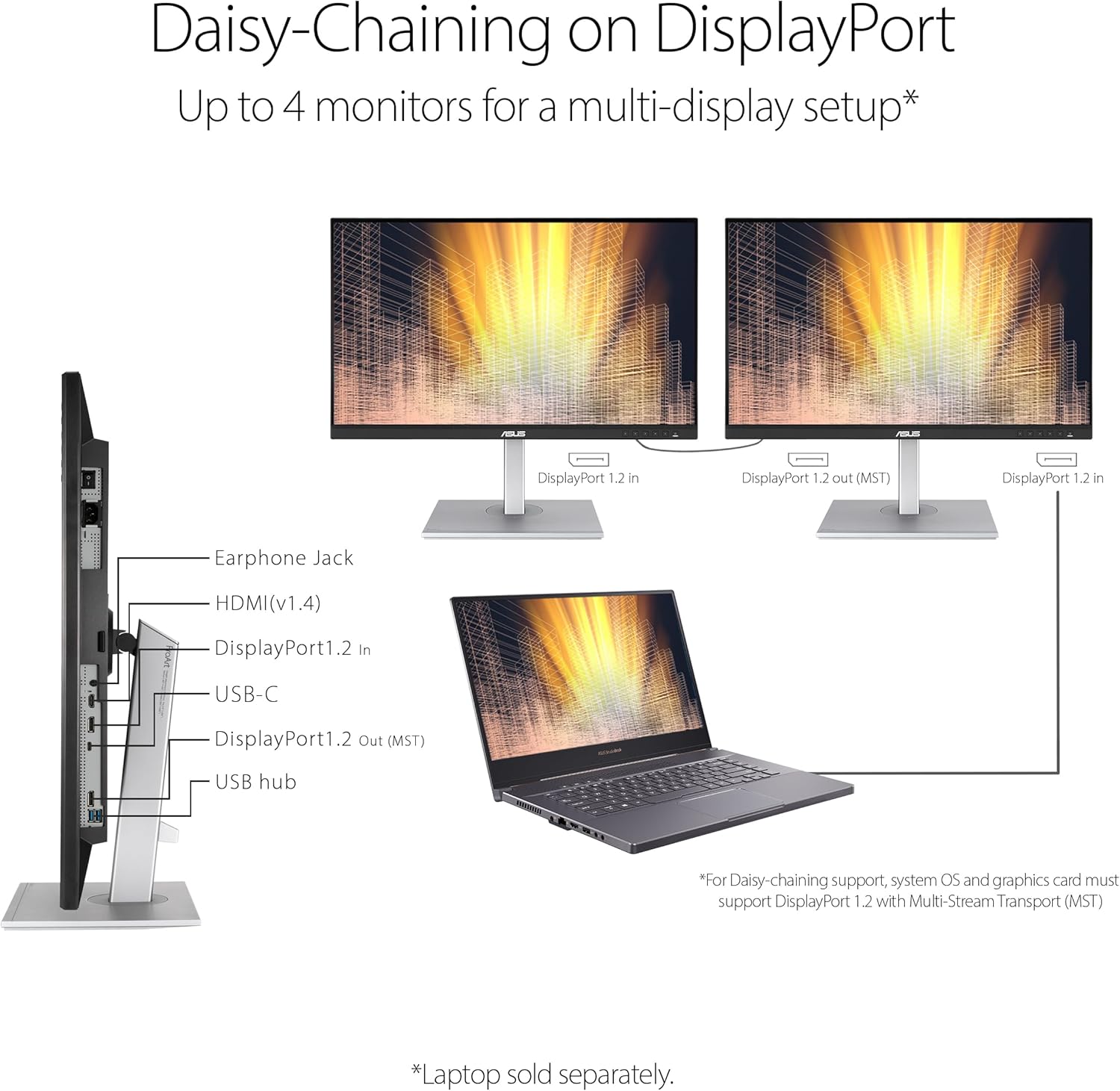
4.3. DisplayPort Daisy-Chaining
The monitor supports DisplayPort daisy-chaining, allowing you to connect up to four monitors for a multi-display workstation using a single DisplayPort cable from your source device to the first monitor, and then from the first monitor to subsequent monitors. Ensure your system and graphics card support DisplayPort 1.2 with Multi-Stream Transport (MST).
4.4. Ajustaments ergonòmics
The PA278CV features an ergonomic stand that allows for height adjustment, tilt, swivel, and pivot to optimize your viewing comfort and workflow.
- Ajust d'alçada: Adjust the monitor height up to 150 mm.
- Inclinació: Ajusta l'angle de la pantalla de +35° a -5°.
- Girar: Rotate the screen horizontally from +45° to -45°.
- Pivot: Rotate the screen vertically from +90° to -90° for portrait mode.

5. Instruccions de funcionament
5.1. Encendre/apagar
Press the power button located on the front right bottom bezel of the monitor to turn it on or off. The power indicator light will illuminate when the monitor is on.
5.2. Menú de visualització en pantalla (OSD).
Use the buttons on the front right bottom bezel to navigate the OSD menu. The OSD menu allows you to adjust various display settings, including brightness, contrast, color temperature, and input source.
5.3. Color Accuracy and Modes
The PA278CV is factory pre-calibrated for excellent Delta E < 2 color accuracy, ensuring precise color reproduction. It supports 100% sRGB and 100% Rec. 709 color gamuts.


5.4. ProArt Palette
Utilize the ASUS ProArt Palette to customize your display via a range of parameters, allowing for fine-tuning of color, brightness, and other settings to match your specific creative needs.

5.5. Característiques de la cura dels ulls
The monitor incorporates ASUS Eye Care technology to reduce eye strain during prolonged use:
- Filtre de llum blava: Redueix les emissions nocives de llum blava. Els nivells ajustables estan disponibles a través del menú OSD.
- Tecnologia sense parpelleig: Eliminates screen flickering to minimize eye fatigue.
- Anti-glare Screen: Reduces reflections from ambient light.
6. Manteniment
6.1. Neteja de la pantalla
Per netejar la pantalla, netegeu-la suaument amb un drap suau i sense borrissol. Per a marques difícils, fregueu-la suaument.ampRenta el drap amb aigua o un netejador de pantalles suau i no abrasiu. Evita utilitzar netejadors amb base d'alcohol o productes químics agressius.
6.2. Neteja de la Casing
Netegeu el monitor casing with a soft, dry cloth. Do not use liquid or aerosol cleaners directly on the casing.
6.3. Emmagatzematge
Si guardeu el monitor durant un període prolongat, desconnecteu tots els cables i guardeu-lo en un lloc fresc i sec, preferiblement en el seu embalatge original.
7. Solució De Problemes
Si teniu problemes amb el monitor, consulteu els problemes i solucions més comuns següents:
- Sense energia: Assegureu-vos que el cable d'alimentació estigui connectat correctament tant al monitor com a una presa de corrent que funcioni. Comproveu l'indicador lluminós d'engegada.
- Sense senyal: Verify that the video cable (USB-C, DisplayPort, or HDMI) is correctly connected to both the monitor and your computer. Ensure the correct input source is selected in the OSD menu.
- Pantalla parpellejant: Check the video cable connection. Ensure the refresh rate is set correctly in your computer's display settings.
- Image Distortion/Blurry: Adjust the resolution and refresh rate in your computer's display settings to match the monitor's native resolution (2560 x 1440 at 75Hz).
- Inexactitud del color: Ensure the monitor is set to a suitable ProArt Preset mode. If you have a colorimeter, perform a calibration.
If the problem persists after trying these steps, contact ASUS customer support.
8. Especificacions
| Característica | Especificació |
|---|---|
| Marca | ASUS |
| Número de model | PA278CV |
| Mida de la pantalla | 27 polzades |
| Tipus de visualització | LED IPS |
| Resolució nativa | 2560 x 1440 (WQHD) |
| Freqüència d'actualització | 75 Hz |
| Temps de resposta | 5 mil·lisegons |
| Gamma de colors | 100% sRGB, 100% Rec. 709 |
| Exactitud del color | Calman Verified, ΔE < 2 |
| Brillantor | 350 cd/m² |
| Relació de contrast | 1000:1 |
| Viewangle ing | 178 Degrees (H/V) |
| Connectivitat | 1x HDMI, 1x DisplayPort, 1x USB-C (DP Alt Mode, 65W PD), 3x USB 3.0, 1x 3.5mm Audio |
| Consum d'energia | 65 watts |
| Item Dimensions (DxWxH) | 14.72 "P x 24.21" W x 8.98" H |
| Pes de l'article | 18.52 lliures |
| Tipus de muntatge | Suport de paret (compatible amb VESA) |
| Característiques addicionals | Height Adjustment, Mac Compatible, Pivot Adjustment, Tilt Adjustment, Adaptive-Sync |
9. Garantia i assistència
9.1. Informació de la garantia
The ASUS ProArt Display PA278CV monitor comes with a 3 any de garantia del fabricant. For detailed terms and conditions, please refer to the warranty card included in your product packaging or visit the official ASUS support weblloc.
9.2. Atenció al client
Per a assistència tècnica, resolució de problemes o consultes de servei, visiteu el servei d'assistència oficial d'ASUS. website or contact their customer service hotline. Have your product model number (PA278CV) and serial number ready when contacting support.