
1. Introducció
This manual provides comprehensive instructions for the safe and efficient operation of your Caso Design Hot Brew 10-Cup Coffee Maker, Model 11858. Please read all instructions carefully before first use and retain this manual for future reference.
The Caso Design Hot Brew coffee maker is designed to brew up to 10 cups of hot coffee. Key features include a programmable timer for scheduled brewing, a permanent removable filter for convenience, and a warming plate to keep coffee warm for up to 35 minutes. The filter lid features 17 holes for even water distribution, optimizing coffee extraction.
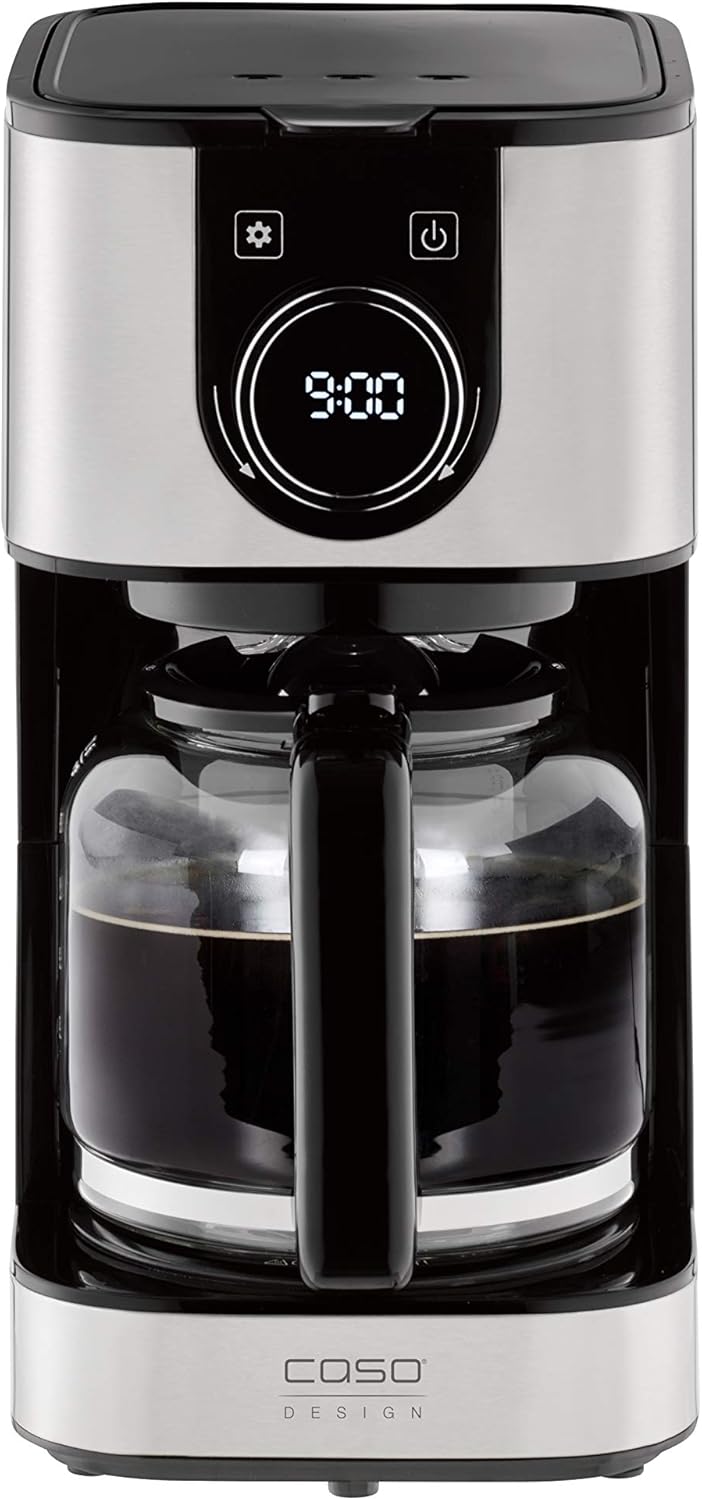
Imatge 1.1: Frontal view of the Caso Design Hot Brew 10-Cup Coffee Maker.
2. Instruccions de seguretat
To prevent personal injury or damage to your appliance, always follow these basic safety precautions:
- Read all instructions before operating the coffee maker.
- No toqueu superfícies calentes. Utilitzeu nanses o poms.
- Per protegir-vos contra incendis, descàrregues elèctriques i lesions personals, no submergiu el cable, els endolls ni l'aparell en aigua ni en altres líquids.
- És necessària una supervisió estreta quan qualsevol aparell és utilitzat per o a prop dels nens.
- Desendolleu la presa de corrent quan no utilitzeu i abans de netejar. Deixeu refredar abans de posar o treure peces i abans de netejar l'aparell.
- No feu servir cap aparell amb un cable o un endoll danyats, o després que l'aparell funcioni malament o s'hagi fet malbé de cap manera.
- L'ús d'accessoris no recomanats pel fabricant de l'aparell pot provocar incendis, descàrregues elèctriques o lesions a persones.
- No utilitzar a l'aire lliure.
- No deixeu que el cable pengi de la vora de la taula o del taulell, ni toqui superfícies calentes.
- No col·loqueu-lo sobre o prop d'un cremador de gas o elèctric calent, ni en un forn calent.
- Connecteu sempre primer l'endoll a l'aparell i després connecteu el cable a la presa de corrent. Per desconnectar, gireu qualsevol control a "apagat" i, a continuació, traieu l'endoll de la presa de corrent.
- No utilitzeu l'aparell per a un altre ús que el previst.
3. Components del producte
Familiarize yourself with the parts of your Caso Design Hot Brew Coffee Maker:
- Main Coffeemaker Unit
- Carafe de vidre
- Permanent Removable Filter
- Bol de cafè
- Dipòsit d'aigua amb indicador de nivell
- Control Panel with Display and Rotary Knob
- Placa escalfadora

Imatge 3.1: acabatview of coffee maker features, including water tank, timer, and permanent filter.
4. Configuració
- Desembalatge: Traieu amb cura tots els materials d'embalatge i inspeccioneu la cafetera per detectar qualsevol dany.
- Neteja inicial: Before first use, wash the glass carafe and permanent filter in warm, soapy water. Rinse thoroughly and dry. Wipe the exterior of the coffee maker with a damp tela.
- Col·locació: Col·loqueu la cafetera sobre una superfície plana, estable i resistent a la calor, allunyada de la vora del taulell. Assegureu-vos que hi hagi una ventilació adequada al voltant de l'aparell.
- Primer cicle d'elaboració (netja): Fill the water reservoir to the MAX (10-cup) level with cold water. Do not add coffee grounds. Run a full brew cycle to clean the internal components. Discard the water from the carafe. Repeat this process once more.

Image 4.1: Water level indicator showing up to 10 cups capacity.
5. Instruccions de funcionament
5.1. Elaboració de cafè
- Omplir el dipòsit d'aigua: Open the top lid and fill the water reservoir with cold, fresh water up to the desired number of cups, indicated by the water level markings. The maximum capacity is 10 cups.
- Afegeix el marc de cafè: Place the permanent filter into the filter basket. Add the desired amount of ground coffee using the provided scoop. A general guideline is one scoop per cup, but adjust to your taste. Close the top lid securely.
- Col·loca la garrafa: Ensure the glass carafe is correctly positioned on the warming plate.
- Comença a fer cervesa: Premeu el botó d'engegada (U) on the control panel. The coffee maker will begin brewing. The brewing temperature is approximately 200°F.
- Funció antidegoteig: The drip stop feature allows you to temporarily remove the carafe during brewing to pour a cup of coffee. Replace the carafe within 20 seconds to prevent overflow.
- Funció de mantenir la calor: After brewing, the warming plate will automatically activate and keep the coffee warm for 35 minutes. The display will show the remaining time in keep warm mode. After 35 minutes, the coffee maker will automatically shut off.

Image 5.1: Adding coffee grounds to the permanent filter.

Image 5.2: Display indicating the 'Keep Warm' function is active.
5.2. Setting the Programmable Timer
The programmable timer allows you to set a specific time for the coffee maker to start brewing automatically.
- Estableix l'hora actual: Premeu el botó de configuració (⚙️). The clock icon will appear. Rotate the knob to set the current hour and press the knob to confirm. Rotate the knob again to set the minutes and press to confirm.
- Estableix l'hora programada: Premeu el botó de configuració (⚙️) again until the timer icon appears. Rotate the knob to set the desired brewing start time (hour) and press to confirm. Rotate the knob again to set the minutes and press to confirm.
- Activa el temporitzador: After setting the programmed time, ensure the coffee maker is prepared with water and coffee grounds. Press the power button (U) once. The display will show the current time, and a small timer icon will illuminate, indicating the timer is active. The coffee maker will start brewing at the set time.

Image 5.3: Setting the programmable timer for automatic brewing.
5.3. Aroma Plus Function
The Aroma Plus function allows you to adjust the coffee intensity. Refer to the display and rotary knob for selecting your preferred intensity level. This function ensures optimal taste by adjusting the brewing process.
6. Manteniment i Neteja
Una neteja regular garanteix un rendiment òptim i allarga la vida útil de la teva cafetera.
- Desconnecta sempre: Before cleaning, always unplug the coffee maker from the power outlet and allow it to cool completely.
- Carafe and Filter: The glass carafe and permanent filter can be washed in warm, soapy water. Rinse thoroughly and dry. These parts are also dishwasher safe (top rack recommended).
- Exterior: Netegeu les superfícies exteriors de la cafetera amb un drap suau i sec.amp tela. No utilitzeu netejadors abrasius ni fregalls.
- Placa d'escalfament: Wipe the warming plate with a clean, damp cloth. Do not use abrasive materials that could scratch the surface.
- Descalcificació: Over time, mineral deposits (limescale) can build up in your coffee maker, affecting performance. Descale your coffee maker regularly (e.g., every 2-3 months, or more often in hard water areas) using a commercial descaling solution or a mixture of white vinegar and water (1:2 ratio). Follow the descaling product's instructions or run a brew cycle with the vinegar solution, then two cycles with fresh water to rinse.
7. Solució De Problemes
Si teniu problemes amb la vostra cafetera, consulteu els següents problemes i solucions habituals:
| Problema | Causa possible | Solució |
|---|---|---|
| La cafetera no s'encén. | No connectat; apagadatage; presa de corrent defectuosa. | Assegureu-vos que el cable d'alimentació estigui ben connectat a una presa de corrent que funcioni. Comproveu l'interruptor. |
| El cafè no es fa infusió. | Timer not set correctly; insufficient water; filter basket not properly seated. | Check if the programmable timer is active. Ensure enough water is in the reservoir. Verify the filter basket is correctly in place. |
| El cafè és massa fluix o massa fort. | Incorrect coffee-to-water ratio; Aroma Plus setting. | Adjust the amount of coffee grounds. Experiment with the Aroma Plus function for desired strength. |
| L'aigua desborda de la cistella del filtre. | Massa cafè mòlt; filtre obstruït; garrafa mal col·locada. | Reduce coffee grounds. Clean the permanent filter. Ensure carafe is centered on the warming plate. |
| El cafè no és prou calent. | Acumulació de minerals; problema amb la placa d'escalfament. | Perform a descaling cycle. Ensure the warming plate is clean and functioning. |
8. Especificacions
| Característica | Detall |
|---|---|
| Marca | Caso Design |
| Nom del model | Hot Brew 10 cup Coffee Maker |
| Número de model de l'article | 11858 |
| Color | Inoxidable |
| Capacitat | 10 tasses |
| Dimensions del producte | 12.95 "P x 9.65" W x 6.61" H |
| Pes de l'article | 4.43 lliures |
| Tipus de cafetera | Màquina de cafè per goteig |
| Mode d'operació | Totalment automàtic |
| Característica especial | Programmable Timer, Permanent Filter, Warming Plate, Drip Stop |
| Components inclosos | Coffeemaker, Carafe, Manual, Warranty |

Image 8.1: Product dimensions for the Caso Design Hot Brew Coffee Maker.
9. Vídeo de les característiques del producte
Video 9.1: Official product features video demonstrating the Caso Design Hot Brew 10-cup Coffee Maker.
10. Garantia i Suport
Your Caso Design Hot Brew 10-Cup Coffee Maker comes with a manufacturer's warranty. Please refer to the warranty card included in your product packaging for specific terms and conditions. For technical support, service, or warranty claims, please contact Caso Design customer service through their official weblloc web o la informació de contacte que es proporciona a la documentació del producte.