
1. Producte acabatview
The TrustFire T11R is a compact yet powerful rechargeable LED flashlight designed for various applications, including outdoor activities, emergency preparedness, and daily use. It features a LUMINUS SST-40 LED chip, delivering a maximum brightness of 1800 lumens and a beam distance of up to 276 meters. Its robust construction and versatile features make it a reliable lighting tool.

Image: The TrustFire T11R flashlight demonstrating its powerful beam in a dark outdoor environment.
2. Contingut del paquet
Si us plau, reviseu el paquet per assegurar-vos que hi ha tots els elements:
- TrustFire T11R Flashlight (with pre-installed battery) x1
- Cable de càrrega USB-C x1
- Multi-language User Manual x1
- Spare Waterproof O-ring x1
- Corda x1

Image: All items included in the TrustFire T11R flashlight package, neatly arranged.
3. Especificacions
| Característica | Especificació |
|---|---|
| Font de llum | LUMINUS SST-40 LED |
| Sortida de llum màxima | 1800 lúmens |
| Distància del feix | 276 metres |
| Temps d'execució | Up to 28 days (Moonlight mode) |
| Font d'alimentació | Bateria recarregable d'ions de liti |
| Port de càrrega | USB tipus C |
| Classificació impermeable | IP68 |
| Resistència a l'impacte | 1 metres |
| Material | Aerospace-grade 6061 Aluminum Alloy |
| Dimensions (P x A x A) | 30 mm x 30 mm x 129 mm |
| Pes de l'article | 130 g |
| Característiques especials | Dual Switch, Battery Level Indicator, Overcharge Protection, Smart Temperature Control |
4. Configuració
4.1 Càrrega inicial
Before first use, fully charge the flashlight. The T11R comes with a pre-installed rechargeable battery.
- Locate the USB Type-C charging port on the flashlight.
- Connect the provided USB-C cable to the flashlight and a compatible USB power source (e.g., computer, wall adapter, power bank).
- The indicator light on the neck switch will show the charging status: Vermell indicates charging, Verd indica que la càrrega s'ha completat.

Image: The TrustFire T11R flashlight being charged via its USB-C port, showing the indicator light.
4.2 Attaching the Lanyard and Clip
Attach the lanyard to the tail cap for secure carrying. The stainless steel two-way clip can be attached to either end of the flashlight body for convenient carrying on pockets, belts, or bags.

Image: The TrustFire T11R flashlight demonstrating its versatile two-way clip for various carrying options.
5. Instruccions de funcionament
5.1 Dual Switch Operation
The T11R features both a tail switch and a side switch for flexible control.
- Tail Switch: Press to turn the flashlight ON/OFF. A half-press allows for momentary illumination; release to turn off.
- Interruptor lateral: Used for cycling through brightness modes and activating special modes.

Image: A visual guide to the dual switch system (tail and side switches) on the TrustFire T11R.
5.2 Canvi de mode
The T11R offers multiple lighting modes to suit different needs:
- From OFF, press the Interruptor de cua encendre.
- With the light ON, press the Interruptor lateral to cycle through modes: Clar de lluna → Mitjana → Alt → Turbo. The flashlight has a mode memory function and will turn on in the last used illumination mode.
- Mode estroboscòpic: From any illumination mode, press and hold the Interruptor lateral for 2 seconds to activate Strobe mode. Press again to return to the previous illumination mode.
- Mode SOS: From Strobe mode, press and hold the Interruptor lateral for 2 seconds to activate SOS mode. Press again to return to the previous illumination mode.
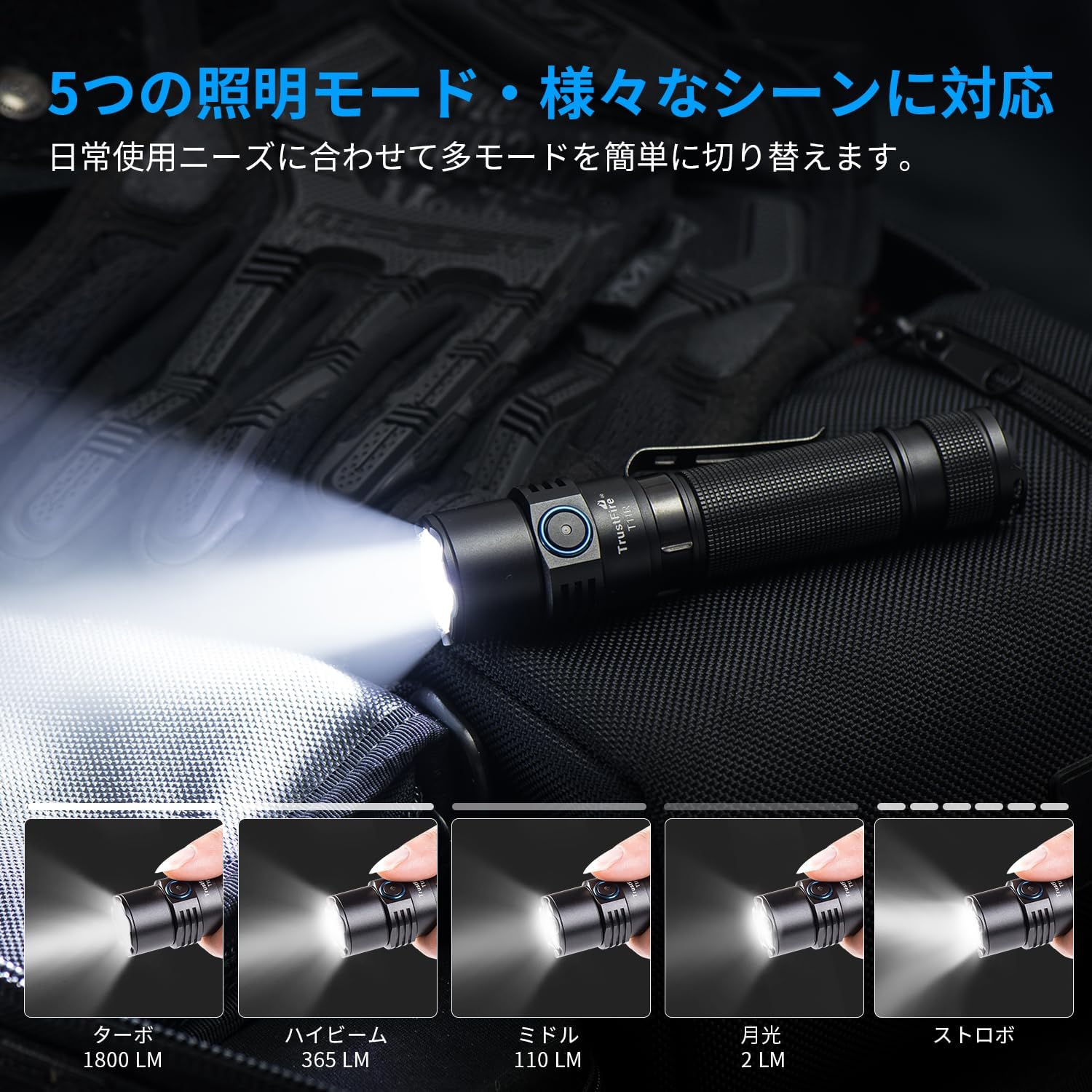
Image: The TrustFire T11R flashlight showcasing its various brightness levels and special modes.
5.3 Indicador de nivell de bateria
The indicator light on the neck switch displays the battery level:
- Verd: Capacitat de la bateria > 50%
- Taronja: Battery capacity 20% - 50%
- Vermell: Battery capacity 5% - 20%
- Vermell intermitent: Battery capacity < 5%. The light will flash three times every minute.

Image: The TrustFire T11R flashlight's battery indicator light, illustrating different colors for various charge levels.
6. Manteniment
6.1 Càrrega
Regularly charge the flashlight to maintain optimal battery performance. Avoid completely draining the battery for extended periods.
6.2 Neteja
Netegeu el cos de la llanterna amb un drap suau iamp drap. No utilitzeu productes de neteja abrasius ni dissolvents. Mantingueu la lent neta per obtenir la màxima potència lumínica.
6.3 O-ring Maintenance
To maintain the IP68 waterproof rating, periodically inspect and lubricate the O-rings with silicone grease. Replace O-rings if they appear damaged or worn. A spare O-ring is included in the package.

Image: The TrustFire T11R flashlight in water, highlighting its IP68 waterproof and impact-resistant design.
7. Solució De Problemes
- La llanterna no s'encén:
- Assegureu-vos que la bateria estigui completament carregada.
- Check if the tail cap is tightened securely.
- Verify that the battery is inserted with the correct polarity.
- La llum és tènue o parpelleja:
- Carregueu la bateria.
- Netegeu els contactes i les rosques de la bateria amb un drap net.
- Entrada d'aigua:
- Check the O-rings for damage or improper seating. Replace if necessary.
- Ensure all parts are tightly screwed together.
If you encounter any issues not covered here, please contact TrustFire customer support for assistance.
8. Garantia i assistència
The TrustFire T11R flashlight comes with a 3 any de garantia from the date of purchase, covering manufacturing defects. This warranty does not cover damage caused by misuse, unauthorized modification, or normal wear and tear.
For warranty claims, technical support, or any product-related inquiries, please contact TrustFire customer service through the retailer where you purchased the product or visit the official TrustFire weblloc per obtenir informació de contacte.
Si us plau, conserveu el comprovant de compra per motius de garantia.


