
Uten UTE-A06
Uten 2685A Electronic Sewing Machine User Manual
Model: UTE-A06
1. Introducció
Welcome to the Uten 2685A Electronic Sewing Machine user manual. This guide provides detailed instructions for setting up, operating, maintaining, and troubleshooting your sewing machine. Please read this manual thoroughly before using the machine to ensure safe and efficient operation.
The Uten 2685A is a versatile computerized sewing machine designed for both beginners and experienced users, offering 200 utility and decorative stitches, including letter patterns, and an extension table for larger projects.
2. Instruccions de seguretat importants
Quan utilitzeu un aparell elèctric, sempre s'han de seguir les precaucions bàsiques de seguretat, com ara les següents:
- Always unplug the machine from the electrical outlet immediately after using and before cleaning, removing covers, or making any user servicing adjustments.
- No permeteu que s'utilitzi com a joguina. Cal anar amb compte quan aquesta màquina sigui utilitzada per nens o a prop d'ells.
- Utilitzeu aquest aparell només per a l'ús previst tal com es descriu en aquest manual. Utilitzeu només els accessoris recomanats pel fabricant tal com s'inclouen en aquest manual.
- Never operate this machine if it has a damaged cord or plug, if it is not working properly, if it has been dropped or damaged, or dropped into water.
- No deixeu caure ni introduïu cap objecte a cap obertura.
- No utilitzar a l'aire lliure.
- No opereu on s'utilitzen productes en aerosol (esprai) o on s'administra oxigen.
- Per desconnectar, gireu tots els controls a la posició d'apagat i, a continuació, traieu l'endoll de la presa.
3. Components del producte i mésview
Familiarize yourself with the main parts of your Uten 2685A sewing machine.

Figura 3.1: Uten 2685A Electronic Sewing Machine with Extension Table. This image shows the overall view of the sewing machine, highlighting its compact design and the attached extension table for increased workspace.

Figura 3.2: A dalt view of the Uten 2685A Sewing Machine, showing the bobbin winding area and thread path. This perspective helps in understanding the threading process from the top.
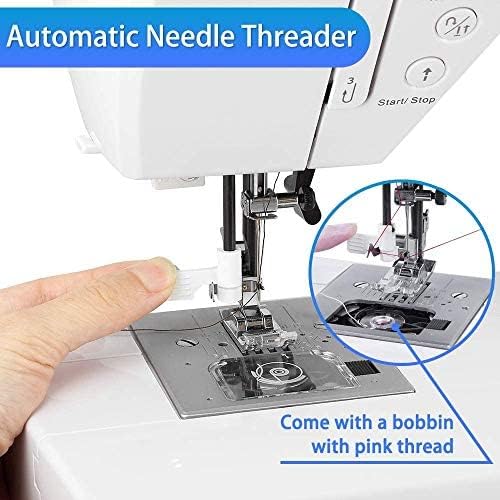
Figura 3.3: Primer pla view of the automatic needle threader mechanism. This feature simplifies the threading process, making it quicker and easier for users.

Figura 3.4: Example of embroidery work possible with the Uten 2685A. This image demonstrates the machine's capability for decorative stitching, though an embroidery presser foot may be required (not included).
4. Configuració i preparació inicial
4.1 Desembalatge
Carefully remove the machine from its packaging. Retain all packing materials for future transport or storage. Ensure all accessories listed in the packing list are present.
4.2 Connexió d'alimentació
Connect the power cord to the machine's power input and then to a suitable electrical outlet. The machine operates on standard household electricity.
4.3 Attaching the Extension Table
The Uten 2685A comes with an extension table. To attach it, slide the table onto the free arm of the machine until it clicks securely into place. This provides a larger, flat work surface, ideal for quilting or handling larger fabric pieces.

Figura 4.1: The Uten 2685A Sewing Machine with its extension table attached, shown in a sewing environment. The extension table significantly increases the work area, making it easier to manage larger sewing projects.
4.4 Enfilar la màquina
Proper threading is crucial for good stitch quality. Follow the numbered guides on the machine for upper thread path. For the bobbin, ensure it is correctly wound and inserted into the bobbin case.

Figura 4.2: Close-up of the LCD screen and control panel for stitch selection, length, and width adjustments. This display provides visual feedback on selected stitch patterns and settings.

Figura 4.3: A comprehensive diagram illustrating the 200 available stitch patterns, including utility, decorative, and letter stitches. This chart is typically found on the machine itself for quick reference.
5. Instruccions de funcionament
5.1 Selecció de puntades
Use the stitch selection buttons (up/down arrows) to navigate through the 200 built-in stitches displayed on the LCD screen. The machine offers 100 utility and decorative stitches, and 100 letter patterns.
5.2 Ajust de la longitud i l'amplada de la puntada
The stitch length can be adjusted from 0.5mm to 3.5mm, and stitch width from 0mm to 7mm using the dedicated '+' and '-' buttons. These adjustments allow for customization of stitches to suit different fabric types and project requirements.
5.3 Sewing with the Free Arm
To use the free arm, remove the extension table. The free arm is ideal for sewing cylindrical items such as pant legs, sleeves, or cuffs.
5.4 Traus automàtiques
The machine features 8 different automatic buttonhole styles. Select the desired buttonhole pattern, attach the buttonhole foot, and follow the on-screen prompts for easy, consistent buttonholes.
5.5 Ús de diferents peus de premsatela
The Uten 2685A comes with various quick-change presser feet for different sewing tasks, including:
- General purpose foot
- Peu de cremallera
- Peu de punt de setinat
- Peu de botó
- Peu de punt cec
- Peu d'ojal


Figura 5.1: Examples of various presser feet included with the Uten 2685A, designed for specific sewing applications like zippers, satin stitches, and button attachment.
6. Manteniment i cura
Un manteniment regular garanteix la longevitat i el rendiment òptim de la teva màquina de cosir.
6.1 Neteja
Always unplug the machine before cleaning. Use a soft brush to remove lint and dust from the bobbin area, feed dogs, and needle plate. Do not use liquid cleaners or harsh chemicals.
6.2 Lubricació
Refer to the specific oiling points indicated in the full manual (if applicable). Use only high-quality sewing machine oil. Over-oiling can cause issues.
6.3 Substitució de l'agulla
Replace the needle regularly, especially if it becomes bent, dull, or if you notice skipped stitches. Always use the correct needle type and size for your fabric and thread.
7. Guia de resolució de problemes
Aquesta secció tracta els problemes habituals que podeu trobar i les seves solucions.
| Problema | Causa possible | Solució |
|---|---|---|
| Punts saltats | Agulla incorrecta, agulla doblegada, enfilat incorrecte, mida d'agulla incorrecta per a la tela. | Replace needle, re-thread machine, ensure correct needle type/size. |
| Trenca fil | Incorrect tension, poor quality thread, needle inserted incorrectly, burr on needle plate. | Adjust tension, use good quality thread, re-insert needle correctly, check for burrs. |
| La tela no s'alimenta | Feed dogs lowered, presser foot not down, lint accumulation. | Raise feed dogs, lower presser foot, clean feed dog area. |
| La màquina no arrenca | Power cord not connected, power switch off, safety feature engaged. | Check power connection, turn on switch, ensure presser foot is down. |
8. Especificacions del producte
| Característica | Especificació |
|---|---|
| Número de model | UTE-A06 |
| Marca | Uten |
| Programes de puntada | 200 (100 utility/decorative + 100 letter patterns) |
| Butoneres | 8 automatic styles |
| Ajust de la longitud de la puntada | 0.5 mm - 3.5 mm |
| Ajust de l'amplada de la puntada | 0 mm - 7 mm |
| Poder | 36 watts |
| Material | Alumini |
| Dimensions (L x A x A) | 46.2 x 34.59 x 29.9 cm (18.2 x 13.6 x 11.8 polzades) |
| Pes | 6 quilos (13.2 lliures) |
| Característiques | Automatic needle threader, LCD display, Free arm, Extension table |
9. Garantia i Suport
For warranty information and customer support, please refer to the documentation included with your purchase or contact Uten customer service directly. If you encounter any problems with your sewing machine, you can contact Uten via email for assistance.
The product has been tested before leaving the factory to ensure quality and functionality.
Ask a question about this manual
Ask about setup, troubleshooting, compatibility, parts, safety, or missing instructions. Manuals+ will review the question and use this page’s manual context to help answer it.