
FLEXISPOT EN2
Manual d'instruccions de l'escriptori elèctric regulable en alçada FLEXISPOT EN2
Model: EN2 | Brand: FLEXISPOT
Introducció
This manual provides comprehensive instructions for the assembly, operation, and maintenance of your FLEXISPOT EN2 Electric Height Adjustable Standing Desk. Please read this manual thoroughly before use to ensure proper function and longevity of your product.
The FLEXISPOT EN2 features a whole-piece bamboo desktop, a removable power outlet with USB ports, a 6-button digital controller with 4 memory presets, and a durable steel frame designed for a stable and productive workspace.
Informació de seguretat
- Capacitat màxima de pes: 176 lliures (80 kg). No supereu aquest límit.
- Assembly requires an electric drill (not included). Exercise caution during assembly.
- Assegureu-vos que totes les connexions estiguin ben connectades abans de fer funcionar l'escriptori.
- Mantingueu els nens i les mascotes allunyats de l'escriptori durant el funcionament.
- Avoid contact with water or abrasive materials during cleaning.
Muntatge i muntatge
Your FLEXISPOT EN2 desk will arrive in two separate packages, which may be shipped separately. Assembly is required and is recommended for two people to facilitate handling of components. An electric drill is necessary for proper setup, but is not included.
Components acabatsview

Figura 1: Mésview of FLEXISPOT EN2 desk components. This image displays the various parts included for assembly, such as the desktop, leg frames, and hardware.
Gestió de cables
The desk includes a cable management device to help organize cords, contributing to a tidy workspace. Fasteners and Velcro straps are provided to secure cables neatly under the desktop.

Figure 2: Illustration of effective cable management. The "Before" section shows disorganized cables, while the "After" section demonstrates how the integrated cable management system tidies them.
Vídeo de muntatge
Video 1: Flexispot Standing Desk - Embrace a Healthier Lifestyle. This official video demonstrates the desk's features and includes brief segments on assembly and operation.
Instruccions de funcionament
Controlador multifuncional
The desk is equipped with a 6-button digital controller for easy height adjustment and memory preset functions. The controller features an LED display showing the current height.

Figura 3: Detallada view of the multifunctional controller. It shows the LED display, up/down arrows, and four programmable height setting buttons.
Ajust d'alçada
- Utilitza el Amunt (^) i Avall (v) arrows to manually adjust the desk height.
- The motorized system adjusts smoothly from 28.1 inches (71.4 cm) to 45.7 inches (116.1 cm).
- The motor operates quietly at less than 50 dB.
Presets de memòria
The controller allows you to save up to 4 preferred height settings for quick transitions between sitting and standing positions.
- Ajusteu l'escriptori a l'alçada desitjada utilitzant les fletxes amunt/avall.
- Premeu el botó "M" button. The LED display will flash.
- Premeu un dels botons predefinits numerats (1, 2, 3 o 4) while the display is flashing to save the current height to that preset.
- To recall a saved height, simply press the corresponding numbered preset button.
Removable Desktop Power Outlet
The desktop includes a removable power outlet with 3 AC outlets and 2 USB charging ports (5V/2A). This can be clipped to the back or side of your desk for convenient access.

Figure 4: The removable desktop power outlet, featuring 3 AC outlets (125V/12A) and 2 USB ports (5V/2A) for charging devices.
Anti-Collision System
The desk is equipped with a smart anti-collision system. If the desk encounters an obstruction during height adjustment, it will stop and reverse slightly to prevent damage.
Manteniment
- Dust regularly with a dry cloth to keep the desktop clean.
- Avoid contact with water or abrasive cleaning materials to prevent damage to the bamboo surface.
- Reviseu periòdicament tots els cargols i connexions per assegurar-vos que estiguin ben ajustats i segurs.
Resolució de problemes
If you encounter any issues with your FLEXISPOT EN2 desk, please refer to the following general advice:
- L'escriptori no es mou: Check all power connections and ensure the power outlet is functioning. Verify that the control panel is properly connected.
- Moviment desigual: Ensure the desk is placed on a level surface. Check that all leg components are securely fastened.
- Codis d'error que es mostren: Consult the full troubleshooting guide available on the FLEXISPOT weblloc web o poseu-vos en contacte amb l'atenció al client per obtenir interpretacions específiques dels codis d'error.
For further assistance, please contact FLEXISPOT customer support.
Especificacions
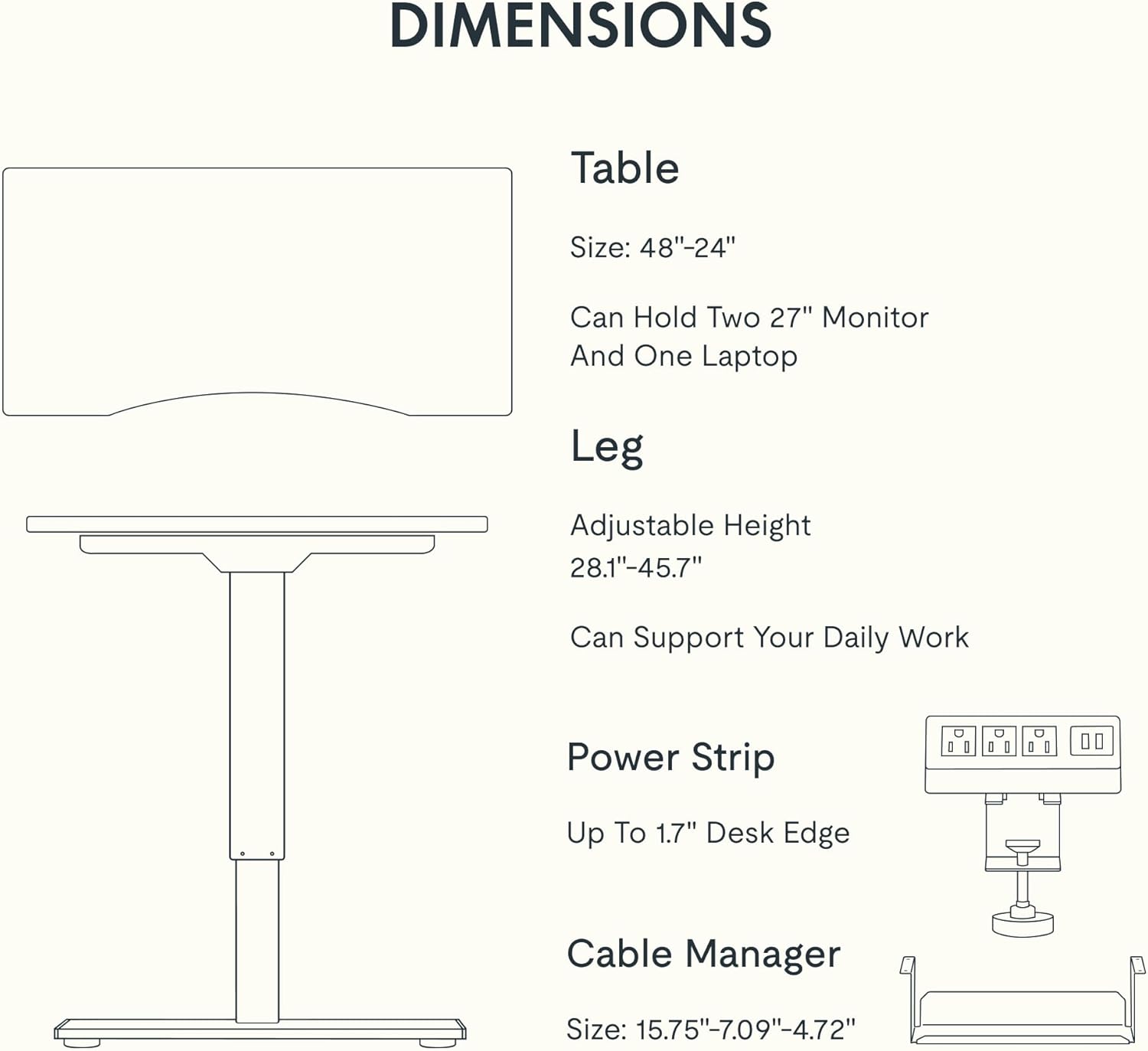
Figure 5: Dimensional specifications of the FLEXISPOT EN2 desk. This diagram illustrates the table size, adjustable height range, and dimensions of the power strip and cable manager.
| Característica | Detall |
|---|---|
| Marca | FLEXISPOT |
| Número de model | EN2 |
| Material d'escriptori | Whole-Piece Bamboo |
| Material del marc | Acer d'aliatge |
| Dimensions del producte (P x A x A) | 61 cm de profunditat x 122 cm d'amplada x 71 cm d'alçada |
| Interval d'alçada ajustable | 28.1" - 45.7" (71.4 cm - 116.1 cm) |
| Capacitat màxima de pes | 176 lliures (80 kg) |
| Nivell de soroll del motor | Menys de 50 dB |
| Endoll | 3 AC Outlets (125V/12A), 2 USB Charging Ports (5V/2A) |
| Muntatge obligatori | Yes (Recommended 2 people, electric drill not included) |
Garantia i Suport
FLEXISPOT provides the following warranty for your EN2 standing desk:
- 5 any de garantia: Covers frames, motors, and other mechanical devices.
- 2 any de garantia: Covers controllers, switches, and electronics.
For customer support, warranty claims, or additional product information, please visit the official FLEXISPOT weblloc web o poseu-vos en contacte amb el seu departament d'atenció al client. També podeu visitar el FLEXISPOT Store on Amazon.
Ask a question about this manual
Ask about setup, troubleshooting, compatibility, parts, safety, or missing instructions. Manuals+ will review the question and use this page’s manual context to help answer it.