
1. Introducció
This manual provides essential information for the safe and efficient use of your iiyama G2470HSU-B1 23.8-inch IPS Full HD 165Hz Gaming Monitor. Please read these instructions thoroughly before operating the device and retain them for future reference.
2. Informació de seguretat
- No exposeu el monitor a la pluja ni a la humitat per evitar riscos d'incendi o descàrrega elèctrica.
- No obriu el monitor casing. No hi ha peces a l'interior que l'usuari pugui reparar. Demaneu totes les tasques de manteniment a personal de servei qualificat.
- Assegureu-vos una ventilació adequada. No bloquegeu les obertures de ventilació.
- Utilitzeu només el cable d'alimentació subministrat amb el monitor.
- Col·loqueu el monitor sobre una superfície estable i plana per evitar que caigui.
- Eviteu col·locar objectes pesats al cable d'alimentació.
3. Contingut del paquet
Verifiqueu que tots els elements que s'enumeren a continuació siguin presents al vostre paquet:
- iiyama G2470HSU-B1 Monitor
- Suport de monitor (base i coll)
- Cable d'alimentació
- Cable HDMI
- Cable DisplayPort
- Cable USB Upstream
- Manual d'usuari (aquest document)
4. Configuració
4.1 Muntatge del suport
- Col·loqueu amb cura el monitor cara avall sobre un drap suau i net per evitar ratllades.
- Attach the stand neck to the back of the monitor. Ensure it clicks securely into place.
- Fixeu la base del suport al coll i estrenyeu el cargol de la part inferior de la base.

Figura 4.1: Frontal view of the monitor with stand.
4.2 Connexió del monitor
Connecteu el monitor al vostre ordinador o a altres dispositius mitjançant els cables adequats.
- Entrada de vídeo: Connect either an HDMI cable or a DisplayPort cable from your computer's graphics card to the corresponding port on the monitor.
- Hub USB: Connect the USB upstream cable from your computer to the USB-B port on the monitor to enable the monitor's USB 2.0 ports.
- Sortida d'àudio: If desired, connect headphones or external speakers to the 3.5mm audio output jack.

Figura 4.2: Ports d'entrada del monitor.
4.3 Connexió d'alimentació
Connecteu el cable d'alimentació a l'entrada d'alimentació del monitor i, a continuació, endolleu l'altre extrem a una presa de corrent amb connexió a terra.
5. Instruccions de funcionament
5.1 Encès/Apagat
Press the power button located on the rear of the monitor to turn it on or off. The power indicator light will illuminate when the monitor is on.
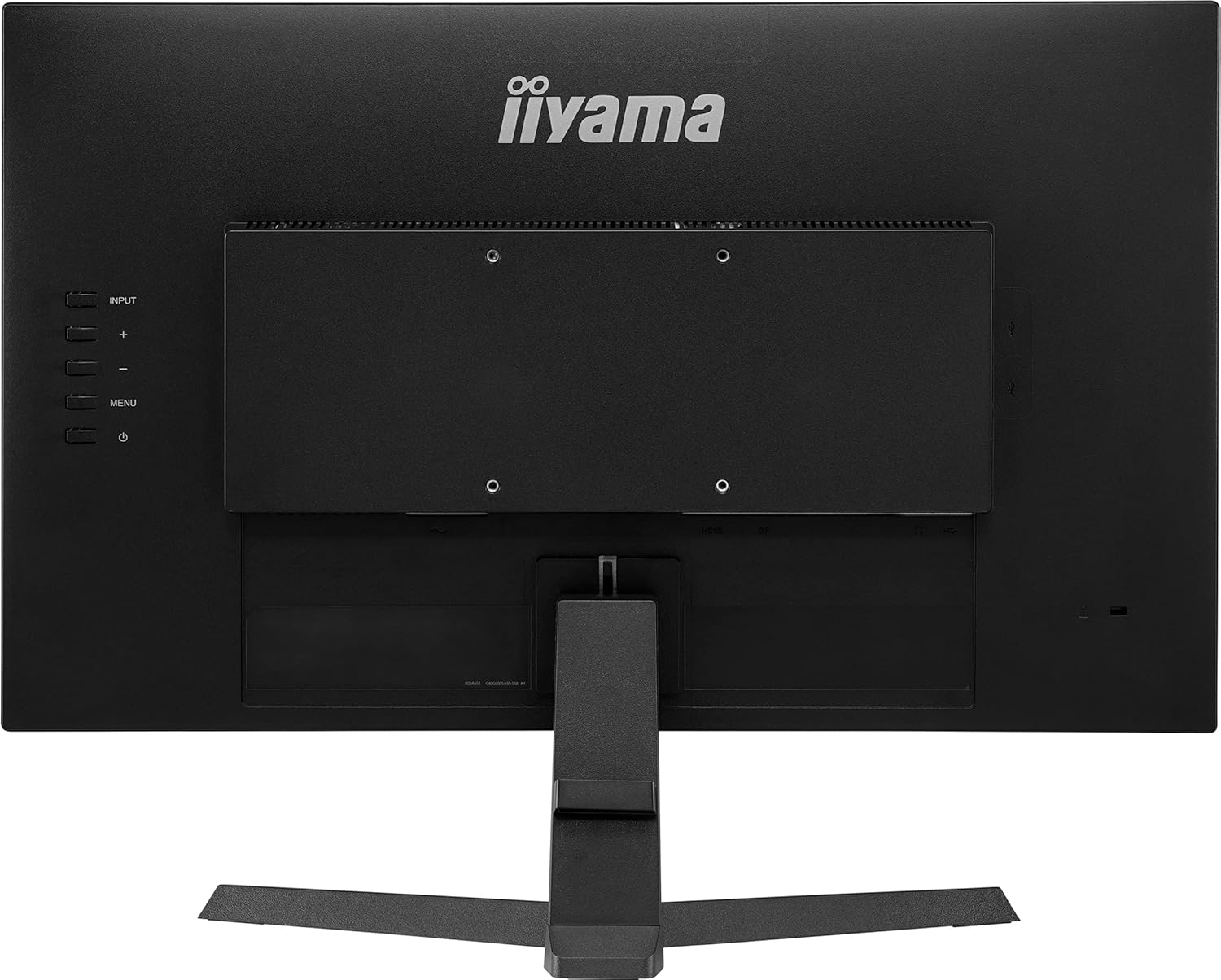
Figura 5.1: posterior view amb botons de control.
5.2 Menú de visualització en pantalla (OSD)
The OSD menu allows you to adjust various monitor settings. Use the buttons on the rear of the monitor to navigate and select options.
- Entrada: Select the video input source (HDMI, DisplayPort).
- Imatge: Ajusta la brillantor, el contrast, la nitidesa i la temperatura del color.
- Àudio: Control volume and mute settings.
- Configuració OSD: Configure OSD language, position, and timeout.
- Configuració de jocs: Access features like Black Tuner, FreeSync, and response time overdrive.
5.3 Adjusting Refresh Rate
To utilize the 165Hz refresh rate, ensure your graphics card and connection cable (DisplayPort recommended) support it. Adjust the refresh rate through your computer's display settings:
- Windows: Right-click on the desktop > Display settings > Advanced display settings > Display adapter properties > Monitor tab > Screen refresh rate.
- macOS: System Settings > Displays > Refresh Rate.
5.4 FreeSync Technology
This monitor supports AMD FreeSync technology, which synchronizes the monitor's refresh rate with your graphics card's frame rate to reduce screen tearing and stuttering. Ensure FreeSync is enabled in the monitor's OSD menu and your graphics card software.
6. Manteniment
6.1 Neteja de la pantalla
Netegeu suaument la pantalla amb un drap suau i sense borrissol. Per a marques difícils, dampNetegeu el drap amb un netejador de pantalles suau i no abrasiu. No ruixeu el netejador directament sobre la pantalla.
6.2 Neteja de la Casing
Feu servir un drap suau i sec per netejar el monitor casing. Eviteu utilitzar detergents o dissolvents forts.
7. Solució De Problemes
| Problema | Causa possible | Solució |
|---|---|---|
| No hi ha imatge a la pantalla | Cable d'alimentació desconnectat; cable de vídeo desconnectat; font d'entrada incorrecta seleccionada. | Comproveu les connexions del cable d'alimentació i de vídeo; seleccioneu la font d'entrada correcta a través del menú OSD. |
| La imatge és borrosa o distorsionada | Resolució incorrecta; Problema amb el controlador de gràfics. | Set resolution to 1920x1080; Update graphics drivers. |
| La pantalla parpelleja | Refresh rate mismatch; Cable issue; FreeSync not properly configured. | Ensure refresh rate is set correctly (165Hz); Try a different video cable; Verify FreeSync settings. |
| No hi ha so dels altaveus/auriculars | Volume too low; Audio cable disconnected; Incorrect audio output selected on PC. | Adjust volume in OSD and PC; Check audio cable connection; Select monitor as audio output on PC. |
8. Especificacions
| Característica | Especificació |
|---|---|
| Marca | iiyama |
| Número de model | G2470HSU-B1 |
| Mida de la pantalla | 24 polzades (23.8 polzades) viewcapaç) |
| Tipus de visualització | LED IPS |
| Resolució | 1920x1080 (Full HD) |
| Freqüència d'actualització | 165 Hz |
| Temps de resposta | 0.8 mil·lisegons |
| Relació d'aspecte | 16:9 |
| Relació de contrast | 1100:1 |
| Brillantor | 250 cd/m² |
| Viewangle ing | 178 Degrees (Horizontal/Vertical) |
| Connectivitat | 1x HDMI, 1x DisplayPort, 2x USB 2.0, Audio Out |
| Sincronització adaptativa | FreeSync |
| Característiques addicionals | Flicker-Free, Black Tuner |
| Tipus de muntatge | Suport de paret (compatible amb VESA) |
| Pes de l'article | 3.2 quilos |
| Consum d'energia | 20 watts |
8.1 Energy Information

Figura 8.1: Etiqueta energètica.
For detailed product information and energy efficiency data, please refer to the official EPREL database: https://eprel.ec.europa.eu/qr/160426
9. Garantia i Suport
The iiyama G2470HSU-B1 monitor comes with a limited warranty. Please refer to the warranty card included in your package or visit the official iiyama weblloc web per obtenir informació detallada sobre els termes i condicions de la garantia.
For technical support, service inquiries, or further assistance, please contact iiyama customer support through their official channels.