
Xtorm FS401
Xtorm 20W Fuel Series Power Bank 10.000mAh User Manual
Model: FS401
Introducció
Thank you for choosing the Xtorm 20W Fuel Series Power Bank 10.000mAh. This manual provides essential information for the safe and efficient use of your power bank. Please read it carefully before use and keep it for future reference.
The Xtorm Fuel Series Power Bank is designed to provide portable power for your mobile devices, featuring 20W power delivery, a 10,000mAh battery capacity, and multiple output ports for versatile charging.
Contingut del paquet
Assegureu-vos que tots els elements siguin presents al paquet:
- 1x Xtorm 20W Fuel Series Power Bank 10.000mAh (Model: FS401)
- 1x Cable USB a USB-C
- 1 x manual d'usuari
Producte acabatview
Familiarize yourself with the components of your Xtorm Power Bank:

Imatge: De dalt a baix view of the Xtorm Fuel Series Power Bank FS401, showcasing its textured grey surface and orange accent.
This image displays the overall design of the power bank, highlighting its compact and ergonomic form factor. The textured surface provides a secure grip, and the orange accent adds a touch of style.

Imatge: Xtorm Fuel Series Power Bank shown next to a credit card and passport, with dimensions indicated.
This image illustrates the portable travel size of the power bank, with dimensions of 136mm length, 71mm width, and 15mm thickness. It weighs 215 grams, making it easy to carry in a pocket or bag.
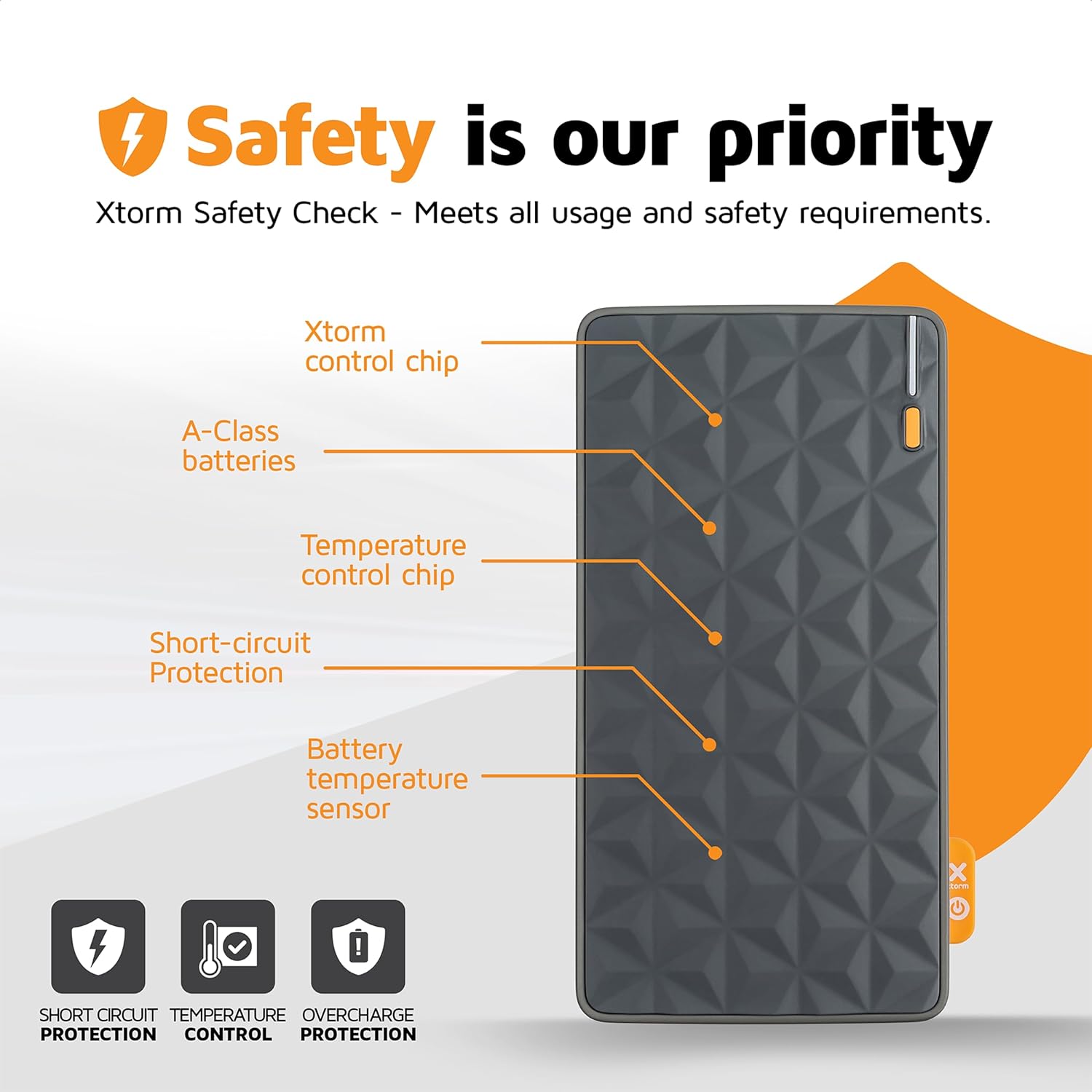
Imatge: Diagram highlighting the safety features of the Xtorm Fuel Series Power Bank.
This diagram points out key internal components responsible for safety, including the Xtorm control chip, A-Class batteries, temperature control chip, short-circuit protection, and battery temperature sensor. These features ensure safe and reliable operation, protecting against short circuits, temperature fluctuations, and overcharge.

Imatge: Xtorm Fuel Series Power Bank demonstrating universal compatibility with various devices.
This image shows the power bank's ability to charge different devices, including smartphones (Apple iPhone, Samsung Galaxy) and tablets, indicating its versatile charging capabilities with 2x Universal USB output and 1x USB-C in/output.

Imatge: Xtorm Fuel Series Power Bank simultaneously charging a smartphone, tablet, and wireless earbuds.
This image illustrates the power bank's capability to charge up to three devices concurrently using its multiple output ports (1x USB-C PD 20W, 2x USB Quick Charge 3.0).
Configuració
Càrrega inicial del banc d'energia
Before first use, it is recommended to fully charge your Xtorm Power Bank.
- Connect the supplied USB to USB-C cable to the USB-C input port on the power bank.
- Connect the other end of the cable to a compatible USB wall charger (not included). For optimal charging speed, use a 20W USB-C PD adapter.
- Els indicadors LED del banc d'energia s'il·luminaran per mostrar el progrés de la càrrega.
- The power bank is fully charged when all LED indicators are solid. A full charge takes approximately 2.5 hours with a 20W PD charger.
Nota: The power bank may not be fully charged out of the box.
Instruccions de funcionament
Carregant els teus dispositius
The Xtorm Power Bank features one USB-C output and two standard USB outputs, allowing you to charge up to three devices simultaneously.
- Identifica el cable de càrrega correcte per al teu dispositiu.
- Connect one end of your device's charging cable to the appropriate output port on the power bank (USB-C or USB-A).
- Connecteu l’altre extrem del cable al dispositiu.
- El banc d'energia començarà a carregar el dispositiu automàticament. Els indicadors LED mostraran el nivell de bateria restant del banc d'energia.
Sortida USB-C: Provides up to 20W Power Delivery (PD) for fast charging compatible smartphones and tablets.
Sortides USB-A: Provide standard USB charging for a wide range of devices.
Comprovació del nivell de la bateria
The power bank is equipped with LED indicators to show its current battery level. Press the power button once to activate the indicators.
- 4 LEDs fixos: 75-100% carregat
- 3 LEDs fixos: 50-75% carregat
- 2 LEDs fixos: 25-50% carregat
- 1 LED fix: 0-25% carregat
- 1 LED parpellejant: Bateria baixa, necessita recàrrega
Manteniment
Un manteniment adequat garanteix la longevitat i el rendiment òptim del teu banc d'energia.
- Neteja: Feu servir un drap suau i sec per netejar la superfície del banc d'energia. No utilitzeu productes químics agressius ni materials abrasius.
- Emmagatzematge: Guardeu el banc d'energia en un lloc fresc i sec, allunyat de la llum solar directa i de temperatures extremes.
- Cura de la bateria: To prolong battery life, avoid fully discharging the power bank frequently. Recharge it when the battery level is low. If storing for extended periods, charge it to about 50-70% every 3-6 months.
- Eviteu les gotes: Protegiu el banc d'energia extern de caigudes i impactes, que poden danyar els components interns.
Resolució de problemes
| Problema | Causa possible | Solució |
|---|---|---|
| El banc d'energia no es carrega |
|
|
| El dispositiu no es carrega des del banc d'energia |
|
|
| Velocitat de càrrega lenta |
|
|
| Power bank gets hot during use/charging |
|
|
Especificacions
| Característica | Detall |
|---|---|
| Número de model | FS401 |
| Capacitat de la bateria | 10,000 mAh |
| Entrada (USB-C) | Lliurament de potència (PD) de 20 W |
| Sortida 1 (USB-C) | Lliurament de potència (PD) de 20 W |
| Sortida 2 (USB-A) | Sortida USB estàndard |
| Sortida 3 (USB-A) | Sortida USB estàndard |
| Dimensions | 136 x 71 x 15 mm |
| Pes | 215 grams |
| Tipus de bateria | Polímer de liti |
| Color | Multicolor (Grey/Orange) |
Garantia i Suport
The Xtorm 20W Fuel Series Power Bank 10.000mAh comes with a 2-year Xtorm warranty.
For warranty claims, technical support, or any questions regarding your product, please contact Xtorm customer service. Refer to the official Xtorm weblloc web per obtenir la informació de contacte més actualitzada.
Important: Do not attempt to disassemble or repair the power bank yourself. This will void the warranty and may cause damage or injury.
Informació de seguretat
Please read and follow these safety guidelines to prevent damage to the product or injury to yourself.
- No exposeu el banc d'energia a temperatures extremes (calor o fred), llum solar directa o humitat elevada.
- Do not use the power bank in wet environments or submerge it in water.
- Keep the power bank away from flammable materials and explosive environments.
- No deixeu caure, perforeu ni desmunteu el banc d'energia extern.
- Mantenir fora de l'abast dels nens.
- Desfeu-vos del banc d'energia de manera responsable d'acord amb la normativa local sobre residus electrònics.
- Only use original or certified charging cables and adapters.
Ask a question about this manual
Ask about setup, troubleshooting, compatibility, parts, safety, or missing instructions. Manuals+ will review the question and use this page’s manual context to help answer it.