
Informació important de seguretat
- Llegiu atentament totes les instruccions abans de muntar i utilitzar.
- Mantingueu els nens i les mascotes allunyats durant el muntatge. Les peces petites poden ser un perill d'asfíxia.
- Ensure all bolts and screws are securely tightened before use. Recheck periodically.
- No us atureu a la cadira.
- Do not use the chair if any parts are missing, damaged, or worn. Contact customer support for replacement parts.
- Maximum weight capacity: 280 pounds. Do not exceed this limit.
- Feu servir la cadira sobre una superfície plana per evitar que es bolqui.
Contingut del paquet
Please refer to the packaging and included assembly guide for a complete list of all components and hardware. Ensure all parts are present before beginning assembly.
Instruccions de configuració
Assembly of the Flash Furniture X40 Gaming Chair is required. Follow the step-by-step instructions provided in the separate assembly manual included with your product. All necessary tools are typically provided.

Imatge: Part posterior view of the chair, illustrating the backrest and lumbar pillow attachment points.
For a visual guide to assembly and features, please watch the official product video:
Video: Official Flash Furniture product overview, demonstrating key features and assembly aspects.
Instruccions de funcionament
1. Funció reclinable
To recline the chair back, locate the lever on the side of the seat (typically on the right). Pull the lever upwards and lean back to your desired angle (between 95° and 175°). Release the lever to lock the backrest in position. The armrests are designed to move with the reclining back for continuous support.
2. Slide-Out Footrest
To extend the footrest, pull the loop located under the front of the seat. The footrest will slide out. You can then flip it up for comfortable leg elevation. To retract, push the footrest back under the seat until it locks into place.

Image: The chair with its footrest fully extended, ready for use.
3. Massaging Lumbar Pillow
The chair includes a removable lumbar pillow with a vibrating massage function. To activate the massage, connect the attached 3-foot USB cord to a compatible USB power source (e.g., computer, USB wall adapter). The pillow can be adjusted or removed as per your comfort preference.

Image: Detail of the massaging lumbar pillow with its USB connection.
4. Ajust d'alçada del seient
To adjust the seat height, locate the pneumatic lever under the seat (typically on the left). While seated, pull the lever up to lower the seat. To raise the seat, stand up slightly and pull the lever up. Release the lever to lock the height.
5. 360-Degree Swivel
The chair is equipped with a 5-star nylon base and sporty casters, allowing for smooth 360-degree rotation and easy movement across various surfaces.
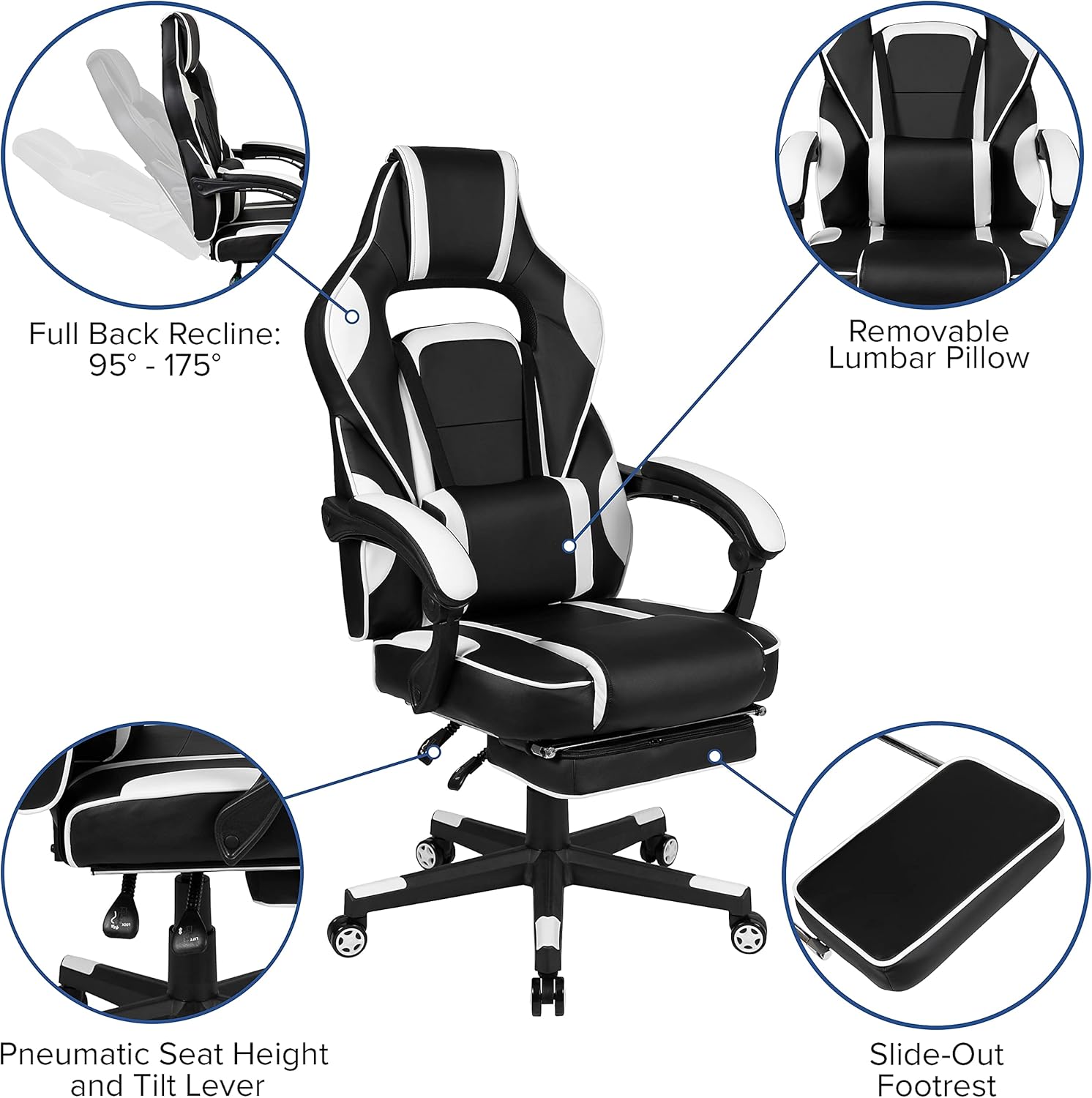
Imatge: Més deview of chair features including recline, lumbar support, height adjustment, and footrest.
Manteniment
Instruccions de neteja
For routine cleaning of the faux leather upholstery, use a solvent and water-based cleaner, such as foam. Apply the cleaner to a soft cloth and gently wipe the surface. Do not saturate the material. Avoid harsh chemicals or abrasive cleaners, as these may damage the finish. Regularly wipe down the base and casters to prevent dust and debris buildup.
Atenció General
- Reviseu periòdicament tots els elements de fixació per assegurar-vos que romanen ajustats.
- Eviteu l'exposició prolongada a la llum solar directa per evitar la decoloració i la degradació del material.
- Keep sharp objects away from the upholstery to prevent punctures or tears.
Resolució de problemes
Chair Not Adjusting Height
Ensure the pneumatic lever is fully engaged. If the issue persists, the gas lift cylinder may need replacement. Contact customer support.
Sorolls de grinyols
Check all bolts and screws for tightness. Lubricate moving parts, such as the tilt mechanism or casters, with a silicone-based lubricant if necessary.
Footrest Not Extending/Retracting Smoothly
Inspect the footrest mechanism for any obstructions. Ensure the tracks are clean and free of debris. A small amount of lubricant may improve movement.
Especificacions
| Característica | Detall |
|---|---|
| Marca | Mobles Flash |
| Nom del model | Flash Furniture X40 |
| Número de model de l'article | CH-00288-WH-GG |
| Color | Blanc |
| Dimensions del producte | 29.25 "P x 28" W x 51.25" H |
| Profunditat del seient | 21.25 polzades |
| Alçada interior del respatller del seient | 31 polzades |
| Arm Height (from floor) | 27.25-30.25"H |
| Recomanació de pes màxim | 280 lliures |
| Material | Metal, Twill, Plastic, Polyurethane, PVC, Plywood, Foam, Leather/Faux Leather |
| Estil d'esquena | Reclining (95° ~ 175°) |
| Característica especial | Adjustable, Massaging Lumbar, Slide-Out Footrest |
| UPC | 889142923763 |

Image: Dimensional drawing of the chair, indicating height, width, and depth ranges.
Garantia i Suport
For warranty information or technical support, please refer to the documentation included with your purchase or visit the official Flash Furniture website. If you require assistance with parts or assembly, please contact Flash Furniture customer service directly.