
Introducció
This manual provides detailed instructions for the safe and efficient operation of your KORAD KWR103 Programmable DC Power Supply. Please read this manual thoroughly before using the device to ensure proper functionality and to prevent damage or injury. The KWR103 is a versatile programmable DC power supply offering a wide range of voltage and current outputs, including 60V/15A/300W, designed for various testing and application needs.
Informació important de seguretat
Always observe the following safety precautions to prevent electric shock, injury, or damage to the device:
- Assegureu-vos que la font d'alimentació estigui connectada a una presa de corrent altern amb connexió a terra i el volum correcte.tage.
- No utilitzeu el dispositiu en mullat o damp condicions.
- No obriu la c.asing; no hi ha peces a l'interior que l'usuari pugui reparar. Demaneu el servei tècnic a personal qualificat.
- Verifiqueu la polaritat i el volum correctestage/current settings before connecting to any load.
- Eviteu curtcircuitar els terminals de sortida.
- Desconnecteu l'alimentació abans de fer o canviar connexions.
- Assegureu-vos que hi hagi una ventilació adequada al voltant de la unitat per evitar el sobreescalfament.
Producte acabatview
The KORAD KWR103 is a high-precision programmable DC power supply. Familiarize yourself with its components:
Panell frontal

Figura 1: Front panel of the KORAD KWR103, showing the display, control buttons, adjustment knob, and output terminals.
- Visualització: Digital readouts for voltage (V) i corrent (A).
- Memory Buttons (M1-M5): For saving and recalling preset voltage i valors actuals.
- Botó d'ajust: Rotary encoder for precise adjustment of voltage i corrent.
- Botons de funció: OVP, OCP, BEEP, ON/OFF, VSET, ISET, V/A PRIORITY for various settings and controls.
- Terminals de sortida: Positive (+), Negative (-), and Ground (GND) connections. Max 10A output directly from front terminals.
- Interruptor d'alimentació: Control d'alimentació principal de la unitat.
Panell posterior

Figura 2: Rear panel of the KORAD KWR103, featuring power input, communication ports, and sense terminals.
- Entrada d'alimentació de CA: Per connectar el cable d'alimentació principal.
- Portafusibles: Conté el fusible de protecció.
- Sense Terminals (SENSE TRIG IN+): For remote sensing to compensate for voltagcaiguda de e a través dels cables de càrrega.
- Terminals RS485: Per a comunicació RS485.
- Port USB: For computer control and communication.
- Port RS232: Per a la comunicació en sèrie.
- Port LAN: For network communication and control.
Accessoris inclosos
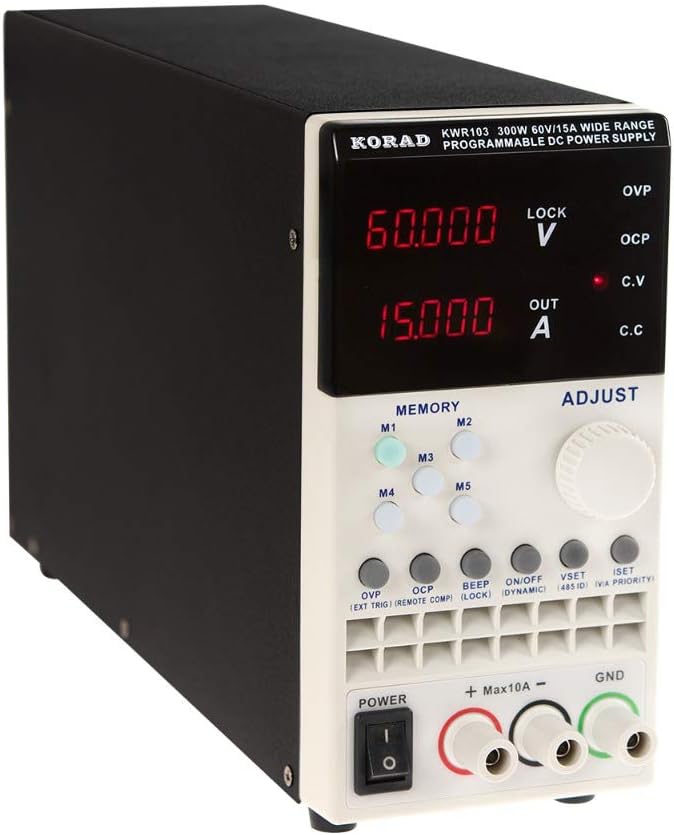
Figura 3: The KORAD KWR103 power supply shown with its standard accessories, including power cord, output cables, USB cable, RS232 cable, and software CD.
Your KWR103 package typically includes:
- KORAD KWR103 Programmable DC Power Supply Unit
- Cable d'alimentació CA
- Output Test Leads (Red/Black)
- Cable de comunicació USB
- Cable de comunicació RS232
- Software CD (for PC control)
- Manual d'usuari (aquest document)
Configuració
- Desembalatge: Traieu amb cura la font d'alimentació i tots els accessoris de l'embalatge. Inspeccioneu-ho per veure si hi ha signes de danys.
- Col·locació: Place the unit on a stable, level surface with adequate ventilation. Ensure no vents are obstructed.
- Connexió d'alimentació:
- Ensure the power switch on the front panel is in the OFF position.
- Connect the supplied AC power cord to the AC power input on the rear panel.
- Connecteu l'altre extrem del cable d'alimentació de CA a una presa de corrent amb connexió a terra.
- Connexió de càrrega:
- Connect the red output test lead to the positive (+) terminal and the black output test lead to the negative (-) terminal on the front panel.
- Connect the other ends of the test leads to your load, ensuring correct polarity. For currents exceeding 10A, use the rear output terminals (if available on your specific model) or thicker gauge wires directly to the internal terminals, following safety guidelines.
- For precise voltage regulation at the load, especially with long cables or high currents, connect the remote sense wires (SENSE TRIG IN+) from the rear panel directly across your load.
- Communication Interface Connection (Optional):
- USB: Connect the USB cable from the rear panel to your computer.
- RS232: Connect the RS232 cable from the rear panel to your computer's serial port or a USB-to-serial adapter.
- LAN: Connect an Ethernet cable from the rear panel to your network router or switch.
- Install the provided software drivers and control application from the included CD or manufacturer's weblloc.
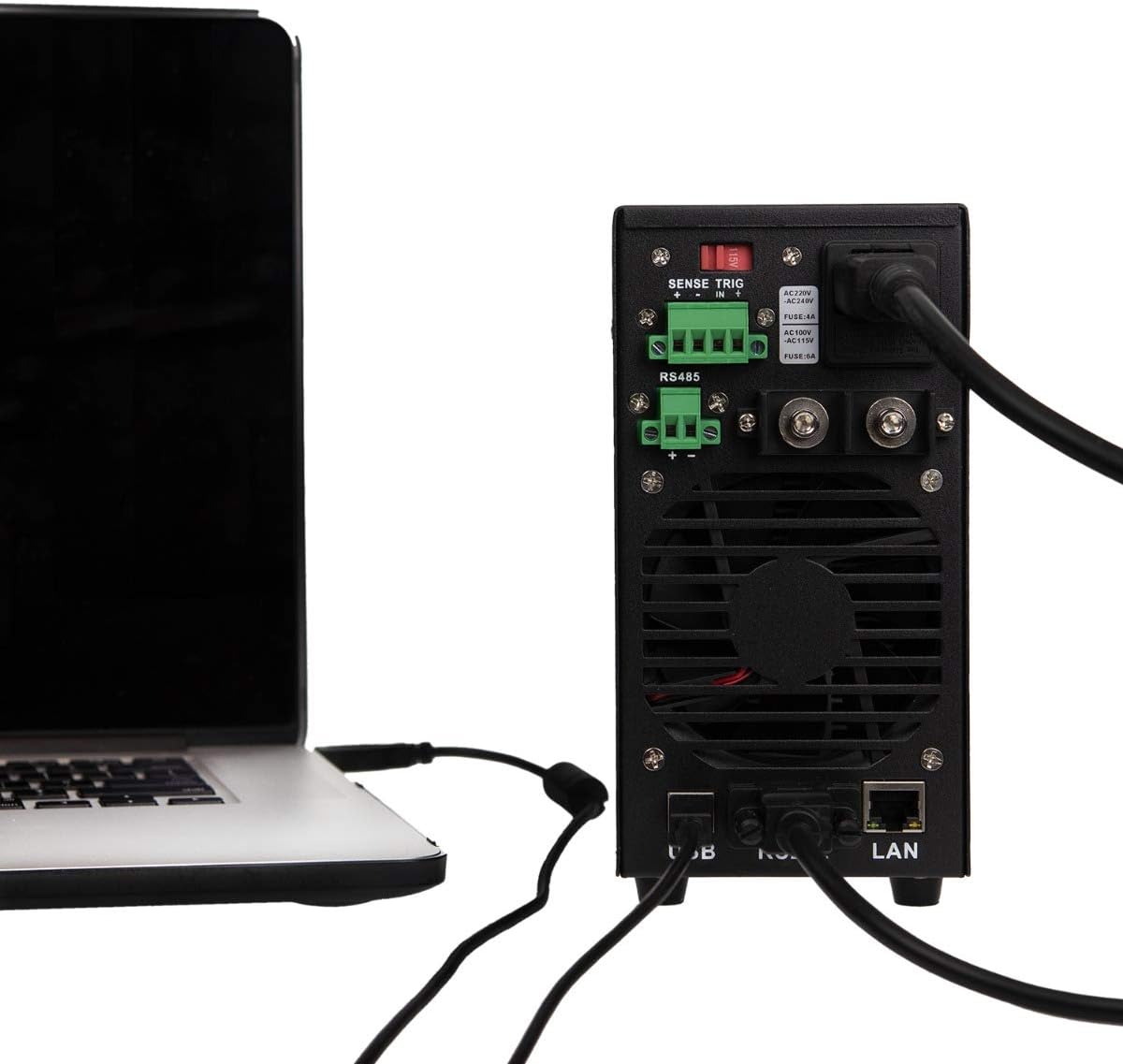
Figura 4: Example of the KORAD KWR103 rear panel connected to a laptop, illustrating USB and LAN connections for remote control.
Instruccions de funcionament
- Encès: Flip the power switch on the front panel to the ON position. The display will illuminate.
- Configuració Voltage i actual:
- Premeu el botó VSET botó per introduir el voltage setting mode. The voltage display will flash.
- Gira el Botó d'ajust to set the desired voltage. Press the knob to move between digits for fine adjustment.
- Premeu el botó ISET button to enter current setting mode. The current display will flash.
- Gira el Botó d'ajust to set the desired current limit. Press the knob to move between digits.
- Premeu VSET or ISET again to exit setting mode, or wait a few seconds for it to exit automatically.
- Control de sortida:
- Després de configurar el voltage and current, press the ON/OFF button to enable the output. The "OUT" indicator will light up.
- Premeu ON/OFF again to disable the output.
- Memory Functions (M1-M5):
- Desar la configuració: Establiu el volum desitjattage i corrent. Premeu i manteniu premut un dels M1-M5 buttons until a beep sounds, indicating the settings are saved.
- Recalling Settings: Premeu breument un dels M1-M5 buttons to recall the saved settings.
- Més del voltage Protection (OVP) and Over Current Protection (OCP):
- Premeu el botó OVP button to set the over-voltage protection limit. Use the Botó d'ajust.
- Premeu el botó OCP button to set the over-current protection limit. Use the Botó d'ajust.
- These functions automatically shut down the output if the set limits are exceeded, protecting the load and the power supply.
- Comandament a distància:
- Once the communication drivers and software are installed, you can control the power supply via USB, RS232, or LAN.
- Refer to the software manual for detailed instructions on using the PC control application.
Manteniment
- Neteja: Desconnecteu l'alimentació de la presa de corrent abans de netejar-lo. Feu servir un drap suau i sec per netejar l'exterior. No utilitzeu productes de neteja abrasius ni dissolvents.
- Ventilació: Ensure the ventilation openings are clear of dust and debris. Periodically clean the fan intake/exhaust areas.
- Substitució de fusibles: If the unit does not power on, the fuse may need replacement.
- Desconnecteu el cable d'alimentació de CA.
- Localitzeu el portafusibles al panell posterior.
- Carefully remove the fuse holder and replace the fuse with one of the same type and rating (e.g., FUSE: 4A for AC220V, FUSE: 6A for AC110V).
- Reinsert the fuse holder and reconnect the AC power.
Resolució de problemes
| Problema | Causa possible | Solució |
|---|---|---|
| La unitat no s'encén. | No AC power; Blown fuse; Power switch off. | Check AC power connection; Replace fuse (see Maintenance); Ensure power switch is ON. |
| Sense sortida voltage / actual. | Output disabled; OVP/OCP triggered; Incorrect settings; Loose connections. | Press ON/OFF button; Check OVP/OCP settings; Verify voltage/current settings; Secure output connections. |
| Voltage/Current unstable. | Poor load connection; Remote sense not used or incorrectly connected; Overheating. | Check load connections; Use remote sense for critical applications; Ensure adequate ventilation. |
| El comandament a distància no funciona. | Incorrect cable; Driver not installed; Software configuration error. | Verify correct USB/RS232/LAN cable; Install drivers; Check software settings and communication parameters. |
Especificacions
| Paràmetre | Valor |
|---|---|
| Model | KWR103 |
| Vol. De sortidatage | 0-60V |
| Corrent de sortida | 0-15A |
| Potència de sortida | 300W |
| Voltage Resolució | 1mV |
| Resolució actual | 1 mA |
| Interfícies | LAN, USB, RS232, RS485 |
| Funcions de protecció | OVP (Over Voltage Protection), OCP (Over Current Protection), OTP (Over Temperature Protection) |
| Pes de l'article | 11.29 lliures (aprox. 5.12 kg) |
| Dimensions del paquet | 16.14 x 11.22 x 7.68 polzades (aprox. 41 x 28.5 x 19.5 cm) |
| Mètode de refrigeració | Aire |
Garantia i Suport
For warranty information and technical support, please refer to the documentation included with your purchase or contact KORAD customer service. Keep your purchase receipt as proof of purchase for warranty claims.
For the latest drivers, software, and additional support resources, please visit the official KORAD weblloc.