
Benro FRHN24C
Benro Rhino Series FRHN24C Carbon Fiber Tripod Instruction Manual
Introducció
Thank you for choosing the Benro Rhino Series FRHN24C Carbon Fiber Tripod. This manual provides essential information for the safe and effective use of your tripod. Please read it thoroughly before operation and retain it for future reference.
The Benro FRHN24C is designed for photographers and videographers seeking a lightweight, stable, and versatile support system. Its carbon fiber construction, multi-angle leg adjustments, and monopod conversion feature make it suitable for a wide range of creative applications, from studio work to outdoor adventures.
Informació de seguretat
- Always ensure all locks and adjustments are securely tightened before mounting equipment or leaving the tripod unattended.
- Do not exceed the maximum weight limit of 39.68 lbs (18 kg) to prevent damage to the tripod or attached equipment.
- Be cautious when extending or collapsing legs to avoid pinching fingers.
- Avoid exposing the tripod to extreme temperatures, corrosive chemicals, or prolonged direct sunlight, which can degrade materials.
- When carrying the tripod with a camera attached, ensure the camera is securely mounted and the tripod is folded to a compact size.
- Do not use the tripod as a climbing aid or for purposes other than supporting camera equipment.
Contingut del paquet
Verifiqueu que tots els elements siguin presents al vostre paquet:
- Benro Rhino Series FRHN24C Carbon Fiber Tripod
- Maleta de transport
- Spiked Feet (set of 3)
- Hex Key / Adjustment Tool
- Manual d'instruccions (aquest document)

Producte acabatview
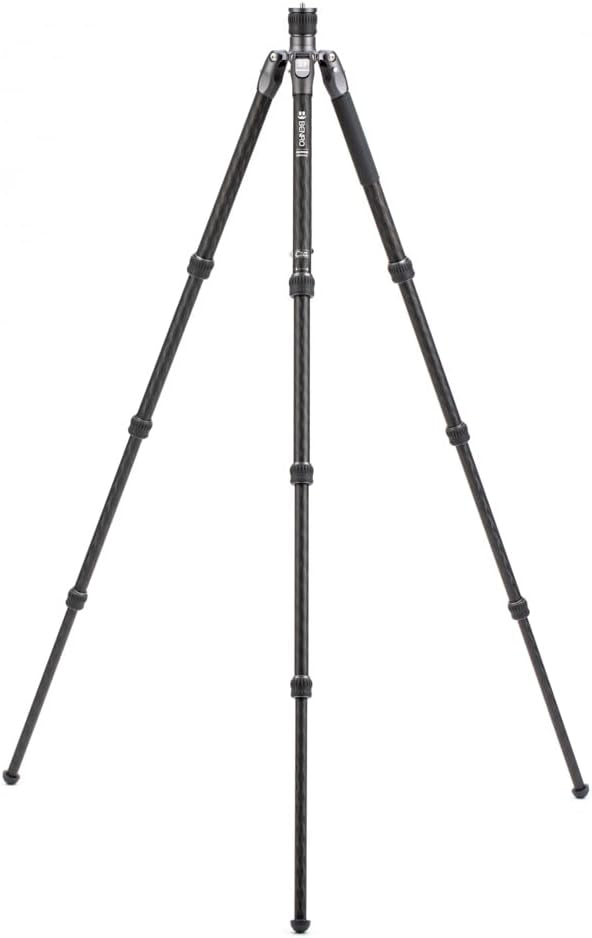
Familiarize yourself with the main components of your Benro FRHN24C tripod.
- Mounting Plate/Screw: For attaching a camera or tripod head.
- Columna central: Extends vertically for additional height.
- Bloqueig de columna central: Secures the center column at desired height.
- Leg Angle Adjustment Locks: Allow independent adjustment of leg angles.
- Potes del trípode: Carbon fiber construction with multiple sections.
- Twist Locks: Securely lock leg sections at desired length.
- Peus de goma: Provide stable grip on various surfaces. Can be replaced with spiked feet.
- Monopod Leg: One leg is detachable for monopod conversion.
- Ganxo accessori: Located at the bottom of the center column for adding weight for stability.

Configuració
1. Desplegament del trípode
- Release the leg angle adjustment locks on each leg.
- Swing the legs outwards until they are fully extended or set to your desired angle.
- Ensure the leg angle adjustment locks click into place to secure the leg position.
2. Adjusting Leg Length (Twist Locks)
- To extend a leg section, twist the corresponding twist lock counter-clockwise until it loosens.
- Estireu la secció de la cama cap a fora fins a la longitud desitjada.
- Twist the lock clockwise to securely fasten the leg section. Repeat for all sections and legs.
3. Attaching a Tripod Head or Camera
- If using a separate tripod head, screw it onto the 3/8"-16 mounting screw located on the top plate of the center column. Ensure it is tightened securely.
- If mounting a camera directly (without a head), ensure your camera has a 1/4"-20 thread. An adapter may be required if the tripod's screw is 3/8"-16.
- Always double-check that your equipment is firmly attached before use.
Instruccions de funcionament
1. Adjusting Center Column Height
- Loosen the center column lock by twisting it counter-clockwise.
- Puja o baixa la columna central a l'alçada desitjada.
- Tighten the center column lock clockwise to secure it.

2. Conversió de monopeu
- Identifica la pota amb l'empunyadura d'escuma. Aquesta és la pota del monopeu desmuntable.
- Unscrew this leg from the tripod chassis by twisting it counter-clockwise.
- Desenrosqueu la columna central del xassís del trípode.
- Screw the detached leg onto the bottom of the center column.
- Ensure both connections are secure before use.

3. Using the Accessory Hook
The hook located at the bottom of the center column can be used to hang a weight (e.g., a camera bag) to increase the tripod's stability, especially in windy conditions or when using heavy equipment.
Manteniment
- Neteja: Netegeu el trípode amb un drap suauamp cloth after each use, especially if used in sandy, dusty, or wet environments. Avoid harsh chemicals.
- Lubricació: The twist locks and leg sections are designed for smooth operation. Do not apply oil or grease unless specifically instructed by Benro, as this can attract dirt and impair function.
- Emmagatzematge: Store the tripod in a dry, cool place, preferably in its carrying case, to protect it from dust and damage.
- Inspecció: Regularly inspect all screws, locks, and joints for tightness and wear. Tighten any loose screws with the provided hex key.
Resolució de problemes
- Problem: Legs do not extend or retract smoothly.
- Solució: Check if the twist locks are fully loosened. Clean any dirt or sand from the leg sections and twist lock mechanisms. Do not force the legs.
- Problem: Tripod feels unstable.
- Solució: Ensure all leg sections are fully extended and all twist locks are securely tightened. Verify that leg angle adjustment locks are engaged. Consider hanging a weight from the accessory hook for added stability.
- Problem: Camera/head wobbles on the mounting plate.
- Solució: Ensure the camera or tripod head is securely screwed onto the mounting plate. Check for any play in the center column lock.
Especificacions
| Característica | Detall |
|---|---|
| Número de model | FRHN24C |
| Material | Fibra de carboni |
| Altura màxima | 66.33 polzades (168.48 cm) |
| Altura mínima | 19.09 polzades (48.49 cm) |
| Límit de pes | 39.68 lliures (18 kg) |
| Pes de l'article | 4.44 lliures (2.01 kg) |
| Mides plegades | 22.04 x 5.51 x 5.51 polzades (56 x 14 x 14 cm) |
| Diàmetre de la cama | 28.6 mil·límetres |
| Dispositius compatibles | Càmera |
| Característica especial | Ajustable, portàtil |
Informació de la garantia
The Benro Rhino Series FRHN24C comes with a standard limited warranty of 3 anys from the date of purchase for the original owner.
If you register your product online, the warranty is extended by an additional 2 anys, totaling 5 anys in applicable regions. Please visit the official Benro website for warranty registration and full terms and conditions.
Suport
For further assistance, technical support, or to inquire about replacement parts, please contact Benro customer service through their official weblloc web o la informació de contacte que s'inclou amb l'embalatge del producte.
També podeu visitar el Benro Store on Amazon per obtenir més informació sobre el producte i recursos.
Ask a question about this manual
Ask about setup, troubleshooting, compatibility, parts, safety, or missing instructions. Manuals+ will review the question and use this page’s manual context to help answer it.