
1. Introducció
The KEFAR KR-H8 is a versatile wireless barcode scanner designed for efficient data capture in various environments such as retail stores, supermarkets, and inventory management. This device supports both 1D and 2D barcodes, including QR codes, Data Matrix, and PDF417, offering flexible connectivity via 2.4G wireless technology with a convenient charging cradle. Its robust design and broad compatibility ensure reliable performance across different operating systems.
2. Característiques clau
- Connectivitat sense fils: Utilizes 2.4G wireless technology for reliable data transmission with a dedicated charging cradle.
- Broad Barcode Support: Capable of reading both 1D and 2D barcodes, including QR Code, Data Matrix, PDF417, UPC/EAN, Code128, Code39, and more.
- Múltiples modes d'escaneig: Supports both manual trigger and continuous automatic scanning modes.
- Alt rendiment: Features excellent decoding capabilities for high-speed and accurate scanning.
- Plug-and-Play: Easy setup without the need for additional drivers.
- Àmplia compatibilitat: Compatible with various operating systems including Windows XP/7/8/10, Mac OS, Linux, Android, and iOS.
- Disseny durador: Constructed with military-grade ABS material for earthquake resistance and fall protection.
- Disseny ergonòmic: Comfortable handheld design for prolonged use.
3. Contingut del paquet
Si us plau, verifiqueu que tots els elements que s'enumeren a continuació estiguin inclosos al vostre paquet:

Image: Contents of the KEFAR KR-H8 barcode scanner package, showing the scanner, charging base, USB cable, instructions, and 2.4G wireless receiver.
- Caixa d'embalatge
- Barcode Scanner (KR-H8)
- Manual d'instruccions
- Cable de càrrega USB
- Receptor sense fil 2.4G
- Base de càrrega
4. Instruccions de configuració
4.1 Càrrega inicial
Before first use, ensure the scanner is fully charged. Place the scanner into the charging cradle. Connect the USB charging cable to the cradle and then to a power source (e.g., computer USB port or USB wall adapter). The LED indicator on the scanner will show charging status.

Image: The KEFAR KR-H8 wireless barcode scanner resting in its charging cradle, with the 2.4G wireless receiver connected to the cradle.
4.2 Connecting to a Host Device
- Insert the 2.4G wireless receiver into an available USB port on your computer, laptop, tablet, or POS system.
- The operating system will typically recognize and install the necessary drivers automatically (plug-and-play).
- The scanner should automatically pair with the receiver. A successful connection is usually indicated by a specific sound or LED status on the scanner.
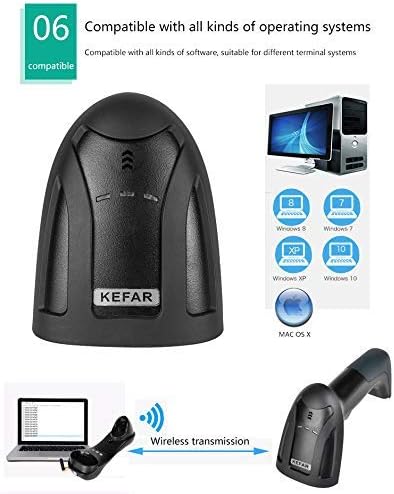
Image: Diagram illustrating the wireless connection between the KEFAR KR-H8 scanner, its charging cradle with a 2.4G receiver, and a laptop, demonstrating plug-and-play compatibility with various operating systems.
5. Instruccions de funcionament
5.1 Escaneig de codis de barres
To scan a barcode, aim the scanner's light beam at the barcode. Ensure the entire barcode is within the scanning area. Press the trigger button (for manual mode) or position the barcode in front of the scanner (for continuous mode). A successful scan is indicated by a beep and/or an LED flash.

Image: The KEFAR KR-H8 barcode scanner highlighting its ergonomic design and illustrating correct and incorrect scanning angles for optimal performance.
5.2 Tipus de codis de barres compatibles
The KR-H8 scanner supports a wide range of 1D and 2D barcode symbologies:
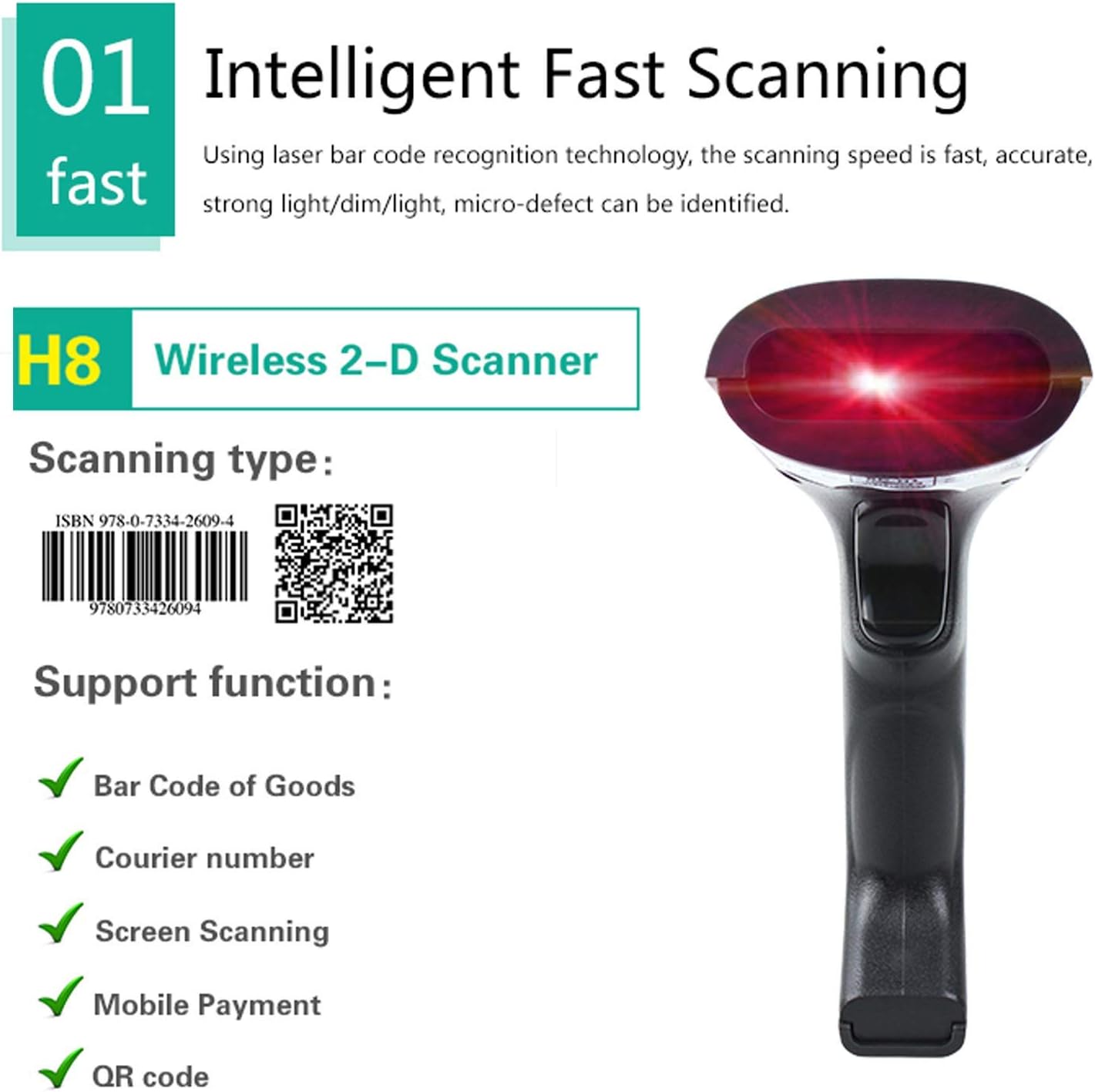
Image: The KEFAR KR-H8 scanner demonstrating its intelligent fast scanning capability, showing examples of 1D (ISBN 9780733426094) and 2D (QR code https://weixin.qq.com/g/AetXx1YeQLQJWZ8m) barcodes it can read, along with supported functions like Bar Code of Goods, Courier number, Screen Scanning, Mobile Payment, and QR code.
- Codis de barres 1D: Codabar, Code11, Code39/Code93, UPC/EAN, Code128/EAN128, InterLeaved 2of5, Matrix 2of5, MSI, Standard 2of5, UPC-A, UPC-E, EAN-13, EAV-8, ISBN/ISSN, Industrial 25 Codes, Matrix 25 Codes, 11 Codes, MSL/PIESSEY, UK/PLESSEY, UC-C/EAN128 Codes.
- Codis de barres 2D: QR-CODE, DATA MATRIX (ECC200, ECC000, 050, 080, 100, 140), PDF417, Micro PDF417, Micro QR Code, Aztec, MaxiCode, Rectangular Data Matrix, Chinese Sensible Code.
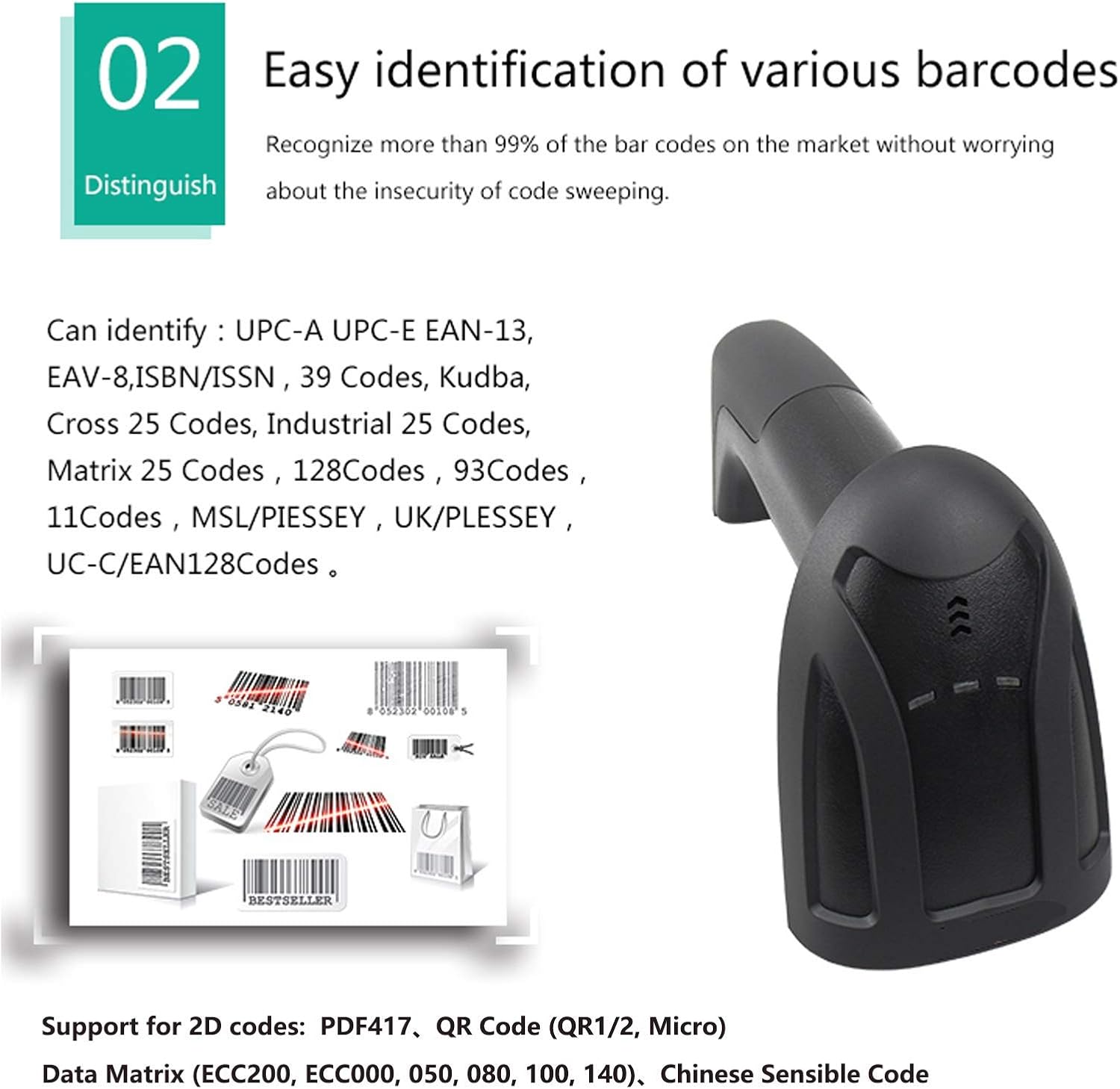
Image: The KEFAR KR-H8 barcode scanner demonstrating its ability to easily identify various barcode types, including common 1D and 2D symbologies, with examples of different barcode formats.
5.3 Modes d'escaneig
The scanner can be configured for different scanning behaviors:
- Manual Handheld Scan Mode: Press the trigger button to initiate a scan.
- Mode d'escaneig automàtic: The scanner continuously scans for barcodes without needing to press the trigger. This mode is ideal for hands-free operation.
Refer to the included instructions manual for specific programming barcodes to switch between these modes.

Image: The KEFAR KR-H8 barcode scanner showcasing its high-quality scan lens, humanized design, high-end button, and plug-and-play compatibility with Windows, capable of scanning various 1D and 2D barcodes, including those that are wide, thin, or damaged.
6. Manteniment
- Neteja: Feu servir un drap suau i sec per netejar l'exterior de l'escàner. Per a la finestra d'escaneig, feu servir un drap de neteja de lents per evitar ratllades. No utilitzeu productes de neteja abrasius ni dissolvents.
- Cura de la bateria: Charge the scanner when the low battery indicator (e.g., two beeps) is activated to ensure optimal performance and battery longevity.
- Emmagatzematge: Guardeu l'escàner en un lloc fresc i sec, allunyat de la llum solar directa i de temperatures extremes.
7. Solució De Problemes
- Scanner Not Decoding Certain Barcodes: Some specific barcode types may require programming. If the scanner fails to decode certain barcodes, please refer to the programming guide in the full manual or contact customer support for command barcodes to program the device.
- Scanner Beeps Twice and Stops Working: This indicates a low battery. Immediately place the scanner in its charging cradle and connect it to a power source.
- No Connection to Host Device: Ensure the 2.4G wireless receiver is securely plugged into a functional USB port. Verify that the scanner is charged and powered on. Try plugging the receiver into a different USB port or restarting the host device.
- Poor Scanning Performance: Ensure the barcode is clean, undamaged, and well-lit. Adjust the distance and angle between the scanner and the barcode.
8. Especificacions
| Característica | Especificació |
|---|---|
| Número de model | KR-H8 |
| Capacitat de descodificació (1D) | Codabar, Code11, Code39/Code93, UPC/EAN, Code128/EAN128, InterLeaved 2of5, Matrix 2of5, MSI, Standard 2of5 |
| Capacitat de descodificació (2D) | QR-CODE, DATA MATRIX, PDF417, Micro PDF417, Micro QR Code, Aztec, MaxiCode, Rectangular Data Matrix |
| Service Life of Button | Up to 8 million times |
| Mode de descodificació | Trigger or Continuous mode |
| Capacitat | 256K (stores approx. 2000pcs Code128) |
| Distància de comunicació | 30 meters indoor, 50 meters outdoor |
| Precisió de l'escaneig | ≥ 4 mil |
| Environmental Brightness | 265 lux |
| Warning Method | Zumbador i indicador LED |
| Sistemes operatius | Compatible with MAC OS, Windows XP/7/8/10, Linux, Android, iOS |
| Aseismic Capacity | 2 meters free fall |
| Font de llum | 630nm LED light |
| Temps de càrrega | 3 - 4 hores |
| Operació Voltage | DC 3.3 - 4.2V +/-5 percent |
| Temperatura de funcionament | 0 - 60 Deg.C |
| Temperatura d'emmagatzematge | -40 - 80 Deg.C |
| Humitat | 5 - 90 percent (non-condensing) |
| Estàndard | IP54 |
| Longitud del cable de càrrega | 1.2 metres |
| UPC | 688529121507 |

Image: The KEFAR KR-H8 barcode scanner highlighting its 'Earthquake Resistant and Fall-proof Military Shell' made from military ABS, designed to withstand external pressure and impacts.
9. Garantia i Suport
For technical assistance, warranty claims, or further inquiries regarding your KEFAR KR-H8 Wireless Barcode Scanner, please contact your original retailer or the manufacturer's customer support. Please retain your proof of purchase for warranty validation.