
1. Introducció
Gràcies per la compraasing the Boytone BT-120MX 12 Channel Bluetooth Studio Audio Mixer. This professional audio mixer is designed for a variety of applications, including studio recording, live performances, and DJ setups. It features 12 channels, Bluetooth connectivity, a USB MP3 player, PC recording capabilities, 48V phantom power, and a 24-bit digital effect processor. This manual provides detailed instructions for setup, operation, and maintenance to ensure optimal performance and longevity of your device.
2. Informació de seguretat
- Font d'alimentació: Feu servir només l'adaptador de corrent especificat. Assegureu-vos que el volumtage coincideix amb la vostra font d'alimentació local.
- Aigua i humitat: Do not expose the mixer to water, rain, or excessive moisture. Avoid placing liquid-filled objects on the unit.
- Ventilació: Assegureu-vos que hi hagi una ventilació adequada al voltant de la unitat. No bloquegeu les obertures de ventilació.
- Fonts de calor: Keep the mixer away from heat sources such as radiators, heat registers, stoves, or other heat-producing appliances.
- Neteja: Desconnecteu l'alimentació abans de netejar. Feu servir un drap sec i suau. No utilitzeu netejadors líquids ni aerosols.
- Manteniment: No intenteu atendre aquest producte vosaltres mateixos. Consulteu tots els serveis a personal de servei qualificat.
- Potència fantasma: When using 48V phantom power, ensure condenser microphones are connected before activating to prevent damage.
3. Contingut del paquet
Verifiqueu que tots els elements siguin presents al paquet:
- Boytone BT-120MX Audio Mixer
- Adaptador d'alimentació
- Cable USB
- Manual d'usuari (aquest document)
4. Producte acabatview
The Boytone BT-120MX is a versatile 12-channel mixer designed for comprehensive audio control. It features a robust metal chassis and intuitive controls for various audio sources.

Figura 4.1: Frontal view of the Boytone BT-120MX Audio Mixer. This image displays the full layout of the mixer's controls and input/output sections.
4.1 Connexions d'entrada/sortida
The mixer offers a wide range of connectivity options for various audio equipment.

Figura 4.2: Detallada view of the input and output ports on the Boytone BT-120MX. This includes XLR/1/4" combo jacks, RCA inputs, 1/4" mono/stereo inputs, send/return jacks, and main outputs.
- XLR/1/4" Combo Inputs (Channels 1-4): For microphones (XLR) or line-level instruments (1/4").
- 1/4" Line Inputs (Channels 5-12): For line-level instruments or audio devices.
- RCA Inputs (Stereo Pairs): For connecting consumer audio devices.
- Main Outputs (1/4" L/R): Connecteu-vos a l'alimentació ampelevadors o altaveus alimentats.
- Headphone Jack (1/4"): Per monitoritzar l'àudio.
- Port USB: For PC recording/playback and USB MP3 player functionality.
4.2 Característiques del tauler de control
The mixer's control panel provides comprehensive adjustments for each channel and master output.

Figure 4.3: Close-up of the Bluetooth and USB section of the Boytone BT-120MX. This highlights the USB port for media playback and PC connection, and the Bluetooth indicator.
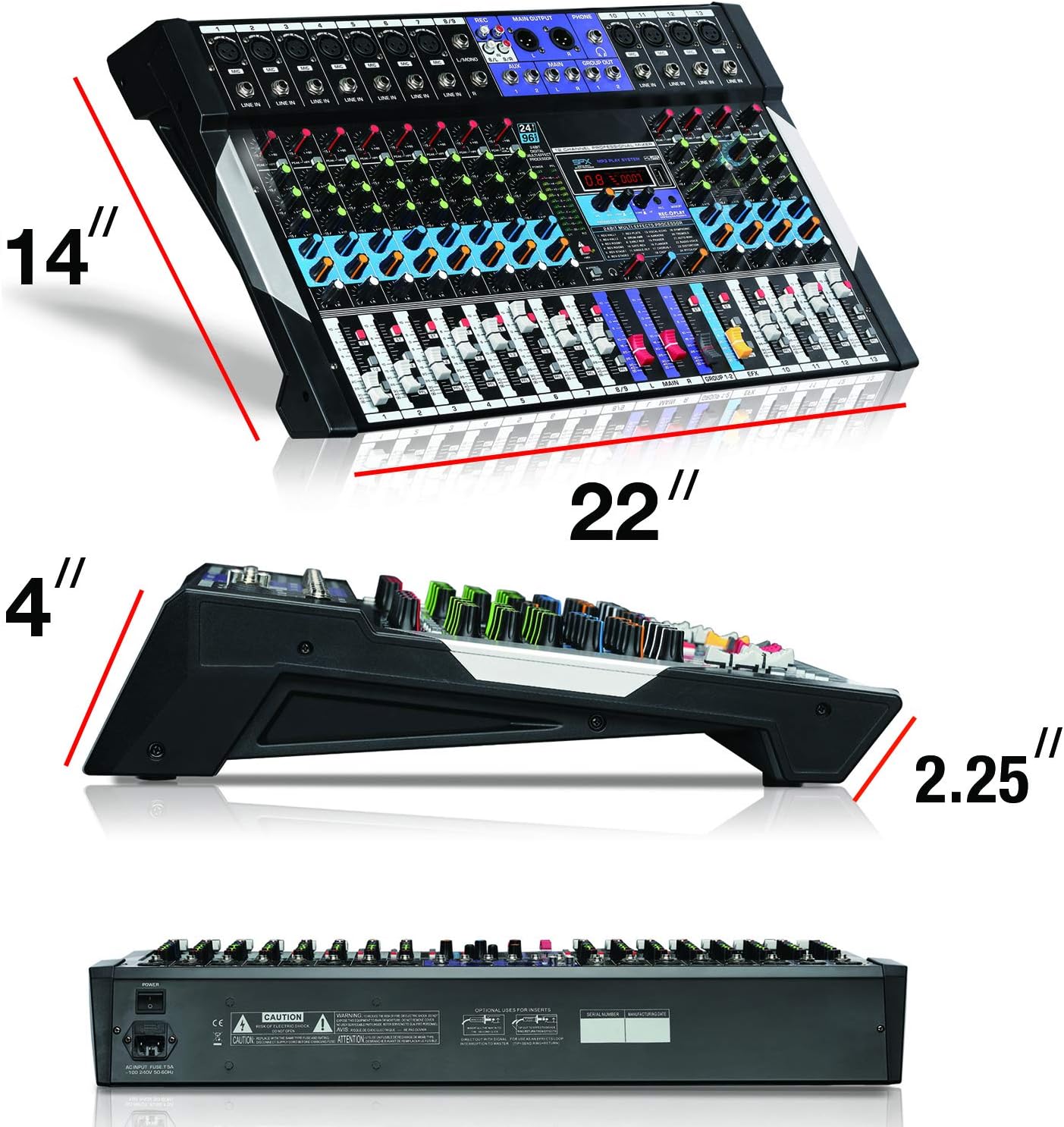
Figure 4.4: Close-up of the 24-bit digital multi-effect processor section. This shows the display, parameter controls, and effect selection options.
- Control de guany: Ajusta la sensibilitat d'entrada per a cada canal.
- High, Mid, Low EQ: Three-band equalizer for tone shaping on each channel.
- Enviament AUX: Controls the level of the channel signal sent to the AUX output for external effects or monitoring.
- Control de panoràmica: Ajusta la posició estèreo del senyal del canal.
- Faders de canals: Controls the volume level of individual channels.
- Main Mix Faders: Controla el volum de sortida general.
- Interruptor d'alimentació phantom de +48V: Activa l'alimentació phantom per a micròfons de condensador.
- 24BIT Digital Multi Effect Processor: Provides various digital effects (e.g., reverb, delay) with parameter adjustments.
- USB/MP3 Player Controls: Playback, pause, skip, and mode selection for USB media.
- Indicador Bluetooth: Mostra l'estat de la connexió Bluetooth.
5. Guia de configuració
Follow these steps to set up your Boytone BT-120MX mixer.
5.1 Connexió d'alimentació
- Assegureu-vos que l'interruptor d'alimentació de la batedora estigui en la posició OFF.
- Connect the power adapter to the mixer's power input.
- Connecteu l'adaptador d'alimentació a una presa de corrent adequada.
5.2 Connexió de fonts d'àudio
- Micròfons: Connect XLR microphones to the XLR inputs (Channels 1-4). If using condenser microphones, ensure the +48V phantom power is OFF before connecting, then activate it after connection.
- Instruments/Line Devices: Connect instruments (e.g., keyboards, guitars with preamps) or other line-level devices to the 1/4" line inputs or RCA inputs.
- Dispositiu USB: Inseriu una unitat flash USB amb MP3 files al port USB per a la reproducció.
5.3 Connexió de dispositius de sortida
- Altaveus/Ampelevadors: Connect the mixer's MAIN OUT (1/4" L/R) to your power amplifier o altaveus alimentats.
- Auriculars: Connect headphones to the 1/4" HEADPHONE jack for monitoring.
5.4 PC Connection for Recording/Playback
- Connect the mixer to your computer using a USB cable.
- Your computer should recognize the mixer as an audio device. Select it as the input/output device in your audio software settings.
6. Instruccions de funcionament
6.1 Mescla bàsica
- Turn on the mixer and all connected audio devices.
- Set all channel faders and the main mix faders to their lowest position.
- For each active channel, gradually increase the GAIN control until the PEAK LED flashes only occasionally.
- Adjust the HIGH, MID, and LOW EQ controls to shape the tone of each input.
- Slowly raise the channel fader for each input to the desired level.
- Adjust the MAIN MIX faders to control the overall output volume.
- Use the PAN control to position the sound within the stereo field.
6.2 Connectivitat Bluetooth
- Press the MODE button on the USB/MP3 player section until 'BT' or 'Bluetooth' is displayed.
- On your Bluetooth-enabled device (smartphone, tablet, etc.), search for available devices.
- Select 'Boytone Mixer' or a similar name from the list to pair.
- Once paired, audio from your device will stream wirelessly to the mixer. Adjust the USB/MP3 channel fader for volume control.
Reproducció de MP3 USB 6.3
- Inseriu una unitat flash USB que contingui àudio MP3 files al port USB.
- The mixer will automatically switch to USB mode or you may need to press the MODE button.
- Feu servir els botons REPRODUIR/PAUSA, ANTERIOR i SEGÜENT per controlar la reproducció.
- Adjust the USB/MP3 channel fader for volume control.
6.4 Gravació a PC
- Connect the mixer to your PC via USB.
- Open your preferred Digital Audio Workstation (DAW) software (e.g., Audacity, GarageBand, Ableton Live).
- In your DAW's audio settings, select the Boytone mixer as the input device.
- Arm a track for recording and begin recording. The main mix output of the mixer will be sent to your PC.
6.5 Processador d'efectes digitals
- Use the PROGRAM knob to select from the available 24 digital effects (e.g., Reverb, Delay, Chorus). The selected effect number will be displayed.
- Adjust the PARAMETER knob to fine-tune the selected effect (e.g., decay time for reverb, delay time for echo).
- Use the EFX SEND controls on each channel to send a portion of that channel's signal to the effects processor.
- Adjust the EFX RETURN fader to control the overall volume of the applied effect in the main mix.
6.6 +48V Phantom Power
The +48V phantom power supplies voltage to condenser microphones. Ensure dynamic microphones are not connected when phantom power is active, as this may cause damage.
- Connect your condenser microphone(s) to the XLR inputs.
- Locate the +48V PHANTOM POWER switch and activate it. The indicator LED will illuminate.
- Deactivate phantom power before disconnecting condenser microphones.
7. Manteniment
- Neteja: Regularly wipe the mixer's surface with a soft, dry cloth. Avoid abrasive cleaners or solvents.
- Emmagatzematge: Quan no l'utilitzeu, guardeu la batedora en un lloc fresc i sec, allunyat de la llum solar directa i de temperatures extremes.
- Gestió de cables: Ensure cables are not tangled or stressed, which can lead to damage.
8. Solució De Problemes
| Problema | Causa possible | Solució |
|---|---|---|
| Sense sortida de so | Power off; incorrect connections; faders down; gain too low; output device issues. | Check power, all cable connections, channel faders, main mix faders, and gain controls. Verify external amplifier/speakers are on and working. |
| So distorsionat | Gain too high; input signal too strong; damaged cables. | Reduce GAIN control. Check input source level. Replace faulty cables. |
| Bluetooth no connectat | Mixer not in Bluetooth mode; device too far; interference; device already paired. | Ensure mixer is in BT mode. Move device closer. Disconnect from other Bluetooth devices. Try re-pairing. |
| USB MP3 not playing | Incorrecte file format; USB drive not recognized; mixer not in USB mode. | Assegureu-vos files are MP3 format. Try a different USB drive. Press MODE to select USB. |
| L'alimentació phantom no funciona | Switch not activated; faulty microphone/cable. | Ensure +48V switch is ON and indicator is lit. Test with another condenser microphone or XLR cable. |
9. Especificacions
| Característica | Detall |
|---|---|
| Marca | Boytone |
| Model | BT-120MX |
| Nombre de canals | 12 |
| Tecnologia de connectivitat | Bluetooth, USB |
| Font d'alimentació | Elèctric amb cable |
| Resposta de freqüència | 20 Hz - 20 kHz |
| Tipus de connector de sortida | RCA, TRS (1/4") |
| Tipus d'entrada d'àudio | XLR, RCA, 1/4" mono/stereo, USB |
| Voltage | 110 V |
| Poder fantasma | +48V |
| Efectes digitals | 24-bit Multi Effect Processor |
| Pes de l'article | 18 lliures |
| UPC | 643307992601 |
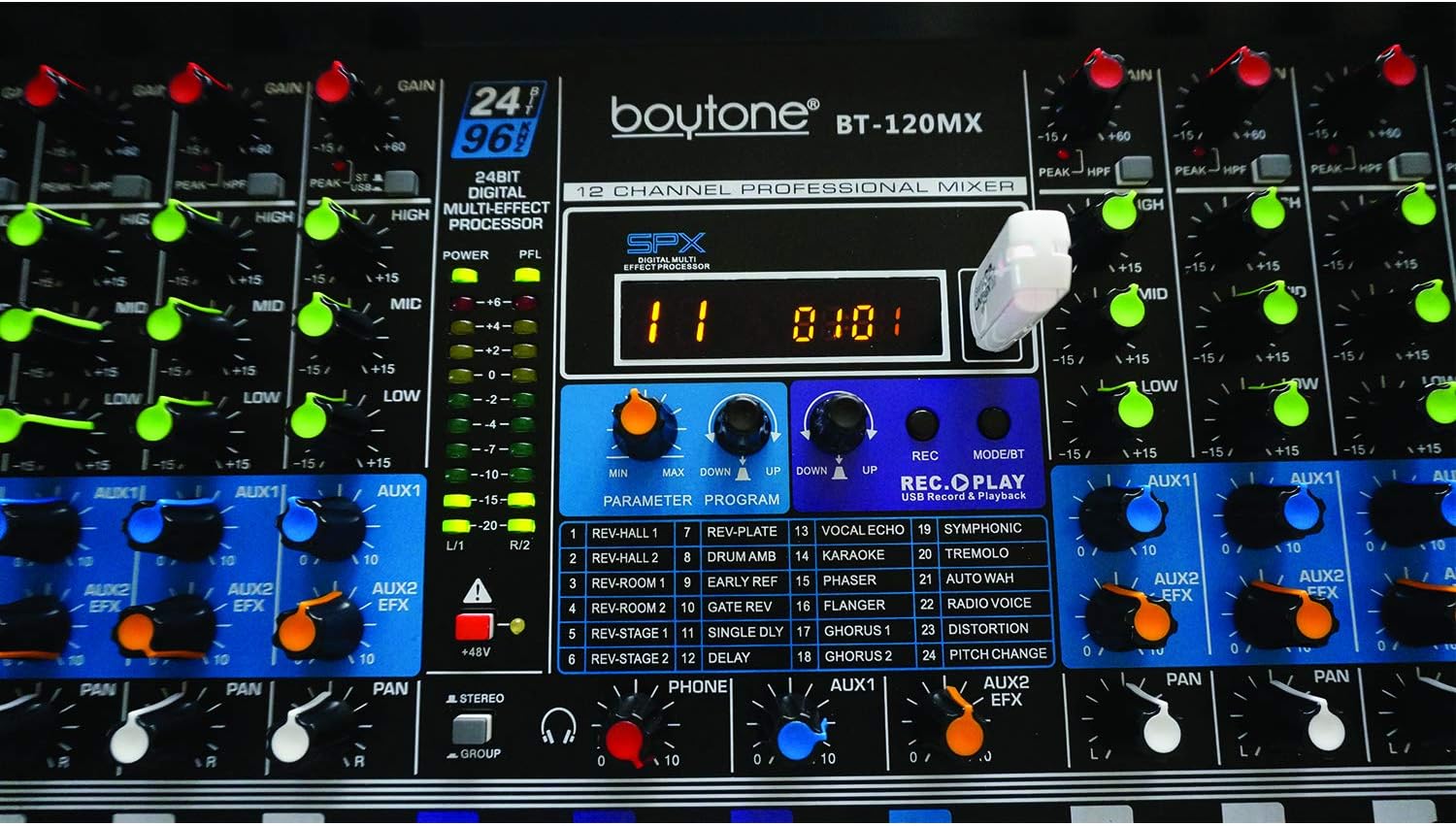
Figure 9.1: Dimensions of the Boytone BT-120MX mixer, showing approximate height, width, and depth.
10. Garantia i assistència
Boytone products are designed for reliability and performance. This product is covered by a limited warranty against defects in materials and workmanship. For specific warranty terms and conditions, please refer to the warranty card included with your product or visit the official Boytone weblloc.
For technical support, troubleshooting assistance, or service inquiries, please contact Boytone customer support through their official website or the contact information provided in your product packaging. Please have your model number (BT-120MX) and purchase information ready when contacting support.