
1. Introducció
This manual provides comprehensive instructions for the WINFLIKE ERF3B69S replacement remote control. This remote is designed to function as a direct replacement for original Sharp and Hisense Smart TV remotes, offering easy access to all standard functions and dedicated app buttons. Please read this manual carefully to ensure proper use and longevity of your remote control.
2. Producte acabatview
The WINFLIKE ERF3B69S remote control is a high-quality replacement unit featuring sensitive keys and a comfortable design. It provides full functionality for compatible Sharp and Hisense Smart TV models, including dedicated buttons for popular streaming services and smart features.
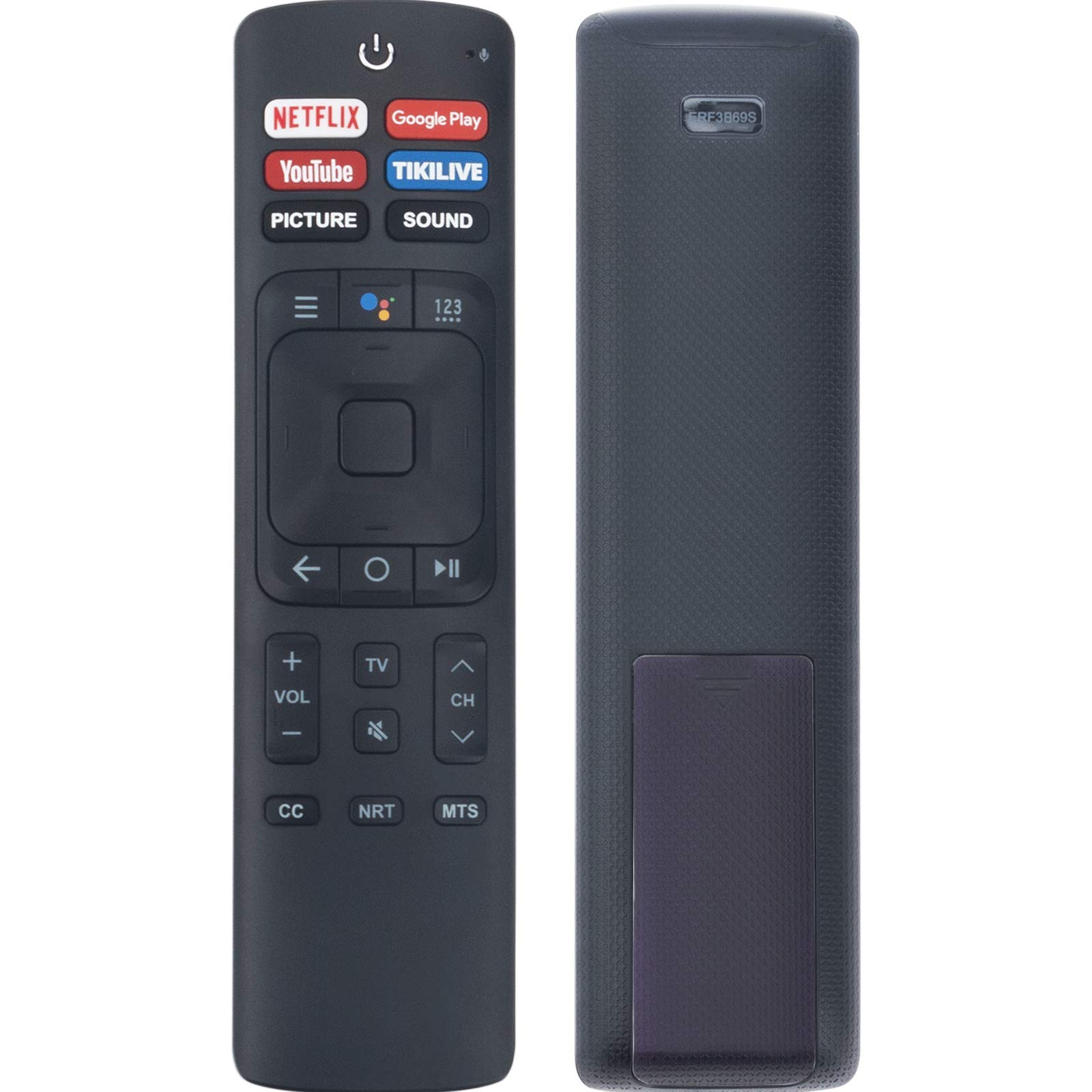
Imatge 1: Frontal view of the WINFLIKE ERF3B69S Replacement Remote Control. It features a power button at the top, dedicated buttons for Netflix, Google Play, YouTube, TIKILIVE, PICTURE, and SOUND. Below these are navigation controls, volume, channel, and other function buttons.
3. Configuració
3.1 Instal·lació de la bateria
The remote control requires two (2) AAA batteries (not included). Follow these steps to install the batteries:
- Localitzeu la tapa del compartiment de la bateria a la part posterior del comandament a distància.
- Premeu la pestanya i feu lliscar la coberta cap avall.
- Introduïu dues piles AAA, assegurant-vos que els terminals positiu (+) i negatiu (-) coincideixin amb els diagrames de l'interior del compartiment.
- Feu lliscar la tapa del compartiment de la bateria fins que faci clic de manera segura.
Once batteries are installed, the remote control is ready for use with compatible Sharp and Hisense Smart TVs. No additional pairing is typically required for this replacement model.
4. Instruccions de funcionament
This remote control provides direct access to various TV functions. Below is a general guide to common button functions:
- Botó d'encendre (⏻): Encén o apaga el televisor.
- Netflix, Google Play, YouTube, TIKILIVE Buttons: Accés directe a aquestes aplicacions de streaming.
- PICTURE, SOUND Buttons: Access picture and sound settings menus.
- Teclat de navegació (amunt, avall, esquerra, dreta, OK): S'utilitza per navegar pels menús i seleccionar opcions.
- Esquena (←): Torna a la pantalla o menú anterior.
- Pujar/Baixar el volum (VOL +/-): Ajusta el volum del televisor.
- Canal amunt/avall (CH ▲/▼): Canvia els canals de televisió.
- Silencia (🔇): Silencia o activa el so del televisor.
- CC (Subtítols): Activa o desactiva els subtítols.
- NRT (Next Recording Time): Functionality may vary by TV model.
- MTS (Multi-channel Television Sound): Selects audio modes (e.g., Stereo, SAP).
5. Manteniment
5.1 Neteja
Per netejar el comandament a distància, feu servir un drap suau i sec. No utilitzeu netejadors líquids ni materials abrasius, ja que poden danyar la superfície o els components interns del comandament a distància.
5.2 Substitució de la bateria
Replace the batteries when the remote control becomes unresponsive or its range decreases significantly. Always replace both batteries at the same time with new AAA batteries. Do not mix old and new batteries, or different types of batteries.
6. Solució De Problemes
If you experience issues with your remote control, please refer to the following common problems and solutions:
- Remote is not working:
- Assegureu-vos que les piles estiguin inserides correctament amb la polaritat correcta (+/-).
- Substituïu les piles per piles AAA noves.
- Check for any obstructions between the remote control and the TV's infrared sensor.
- Point the remote directly at the TV's sensor.
- Els botons no responen:
- Clean the remote control, especially around the buttons, to remove any dirt or debris.
- If specific buttons are not working, it might indicate a fault with the remote.
- Rang limitat:
- Substituïu les piles.
- Ensure there are no strong light sources (like direct sunlight) interfering with the IR signal.
Si aquests passos no resolen el problema, poseu-vos en contacte amb l'atenció al client.
7. Especificacions
| Número de model | WL-ERF3B69S-ORI-DHF (ERF3B69S) |
| Dimensions del producte | 5 x 1 x 0.5 polzades |
| Pes de l'article | 0.7 unces |
| Piles necessàries | 2 piles AAA |
| Tecnologia de connectivitat | Bluetooth |
| Dispositius compatibles | Televisió |
| Característiques especials | Ergonomic, Lightweight, Voice Search |
8. Models de televisors compatibles
The WINFLIKE ERF3B69S replacement remote control is compatible with a wide range of Sharp and Hisense Smart TV models, including but not limited to:
- Hisense Models: 50H5C, 50H6B, 50H7GB, 50H8C, 55H5C, 55H6B, 55H7B, 55H8C, 55H9B, 65H10B, 65H7B, 43H5C, 43H7C
- Sharp/Hisense Remote Models: ERF3I69H, ERF3A69S, ERF3B69, ERF3I69H, ERF3B69S
- Sharp TV Models: LC-40N5000, LC-43N5000, LC-43N610, LC-43N6100, LC-43N7000, LC-50N5000, LC-50N6000, LC-50N7000, LC-55Q7530U, LC-55N6000, LC-55N8003U, LC-55N7000, LC-58N7503U, LC-60N6200, LC-65N5200, LC-65N7000, LC-65N9000, LN-60N7000, LN-75N8000, LC-75N8003U, LC-75Q7570U
- Altres models compatibles: LC55N8003U, LC55Q7530U, LC58N7503U, LC65N8003U, LC75N8003U, LC75Q7570U, LC40N5000, LC43N5000, LC43N610, LC43N6100, LC43N7000, LC50N5000, LC50N6000, LC50N7000, LC55N6000, LC55N7000, LC60N6200, LC65N5200, LC65N7000, LC65N9000, LN60N7000, LN75N8000, LC75N8003U
If your TV model is not listed, but your original remote control matches the ERF3B69S or similar models, this replacement remote may still be compatible.
9. Suport
For any questions regarding the remote control or if you encounter any problems with its operation, please contact WINFLIKE customer support for further assistance. We are committed to providing support for our products.