
STIGA Rucksack Edge XL
STIGA Rucksack Edge XL
Manual d'instruccions
Brand: STIGA | Model: Rucksack Edge XL
1. Introducció
Thank you for choosing the STIGA Rucksack Edge XL. This manual provides detailed instructions for the proper use, care, and maintenance of your new backpack. Please read this manual thoroughly before using the product to ensure optimal performance and longevity.
The STIGA Rucksack Edge XL is designed for versatility and durability, suitable for various activities from daily commutes to sports and travel. Its thoughtful design ensures comfort and functionality.
2. Producte acabatview
The STIGA Rucksack Edge XL is a spacious and robust backpack featuring a sleek gray and black design. It is equipped with multiple compartments and adjustable straps to accommodate your belongings and provide a comfortable carrying experience.
Característiques principals:
- Durable fabric construction for long-lasting use.
- Large main compartment with zipper closure.
- Front zippered pocket for quick access items.
- Adjustable padded shoulder straps for comfort.
- Top grab handle for easy carrying.
- Side pockets for water bottles or small items.
3. Identificació de peces
Familiarize yourself with the different components of your STIGA Rucksack Edge XL:
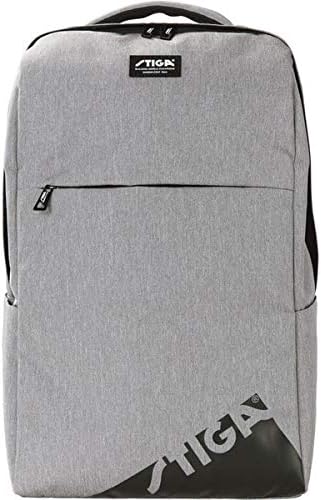
Figura 3.1: Frontal View
This image displays the front of the STIGA Rucksack Edge XL. It highlights the main zippered compartment, the smaller front zippered pocket, and the STIGA logo prominently displayed on the lower right and a small patch near the top handle.
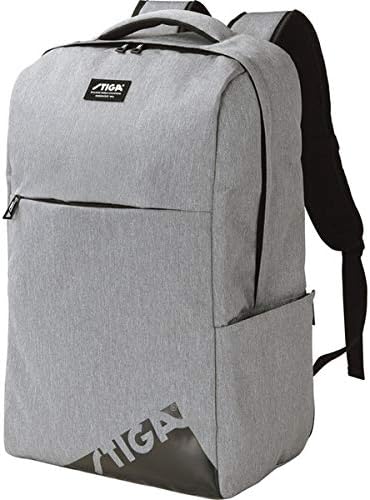
Figure 3.2: Angled Side View
Aquest angle view provides a better perspective of the backpack's depth and shows the side pockets, which are ideal for water bottles or other quick-access items. The padded shoulder straps are also visible from this angle.
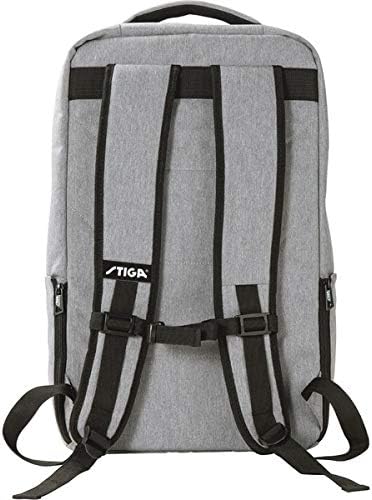
Figura 3.3: Esquena View
L'esquena view illustrates the ergonomic design of the shoulder straps, which are padded for comfort. It also shows the adjustable buckles for customizing the fit and a small STIGA logo near the top of the back panel.

Figura 3.4: superior View (Obert)
This image shows the top opening of the main compartment, revealing the spacious interior. The zipper closure for the main compartment is clearly visible, demonstrating how the bag opens for packing.
4. Configuració
4.1 Inspecció inicial
Upon receiving your backpack, carefully inspect it for any signs of damage during shipping. Check all zippers, seams, and buckles to ensure they are in proper working order.
4.2 Ajust de les corretges de les espatlles
- Put on the backpack and ensure it sits comfortably on your back.
- Locate the adjustment buckles at the bottom of each shoulder strap.
- Pull the loose ends of the straps downwards to tighten the backpack, bringing it closer to your back.
- Pull the buckles upwards to loosen the straps, allowing the backpack to sit lower.
- Adjust both straps evenly until the backpack feels secure and balanced, with the weight distributed comfortably across your shoulders and upper back.
5. Instruccions de funcionament
5.1 Using Compartments
- Compartiment principal: Use for larger items such as books, clothing, or a laptop. Open and close using the dual zippers.
- Butxaca davantera: Ideal for smaller items that require quick access, like pens, keys, or a phone.
- Butxaques laterals: Suitable for water bottles, umbrellas, or other slim items.
5.2 Packing Your Backpack
To maintain balance and comfort, pack heavier items closer to your back and lighter, bulkier items further away. Distribute weight evenly between both sides of the backpack.
5.3 Carrying the Backpack
Always use both shoulder straps to distribute weight evenly and prevent strain on one side of your body. For short distances, the top grab handle can be used.
6. Manteniment i cura
6.1 Neteja
- For minor dirt, wipe the surface with a damp drap i sabó suau.
- Do not machine wash or tumble dry, as this may damage the fabric and structure.
- Per a taques difícils, es pot utilitzar un raspall suau amb suavitat.
- Allow the backpack to air dry completely before storing.
6.2 Emmagatzematge
Store your backpack in a cool, dry place away from direct sunlight when not in use. Ensure it is empty and clean to prevent mold or mildew growth.
6.3 Cura de la cremallera
Mantingueu les cremalleres netes i lliures de brutícia. Si una cremallera s'endureix, apliqueu-hi una petita quantitat de lubricant o cera per a cremalleres.
7. Solució De Problemes
| Problema | Causa possible | Solució |
|---|---|---|
| Zipper stuck or difficult to move. | Fabric caught in zipper; dirt/debris; lack of lubrication. | Gently pull fabric away; clean zipper teeth; apply zipper lubricant or wax. |
| Shoulder straps feel uncomfortable. | Improper adjustment; uneven weight distribution; too much weight. | Re-adjust straps evenly; redistribute contents; reduce load if too heavy. |
| Backpack appears dirty or stained. | Accumulated dirt from use. | Refer to Section 6.1 Cleaning for instructions. |
8. Especificacions
| Característica | Detall |
|---|---|
| Marca | ESTIGA |
| Nom del model | Rucksack Edge XL |
| ASIN | B08PF2KQCL |
| Estil | Motxilla |
| Tipus de tancament | Cremallera |
| Patró | Plana |
| Tipus de closca | Suau |
| Color | Gris/Negre |
9. Garantia i Suport
9.1 Informació de la garantia
STIGA products are manufactured to high-quality standards. For specific warranty details, please refer to the warranty card included with your purchase or visit the official STIGA weblloc web. Conserveu el comprovant de compra per a reclamacions de garantia.
9.2 Atenció al client
If you encounter any issues or have questions not covered in this manual, please contact STIGA customer support. Contact information can typically be found on the product packaging or the official STIGA weblloc.
Nota: Les especificacions i les característiques del producte estan subjectes a canvis sense previ avís.
Ask a question about this manual
Ask about setup, troubleshooting, compatibility, parts, safety, or missing instructions. Manuals+ will review the question and use this page’s manual context to help answer it.