
Introducció
This manual provides detailed instructions for the safe and effective operation of the AOPUTTRIVER AP-7200APP Professional True-RMS Clamp Meter. This device is designed for measuring AC/DC current, AC/DC voltage, resistance, capacitance, continuity, and temperature, and features non-contact voltage (NCV) detection and Bluetooth connectivity for mobile app integration.
Informació de seguretat
Always adhere to safety precautions when using electrical testing equipment. This device complies with IEC 61010-1, CAT III 600V safety standards and features double insulation for enhanced protection.
- No supereu els valors d'entrada màxims especificats per a cada rang de mesura.
- Extremeu les precaucions quan treballeu amb circuits actius.
- Ensure the test leads are in good condition and properly connected before use.
- No feu funcionar el mesurador si sembla danyat o si el casing està obert.
- Refer to local and national safety codes for proper electrical work procedures.
Contingut del paquet
Verifiqueu que tots els elements que s'enumeren a continuació s'inclouen al vostre paquet:
- AOPUTTRIVER AP-7200APP Clamp Mesurador
- Sonda de temperatura
- Test Leads (Red/Black)
- Batteries (AAA type, typically 2)
- Manual d'instruccions

Image: Contents of the AP-7200APP package, including the clamp meter, temperature probe, test leads, batteries, and instruction manual.
Producte acabatview
Familiarize yourself with the components of the AP-7200APP Clamp Mesurador:

Image: Labeled diagram of the AP-7200APP Clamp Meter, highlighting its main components and controls.
- Clamp Mandíbules: Opens 26mm to enclose conductors for current measurement.
- Jaw-opening Handle: Used to open and close the clamp mandíbules.
- NCV Detection Area: Located at the top, used for non-contact voltage detecció.
- Lamp Llum: Illuminates the measurement area. Press the "HOLD" key for over 2 seconds to activate.
- Interruptor rotatiu: Selects measurement functions and ranges.
- Pantalla LCD: 6000 counts display, showing measurement values and function symbols.
- Tecla HOLD: Freezes the current display reading. Press for >2 seconds to activate backlight.
- SEL Key: Used to change measurement modes within a function (e.g., AC/DC, Diode/Continuity/Capacitance).
- MAX/MIN Key: Records maximum and minimum measured values. Press for >2 seconds to exit.
- Hz/Duty Key: Selecciona la mesura de freqüència o cicle de treball.
- REL Key: Activates relative measurement mode.
- Presa d'entrada COM: Common terminal for test leads and temperature probe.
- VΩHz°C°F Input Jack: Terminal d'entrada per a voltage, mesures de resistència, freqüència, capacitància i temperatura.
Configuració
1. Instal·lació de la bateria
The meter requires two AAA batteries. Open the battery compartment cover on the back of the device, insert the batteries according to the polarity indicators, and securely close the cover. A low battery indicator will appear on the LCD when replacement is needed.
2. Bluetooth Connection (AiLink App)
The AP-7200APP can connect to a mobile device via Bluetooth for remote monitoring and data analysis. The effective control distance is approximately 10-15 meters.
- Descarrega l'aplicació: Scan the QR code provided in the manual or search for "AiLink" in the Google Play Store (for Android) or Apple App Store (for iOS). Download and install the application. You can also download it from aicare.net.cn/app/ailink/download/.
- Obriu l'aplicació: Launch the AiLink application on your mobile phone.
- Connecta't al dispositiu: Within the app, press the "ADD" or "Connect" button to search for nearby devices. Select the "Clamp Meter" from the list to establish a connection.
- Monitor Data: Once connected, the app will display real-time measurement data from the clamp meter. You can analyze and save this data.

Image: Visual guide for Bluetooth connection and app usage, showing the AiLink app interface.
Instruccions de funcionament
Before any measurement, ensure the rotary switch is set to the OFF position when not in use.
1. Mesura de corrent AC/DC (Clamp)
- Poseu el commutador rotatiu a la 60A~ or 400A~ position for AC current, or 60A= or 400A= per a corrent continu.
- Press the jaw-opening handle to open the clamp mandíbules.
- Enclose a single conductor with the clamp jaws. Ensure the conductor is centered within the jaws for accurate readings.
- Llegiu el valor actual a la pantalla LCD.
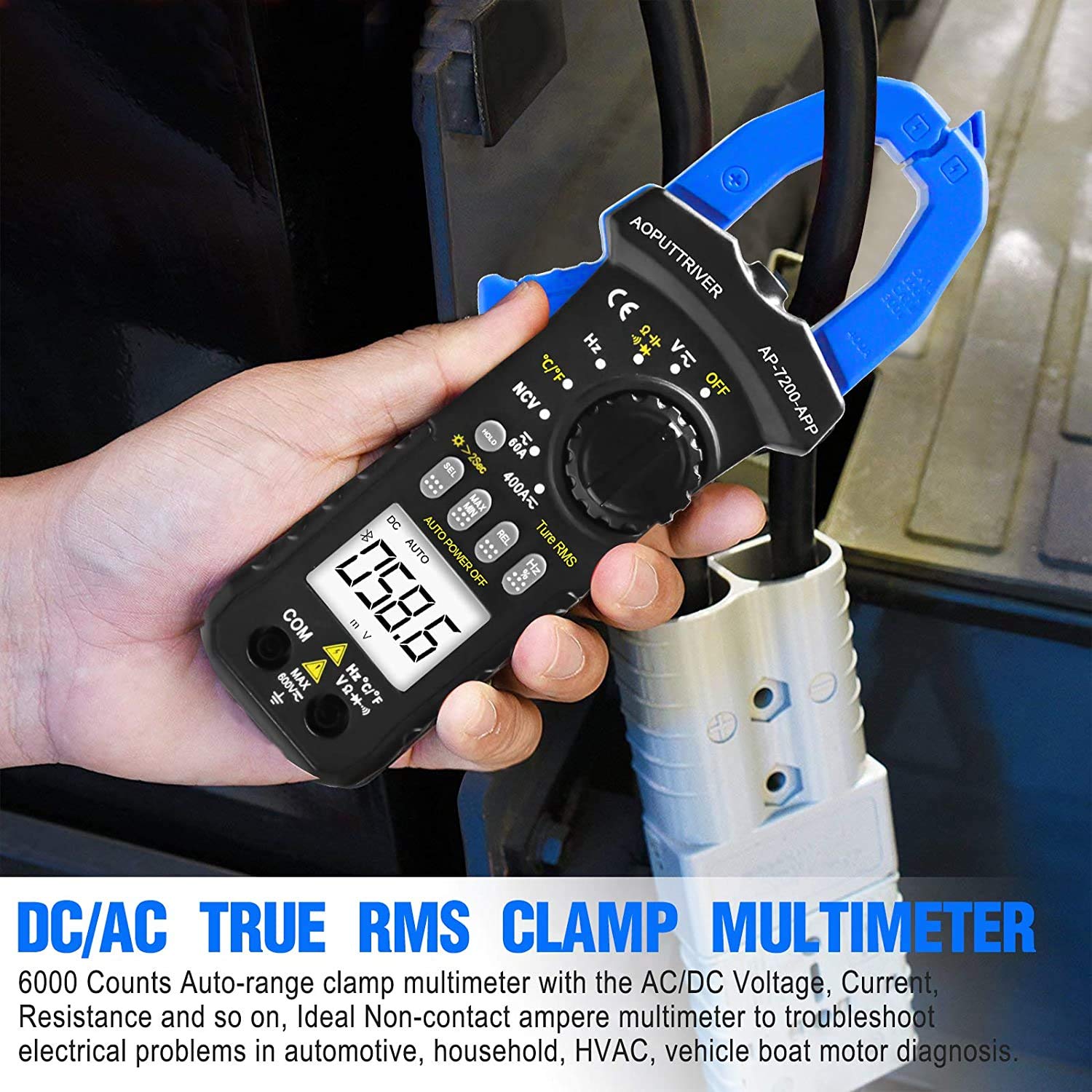
Image: Demonstrating current measurement using the clamp jaws on an electrical cable.
2. AC/DC Voltage Mesura
- Insert the red test lead into the VΩHz°C°F jack and the black test lead into the COM jack.
- Poseu el commutador rotatiu a la V~ (Volum AC)tage) o V= (DC Voltage) posició.
- Connecteu els cables de prova en paral·lel al circuit o component que s'està provant.
- Llegeix el voltage valor a la pantalla LCD.
3. Resistance, Capacitance, Continuity, Diode Measurement
- Insert the red test lead into the VΩHz°C°F jack and the black test lead into the COM jack.
- Poseu el commutador rotatiu a la Ω posició.
- Premeu el botó SEL key to cycle through Resistance (Ω), Continuity (buzzer icon), Diode (diode icon), and Capacitance (F) modes.
- Connect the test leads to the component. For resistance and capacitance, ensure the component is de-energized.
- Read the measurement on the LCD. For continuity, a beep indicates a continuous circuit.
4. Vol sense contactetage (NCV) Detecció
- Poseu el commutador rotatiu a la NCV posició.
- Place the NCV detection area (top of the clamp jaws) near the conductor or outlet to be tested.
- Si AC voltage ≥ 90V RMS is detected, the lamp light will illuminate, and an audible alarm will sound.

Image: Demonstrations of temperature measurement, NCV detection, continuity testing, and current measurement.
5. Mesura de la temperatura
- Insert the temperature probe into the VΩHz°C°F and COM jacks, observing polarity.
- Poseu el commutador rotatiu a la ° C / ° F posició.
- Place the tip of the temperature probe on or near the object whose temperature is to be measured.
- Llegiu el valor de la temperatura a la pantalla LCD. Premeu el botó SEL key to switch between Celsius (°C) and Fahrenheit (°F).

Image: Temperature measurement using the included probe, with display examples in Celsius and Fahrenheit.
6. Funció de retroiluminació
To activate the backlight for improved visibility in dim environments, press and hold the MANTENIM key for more than 2 seconds. Press and hold again for 2 seconds to turn it off.

Imatge: El clamp meter's backlight feature in action, enhancing readability in low-light conditions.
Manteniment
1. Neteja
Netegeu la c del comptadorasing amb anunciamp cloth and mild detergent. Do not use abrasives or solvents. Ensure the meter is completely dry before storage or use.
2. Substitució de la bateria
When the low battery indicator appears on the display, replace the batteries promptly to ensure accurate measurements. Refer to the "Battery Installation" section for instructions.
3. Emmagatzematge
If the meter is not used for an extended period, remove the batteries to prevent leakage. Store the device in a cool, dry place, away from direct sunlight and extreme temperatures.
Resolució de problemes
| Problema | Causa possible | Solució |
|---|---|---|
| El mesurador no s'encén. | Piles gastades o instal·lades incorrectament. | Comproveu la polaritat de la bateria; substituïu les piles. |
| Lectures inexactes. | Funció incorrecta seleccionada; mala connexió del cable de prova; interferències externes. | Verify rotary switch setting; ensure secure test lead connection; move away from strong electromagnetic fields. |
| La connexió Bluetooth falla. | Meter too far from phone; Bluetooth off on phone; app not installed correctly. | Ensure meter is within 10-15m range; enable Bluetooth on phone; reinstall AiLink app. |
| NCV detection not working. | Not in NCV mode; voltage per sota del llindar. | Set rotary switch to NCV; ensure voltage is ≥ 90V AC RMS. |
Especificacions
| Característica | Especificació |
|---|---|
| Número de model | AP-7200APP |
| Mostra | LCD de 6000 recomptes |
| Vol. ACtage Rang | 6V ~ 600V |
| DC Voltage Rang | 600 mV ~ 600 V |
| Interval de corrent de CA | 60A ~ 400A |
| Interval de corrent DC | 60A ~ 400A |
| Interval de resistència | 600Ω ~ 60MΩ |
| Interval de capacitat | 6nF ~ 60mF (Inferred from 6000 counts and common multimeter ranges) |
| Interval de temperatura | -20 °C ~ 1000 °C |
| NCV Detection Threshold | ≥ 90V AC RMS |
| Norma de seguretat | IEC 61010-1, CAT III 600V |
| Font d'alimentació | Funciona amb bateria |
| Dimensions | 207 x 75 x 37 mm |
| Pes de l'article | 390 grams |
| Interval Bluetooth | 10-15 m (aprox.) |
Garantia i Suport
AOPUTTRIVER provides a Garantia del producte de 48 mesos for the AP-7200APP Clamp Meter. For any product issues or technical assistance, please contact our customer service. We offer Atenció al client 7 hores al dia, 24 dies a la setmana to resolve your concerns promptly.
Contact information can typically be found on the product packaging or the official AOPUTTRIVER weblloc.


