
1. Introducció
This manual provides instructions for the proper installation and use of your Radtel USB Programming Cable. This cable is designed to connect your Radtel RT-480, RT-67, or RT-68P handheld two-way radio to a computer for programming channel frequencies, settings, and other parameters using compatible software. Please read this manual thoroughly before use to ensure optimal performance and avoid potential issues.
2. Contingut del paquet
Verifiqueu que tots els elements siguin presents al vostre paquet:
- 1 x Radtel USB Programming Cable
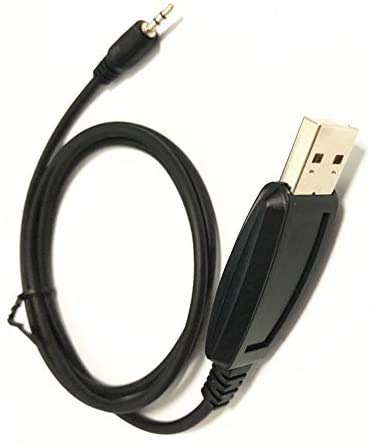
Figure 1: Radtel USB Programming Cable. This image shows the entire black cable, featuring a standard USB Type-A connector on one end and a 3.5mm audio jack on the other, designed for connecting to compatible Radtel two-way radios.
3. Requisits del sistema
To use this programming cable, ensure your system meets the following requirements:
- Sistema operatiu: Windows 10 (or compatible versions of Windows).
- Port USB disponible: A standard USB Type-A port.
- Programari de programació: Manufacturer-provided programming software for your specific Radtel radio model (e.g., RT-480, RT-67, RT-68P). This software is typically available for download from the Radtel official website or provided on a CD with the radio.
- Accés a Internet: May be required for driver downloads or software updates.
4. Configuració
4.1 Instal·lació del controlador
The programming cable requires a USB driver to function correctly. In most cases, Windows 10 will automatically install the necessary driver when the cable is first connected. If automatic installation fails, follow these steps:
- Do NOT connect the cable to your computer yet.
- Obtain the correct USB driver. This is usually found on the Radtel official website under the support or download section for your radio model, or on a CD included with your radio.
- Run the driver installation executable file. Follow the on-screen prompts to complete the installation.
- Reinicieu l'ordinador si se us demana.
- Connect the USB Type-A end of the programming cable to an available USB port on your computer.
- Windows should now recognize the device and assign a COM port. You can verify this in Device Manager (Control Panel > Device Manager > Ports (COM & LPT)). Note the assigned COM port number, as you will need it for the programming software.
4.2 Programming Software Installation
Install the programming software specific to your Radtel radio model (e.g., RT-480, RT-67, RT-68P). This software is essential for configuring your radio.
- Download the appropriate programming software from the Radtel official website or use the provided installation media.
- Run the software installation executable.
- Seguiu les instruccions a la pantalla per completar la instal·lació.
- Launch the programming software after installation.
Nota: Generic programming software like CHIRP may not be compatible with all Radtel radio models. Always use the manufacturer's recommended software for best results.
5. Instruccions de funcionament
Follow these steps to program your Radtel radio using the USB programming cable:
- Prepare the Radio: Ensure your Radtel radio is turned OFF.
- Connect the Cable to Radio: Insert the 3.5mm audio jack end of the programming cable into the programming port of your Radtel radio. This port is typically located on the side of the radio, often covered by a rubber flap. Ensure a secure connection.
- Connect the Cable to Computer: Connect the USB Type-A end of the programming cable to an available USB port on your computer.
- Turn On Radio: Turn ON your Radtel radio.
- Launch Programming Software: Open the Radtel programming software on your computer.
- Seleccioneu el port COM: In the programming software, navigate to the "Settings," "Options," or "Communications" menu. Select the correct COM port that was assigned to the USB programming cable (as noted in Device Manager during driver installation).
- Llegit des de la ràdio: Before making any changes, it is highly recommended to read the current configuration from your radio. Look for an option like "Read from Radio," "Download," or "Get Data." This creates a backup of your radio's existing settings.
- Modifica la configuració: Make the desired changes to frequencies, channels, tones, and other radio settings within the software interface.
- Escriu a la ràdio: Once you have finished modifying the settings, save your changes in the software and then use the "Write to Radio," "Upload," or "Send Data" function to transfer the new configuration to your radio.
- Verificar: After writing, turn your radio OFF and then ON again to apply the new settings. Verify that the changes have been successfully implemented.
- Desconnectar: Safely disconnect the cable from both the radio and the computer.
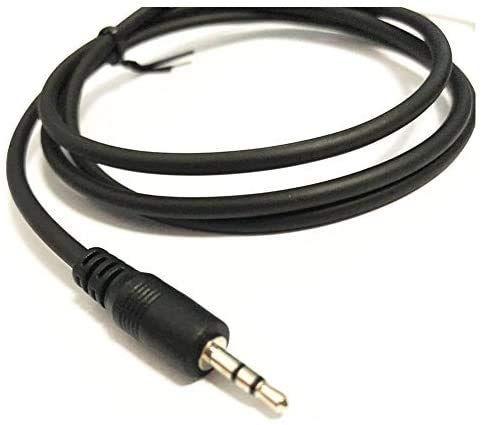
Figure 2: Close-up of the 3.5mm audio jack connector. This image highlights the 3.5mm jack, which connects to the programming port on your Radtel two-way radio.
Important: Always ensure the radio is powered on and the cable is securely connected during the read/write process to prevent data corruption.
6. Manteniment
Proper care will extend the life of your programming cable:
- Emmagatzematge: Guardeu el cable en un lloc fresc i sec, allunyat de la llum solar directa i de temperatures extremes.
- Neteja: Feu servir un drap suau i sec per netejar el cable i els connectors. No utilitzeu netejadors líquids ni dissolvents.
- Manipulació: Avoid bending or kinking the cable sharply. Always grasp the connector ends when plugging or unplugging, not the cable itself.
- Protecció: Keep the connectors free from dust and debris.
7. Solució De Problemes
Si teniu problemes, consulteu els següents problemes i solucions habituals:
| Problema | Causa possible | Solució |
|---|---|---|
| Cable not recognized by computer. | Missing or incorrect driver. Faulty USB port. |
|
| Programming software cannot find the radio or COM port. | Incorrect COM port selected. Radio not powered on or connected. Driver issue. |
|
| Error during read/write operation. | Loose connection. Radio powered off during process. Incompatible software. |
|
8. Especificacions
- Marca: Radtel
- Connector Type (Computer): USB tipus A
- Connector Type (Radio): 3.5mm Audio Jack (compatible with Radtel RT-480, RT-67, RT-68P)
- Tipus de cable: USB
- Color: Negre
- Característica especial: Sense enredos
- Sistemes operatius compatibles: Windows 10 (and potentially earlier versions with appropriate drivers)
- Pes de l'article: Aproximadament 0.634 unces (18 grams)
- Dimensions del paquet: Aproximadament 5.12 x 3.62 x 0.47 polzades
9. Garantia i Suport
Radtel products are manufactured to high-quality standards. For warranty information, technical support, or service inquiries, please refer to the documentation included with your original radio purchase or visit the official Radtel weblloc web. Si us plau, tingueu a mà el model del producte i la data de compra quan us poseu en contacte amb el servei d'assistència.
Oficial Weblloc: www.radtel.com (Nota: Això és un marcador de posició URL. Please refer to the actual Radtel weblloc de suport.)