
Introducció
The Xtrike Me GM-512 is a high-performance wired optical gaming mouse designed for precision and comfort. It features 7 programmable buttons, adjustable DPI settings, and an RGB backlight with transition effects. This manual provides essential information for setting up, operating, maintaining, and troubleshooting your GM-512 gaming mouse.

Figure 1: Xtrike Me GM-512 Gaming Mouse. This image displays the top-front view of the mouse, highlighting its ergonomic design, honeycomb pattern, and vibrant RGB lighting.
Característiques principals:
- 7 botons programables: Customize your gaming experience with versatile button assignments.
- DPI ajustable: Cycle through 800/1600/2400/3200/4800/6400 DPI settings for optimal precision.
- Retroil·luminació RGB: Enjoy dynamic lighting effects with various transition schemes.
- Sensor òptic: Reliable and accurate tracking for gaming and general use.
- Disseny durador: Built for longevity with a switching capacity of up to 3 million clicks.
- Interfície USB 2.0: Standard wired connectivity for stable performance.
Configuració
Follow these steps to set up your Xtrike Me GM-512 gaming mouse:
- Desempaqueta el ratolí: Carefully remove the GM-512 mouse from its packaging.
- Connexió a l'ordinador: Locate an available USB port on your computer. Insert the USB connector of the GM-512 mouse firmly into the USB port.
- Instal·lació del controlador: The mouse is plug-and-play. Your operating system (Windows 7 or newer) will automatically detect and install the necessary drivers. No additional software installation is typically required for basic functionality.
- Funcionalitat de prova: Once connected, the RGB backlight will illuminate. Move the mouse and click the buttons to ensure it is functioning correctly.
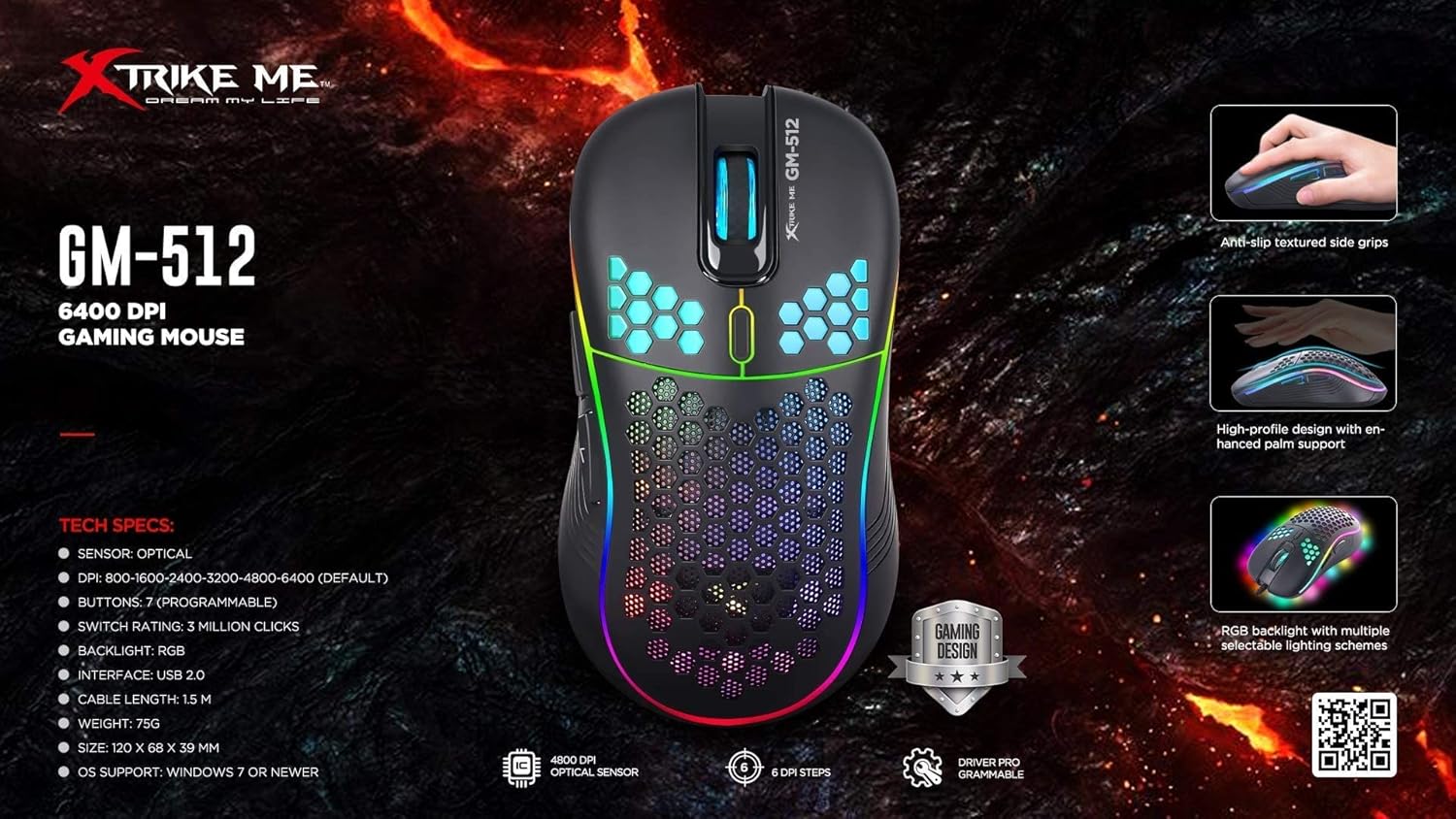
Figure 2: GM-512 Gaming Mouse Feature Overview. This image highlights key technical specifications and design elements such as anti-slip textured side grips, high-profile design for palm support, and RGB backlight schemes.
Instruccions de funcionament
The Xtrike Me GM-512 mouse features 7 buttons and adjustable DPI settings for enhanced control.
Funcions del botó:
- Botó esquerre de clic: Funció de clic principal estàndard.
- Botó dret: Funció de clic secundari estàndard.
- Roda de desplaçament (botó central): Scroll up/down, and click for middle button function.
- Botó de commutació de DPI: Located below the scroll wheel. Press to cycle through DPI settings.
- Botó Endavant (lateral): Typically used for navigating forward in web navegadors o file exploradors.
- Botó enrere (lateral): Typically used for navigating backward in web navegadors o file exploradors.
- Seventh Button: Function may vary or be programmable depending on software.

Figura 3: lateral View of GM-512 Mouse. This image shows the left side of the mouse, highlighting the two side buttons (forward and backward) and the RGB light strip along the edge.
Ajust de DPI:
The DPI (Dots Per Inch) button allows you to instantly change the mouse's sensitivity. Press the DPI button to cycle through the following settings:
- 800 DPI
- 1600 DPI
- 2400 DPI
- 3200 DPI
- 4800 DPI
- 6400 DPI (predeterminat)
Each DPI setting may be indicated by a change in the RGB lighting color or pattern, allowing for quick visual confirmation.

Figura 4: superior View of GM-512 Mouse. This image provides a top-down angled view, clearly showing the left and right click buttons, the scroll wheel, and the DPI switch button located just behind the scroll wheel.
Retroil·luminació RGB:
The mouse features an RGB backlight with transition effects. The lighting is automatic and typically cycles through various colors and patterns. Specific controls for the RGB lighting may be available through dedicated software if provided by the manufacturer (check the Xtrike Me website for driver downloads).
Manteniment
Proper maintenance ensures the longevity and optimal performance of your GM-512 gaming mouse.
- Neteja: Feu servir un drap suau i sec per netejar la superfície del ratolí. Per a la brutícia persistent, netegeu lleugerament.ampNetegeu el drap amb aigua o una solució de neteja suau. Eviteu utilitzar productes químics agressius o materials abrasius.
- Neteja del sensor: Occasionally, dust or debris may accumulate around the optical sensor on the underside of the mouse. Use a cotton swab or compressed air to gently clean the sensor area.
- Cura del cable: Eviteu doblegar o torçar bruscament el cable USB. Guardeu el ratolí de manera que no es doblegui o es faci malbé el cable.
- Emmagatzematge: Quan no l'utilitzeu, guardeu el ratolí en un entorn net i sec, allunyat de temperatures extremes.
Resolució de problemes
If you encounter issues with your Xtrike Me GM-512 mouse, refer to the following troubleshooting tips:
| Problema | Possible solució |
|---|---|
| El ratolí no respon. |
|
| El moviment del cursor és erràtic o irregular. |
|
| RGB backlight is not working. |
|
| Buttons are not responding or double-clicking. |
|
Especificacions
Detailed technical specifications for the Xtrike Me GM-512 Gaming Mouse:
| Característica | Detall |
|---|---|
| Número de model | GM-512 (Item Model Number: XDXT512) |
| Tipus de sensor | Òptic |
| Configuració de DPI | 800/1600/2400/3200/4800/6400 |
| Nombre de botons | 7 |
| Capacitat de commutació | Fins a 3 milions de clics |
| Llum de fons | RGB with transition effect |
| Connectivitat | USB 2.0 per cable |
| Sistemes operatius compatibles | Windows 7 i posteriors |
| Dispositius compatibles | Ordinador personal, portàtil |
| Orientació de la mà | D'acord |
| Dimensions del producte | 20 x 13.6 x 5.6 cm |
| Pes de l'article | 75 grams |
| Font d'alimentació | Elèctric amb cable (alimentat per USB) |
| Piles necessàries | No |
Garantia i Suport
For warranty information and technical support, please refer to the documentation included with your purchase or visit the official Xtrike Me weblloc web. Conserveu el comprovant de compra per a qualsevol reclamació de garantia.