
1. Introducció
The Tycon TPSC2440NMPPT is an advanced Maximum Power Point Tracking (MPPT) solar charge controller designed for efficient battery charging from solar panels. It automatically adjusts to 12V or 24V battery systems and supports various battery types including Flooded, AGM, GEL, and Lithium, with a customizable USER setting. This controller features an integral LCD display for monitoring key system parameters.
2. Instruccions de seguretat
Please read and understand all instructions before installation and operation. Failure to follow these instructions may result in electric shock, fire, or severe injury.
- Assegureu-vos que tot el cablejat estigui correctament polaritzat i connectat de manera segura.
- Do not disassemble or attempt to repair the controller. Refer to qualified service personnel.
- Install the controller in a well-ventilated area, away from flammable materials and corrosive gases.
- Always disconnect the battery and solar panel before installing or moving the controller.
- Utilitzeu l'equip de protecció individual (EPI) adequat durant la instal·lació.
- The controller is designed for indoor use or protected outdoor environments (IP32 rating). Avoid direct exposure to water.
3. Producte acabatview
The TPSC2440NMPPT controller is equipped with several features to optimize solar charging and battery management:
- Tecnologia MPPT: Maximitza la captació d'energia dels panells solars.
- Auto-Ranging Voltage: Compatible with 12V or 24V battery arrays.
- Multimode Load Operation: Offers 5 selectable modes for load control.
- Soft Start Load Output: Powers high capacitive loads safely.
- Automatic Battery Equalization: Performs 30-day equalization for optimal battery health.
- Conformal Coated Electronics: Provides environmental protection.
- TVS Lightning Protection: Enhances durability against electrical surges.
- Integral LCD Display: Mostra Battery Voltage, Capacity, Charging Capacity, Temperature, Load Current, and Solar Current.
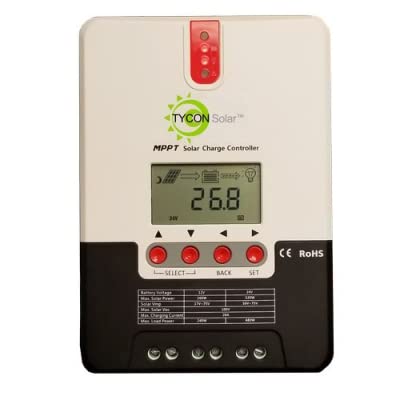
Figura 1: Frontal view of the Tycon TPSC2440NMPPT Solar MPPT Battery Charging Controller, showing the LCD display and connection terminals.
4. Configuració i instal·lació
Seguiu aquests passos per a una instal·lació correcta:
- Muntatge: Choose a suitable location for mounting the controller. Ensure good ventilation and protection from direct sunlight and moisture.
- Connexió de la bateria: Connecteu primer la bateria als terminals de la bateria del controlador. Assegureu-vos de la polaritat correcta (+ a + i - a -). El controlador detectarà automàticament el volum de la bateria.tage (12V o 24V).
- Connexió del panell solar: Connect the solar panel array to the controller's solar input terminals. Observe correct polarity. Ensure the open-circuit voltage of the solar array does not exceed the controller's maximum input voltage (110V at 25°C).
- Connexió de càrrega (opcional): If using the load output, connect your DC loads to the controller's load terminals. Do not exceed the rated load current (20A Max).
- Sensor de temperatura: Connect the included battery temperature probe cable to the designated port on the controller. Place the sensor near the battery for accurate temperature compensation.
- Encès: Once all connections are secure, the controller will power on and begin operation.
5. Instruccions de funcionament
The integral LCD display provides real-time information about your solar charging system. Use the buttons (if present, assuming standard UP/DOWN/SET) to navigate through the display menus and adjust settings.
5.1 Informació de la pantalla LCD
- Voltage: Vol actualtage de la bateria connectada.
- Capacitat de la bateria: Estimated state of charge.
- Capacitat de càrrega: Current power being delivered to the battery.
- Temperatura de la bateria: Temperature measured by the external probe.
- Corrent de càrrega: Current being drawn by connected DC loads.
- Solar Current: Current being generated by the solar panels.
5.2 Configuració del tipus de bateria
The controller supports Flooded, AGM, GEL, and Lithium battery types. A USER setting allows for custom charge parameters. Refer to the on-screen menu for selecting and configuring the battery type.
5.3 Load Operation Modes
The controller offers 5 selectable load operation modes. Consult the device's menu for details on each mode and how to select them, typically involving timed operation or dusk-to-dawn control.
6. Manteniment
Un manteniment regular garanteix un rendiment òptim i una llarga vida útil del controlador de càrrega solar.
- Inspeccionar connexions: Comproveu periòdicament totes les connexions del cablejat per verificar si estan ben ajustades i si hi ha corrosió.
- Controlador net: Keep the controller clean and free of dust. Use a dry cloth for cleaning. Do not use liquids.
- Salut de la bateria: Monitor de vol de la bateriatage and capacity on the LCD. Ensure batteries are properly maintained according to their manufacturer's guidelines.
- Ventilació: Ensure the installation area remains well-ventilated to prevent overheating.
7. Solució De Problemes
| Problema | Causa possible | Solució |
|---|---|---|
| Sense pantalla/Sense alimentació | Loose battery connection; Battery voltage too low; Blown fuse (external, if applicable). | Check battery connections and polarity. Charge battery if voltage is below operating threshold. Check and replace any external fuses. |
| Sense càrrega solar | Solar panel not connected; Incorrect polarity; Insufficient sunlight; Damaged solar panel/wiring. | Verify solar panel connections and polarity. Ensure panels are receiving adequate sunlight. Inspect panels and wiring for damage. |
| La càrrega no funciona | Load disconnected; Overload; Short circuit; Battery voltage massa baix. | Check load connections. Reduce load if exceeding 20A. Check for short circuits. Ensure battery is sufficiently charged. |
| Lectures inexactes | Loose connections; Faulty sensor. | Check all wiring connections. Ensure temperature sensor is properly connected and placed. |
8. Especificacions
- Model: TPSC2440NMPPT
- Auto Voltage: 12V/24V (System)
- Ampere: 40A
- Corrent de càrrega nominal: 20 A màx
- Càrrega capacitiva màxima: 10,000uF
- Volum d'entrada solar màximatage: 110V (25°C), 90V (25°C)
- Max Power Point Range: 2VDC to 75VDC (Battery Volts)
- Eficiència de conversió: 96% Tip.
- MPPT Tracking Efficiency: 99%
- Autoconsum: 1W
- Compensació de temperatura: -3.0mV/°C/cel·la
- Mida màxima del cable: 8 AWG
- Voltage and Current Accuracy: +/-2%
- Posada a terra: Terreny negatiu
- Protecció del medi ambient: IP32
- Dimensions del producte: 12 x 9 x 6 polzades
- Pes de l'article: 5.16 lliures
- Tipus de visualització: LCD