
1. Introducció i finalview
The CallToU Wireless Door/Window Sensor Chime (Model CC01-DS04) is a versatile security and alert system designed to notify you when a door or window is opened. It consists of a receiver unit and a magnetic sensor. When the magnetic sensor detects an opening, it wirelessly transmits a signal to the receiver, which then sounds an alarm or chime.
This system is suitable for various applications, including:
- Seguretat domèstica: Detects unauthorized entry through doors or windows.
- Seguretat infantil: Alerts you if children open restricted doors or windows.
- Monitorització de mascotes: Notifies you if pets open doors or gates.
- Customer Alert: Functions as a welcome chime for retail stores or offices.

Figure 1: CallToU Wireless Door/Window Sensor Chime system overview.
2. Contingut del paquet
Si us plau, reviseu el paquet per assegurar-vos que hi ha tots els elements:
- 1 x Unitat receptora
- 1 x Magnetic Sensor (Transmitter)
- 1 x manual d'instruccions
- Mounting Accessories (Double-sided tape, screws)
- 1 x 12V 23A Alkaline Battery (pre-installed in transmitter)
3. Característiques del producte
- Volum ajustable: 5 levels of volume adjustment, ranging from 0dB (silent) to 110dB.
- Multiple Melodies: 55 selectable chime melodies.
- Indicador LED: Visual alert with LED flashing.
- Interval estès: Up to 200 meters (650 feet) in open areas, and up to 80 meters (260 feet) indoors.
- Llarga vida útil de la bateria: Magnetic sensor battery lasts for approximately 13,000 triggers (about 8 months with 50 uses per day).
- Fàcil instal·lació: Wireless design with no complex wiring required.
- Sistema ampliable: One receiver can pair with up to 30 transmitter sensors.

Figure 2: Receiver features including 55 melodies and 5 volume levels.
4. Instruccions de configuració
4.1 Components anteriorsview
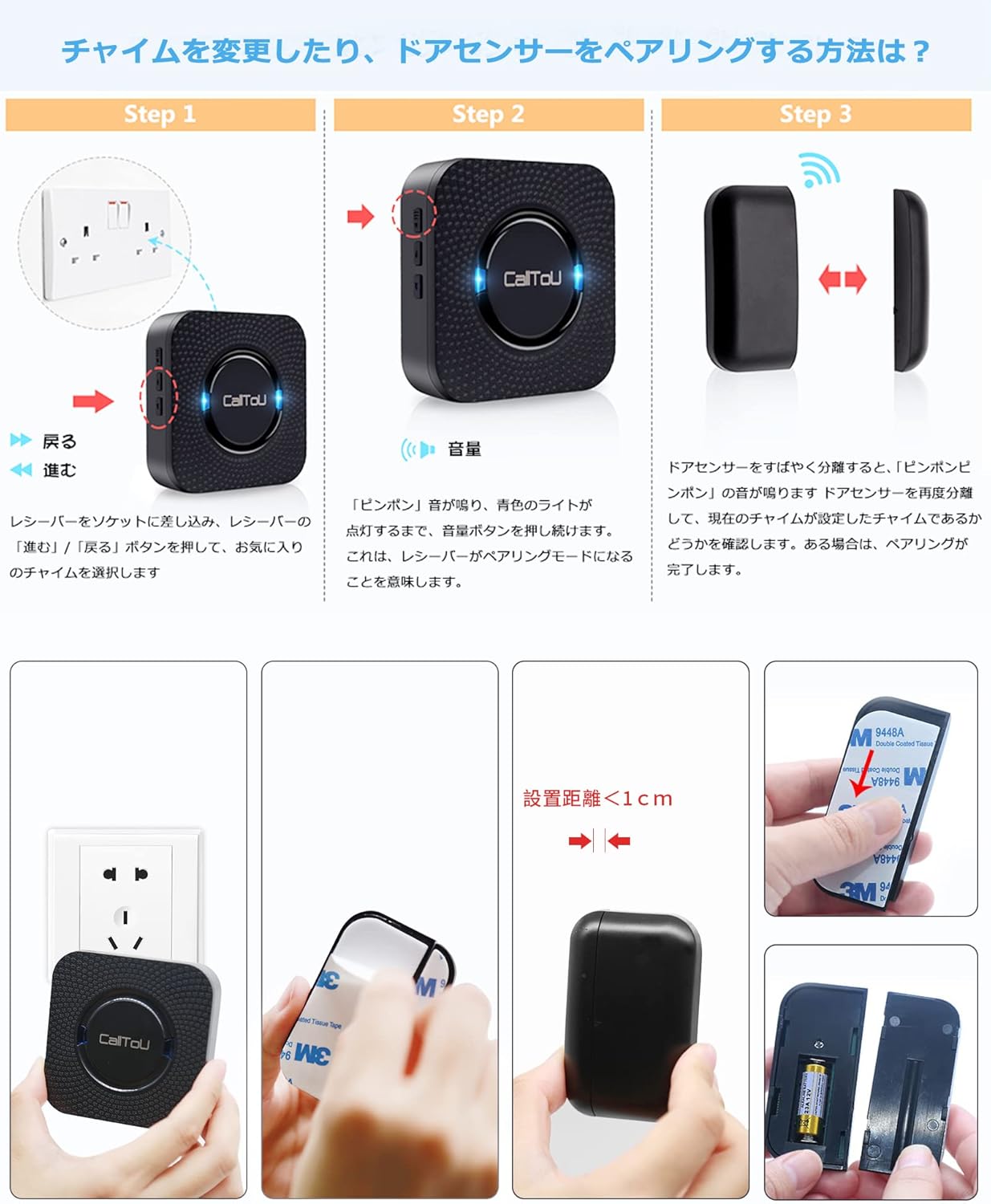
Figura 3: Detallada view of receiver and magnetic sensor components.
4.2 Configuració inicial i emparellament
- Engegueu el receptor: Plug the receiver unit into a standard electrical outlet. The receiver will power on and be ready for pairing.
- Selecciona la melodia: Press the 'Up' or 'Down' buttons on the side of the receiver to cycle through the 55 available melodies. Select your preferred chime sound.
- Introduïu el mode de vinculació: Press and hold the volume button on the side of the receiver for approximately 5 seconds until you hear a "ding-dong" sound and the blue LED light flashes. This indicates the receiver is in pairing mode.
- Activate Magnetic Sensor: Separate the two parts of the magnetic sensor by more than 1.5 cm (0.6 inches). The receiver will emit the selected chime sound and its LED will flash, indicating successful pairing.
- Muntar el sensor: Use the provided double-sided tape or screws to attach the magnetic sensor to your desired door or window frame. Ensure the two parts of the sensor are aligned and within 1.5 cm (0.6 inches) of each other when the door/window is closed.

Figure 4: Plug the receiver into an outlet.

Figure 5: Select your desired melody.

Figure 6: Enter pairing mode by holding the volume button.
Video 1: Demonstrates the door sensor setup method, including powering on, selecting a melody, entering pairing mode, and activating the magnetic sensor for successful pairing.

Figure 7: Proper installation of the magnetic sensor on a door or window.

Figure 8: Visual guide for the setup and pairing process.
5. Instruccions de funcionament
- Activació de l'alarma: When the magnetic sensor's two parts separate (e.g., a door or window opens), the sensor will send a signal to the paired receiver.
- Receiver Alert: The receiver will sound the selected melody and its LED light will flash, alerting you to the opening.
- Ajust de volum: Press the volume button on the receiver to adjust the sound level through 5 different settings.
- Selecció de melodies: Use the 'Up' and 'Down' buttons on the receiver to change the chime melody.

Figura 9: Examples of how the door sensor chime can be used in different scenarios.
6. Manteniment
6.1 Battery Replacement (Magnetic Sensor)
The magnetic sensor is powered by a 12V 23A alkaline battery. When the battery is low, the sensor's indicator light may flash or the transmission range may decrease. Replace the battery as follows:
- Carefully pry open the magnetic sensor casing using a small screwdriver.
- Remove the old 12V 23A battery.
- Insert a new 12V 23A alkaline battery, ensuring correct polarity.
- Tanqueu el sensor casing de manera segura.
Video 2: Detailed instructions on how to replace the battery in the door sensor.

Figure 10: Visual guide for magnetic sensor battery replacement.
6.2 Neteja
Netegeu les unitats amb un drap suau i sec. No utilitzeu productes de neteja abrasius ni dissolvents.
7. Solució De Problemes
| Problema | Causa possible | Solució |
|---|---|---|
| El receptor no emet cap so quan s'activa el sensor. | 1. Sensor and receiver are not paired. 2. Sensor battery is low or dead. 3. Sensor and receiver are out of range. 4. Obstructions between sensor and receiver. | 1. Re-pair the sensor and receiver (refer to Section 4.2). 2. Replace the sensor battery (refer to Section 6.1). 3. Move the receiver closer to the sensor. 4. Reduce obstructions or reposition units. |
| Chime sound is too low or too loud. | La configuració del volum és incorrecta. | Adjust the volume using the volume button on the receiver. |
| Falses alarmes. | Magnetic sensor parts are too far apart or misaligned. | Ensure the magnetic sensor parts are within 1.5 cm (0.6 inches) when the door/window is closed and are properly aligned. |
8. Especificacions
- Marca: CallToU
- Model: CC01-DS04
- Color: Negre
- Dimensions del receptor: 8.17 x 8.17 x 3 cm (aprox. 3.22 x 3.22 x 1.18 polzades)
- Magnetic Sensor Dimensions: 9.5 x 9 x 9 cm (overall product dimension, specific sensor dimensions not provided but implied to be smaller)
- Font d'alimentació: Receiver: AC Plug-in; Transmitter: 1 x 12V 23A Alkaline Battery (included)
- Interval sense fil: Up to 200 meters (650 feet) outdoors (line of sight), up to 80 meters (260 feet) indoors
- Nivells de volum: 5 (0-110dB)
- Melodies: 55 seleccionables
- Tecnologia del sensor: Sensor de contacte (magnètic)
- UPC: 779584902443

Figura 11: Dimensions del producte.
9. Garantia i Suport
This CallToU product comes with a 1 any de garantia de qualitat. If you encounter any issues or have questions regarding the product during use, please contact CallToU customer support through Amazon's order details page. We are committed to providing prompt assistance and replacements if necessary.
For further assistance, please refer to the contact information provided with your purchase or visit the official CallToU brand store on Amazon.