
ANYSECU S200
Manual d'usuari de la ràdio Inrico S200 POC
Model: S200
Marca: ANYSECU
Introducció
The Inrico S200 is a robust and versatile Push-to-Talk (PTT) over Cellular (POC) radio designed for professional communication across 2G, 3G, 4G, and WLAN networks. Featuring an Android 10.0 operating system, a 3.1-inch touch display, and dual cameras, it offers advanced functionalities for various applications. Its IP67 waterproof rating ensures durability in challenging environments, making it suitable for demanding professional use.
Producte acabatview i Components
Familiarize yourself with the Inrico S200 radio and its key components.

This image displays the Inrico S200 from multiple angles, highlighting its overall form factor, antenna, and belt clip.
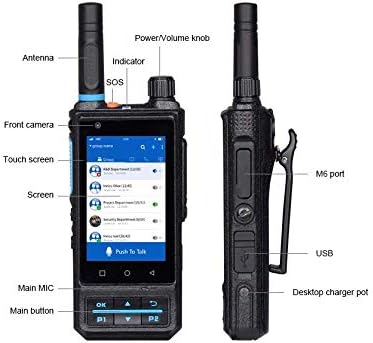
Aquest diagrama proporciona una informació detallada view of the front and left side of the device, labeling important buttons, ports, and indicators for easy identification.

This diagram illustrates the rear and right side of the device, pointing out the rear camera, flash, belt clip, and the Push-to-Talk (PTT) button along with additional programmable function keys.
Guia de configuració
Desembalatge i inspecció inicial
Upon receiving your Inrico S200, carefully unbox all components and verify their presence:
- Inrico S200 Radio Unit
- Built-out Antenna
- Clip de cinturó
- Bateria (4000mAh)
- Cable USB
- Adaptador d'alimentació
Battery and SIM Card Installation
The Inrico S200 supports dual micro SIM cards and a TF card for expanded storage.

This image shows the back of the radio with the battery cover removed, revealing the slots for SIM cards and a TF card, as well as the included 4000mAh battery.
- Traieu la tapa de la bateria a la part posterior del dispositiu.
- Insert up to two micro SIM cards into the designated slots. Ensure the gold contacts face downwards.
- (Optional) Insert a TF card (up to 32GB) into its slot for additional storage.
- Insert the 4000mAh battery into the battery compartment, aligning the contacts.
- Col·loqueu la tapa de la bateria de manera segura.
Càrrega del dispositiu
Before first use, fully charge the Inrico S200.

This image highlights the charging interface of the device, including the pogo pin contacts for desktop charging and the Micro USB 2.0 port for direct cable charging.
- Connect the provided USB cable to the Micro USB 2.0 port on the side of the radio.
- Connecteu l'altre extrem del cable USB a l'adaptador d'alimentació.
- Connecteu l'adaptador de corrent a una presa de corrent.
- El llum indicador mostrarà l'estat de càrrega.
- Alternatively, use a compatible desktop charger (sold separately) with the pogo pin contacts at the bottom of the device.
Instruccions de funcionament
Encès/Apagat
To power on the device, press and hold the Power/Volume knob until the screen illuminates. To power off, press and hold the Power/Volume knob, then select "Power off" from the options on the screen.
Navegació bàsica
The Inrico S200 features a 3.1-inch touch screen for intuitive navigation.
- Swipe left/right or up/down to navigate through applications and menus.
- Toqueu les icones per obrir aplicacions o seleccionar opcions.
- Use the physical "OK", "Back", and navigation buttons (P1, P2) below the screen for quick access and control.
Push-to-Talk (PTT) Functionality
The primary function of the S200 is Push-to-Talk communication.
- Ensure the device is connected to a network (4G, 3G, or Wi-Fi).
- Open your preferred PTT application (e.g., Zello, or a proprietary dispatch application).
- Select the desired group or private contact.
- Press and hold the dedicated PTT button on the side of the radio to transmit your voice.
- Deixeu anar el botó PTT per escoltar.
Ús de la càmera
The S200 is equipped with a 2.0MP front camera and a 13.0MP rear camera with autofocus and flash.

This image illustrates the camera interface on the S200's screen, capturing a scene, indicating its capability for photo and video recording.
- Obriu l'aplicació Càmera.
- Select between the front and rear cameras as needed.
- Toqueu la pantalla per enfocar o premeu el botó de captura per fer una foto o iniciar/aturar la gravació de vídeo.
- Captured media can be used for image or video records, important for field professionals.
Network Connectivity (Wi-Fi, Bluetooth, GPS)
The S200 supports Wi-Fi (802.11 b/g/n, 2.4G and 5G), Bluetooth 4.2, and GPS/AGPS/GLONASS.
- Access network settings via the "Settings" application on the touch screen.
- Enable Wi-Fi to connect to available wireless networks.
- Enable Bluetooth to pair with compatible accessories.
- GPS functionality is automatically active for location services and dispatch applications.
Dispatch Center Integration
The Inrico S200 is designed to integrate with dispatch center software for enhanced communication and management.

This image demonstrates the Inrico Dispatch Center software, which allows for group calls, private calls, voice recording, location sharing, and real-time tracking of S200 devices on a map.
Features include group calls, private calls, voice recording, location sharing, and dispatch management. Consult your system administrator for specific dispatch software instructions.
Manteniment i cura
Neteja
Regularly clean your Inrico S200 to ensure optimal performance and longevity.
- Feu servir un drap suau i sense borrissol per netejar la pantalla i la carcassa.
- Per a la brutícia persistent, lleugerament dampal drap amb aigua o un netejador suau i no abrasiu.
- Eviteu l'ús de productes químics agressius, dissolvents o materials abrasius.
- Assegureu-vos que tots els ports estiguin secs abans de carregar o connectar accessoris.
Cura de la bateria
Per maximitzar la durada i el rendiment de la bateria:
- Avoid exposing the battery to extreme temperatures (below -20°C or above 70°C).
- No descarregueu completament la bateria amb freqüència.
- If storing the device for an extended period, charge the battery to approximately 50% and store in a cool, dry place.
Water and Dust Protection (IP67)
The Inrico S200 is rated IP67, meaning it is protected against dust ingress and can withstand immersion in water up to 1 meter for 30 minutes.
- Ensure all port covers (USB, M6 interface) are securely closed before exposing the device to water or dust.
- Do not intentionally submerge the device beyond the specified depth or duration.
- If the device gets wet, dry it thoroughly before charging or opening any compartments.
Protecció contra caigudes
The device is designed to withstand drops from 1.0 meter. While robust, avoid unnecessary drops to prevent damage.
Resolució de problemes
This section addresses common issues you might encounter with your Inrico S200.
| Problema | Causa possible | Solució |
|---|---|---|
| El dispositiu no s'encén | Bateria baixa; Fallada del programari | Charge the device; Press and hold the Power/Volume knob for 10-15 seconds to force restart. |
| Sense connexió de xarxa | Out of network coverage; SIM card issue; Wi-Fi off | Move to an area with better signal; Reinsert SIM card; Check Wi-Fi settings and connect to a network. |
| PTT not transmitting/receiving | No network; PTT application not running; Incorrect group/contact selected | Ensure stable network connection; Open PTT application; Verify selected group/contact. |
| La pantalla no respon | Software issue; Physical damage | Restart the device; If issue persists, contact support. |
| Mala qualitat d'àudio | Microphone/speaker obstructed; Network interference | Ensure microphone/speaker are clear; Move to an area with less interference. |
Especificacions tècniques
Detailed technical specifications for the Inrico S200.

This image provides a concise overview of the device's technical capabilities and lists the items included in the standard package.
| Característica | Especificació |
|---|---|
| Model | S200 |
| Sistema operatiu | Android 10.0 |
| CPU | MT6737WM |
| Memòria (RAM+ROM) | 1 GB de RAM + 8 GB de ROM |
| Suport de la targeta TF | Fins a 32 GB |
| Ranura per a targeta SIM | Dual Micro SIM |
| Ports USB | Micro USB 2.0 |
| Interfície | M6 |
| Mida de la pantalla | Pantalla tàctil de 3.1 polzades |
| Càmera frontal | 2.0MP |
| Càmera posterior | 13.0MP (Autofocus) |
| Llanterna | Support LED Flashlight |
| Altaveu | Ø36mm, 8Ω 2W |
| Micròfon | Dual Microphone, Noise reduction |
| Bateria | 4000 mAh |
| Speaking Times | 16 hores |
| Standby Times | 20 hores |
| Mides (H*W*D) | 128.0 x 57.0 x 24.5mm (Without Antenna and Belt clip) |
| Pes | ≈210g (7.4 ounces) |
| Temperatura d'emmagatzematge | -20 °C ~ 70 °C |
| Temperatura de treball | -5 °C ~ 55 °C |
| Nivell de protecció | IP67 (Dustproof, Waterproof 1m for 30min) |
| Resistència a les caigudes | 1.0 metres |
| Certificacions | CE/FCC |
| GSM Frequencies (US) | B2/B3/B5/B8 |
| WCDMA Frequencies (US) | B1/B2/B5/B8 |
| FDD-LTE Frequencies (US) | B2/B4/B5/B12/B13/B17/B20/B28a/B28b |
| Wi-Fi | IEEE 802.11 b/g/n (2.4G and 5G) |
| Bluetooth | BT4.2 and BLE |
| GPS | GPS, AGPS (Customized: GLONASS) |
Informació de la garantia
This product comes with a standard manufacturer's warranty. For specific details regarding warranty coverage, duration, and terms, please refer to the warranty card included in your product packaging or visit the official ANYSECU weblloc web. Conserveu el comprovant de compra per a reclamacions de garantia.
Protection plans are also available for extended coverage, offering additional peace of mind beyond the standard warranty period.
Atenció al client
For technical assistance, troubleshooting, or service inquiries, please contact ANYSECU customer support.
- Visit the official ANYSECU weblloc web per a preguntes freqüents i recursos de suport.
- Consulteu la informació de contacte que trobareu a l'embalatge del producte.
When contacting support, please have your product model (S200) and serial number ready to expedite the service process.
Ask a question about this manual
Ask about setup, troubleshooting, compatibility, parts, safety, or missing instructions. Manuals+ will review the question and use this page’s manual context to help answer it.