
T-Wolf G530
T-Wolf G530 Wired Gaming Mouse User Manual
Model: G530 | Brand: T-Wolf
Introducció
Gràcies per la compraasing the T-Wolf G530 Wired Gaming Mouse. This manual provides detailed instructions on how to set up, operate, and maintain your new gaming mouse. Please read this manual carefully before use to ensure optimal performance and longevity of your device.

Image: The T-Wolf G530 Wired Gaming Mouse in silver, showcasing its ergonomic design and blue LED accents.
Producte acabatview
The T-Wolf G530 is a high-performance wired gaming mouse designed for precision and comfort. It features 7 programmable buttons, adjustable DPI settings, and dynamic backlight colors to enhance your gaming experience. Its ergonomic design ensures comfortable use during extended gaming sessions.
Característiques principals:
- 7 botons programables: Customize your controls for various games and applications.
- DPI ajustable: Cycle through 1200, 2400, 3200, and 6400 DPI settings for precise tracking.
- Retroiluminació de 4 colors: Enjoy dynamic lighting effects that change with DPI settings.
- Disseny ergonòmic: Comfortable hand-shaped design suitable for various hand sizes.
- Symmetrical DIY Counterweight: Independent weights allow customization for improved stability and accuracy.
- Durable Micro-Motions: Designed for millions of quick clicks, ensuring longevity.
- Connectivitat USB: Configuració senzilla de tipus plug-and-play.

Image: The T-Wolf G530 mouse highlighting its competitive gaming features and backlight.

Imatge: A view of the T-Wolf G530 mouse emphasizing its double-wing hand rest and scientific structure for comfort.
Guia de configuració
Setting up your T-Wolf G530 mouse is straightforward. Follow these steps to get started:
- Desempaqueta el ratolí: Carefully remove the mouse from its packaging. Ensure all components are present (1x T-Wolf G530 Gaming Mouse).
- Connexió a l'ordinador: Plug the USB connector of the mouse into an available USB port on your laptop or personal computer.
- Instal·lació del controlador: The mouse is plug-and-play. Your operating system (Windows 7, Linux, etc.) will automatically detect and install the necessary drivers. This process usually takes a few seconds.
- Funcionalitat de prova: Once installed, move the mouse to check cursor movement. Click the left and right buttons to ensure they are responsive.
Adjusting Weights (Optional):
The T-Wolf G530 features a symmetrical DIY counterweight system, allowing you to customize the mouse's weight for optimal feel and precision. Locate the weight compartments, typically on the underside or within the mouse body, and add or remove weights as desired.

Image: The T-Wolf G530 mouse illustrating its customizable weight system with weights being added.
Instruccions de funcionament
Ajust de DPI:
The mouse features a dedicated DPI button, usually located behind the scroll wheel. Press this button to cycle through the available DPI settings:
- 1200 DPI: Standard speed for general use.
- 2400 DPI: Increased sensitivity for faster cursor movement.
- 3200 DPI: Higher sensitivity for quick reactions in gaming.
- 6400 DPI: Maximum sensitivity for competitive gaming and rapid movements.
The backlight colors will change synchronously with the DPI setting, providing a visual indicator of your current sensitivity.
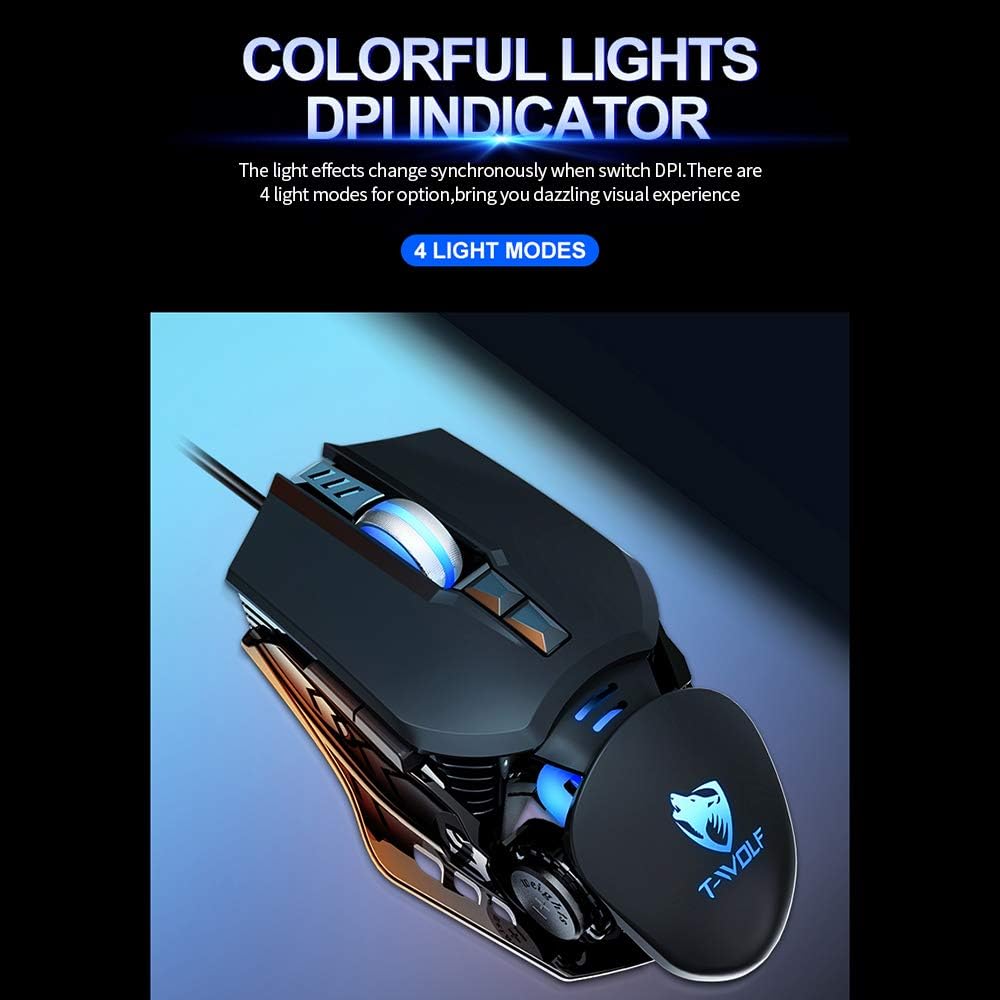
Image: The T-Wolf G530 mouse displaying its colorful LED lights, which indicate the current DPI setting.

Image: The T-Wolf G530 mouse highlighting its 6400 DPI tracking capability for precise positioning.
Funcions del botó:
The T-Wolf G530 mouse features 7 buttons. The standard functions are:
- Clic esquerre: Acció primària.
- Clic dret: Menú contextual/d'acció secundària.
- Scroll Wheel (Click): Clic amb el botó del mig, sovint utilitzat per obrir enllaços en pestanyes noves.
- Scroll Wheel (Scroll Up/Down): Navigates content vertically.
- Botó DPI: Passa ciclísticament pels paràmetres de DPI.
- Botó Endavant: Navega cap endavant web navegadors o file exploradors.
- Botó enrere: Navega cap enrere web navegadors o file exploradors.
For advanced customization, you may use third-party software (not included) to remap these buttons according to your preferences for specific games or applications.

Image: A diagram illustrating how both large and small hands can comfortably use the mouse buttons.
Manteniment i cura
To ensure the longevity and optimal performance of your T-Wolf G530 gaming mouse, follow these maintenance guidelines:
- Neteja:
- Feu servir un drap suau, sec i sense borrissol per netejar la superfície del ratolí.
- Per a la brutícia persistent, lleugerament dampNetegeu el drap amb aigua o una solució de neteja suau. Eviteu productes químics agressius.
- Do not spray cleaning solutions directly onto the mouse.
- Regularly clean the optical sensor on the underside of the mouse with a cotton swab to prevent tracking issues.
- Emmagatzematge: Guardeu el ratolí en un lloc fresc i sec, allunyat de la llum solar directa i de temperatures extremes.
- Cura del cable: Eviteu doblegar o torçar excessivament el cable USB, ja que això pot danyar els cables interns.
- Eviteu líquids: Keep the mouse away from liquids to prevent internal damage.
- Manejar amb cura: Do not drop or subject the mouse to strong impacts.
Resolució de problemes
If you encounter issues with your T-Wolf G530 mouse, refer to the following common problems and solutions:
| Problema | Causa possible | Solució |
|---|---|---|
| El ratolí no respon | Connexió USB fluixa, port USB defectuós, problema amb el controlador. |
|
| El moviment del cursor és erràtic o brusc | Sensor òptic brut, superfície inadequada del coixinet del ratolí. |
|
| Els botons no funcionen | Conflicte de programari, danys físics. |
|
| La llum de fons no funciona | Problema d'alimentació, fallada interna. |
|
Especificacions
| Característica | Detall |
|---|---|
| Marca | T-Wolf |
| Model | G530 |
| Color | Silver (also available in Black/Pink) |
| Tecnologia de connectivitat | USB per cable |
| Nombre de botons | 7 |
| Configuració de DPI | 1200/2400/3200/6400 |
| Llum de fons | 4-color backlight |
| Tecnologia de detecció de moviment | Òptic |
| Longitud del cable | 1.5 metres |
| Mida del producte | 13 x 8 x 3.5 cm (5.1 x 3.1 x 1.4 polzades) |
| Pes del producte | 160 grams (5.6 unces) |
| Usos recomanats | Jocs |
| Dispositius compatibles | Personal Computer (Laptop, Desktop) |
| Sistemes operatius | Linux, Windows 7 (and likely newer Windows versions) |
| Característica especial | Ergonomic Design, Adjustable Weights |
| Orientació de la mà | D'acord |
Garantia i Suport
For warranty information and technical support, please refer to the documentation provided with your purchase or contact the retailer where you purchased the T-Wolf G530 mouse. Keep your proof of purchase for warranty claims.
Ask a question about this manual
Ask about setup, troubleshooting, compatibility, parts, safety, or missing instructions. Manuals+ will review the question and use this page’s manual context to help answer it.