
NC A9 Mini Camera
A9 Mini Camera Wireless WiFi IP Home Security Camera User Manual
Brand: NC | Model: A9 Mini Camera
1. Introducció
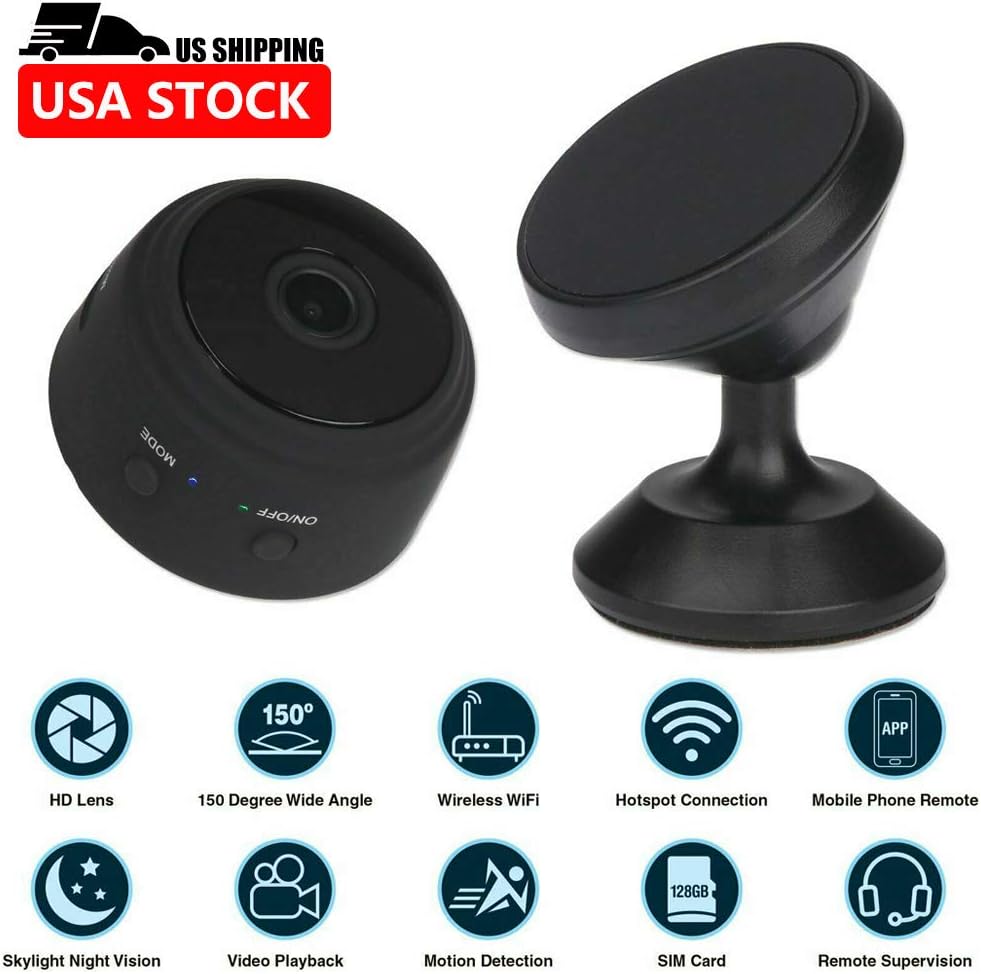
The A9 Mini Camera is a compact and versatile wireless IP camera designed for home and office security, surveillance, and general monitoring. Featuring 1080P HD video recording, 150-degree wide-angle viewing, night vision capabilities, and smart motion detection, this camera offers comprehensive monitoring solutions. Its ultra-miniature design and multiple installation options make it suitable for various indoor and outdoor applications. This manual provides detailed instructions for setup, operation, maintenance, and troubleshooting to ensure optimal performance of your device.
2. Contingut del paquet
Si us plau, verifiqueu que tots els elements que s'enumeren a continuació estiguin inclosos al vostre paquet:
- 1 x A9 Mini Camera
- 1 x Camera Holder
- 1 x Standard USB Cable
- 1 x Flexible Gooseneck USB Cable
- 1 x Manual d'usuari

3. Producte acabatview
Familiarize yourself with the components of your A9 Mini Camera:

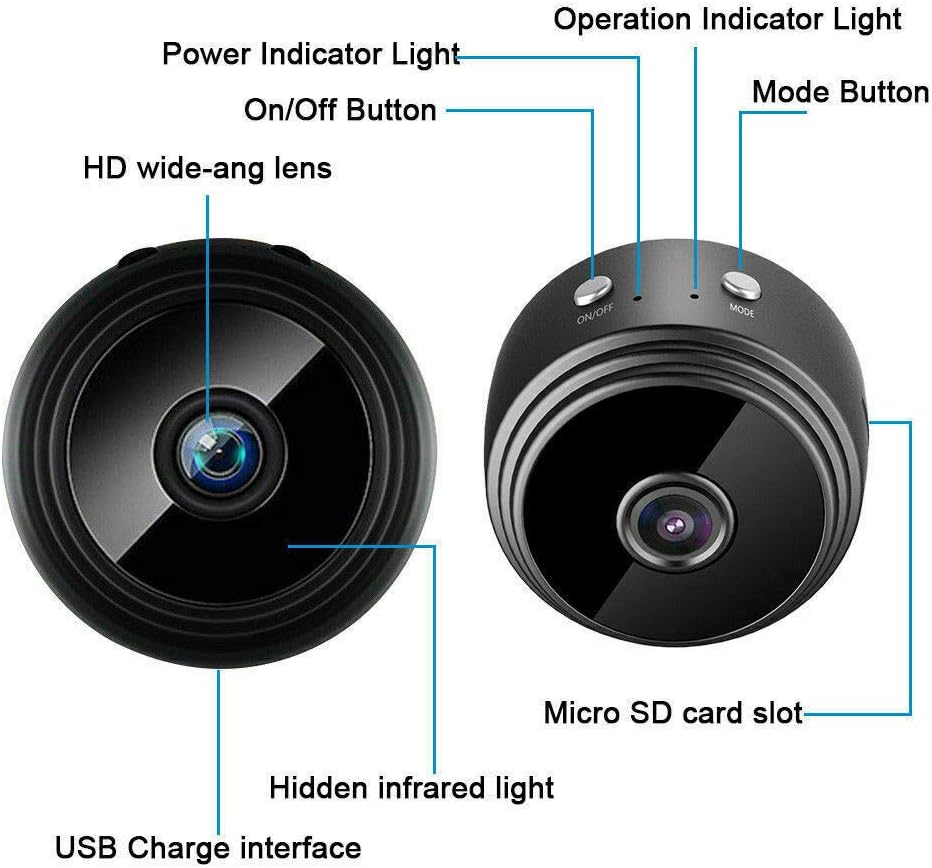
- HD wide-angle lens: Captures 1080P video with a 150-degree viewangle de ing.
- Botó On/Off: Encén o apaga el dispositiu.
- Llum indicador d'alimentació: Indica l'estat d'alimentació.
- Llum indicador de funcionament: Shows current operating mode (e.g., recording, standby).
- Botó de mode: Switches between different operating modes.
- Ranura per a targeta Micro SD: For inserting a TF card (not included) for local storage.
- Hidden infrared light: Enables night vision capabilities.
- USB Charge interface: For charging the camera and connecting to power.
4. Configuració
4.1 Mètodes d'instal·lació
The A9 Mini Camera offers flexible installation options:
- With Holder: Place the camera on the included holder for stable placement on countertops, desks, or flat surfaces.
- Imant incorporat: The camera features a powerful built-in magnet, allowing it to be easily attached to metal surfaces such as table legs, refrigerators, or metal shelves.
- Flexible Gooseneck USB Cable: Use the flexible gooseneck USB cable to power the camera and adjust its angle. This can be inserted directly into a PC USB port or a USB power adapter.

4.2 Initial Setup (App & Power)
- Descarregar l'aplicació: Download the compatible application to your smartphone or tablet. The camera supports Android and iOS mobile operating systems.
- Encès: Connect the camera to a power source using the provided USB cable. The camera will power on automatically or can be turned on using the On/Off button.
- Connexió Wi-Fi: Proceed to connect the camera to your Wi-Fi network as described in the next section.
4.3 Wi-Fi Connection Methods
There are two primary methods for connecting your camera to Wi-Fi:
- Wireless Wi-Fi Connection (via Router): Connect the camera to your home or office Wi-Fi router. This allows for remote control and viewing from anywhere with an internet connection.
- Camera's Built-in Wi-Fi Hotspot: The camera has a built-in Wi-Fi hotspot. You can directly connect your phone to this hotspot. This method allows for remote control within approximately 10 meters, even if your phone does not have an internet connection.
5. Instruccions de funcionament
5.1 Modes d'enregistrament
The A9 Mini Camera supports three recording modes:
- 24H Recording: The camera records continuously throughout the day (default mode).
- Detecció de moviment: Recording starts automatically when motion is detected within the camera's field of view.
- Temporitzador: Set a specific schedule for the camera to record, allowing for customized recording periods.
5.2 Visió nocturna
The camera is equipped with hidden infrared lights, enabling clear video recording in low-light conditions or complete darkness. Night vision activates automatically when ambient light levels are insufficient.
5.3 Detecció de moviment
When motion detection is enabled, the camera will begin recording when it senses movement. This feature helps conserve storage space and battery life by only recording when an event occurs. Alerts can be configured through the mobile application.
5.4 Multi-Platform and Multi-User Support
The A9 Mini Camera supports viewing and control from multiple platforms, including Android, iOS, Windows, and Mac OS. Multiple users can also access the camera feed simultaneously from different devices (phone and computer).
5.5 Recording Without Wi-Fi
The camera can record video even without a Wi-Fi connection. Simply insert a Micro SD card (TF card, not included) into the camera's slot. The camera will automatically record HD video to the Micro SD card. This is useful for situations where Wi-Fi is unavailable or unreliable.
6. Manteniment
- Neteja: Feu servir un drap suau i sec per netejar la lent i el cos de la càmera. Eviteu utilitzar netejadors líquids o materials abrasius.
- Temperatura i humitat: Store and operate the camera within the specified temperature and humidity ranges to prevent damage. Avoid extreme heat, cold, or high humidity.
- Emmagatzematge: When not in use for extended periods, ensure the camera is fully charged and stored in a cool, dry place.
- Actualitzacions de firmware: Comproveu el del fabricant website or the mobile application periodically for any available firmware updates to ensure optimal performance and security.
7. Solució De Problemes
- La càmera no s'encén: Ensure the camera is properly connected to a power source or that its internal battery is charged.
- No es pot connectar a Wi-Fi: Verify that your Wi-Fi network is active and within range. Ensure you have entered the correct Wi-Fi password. If using the camera's hotspot, ensure your phone is connected directly to it.
- Autonomia curta de la bateria: The camera's continuous recording time is approximately 1 hour. For extended use, keep the camera connected to a power source.
- Poca qualitat de vídeo: Check if the lens is clean and free from obstructions. Ensure adequate lighting for optimal video clarity, especially if night vision is not active. Verify the resolution settings in the app.
- Targeta Micro SD no reconeguda: Ensure the TF card is inserted correctly and is not damaged. Format the card if necessary (this will erase all data).
8. Especificacions
| Característica | Especificació |
|---|---|
| Resolució | 1080P HD |
| Format de vídeo | AVI, MP4 |
| Velocitat de fotogrames | 25 FPS |
| Viewangle ing | 150 graus |
| Distància de detecció de moviment | 6 metres (recte) |
| Il·luminació mínima | 1 LUX |
| Temps d'enregistrament continu | Aprox. 1 hora |
| Format comprimit | H.264 |
| Interval d'enregistrament | 5 m² |
| Consum d'energia | 240MA/3.7V |
| Temperatura d'emmagatzematge | -20 a 80 graus centígrads |
| Temperatura de funcionament | -10 a 60 graus centígrads |
| Humitat de funcionament | 15% a 85% HR |
| Tipus de targeta de memòria | TF card (Micro SD, not included) |
| Compatible Playback Software | VLCPlayer / SMPlayer |
| Compatibilitat del sistema operatiu de l'ordinador | Windows / Mac OS X |
| Compatibilitat del sistema operatiu mòbil | Android/iOS |
| Web Compatibilitat del navegador | IE7+, Chrome, Firefox, Safari, etc. |
| Mida de l'article | 4.4cm x 2.3cm |
| Pes de l'article | 0.15 quilograms (5.3 unces) |
| Material | Metall |
| Tecnologia de connectivitat | Cablejat, sense fil (Wi-Fi) |
| Font d'alimentació | Funciona amb bateria |
| Tipus de muntatge | Wall Mount, Stand, Magnetic |
| Característiques especials | Sensor de moviment, visió nocturna |
| Ús interior/exterior | Interior, Exterior |
| Classificació de protecció internacional | IP67 |
| UPC | 772728676361 |
9. Garantia i Suport
For information regarding the product warranty, please refer to the documentation provided at the time of purchase or visit the official website of the retailer or manufacturer. If you encounter any issues not covered in this manual or require further assistance, please contact the customer support channels provided by your point of purchase or the manufacturer's official support page.
Ask a question about this manual
Ask about setup, troubleshooting, compatibility, parts, safety, or missing instructions. Manuals+ will review the question and use this page’s manual context to help answer it.