
1. Introducció
This manual provides essential information for the safe and efficient operation of your DOOGEE S97 Pro Rugged Smartphone. Please read it thoroughly before using your device.

Image 1.1: The DOOGEE S97 Pro Rugged Smartphone, showcasing its robust design and display.
2. Dispositiu acabatview
The DOOGEE S97 Pro is a rugged smartphone designed for durability and performance. Key features include:
- Sistema operatiu: Android 11
- Processador: Helio G95 Octa Core 2.1GHz 12nm
- Memòria: 8 GB de RAM + 128 GB de ROM
- Bateria: 8500mAh Super Battery with 33W Fast Charging and 10W Wireless Charging
- Visualització: 5.71-inch Corning Gorilla Glass
- Càmera posterior: Samsung 48MP AI Main Camera (48MP + 8MP + 2MP + 2MP)
- Càmera frontal: 16MP
- Característiques especials: 40m Rangefinder, IP68 Waterproof, Dustproof, Shockproof, NFC Support
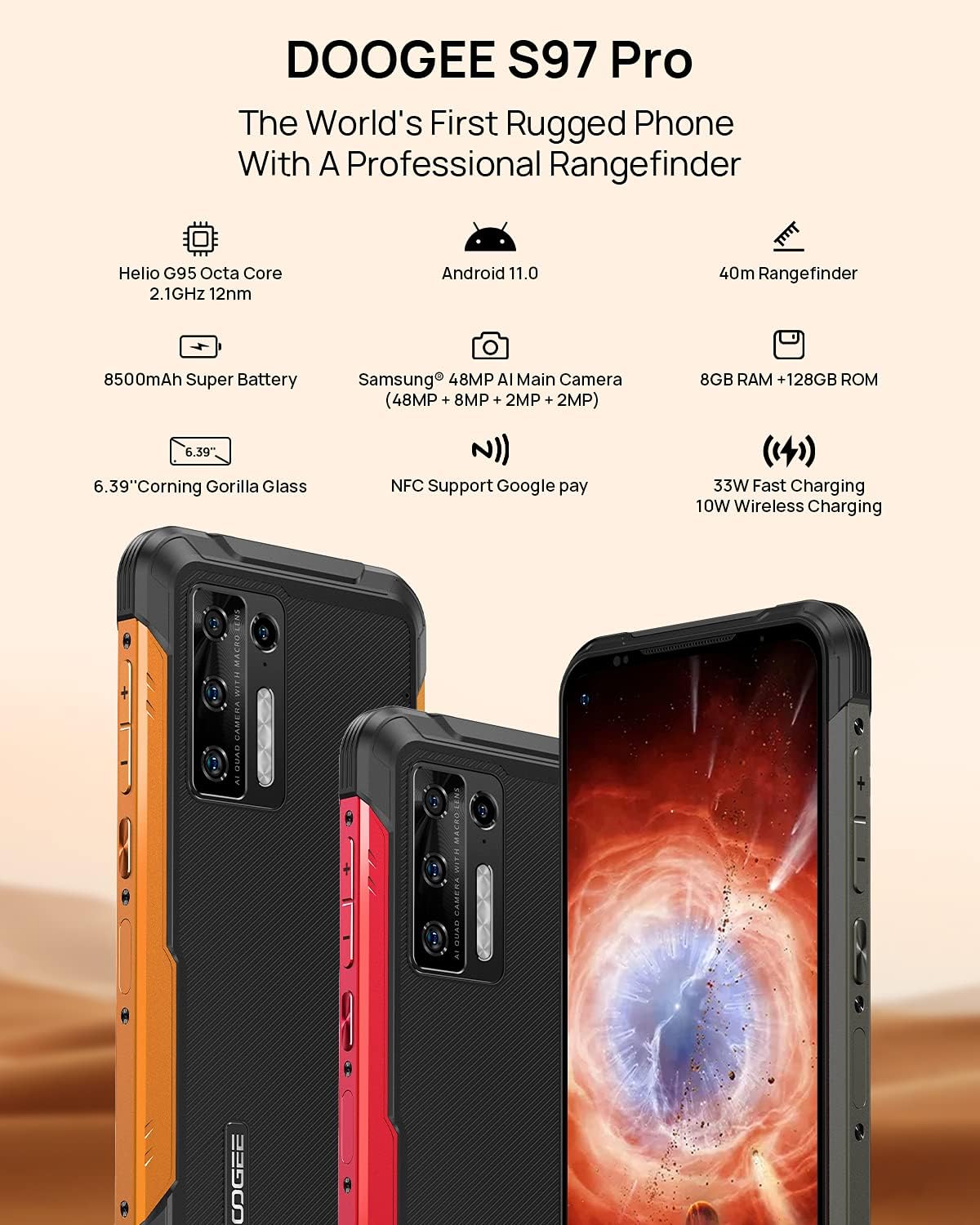
Image 2.1: Visual representation of the DOOGEE S97 Pro's main features, including processor, battery, camera, and display.
3. Configuració
3.1 Instal·lació de la targeta SIM
- Localitza la safata de la targeta SIM al lateral del dispositiu.
- Feu servir l'eina d'expulsió de la SIM proporcionada per obrir la safata.
- Carefully place your Nano SIM card(s) into the designated slots. Ensure proper orientation.
- Gently push the SIM card tray back into the device until it is flush with the body.
Nota: This device supports specific frequency bands. Please verify compatibility with your network carrier before use. The DOOGEE S97 Pro does not support certain CDMA network carriers such as Verizon, Sprint, Xfinity, and TracFone.
3.2 Encès inicial
- Press and hold the Power button located on the side of the device until the DOOGEE logo appears.
- Segueix les instruccions que apareixen a la pantalla per completar la configuració inicial, inclosa la selecció d'idioma, la connexió Wi-Fi i la configuració del compte de Google.
4. Instruccions de funcionament
4.1 Navegació bàsica
- Back Function: Llisca des de la vora esquerra o dreta de la pantalla cap al centre.
- Pantalla d'inici: Feu lliscar el dit cap amunt des de la part inferior de la pantalla per tornar a la pantalla d'inici.
- Aplicacions recents: Swipe up from the bottom of the screen and hold briefly to view recent applications. Swipe left or right along the very bottom of the screen to scroll through recent apps.
- Calaix d'aplicacions: The device does not feature a traditional app drawer. All installed applications are displayed on the home screen. Additional home screens are automatically added to the right as more apps are installed.
4.2 Ús de la càmera
The DOOGEE S97 Pro is equipped with a versatile camera system:
- Càmera posterior: 48MP main sensor, 8MP ultra-wide angle, 2MP portrait, and 2MP macro lens.
- Càmera frontal: 16MP per a selfies i videotrucades.
To access the camera, tap the Camera icon on your home screen. Select desired modes (Photo, Video, Portrait, Macro, etc.) from the interface.

Imatge 4.1: Primer pla view of the Samsung 48MP AI Quad Rear Camera system on the DOOGEE S97 Pro.
4.3 Rangefinder Functionality
The integrated 40m laser rangefinder allows for precise distance measurements. To use:
- Locate and open the 'Rangefinder' application on your device.
- Select the desired measurement mode (Length, Area, Volume, Pythagoras).
- Follow the on-screen instructions to aim the laser and take measurements.

Image 4.2: Screenshots of the DOOGEE S97 Pro's 40m Rangefinder application interface, showing various measurement modes.
4.4 Gestió de la bateria
The DOOGEE S97 Pro features an 8500mAh battery. To optimize battery life and charging:
- Càrrega per cable: Use the provided USB Type-C cable and a compatible 33W fast charger for optimal charging speed.
- Càrrega sense fils: The device supports 10W wireless charging. Place the phone on a compatible wireless charging pad.
- Optimització de la bateria: Access battery settings to manage app power usage and enable power-saving modes.

Image 4.3: Illustration of the DOOGEE S97 Pro's 8500mAh Super Battery and charging capabilities.
4.5 Característiques de durabilitat
The S97 Pro is built to withstand harsh environments:
- Classificació IP68: Provides protection against dust ingress and immersion in water up to 1.5 meters for 30 minutes.
- A prova de cops: Designed to resist drops and impacts.
- Vidre Corning Gorilla: Enhances screen durability against scratches and minor impacts.

Image 4.4: Demonstrations of the DOOGEE S97 Pro's waterproof, dustproof, and shockproof capabilities.
Video 4.5: An official video from DOOGEE showcasing the rugged features and capabilities of the S59 Pro smartphone.
4.6 Sistema operatiu Android 11
The device runs on Android 11, offering enhanced privacy controls, improved notification management, and a streamlined user experience.

Image 4.6: Visual representation of the Android 11 operating system interface on the DOOGEE S97 Pro.
5. Manteniment
5.1 Neteja del vostre dispositiu
Due to its waterproof design, the DOOGEE S97 Pro can be cleaned with water. Ensure all ports are securely closed before rinsing. Use a soft, damp cloth to wipe the screen and body. Avoid harsh chemicals or abrasive materials.
5.2 Actualitzacions de programari
Comproveu i instal·leu regularment si hi ha actualitzacions de programari per garantir un rendiment òptim, seguretat i accés a noves funcions. Navegueu a Configuració > Sistema > Actualització del sistema per comprovar si hi ha actualitzacions disponibles.
6. Solució De Problemes
Si teniu problemes amb el dispositiu, consulteu les solucions habituals següents:
- El dispositiu no respon: Premeu i manteniu premut el botó d'engegada durant aproximadament 10-15 segons per forçar un reinici.
- Problemes de connectivitat de xarxa: Verify your SIM card is correctly inserted. Check network settings (Configuració > Xarxa i Internet > Xarxa mòbil). Reinicieu el dispositiu.
- Problemes de càrrega: Ensure the USB cable and charger are securely connected and undamaged. Try a different charger or cable. For wireless charging, ensure the phone is correctly positioned on the charging pad.
- Fingerprint Sensor Inaccuracy: Assegureu-vos que el dit estigui net i sec. Torneu a registrar les empremtes dactilars a Configuració > Seguretat > empremta digital.
- Rendiment lent: Close unused applications. Clear cache (Configuració > Aplicacions i notificacions > Veure totes les aplicacions > [Nom de l'aplicació] > Emmagatzematge i memòria cau > Esborra la memòria cau). Consider a factory reset as a last resort (Configuració > Sistema > Opcions de restabliment > Esborra totes les dades (restabliment de fàbrica)).
7. Especificacions
| Característica | Detall |
|---|---|
| Dimensions del producte | 6.41 x 3.19 x 0.63 polzades |
| Pes de l'article | 12 unces (340 grams) |
| Sistema operatiu | Android 11.0 |
| RAM | 8 GB (Note: Product data shows 4GB RAM, but images and title indicate 8GB. This manual uses 8GB as per prominent product claims.) |
| Capacitat d'emmagatzematge de memòria | 128 GB |
| Mida de la pantalla | 5.71 polzades |
| Capacitat de la bateria | 8500 milionsamp Hours (Note: Product data shows 10050 mAh, but images and title indicate 8500 mAh. This manual uses 8500 mAh as per prominent product claims.) |
| Tecnologies de comunicació sense fil | Mòbil, Wi-Fi |
| Tecnologia cel·lular | LTE |
| Tipus de connector | USB tipus C |
| Entrada de la interfície humana | Botons |
| Què hi ha a la caixa | Cable USB |
For detailed specifications, please refer to the product packaging or the official DOOGEE weblloc.

Image 7.1: The DOOGEE S97 Pro highlighting its 8GB RAM and 128GB ROM, powered by a Helio G95 Octa Core processor.
8. Garantia i Suport
Your DOOGEE S97 Pro smartphone is covered by a manufacturer's warranty. Please refer to the warranty card included in your product packaging for specific terms and conditions, including warranty duration and coverage details.
For technical support, product inquiries, or service requests, please visit the official DOOGEE website or contact their customer service department. Contact information can typically be found on the DOOGEE weblloc o a l'embalatge del producte.