
Varmilo VBS108
Varmilo VBS108 Lure Bot Mechanical Keyboard
Manual d'instruccions
Introducció
Thank you for choosing the Varmilo VBS108 Lure Bot Mechanical Keyboard. This keyboard is designed for versatility and durability, featuring triple mode connectivity (Bluetooth 5.0, 2.4GHz Wireless, and USB-C), high-quality PBT dye-sub keycaps, and Cherry MX Brown switches for a tactile typing experience. This manual provides detailed instructions for setup, operation, maintenance, and troubleshooting to ensure optimal performance and longevity of your keyboard.
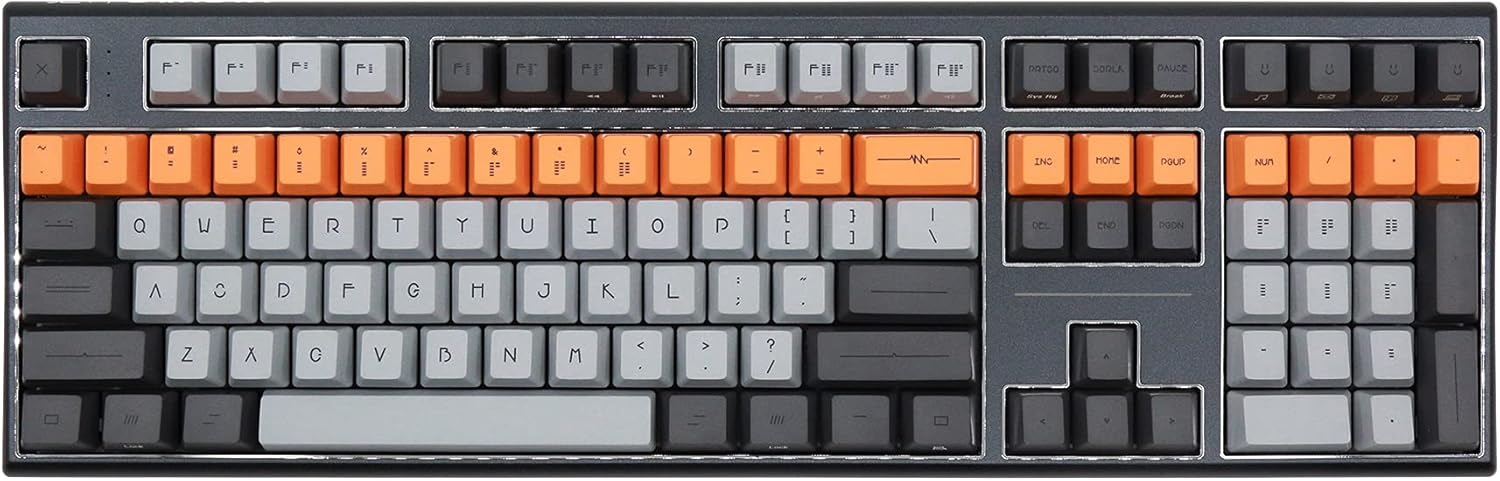
Figure 1: Varmilo VBS108 Lure Bot Mechanical Keyboard
Contingut del paquet
Si us plau, assegureu-vos que tots els elements estiguin presents al paquet:
- Varmilo VBS108 Lure Bot Mechanical Keyboard
- Cable USB-C a USB-A
- 2.4GHz Wireless Dongle (typically stored in the keyboard's battery compartment or a dedicated slot)
- Extractor de tecles (pot estar inclòs)
- Manual d'usuari (aquest document)
Configuració
The Varmilo VBS108 offers three connectivity modes: USB-C wired, 2.4GHz wireless, and Bluetooth 5.0.
1. Connexió amb cable USB-C
- Locate the USB-C port on the keyboard (usually on the top edge).
- Connecteu un extrem del cable USB-C proporcionat al teclat.
- Connect the other end (USB-A) to an available USB port on your computer.
- El teclat es reconeixerà automàticament i estarà llest per al seu ús.
2. Connexió sense fil de 2.4 GHz
- Locate the 2.4GHz wireless dongle.
- Connecteu el dongle a un port USB disponible de l'ordinador.
- Ensure the keyboard is in 2.4GHz mode (refer to the keyboard's function key combinations or a physical switch if available).
- El teclat s'hauria de connectar automàticament.
3. Connexió Bluetooth 5.0
- Ensure the keyboard is in Bluetooth pairing mode. This typically involves holding down a specific Fn key combination (e.g., Fn + 1, Fn + 2, or Fn + 3 for different profiles) until an indicator light flashes. Consult your keyboard's specific key legend for Bluetooth pairing.
- A l'ordinador o dispositiu, obriu la configuració de Bluetooth.
- Cerca new devices and select "Varmilo VBS108" or a similar name from the list.
- Seguiu les indicacions de la pantalla per completar el procés de vinculació.
En funcionament
The Varmilo VBS108 keyboard includes various function key combinations for enhanced control.
Combinacions de tecles de funció (Fn + tecla)
- Fn + F1-F12: Multimedia controls (play/pause, volume up/down, mute, etc.). Refer to the keycap legends for specific functions.
- Fn + Win: Tecla de bloqueig/desbloqueig de Windows.
- Fn + Left Alt: Switch between macOS and Windows layouts (if supported).
- Fn + Q/W/E: Canvia entre Bluetooth profiles (si escau).
- Fn + R: Switch to 2.4GHz wireless mode.
- Fn + T: Canvia al mode amb cable USB-C.
- Fn + Backlight Keys: Adjust backlight brightness or effects (if applicable).
Adjustable Flip-out Feet
El teclat té 3tage adjustable flip-out feet on the underside, allowing you to customize the typing angle for ergonomic comfort.

Figure 2: Adjustable Flip-out Feet
Manteniment
Proper maintenance ensures the longevity and performance of your Varmilo keyboard.
Neteja del teclat
- Tecles de tecles: Use a keycap puller to carefully remove keycaps. Clean them with a mild soap solution and a soft cloth, then rinse thoroughly and air dry completely before reattaching.
- Cas: Wipe the keyboard case with a soft, slightly damp, lint-free cloth. Avoid using harsh chemicals or abrasive materials.
- Entre claus: Use compressed air to remove dust and debris from between the key switches. A small brush can also be used for stubborn particles.

Figure 3: PBT Dye-Sub Keycaps
Resolució de problemes
If you encounter issues with your Varmilo VBS108 keyboard, try the following solutions:
- El teclat no respon (amb cable): Assegureu-vos que el cable USB-C estigui connectat correctament tant al teclat com a l'ordinador. Proveu un port o cable USB diferent.
- Keyboard not responding (Wireless/Bluetooth):
- Comproveu el nivell de la bateria.
- Ensure the keyboard is in the correct mode (2.4GHz or Bluetooth).
- For 2.4GHz, ensure the dongle is properly inserted and try a different USB port.
- For Bluetooth, unpair and re-pair the keyboard with your device. Ensure your device's Bluetooth is enabled.
- Claus que no es registren: Remove the keycap and check for any obstructions around the switch. Clean the area with compressed air.
- Connexió intermitent: Ensure there are no major sources of interference (e.g., other wireless devices) near the keyboard or dongle.
- Actualització del firmware: Check the official Varmilo website for any available firmware updates for your model, which can resolve known issues.
Especificacions
| Característica | Detall |
|---|---|
| Marca | Varmilo |
| Model | VBS108 Lure Bot |
| Tecnologia de connectivitat | Bluetooth 5.0, 2.4GHz Wireless, USB-C |
| Tipus de canvi | Cirera MX Marró |
| Material de claus | PBT Dye-Sub |
| Nombre de claus | 104 |
| Dispositius compatibles | PC |
| Color | Cherry MX Brown (keyboard color scheme) |
| Característica especial | 3-Stage Adjustable Flip-out Feet |
Garantia i Suport
Varmilo products are designed for quality and reliability. For information regarding warranty coverage, technical support, or service, please refer to the warranty card included with your product or visit the official Varmilo weblloc web. També podeu contactar amb el distribuïdor on heu comprat el producte per obtenir ajuda.
Ask a question about this manual
Ask about setup, troubleshooting, compatibility, parts, safety, or missing instructions. Manuals+ will review the question and use this page’s manual context to help answer it.