
1. Producte acabatview
The UNIWEIGH UF200-1 Digital Gram Scale is a compact and precise electronic mini scale designed for accurate measurements of small items. It features a high-precision sensor, an easy-to-read LCD display with orange backlight, and multiple weighing modes. Its portable design with a protective lid makes it suitable for various applications.
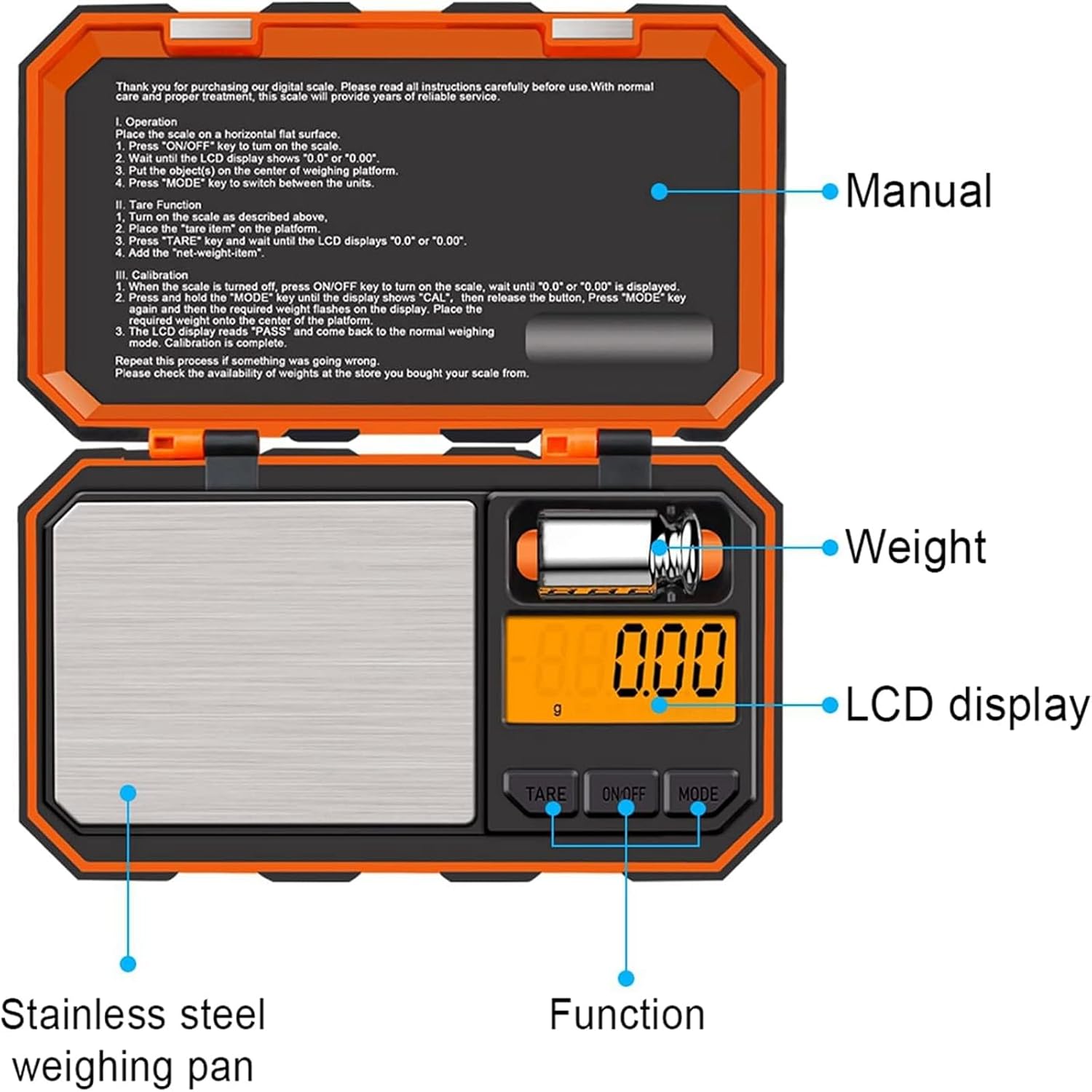
Figura 1: Mésview of the UNIWEIGH UF200-1 Digital Gram Scale with key components labeled.

Figure 2: The compact dimensions of the scale (5.6" x 3.3" x 0.9") highlighting its portability.
2. Configuració
- Instal·lació de la bateria: Open the battery compartment located on the underside of the scale. Insert 2 AAA batteries, ensuring correct polarity. Close the compartment securely.
- Col·locació: Col·loqueu la bàscula sobre una superfície dura, plana i estable per garantir lectures precises. Eviteu col·locar-la sobre superfícies toves o irregulars.
- Eliminació de la pel·lícula protectora: Gently remove any protective film from the weighing platform before first use.
3. Instruccions de funcionament
3.1 Pesatge bàsic
- Premeu el botó ON/OFF button to turn on the scale. Wait for the display to show "0.00" or "0.000".
- Place the item(s) to be weighed gently on the center of the stainless steel weighing platform.
- Llegeix el pes que es mostra a la pantalla LCD.
3.2 Conversió d'unitats
The scale supports 6 different weighing units: grams (g), ounces (oz), grains (gn), carats (ct), pennyweights (dwt), and troy ounces (ozt).
- With the scale turned on and displaying "0.00", press the MODE button repeatedly to cycle through the available units.
- Seleccioneu la unitat de mesura desitjada.

Figure 3: The scale's display illustrating the six available weighing units.
3.3 Funció de tara
The Tare function allows you to subtract the weight of a container, ensuring only the weight of the contents is measured.
- Col·loqueu un recipient buit a la plataforma de pesatge.
- Premeu el botó TARA button. The display will reset to "0.00" or "0.000".
- Afegiu els articles que voleu pesar al contenidor. La pantalla mostrarà el pes net dels articles.

Figure 4: Step-by-step guide for using the Tare function to measure net weight.
3.4 Funció d'apagada automàtica
To conserve battery life, the scale is equipped with an automatic shut-off function. If there is no activity for 180 seconds, the scale will automatically turn off.

Figure 5: The backlit LCD screen clearly displays readings and indicates the 180-second auto-off feature.
4. Calibració
For optimal accuracy, it is recommended to calibrate the scale regularly, especially after moving it or if you suspect inaccurate readings. A 50g calibration weight is included with your scale.
- Gira l'escala ON and wait until the display shows "0.00" or "0.000".
- Manteniu premut el botó MODE button until "CAL" is displayed, then release the button.
- Premeu el botó MODE button again. The display will flash the required calibration weight (e.g., "50.00").
- Place the included 50g calibration weight gently on the center of the weighing platform.
- La pantalla mostrarà "PASS" i després tornarà al mode de pesatge normal, cosa que indicarà que el calibratge és correcte.

Figure 6: The scale with the 50g calibration weight, demonstrating its use for various small items.
5. Manteniment
- Neteja: Utilitzeu un suau, damp cloth to clean the scale. Do not use abrasive cleaners or immerse the scale in water.
- Emmagatzematge: Store the scale in a cool, dry place. Keep the protective lid closed to prevent dust and damage to the weighing platform.
- Manipulació: Manipuleu la bàscula amb cura. Eviteu deixar-la caure o sotmetre-la a impactes forts, ja que això pot afectar la seva precisió.
6. Solució De Problemes
- "Lo" or Low Battery Indicator: Substituïu les piles per unes de noves.
- "O-Ld" or Overload Indicator: Remove the item from the platform immediately. The weight exceeds the maximum capacity of 200g.
- Lectures inestables: Ensure the scale is on a stable, flat surface and away from vibrations or air currents. Recalibrate if necessary.
- Lectures inexactes: Recalibrate the scale using the included 50g weight.
7. Especificacions
- Capacitat: 200 g / 0.01 g
- Unitats: g, oz, gn, ct, dwt, ozt
- Visualització: LCD amb retroil·luminació taronja
- Potència: 2 piles AAA (incloses)
- Apagat automàtic: 180 segons d'inactivitat
- Material de la plataforma: Acer inoxidable
- Dimensions del producte: 5.6 x 3.3 x 0.9 polzades
- Número de model de l'article: 609378946684
8. Vídeo oficial del producte
Video 1: An official demonstration of the UNIWEIGH mini weight multifunction pocket scale, showcasing les seves característiques i facilitat d'ús.
9. Garantia i Suport
UNIWEIGH is committed to providing high-quality digital scales. If you encounter any issues or are not completely satisfied with your purchase, please contact our customer service. We aim to respond within 24 hours and provide a satisfactory solution.
For further assistance, please refer to the contact information provided with your purchase or visit the official UNIWEIGH store on Amazon: UNIWEIGH Store