
CaDA S059-003
CaDA Pro HighSpeed Power System Instruction Manual
Model: S059-003
1. Introducció
This manual provides detailed instructions for the CaDA Pro HighSpeed Power System (Model S059-003). This system is designed to enhance your building block models with advanced motorization, lighting, and remote control capabilities. Please read this manual thoroughly before use to ensure proper operation and maintenance.
2. Producte acabatview
The CaDA Pro HighSpeed Power System includes the following components:
- 3 High-Performance Motors (M-Motor, L-Motor, Servo Motor)
- 2.4 GHz Rechargeable Battery Box (500 mAh, 7.4 V)
- Conjunt de llums LED
- Comandament a distància de 2.4 GHz
- Extension Cable (30 cm)
- Micro USB Charging Cable (75 cm)
- Components for Steering Wheel Control

Figura 2.1: Mésview of the CaDA Pro HighSpeed Power System components as packaged.

Figura 2.2: Primer pla view of the individual components including motors, battery box, remote control, and cables.
3. Configuració i instal·lació
Follow these steps to set up your CaDA Pro HighSpeed Power System with your building block model.
- Charge the Battery Box: Connect the Micro USB charging cable to the battery box and a suitable USB power source. The indicator light will show charging status. A full charge is recommended before first use.
- Instal·leu les bateries al comandament a distància: Open the battery compartment on the 2.4 GHz remote control and insert 2 x 1.5V AA batteries (not included), ensuring correct polarity.
- Connect Motors and LEDs: Attach the M-Motor, L-Motor, Servo Motor, and LED Light Set to your building block model as per your model's instructions. Use the 30 cm extension cable if additional reach is needed.
- Connect to Battery Box: Plug the cables from the motors and LED lights into the appropriate ports on the rechargeable battery box.
- Comandament remot de vinculació:
- Ensure the battery box is powered on.
- Turn on the remote control. The indicator light on the remote control will flash.
- Press and hold the pairing button on the battery box until the indicator light on both the battery box and remote control become solid, indicating successful pairing.

Figure 3.1: The 2.4GHz rechargeable battery box, which powers the system components.
4. Instruccions de funcionament
Once the system is set up and paired, you can control your model using the 2.4 GHz remote control.
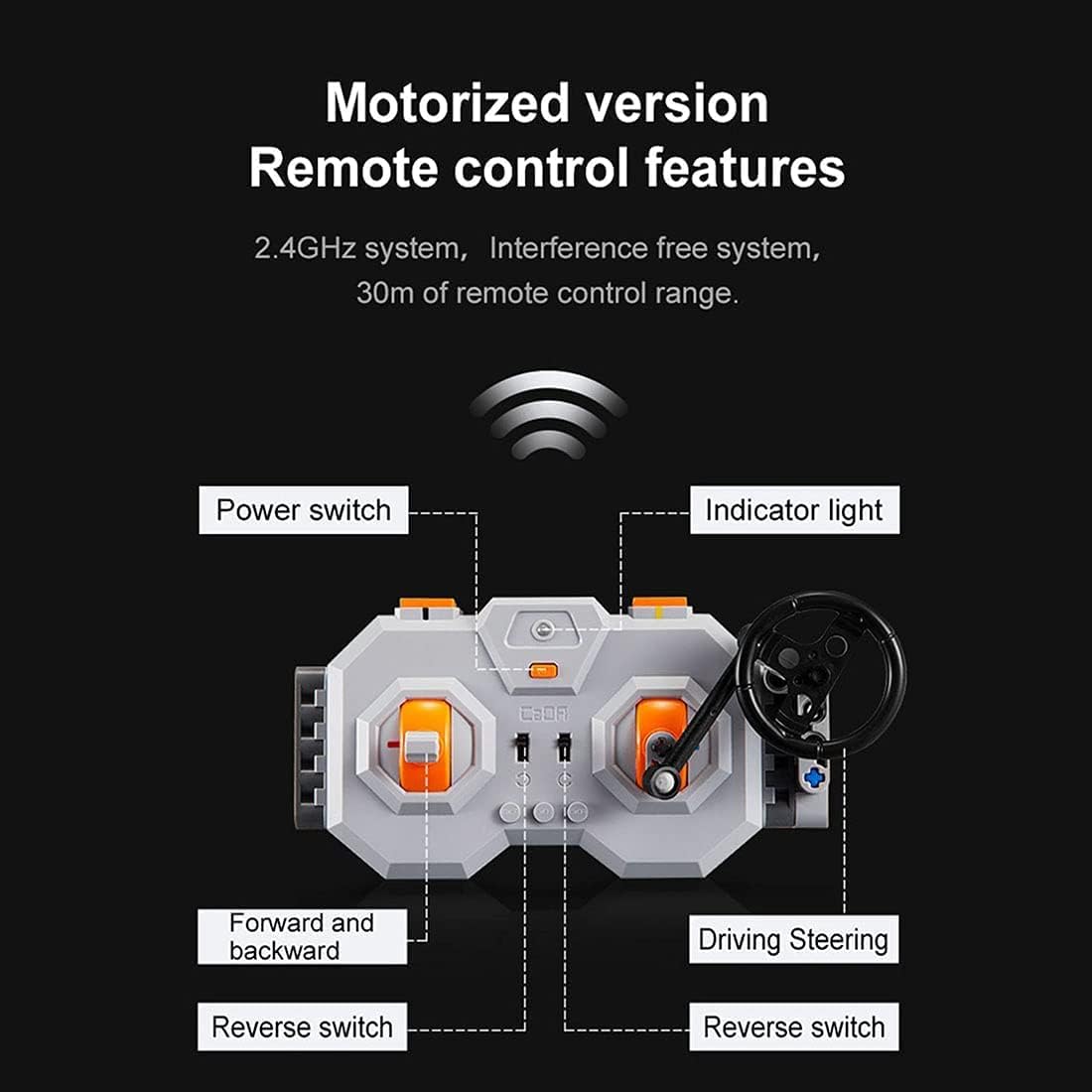
Figure 4.1: Diagram illustrating the features of the 2.4GHz remote control, including power switch, indicator light, forward/backward controls, and driving/steering controls.
- Interruptor d'alimentació: Located on the remote control, turn it on to activate the system.
- Llum indicadora: Shows the connection status. Solid light indicates successful pairing.
- Forward and Backward Controls: Use the left joystick/buttons to control the forward and backward movement of the model.
- Driving/Steering Controls: Use the right joystick/steering wheel to control the steering or other directional movements of the model.
- Reverse Switches: Specific switches may be present for fine-tuning motor direction.
- Smooth Start Control: The motors feature a smooth start control, accelerating gradually over one second instead of abruptly.
The 2.4 GHz system provides an interference-free connection with a remote control range of up to 30 meters.
5. Manteniment
To ensure the longevity and optimal performance of your CaDA Pro HighSpeed Power System, follow these maintenance guidelines:
- Neteja: Use a dry, soft cloth to clean the components. Do not use water or chemical cleaners, as this can damage the electronic parts.
- Cura de la bateria:
- Recharge the lithium-ion battery box regularly, even if not in use, to maintain battery health.
- No sobrecarregueu ni descarregueu profundament la bateria.
- Remove AA batteries from the remote control if storing for extended periods to prevent leakage.
- Emmagatzematge: Store the system components in a cool, dry place away from direct sunlight and extreme temperatures.
- Gestió de cables: Avoid bending or crimping cables excessively to prevent internal damage.
6. Solució De Problemes
If you encounter issues with your CaDA Pro HighSpeed Power System, refer to the following common problems and solutions:
| Problema | Causa possible | Solució |
|---|---|---|
| El sistema no s'encén. | Battery box is not charged or remote control batteries are dead. | Charge the battery box. Replace AA batteries in the remote control. |
| El comandament a distància no respon. | Not paired, out of range, or interference. | Re-pair the remote control and battery box. Ensure you are within 30m range. Move away from other 2.4GHz devices. |
| Motors not moving or moving slowly. | Low battery, incorrect connection, or motor obstruction. | Charge the battery box. Check all cable connections. Ensure no parts are blocking motor movement. |
| Els llums LED no funcionen. | Loose connection or damaged LED set. | Check the connection of the LED light set to the battery box. |
If the problem persists after trying these solutions, please contact CaDA customer support.
7. Especificacions
| Característica | Detall |
|---|---|
| Número de model | S059-003 |
| Motors inclosos | 1x M-Motor (up to 650 rpm), 1x L-Motor (up to 680 rpm), 1x Servo Motor |
| Caixa de bateries | Lithium-ion, 500 mAh, 7.4 V, Rechargeable via Micro USB |
| Control remot | 2.4 GHz, requires 2x 1.5V AA batteries |
| LED Light Set Cable Length | 53 cm |
| Longitud del cable d'extensió | 30 cm |
| Micro USB Charging Cable Length | 75 cm |
| Compatibilitat | Universal for CaDA and Lego models (e.g., C61001W, C61003W, C61007W, etc.) |
| Edat recomanada | 12 anys i més |
| Material principal | Acrilonitril butadiè estirè (ABS) |
8. Advertències de seguretat
WARNING: Contains toys. Adult supervision recommended.
- Aquest producte conté peces petites i no és adequat per a nens menors de 3 anys a causa del perill d'asfíxia.
- Do not disassemble or modify the components.
- Do not expose the battery box to water, fire, or extreme temperatures.
- Ensure proper battery polarity when inserting batteries into the remote control.
- Desfeu-vos de les piles de manera responsable d'acord amb la normativa local.
9. Garantia i Suport
CaDA products are manufactured to high-quality standards. For warranty information or technical support, please refer to the official CaDA weblloc o poseu-vos en contacte amb el vostre distribuïdor.
For further assistance, you may visit the official CaDA weblloc: www.doubleeagle.cc
Ask a question about this manual
Ask about setup, troubleshooting, compatibility, parts, safety, or missing instructions. Manuals+ will review the question and use this page’s manual context to help answer it.