
1. Introducció
This manual provides essential information for the safe and effective operation, maintenance, and care of your Parkside PMZS 50 A1 Rotary Tool Set. This 30-piece set is designed for various applications including working with metal, plastic, and wood. Please read these instructions thoroughly before using the tool set and keep them for future reference.
2. Instruccions de seguretat
Observeu sempre les precaucions de seguretat bàsiques per reduir el risc d'incendi, descàrrega elèctrica i lesions personals. Si no seguiu aquestes instruccions, podeu patir lesions greus.
- Protecció ocular: Utilitzeu sempre ulleres de seguretat o ulleres de seguretat amb protectors laterals quan feu servir l'eina rotativa.
- Protecció respiratòria: Wear a dust mask, especially when sanding or cutting materials that produce fine dust.
- Peça de treball segura: Always secure the workpiece firmly with clamps o un cargol. No subjecteu mai la peça amb la mà.
- Ventilació adequada: Ensure adequate ventilation in your work area.
- Correct Accessories: Use only accessories that are rated for the speed of your rotary tool and are appropriate for the task.
- Inspeccionar els accessoris: Before each use, inspect accessories for damage. Do not use damaged accessories.
- Evita el contacte: Keep hands and body parts away from rotating accessories.
- Unplug When Changing Accessories: Always unplug the tool from the power source before changing accessories or making adjustments.
- Mantenir la zona de treball neta: Les zones de treball desordenades conviden accidents.
3. Contingut del paquet
Your Parkside PMZS 50 A1 Rotary Tool Set includes the following items:
- 1x Rotary Tool
- 30x Assorted Rotary Tool Accessories, which may include:
- Grinding stones (for metal, stone)
- Cutting discs (for metal, plastic)
- Sanding bands and discs (for wood, plastic)
- Polishing wheels (for various materials)
- Engraving bits (for various materials)
- Mandrels for mounting accessories
- Manual d'instruccions
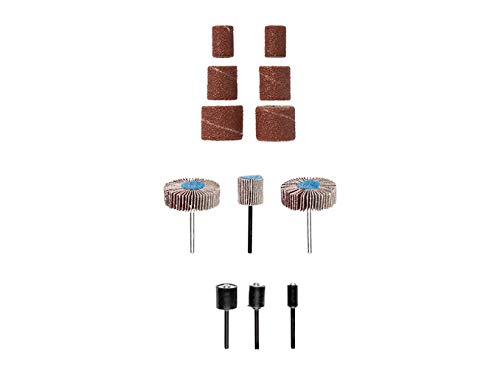
Image 1: The Parkside PMZS 50 A1 Rotary Tool Set, showcasing the tool and a selection of its 30 included accessories for diverse applications.
4. Configuració
Before operating the rotary tool, ensure it is unplugged from the power source.
- Selecciona l'accessori: Choose the appropriate accessory for your task and material (e.g., grinding stone for metal, sanding band for wood).
- Inserir accessori: Depress the spindle lock button (if present) and insert the accessory shank into the collet. Ensure the accessory is inserted as far as possible without the working part touching the collet nut.
- Estrenyeu la femella de la pinça: While holding the spindle lock button, use the collet wrench to securely tighten the collet nut. Do not overtighten.
- Comprovació de seguretat: Gently pull on the accessory to ensure it is firmly seated and will not slip during operation.
5. Funcionament
Always wear appropriate personal protective equipment (PPE) as outlined in the safety instructions.
- Encès: Plug the tool into a suitable power outlet. Turn the tool on using the power switch.
- Ajustar velocitat: If your tool has variable speed control, select an appropriate speed for your material and accessory. Lower speeds are generally for polishing, delicate work, and some plastics. Higher speeds are for cutting, grinding, and sanding.
- Començar el treball: Bring the rotating accessory into contact with the workpiece gently. Apply light, consistent pressure. Let the tool do the work; excessive force can damage the tool, accessory, or workpiece.
- Consells específics del material:
- Metall: Use grinding stones or cutting discs. Maintain a steady hand and avoid overheating the metal.
- Fusta: Use sanding bands, carving bits, or engraving bits. Work with the grain for smoother results.
- Plàstic: Use lower speeds to prevent melting. Cutting discs or sanding accessories can be used carefully.
- Apagar: When finished, turn off the tool and unplug it from the power source. Allow the accessory to stop completely before setting the tool down.
6. Manteniment
Un manteniment regular garanteix un rendiment òptim i allarga la vida útil de la vostra eina.
- Neteja: After each use, unplug the tool and use a soft brush or compressed air to clean dust and debris from the ventilation openings and around the collet. Do not use solvents.
- Emmagatzematge d'accessoris: Store accessories in their designated case or a dry, secure location to prevent damage and loss.
- Inspecció del cable: Periodically inspect the power cord for any signs of damage. If damaged, have it repaired by a qualified technician.
- Collet Maintenance: Keep the collet and collet nut clean. If accessories are difficult to insert or remove, clean the collet thoroughly.
7. Solució De Problemes
If you encounter issues with your rotary tool, refer to the following common problems and solutions:
- L'eina no s'inicia:
- Check if the tool is properly plugged into a working power outlet.
- Assegureu-vos que l'interruptor d'alimentació estigui a la posició "ON".
- Comproveu si hi ha disjuntors saltats o fusibles fundits.
- L'accessori tremola o vibra excessivament:
- Ensure the accessory shank is fully inserted into the collet.
- Estrenyeu bé la femella de la pinça amb la clau anglesa.
- Inspect the accessory for damage or bending; replace if necessary.
- Tool Overheats:
- Reduïu la pressió aplicada a la peça de treball.
- Assegureu-vos que les obertures de ventilació estiguin lliures de residus.
- Deixeu que l'eina es refredi durant un ús prolongat.
Si els problemes persisteixen, poseu-vos en contacte amb el servei d'atenció al client.
8. Especificacions
| Model | PMZS 50 A1 |
| Marca | Lidl |
| Compatibilitat de materials | Metall, Fusta, Plàstic |
| Accessory Count | 30 peces |
| ASIN | B08V92KZH9 |
9. Garantia i Suport
Your Parkside PMZS 50 A1 Rotary Tool Set is covered by a manufacturer's warranty. Please refer to the warranty card included with your purchase for specific terms and conditions, including the warranty period and coverage details.
For technical support, spare parts, or warranty claims, please contact the customer service department of your retailer or the manufacturer directly. Contact information can typically be found in the packaging or on the manufacturer's official weblloc.