
ZIPRO 6299212
ZIPRO Dash Foldable Rowing Machine User Manual
Model: 6299212
Introducció
The ZIPRO Dash Rowing Machine is designed to provide an effective and smooth full-body workout in the comfort of your home. Featuring a magnetic braking system, it offers quiet operation and adjustable resistance levels to suit individual training needs. The integrated training computer is compatible with the iConsole+ mobile application, allowing for wireless control via Bluetooth from your smartphone or tablet. Additionally, it supports the Kinomap application for enhanced training experiences. The computer tracks essential workout data such as time, stroke count, calorie consumption, and heart rate (with the included Polar telemetry band), displaying them on its LCD screen. Its foldable design ensures convenient storage.

Image: The ZIPRO Dash Foldable Rowing Machine, showcasing its sleek black design with green accents, magnetic resistance unit, and comfortable seat on a sturdy rail.
Informació important de seguretat
Please read all instructions carefully before assembling and using the ZIPRO Dash Rowing Machine. Keep this manual for future reference.
- Consulteu el vostre metge abans de començar qualsevol programa d'exercici.
- Mantingueu els nens i les mascotes lluny de la màquina durant l'ús.
- Place the rowing machine on a flat, stable surface with adequate clearance around it.
- Inspeccioneu la màquina per detectar peces soltes o desgastades abans de cada ús. No l'utilitzeu si està danyada.
- Utilitzeu roba i calçat esportiu adequats durant l'exercici.
- No supereu el pes màxim de l'usuari de 135 kg (297 lliures).
- Utilitzeu la màquina només per a la finalitat prevista, tal com es descriu en aquest manual.
- Deixa de fer exercici immediatament si et sents dèbil, marejat o tens dolor.
Contingut del paquet
Carefully unpack all components and ensure you have received the following parts:
- Main Frame Assembly (with magnetic resistance unit and console mount)
- Carril de seient
- Seient lliscant
- Estabilitzador frontal
- Estabilitzador posterior
- Footrests (2)
- Manillar
- Training Computer (LCD display)
- Polar T34 Telemetry Heart Rate Band
- Kit de ferramenta (cargols, volanderes, femelles, eines)
- Manual d'usuari
Si falta alguna peça o hi ha alguna danyada, poseu-vos en contacte amb el servei d'atenció al client immediatament.
Muntatge i configuració
Assembly typically takes 30-60 minutes. It is recommended to have two people for assembly. Ensure all parts are present before beginning.
- Connecteu els estabilitzadors: Securely attach the front and rear stabilizers to the main frame using the provided bolts and tools. Ensure the stabilizing pads are properly aligned.
- Install Seat Rail: Connect the seat rail to the main frame. Make sure it is firmly attached and aligned.
- Seient de muntatge: Slide the seat onto the seat rail. Verify that the ball bearings allow for smooth movement.
- Attach Footrests: Secure the two footrests to the main frame. Ensure they are stable and the straps are adjustable.
- Connecta el manillar: Attach the handlebar to the pulling strap/chain mechanism.
- Instal·la la consola: Mount the training computer onto its designated holder. Insert the included batteries (AA Mignon cells). Connect any necessary cables from the main unit to the console.
- Comprovació final: Before first use, double-check all bolts and connections to ensure they are tight and secure. Test the rowing motion and resistance adjustment.
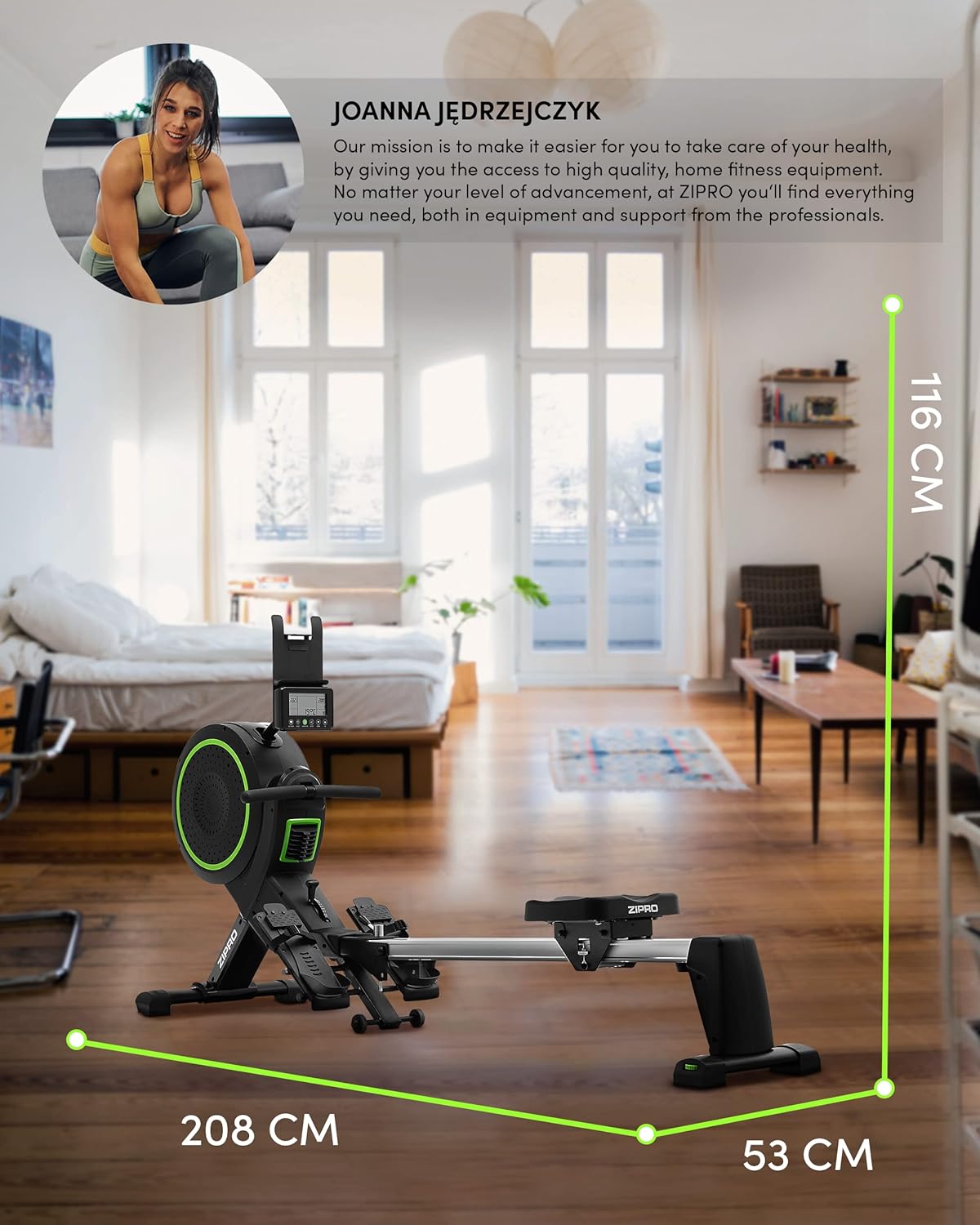
Image: Diagram showing the dimensions of the ZIPRO Dash Rowing Machine (208 cm length, 53 cm width, 116 cm height), useful for planning placement.
Instruccions de funcionament
Powering On the Console
The LCD training computer powers on automatically when you begin rowing or press any button. It is powered by AA batteries (included).

Imatge: Primer pla view of the ZIPRO Dash Rowing Machine's LCD console, showing various workout metrics and control buttons.
Ajust de resistència
The ZIPRO Dash features an 8-step magnetic resistance system. To adjust the resistance, locate the resistance knob or lever on the main unit (often near the fan/flywheel housing). Turn the knob clockwise to increase resistance and counter-clockwise to decrease it. Choose a level that challenges you appropriately for your fitness level.
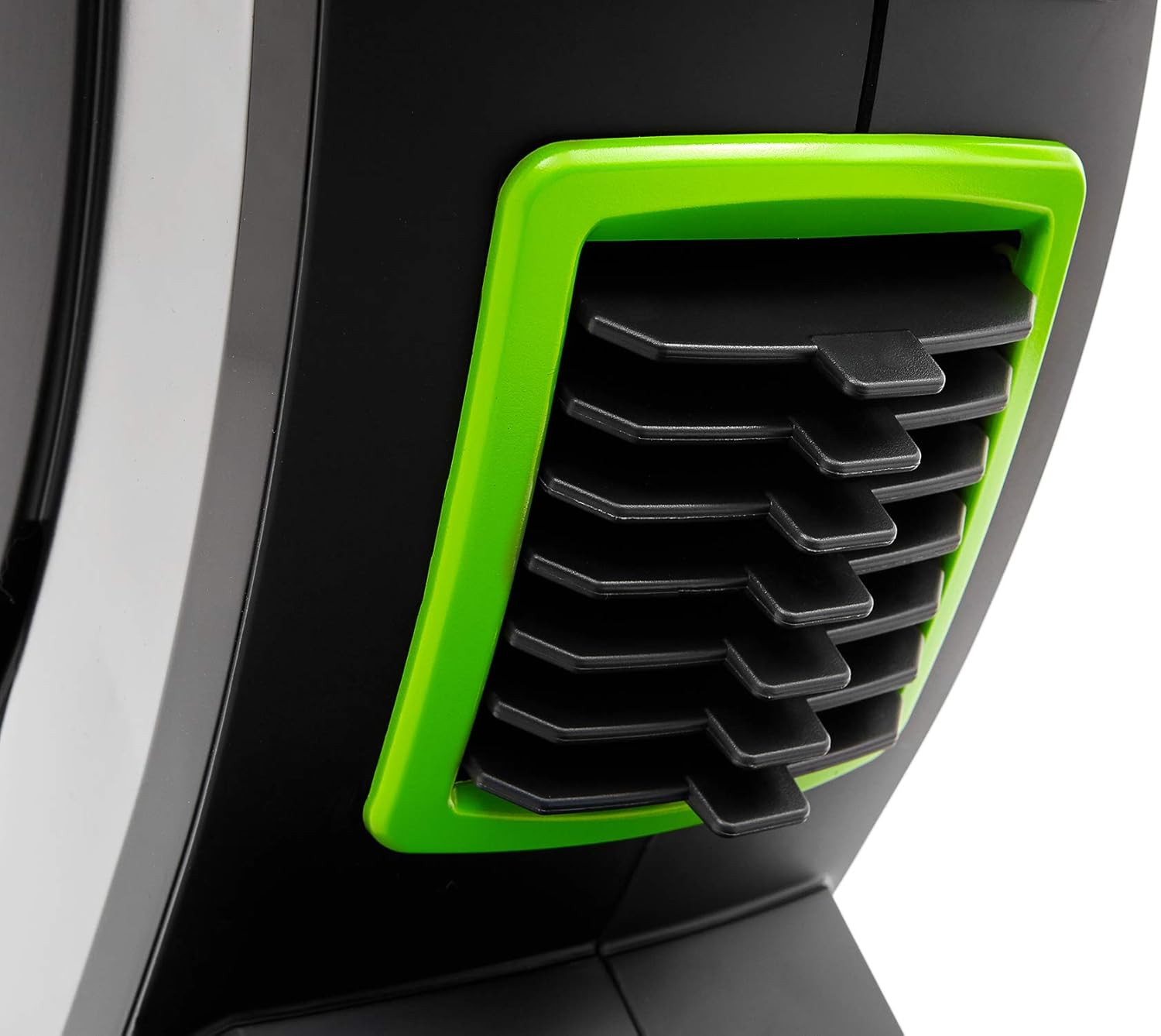
Image: Detail of the resistance adjustment mechanism on the ZIPRO Dash Rowing Machine, showing the numbered settings.
Ús de l'ordinador d'entrenament
The LCD display shows various workout metrics:
- HORA: Durada del teu entrenament.
- CLAUSOS: Total number of strokes performed.
- CALORIES: Calories cremades estimades.
- RITME CARDÍAC: Your heart rate, measured via the Polar T34 telemetry band (if worn and connected).
- Other metrics may include distance, strokes per minute, etc.
Use the buttons on the console (e.g., MODE, SET, RESET) to navigate through display modes, set target values, or reset your workout data. Refer to the console's specific instructions for detailed button functions.
Connecting to Mobile Applications (iConsole+ & Kinomap)
The ZIPRO Dash computer is Bluetooth-enabled for connectivity with mobile apps.
- Descarregar aplicacions: Download the "iConsole+" and/or "Kinomap" applications from your device's app store.
- Activa el Bluetooth: Assegureu-vos que el Bluetooth estigui habilitat al vostre telèfon intel·ligent o tauleta.
- Connectar: Open the chosen app and follow the in-app instructions to search for and connect to your ZIPRO Dash rowing machine. The app will typically detect the machine automatically.
- Característiques:
- iConsole+: Allows wireless control of the rowing computer, access to workout programs, and virtual routes.
- Kinomap: Tracks your progress and offers virtual routes with real-world video, allowing you to compete with other users.

Image: A user rowing on the ZIPRO Dash, with logos for Kinomap and iConsole+ apps, highlighting the machine's smart connectivity features.
Plegable i emmagatzematge
The ZIPRO Dash is designed to be foldable for convenient storage.
- Mecanisme d'alliberament: Locate the folding release pin or knob, usually near the connection point of the seat rail to the main frame.
- Fold Up: Carefully lift the seat rail upwards until it locks into the vertical storage position. Ensure it is securely latched.
- Moure: Use the integrated transport wheels (located on the front stabilizer) to easily move the folded machine for storage.

Image: The ZIPRO Dash Rowing Machine shown in its folded, upright storage position, demonstrating its space-saving design.
Manteniment
Regular maintenance will prolong the life of your rowing machine.
- Neteja: Netegeu la màquina amb un anunciamp drap després de cada ús per eliminar la suor i la pols. No utilitzeu productes de neteja abrasius.
- Lubricació: Periodically check the seat rail for smooth operation. If needed, apply a small amount of silicone-based lubricant to the rail.
- Inspeccions: Regularly check all bolts, nuts, and moving parts for tightness and wear. Tighten any loose fasteners. Inspect the pulling strap/chain for fraying or damage.
- Substitució de la bateria: If the console display becomes dim or unresponsive, replace the AA batteries. Note that the battery compartment might require unscrewing the console from its mount.
Resolució de problemes
| Problema | Causa possible | Solució |
|---|---|---|
| La consola no mostra les dades. | Batteries are dead or incorrectly installed. Loose connection. | Replace batteries. Check all cable connections to the console. |
| La resistència es percep com a inconsistent o massa feble/forta. | Resistance setting is incorrect. Internal mechanism issue. | Adjust the resistance knob. If problem persists, contact support. |
| El seient no llisca suaument. | Dirt or debris on the rail. Rail needs lubrication. | Clean the seat rail. Apply silicone lubricant. |
| La màquina fa sorolls estranys. | Loose bolts or components. Worn parts. | Check and tighten all bolts. Inspect for worn parts and contact support if necessary. |
| App (iConsole+/Kinomap) not connecting via Bluetooth. | Bluetooth off on device. App permissions. Console not active. | Ensure Bluetooth is on. Grant app permissions. Start rowing to activate console. Restart app/device. |
Especificacions
| Nom del model | ZIPRO Dash |
| Número de model | 6299212 |
| Color | Negre |
| Mecanisme de resistència | Magnètic (8 nivells) |
| Tipus de visualització | LCD |
| Tracked Metrics | Time, Strokes, Calories, Heart Rate (with Polar T34 band) |
| Connectivitat | Bluetooth (iConsole+, Kinomap compatible) |
| Pes màxim de l'usuari | 135 kg (297 lliures) |
| Alçada màxima recomanada per a l'usuari | 200 cm (6 peus i 7 polzades) |
| Dimensions del producte (L x A x A) | 207 x 53 x 115 cm (81.5 x 20.9 x 45.3 polzades) |
| Dimensions plegades (aprox.) | (Vertical storage, specific dimensions not provided but implied by foldable feature) |
| Pes de l'article | 40 kg (88 lliures) |
| Material del marc | Metall / Acer d'aliatge |
| Font d'alimentació | Manual (hand-operated), Console: Batteries (AA) |
| Característiques especials | Foldable design, Anti-slip footrests, Portable device holder, Stabilizing pads, Transport wheels |
Garantia i Suport
For warranty information, please refer to the warranty card included with your product or visit the official ZIPRO weblloc web. Conserveu el comprovant de compra per a reclamacions de garantia.
If you encounter any issues not covered in the troubleshooting section or require further assistance, please contact ZIPRO customer support. Contact details can typically be found on the manufacturer's weblloc web o a l'embalatge del producte.
Fabricant: Morele.net Sp. z oo
Documents relacionats6299212


Ask a question about this manual
Ask about setup, troubleshooting, compatibility, parts, safety, or missing instructions. Manuals+ will review the question and use this page’s manual context to help answer it.