
Introducció
This manual provides essential instructions for the safe and efficient use of your REMAX RP-W18 Wireless Fast Charger. Please read this manual thoroughly before using the product and retain it for future reference.
Producte acabatview
The REMAX RP-W18 is a wireless charging pad designed to provide fast and convenient charging for compatible mobile phones. It features a single charging port and supports Qi-compliant devices.
Característiques principals:
- Capacitat de càrrega sense fil
- Suport de càrrega ràpida
- 10 Watts power output
- Compatible with various mobile phones
- Qi standard compliant
- Disseny compacte i fàcil d'utilitzar
Contingut del paquet:
- REMAX RP-W18 Wireless Fast Charger
- USB Charging Cable (assumed, typical for such products)
- Manual d'usuari
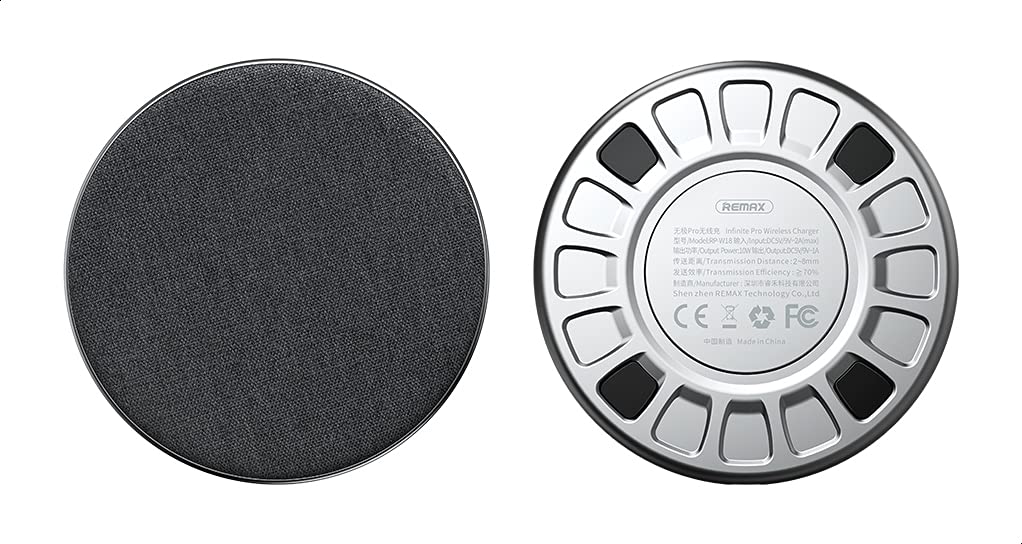
Figure 1: REMAX RP-W18 Wireless Fast Charger. This image displays the top surface of the charger, highlighting its circular design and the REMAX brand logo. The charging surface is smooth and black.
Configuració
- Connecteu-vos a l'alimentació: Connect the provided USB charging cable to the micro-USB or USB-C port on the REMAX RP-W18 charger. Plug the other end of the cable into a compatible USB power adapter (not included) or a powered USB port. Ensure the power adapter provides at least 5V/2A for optimal performance.
- Col·locació: Place the wireless charger on a flat, stable surface, such as a desk or nightstand. Ensure there are no metallic objects between the charger and the device to be charged.
- Indicador d'alimentació: Once connected to power, a small LED indicator on the charger may light up briefly, indicating it is ready for use.
Instruccions de funcionament
- Iniciar la càrrega: Place your Qi-compatible smartphone directly onto the center of the REMAX RP-W18 wireless charging pad.
- Confirmació de càrrega: The LED indicator on the charger will typically change color or illuminate steadily to confirm that charging has begun. Your smartphone's screen should also indicate that it is charging wirelessly.
- Col·locació òptima: For efficient charging, ensure your device is centered on the charging pad. Misalignment may result in slower charging or no charging at all.
- Càrrega completa: Once your device is fully charged, it will stop drawing power from the charger. You can remove your device at any time.
Nota: For fast charging, ensure your smartphone supports wireless fast charging and that you are using a compatible fast charging power adapter (e.g., Quick Charge 2.0/3.0 or Power Delivery) with the wireless charger.
Informació de seguretat
- No exposeu el carregador a l'aigua, la humitat ni a temperatures extremes.
- Eviteu deixar caure el carregador ni sotmetre'l a impactes forts.
- No desmunteu, modifiqueu ni intenteu reparar el carregador vosaltres mateixos.
- Mantingueu el carregador lluny dels nens i de les mascotes.
- Feu servir només adaptadors i cables d'alimentació compatibles.
- Do not place metallic objects (e.g., credit cards, keys, coins) on the charging pad during operation, as this may cause overheating or damage.
- If the charger becomes excessively hot during use, disconnect it from the power source immediately.
Manteniment
- Neteja: Desconnecteu el carregador de la font d'alimentació abans de netejar-lo. Feu servir un drap suau i sec per netejar la superfície del carregador. No utilitzeu netejadors líquids ni aerosols.
- Emmagatzematge: Quan no l'utilitzeu, guardeu el carregador en un lloc fresc i sec, allunyat de la llum solar directa i de temperatures extremes.
Resolució de problemes
| Problema | Causa possible | Solució |
|---|---|---|
| El dispositiu no es carrega |
|
|
| Càrrega lenta |
|
|
| El LED del carregador no s'il·lumina |
|
|
Especificacions
| Marca | REMAX |
| Número de model | RP-W18 |
| Tecnologia de connectivitat | Sense fil |
| Dispositius compatibles | Mobile Phones (Qi-compatible) |
| Característiques especials | Càrrega ràpida |
| Entrada Voltage | 5 Volts |
| Corrent d'entrada | 2 Amps |
| Potència de sortida | 10 watts |
| Vol. De sortidatage | 5 Volts |
| Ports USB totals | 1 (for power input) |
| Font d'alimentació | Elèctric amb cable |
| Compliment | Qi estàndard |
| Color | Negre |
| Materials | Materials múltiples |
| ASIN | B08WGCTRGM |
Garantia i Suport
This product comes with a manufacturer's warranty for 3 months from the date of purchase. For warranty claims, technical support, or further details, please contact the manufacturer or their authorized agent. Alternatively, you may contact Amazon customer service for assistance.
For more information, visit the official REMAX weblloc o poseu-vos en contacte amb el seu servei d'atenció al client.