
Introducció
This manual provides detailed instructions for the safe and efficient use of your XO B26 Bluetooth 4.2 Wireless Earbud. Please read this manual thoroughly before using the product and retain it for future reference.
Producte acabatview
The XO B26 is a single Bluetooth 4.2 wireless earbud designed for mobile phones, offering ease of use and portability. It is crafted from high-quality materials to ensure durability and a secure fit.
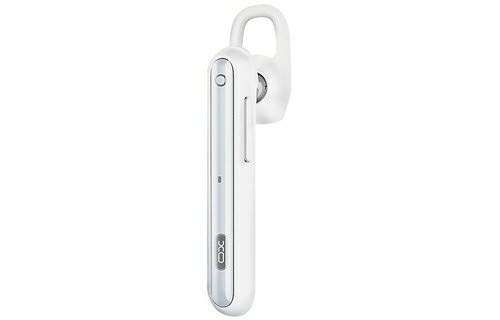
Image: The XO B26 Bluetooth Wireless Earbud, shown in white with a silver accent, featuring its ergonomic design and ear hook.
Característiques principals:
- Bluetooth 4.2 connectivity for stable wireless connection.
- Disseny compacte i lleuger per a una fàcil portabilitat.
- Ergonomically designed for a secure and comfortable fit.
- Touch control method for intuitive operation.
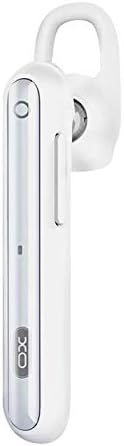
Imatge: Un primer pla view of the XO B26 earbud, highlighting the control button and sleek design.
Configuració
1. Charging the Earbud
- Connect the charging cable (not included) to the earbud's charging port.
- Connecteu l'altre extrem del cable a una font d'alimentació USB compatible.
- The indicator light will show the charging status. A full charge takes approximately 2 hours.
- Once fully charged, disconnect the earbud from the power source.
2. Vinculació amb un dispositiu
- Ensure the earbud is fully charged and turned off.
- Press and hold the multi-function button on the earbud until the indicator light flashes red and blue alternately, indicating it is in pairing mode.
- On your mobile phone or compatible device, enable Bluetooth and search for available devices.
- Select "XO B26" from the list of found devices.
- Once paired, the indicator light will flash blue slowly, and you may hear a confirmation tone.
- Si se us demana una contrasenya, introduïu "0000".
Instruccions de funcionament
Encès/Apagat
- Encès: Press and hold the multi-function button for approximately 3 seconds until the blue indicator light flashes.
- Apagar: Press and hold the multi-function button for approximately 5 seconds until the red indicator light flashes and then turns off.
Making and Receiving Calls (Touch Control)
- Respon a la trucada: Briefly tap the multi-function button when an incoming call rings.
- Finalitzar la trucada: Briefly tap the multi-function button during a call.
- Rebutja la trucada: Press and hold the multi-function button for approximately 2 seconds during an incoming call.
- Torna a marcar l'últim número: Double-tap the multi-function button when not on a call.
Reproducció de música (control tàctil)
- Reproduir/pausa: Briefly tap the multi-function button to play or pause music.
- Pista següent: Press and hold the multi-function button for approximately 2 seconds to skip to the next track.
- Control de volum: Volume is typically controlled via the connected device.
Manteniment
Neteja
- Wipe the earbud with a soft, dry, lint-free cloth.
- Do not use abrasive cleaners, solvents, or spray cleaners.
- Mantingueu el port de càrrega net de pols i deixalles.
Emmagatzematge
- Store the earbud in a cool, dry place away from direct sunlight and extreme temperatures.
- Avoid storing near magnetic fields.
Cura de la bateria
- Charge the earbud regularly, even if not in use, to maintain battery health.
- Eviteu descarregar completament la bateria amb freqüència.
Resolució de problemes
| Problema | Possible solució |
|---|---|
| Els auriculars no s'encén. | Ensure the earbud is fully charged. Press and hold the multi-function button for a longer duration. |
| No es pot emparellar amb el dispositiu. | Make sure the earbud is in pairing mode (flashing red and blue). Turn off and on Bluetooth on your device. Move the earbud closer to your device. |
| No sound during music or calls. | Check the volume level on both the earbud and your connected device. Ensure the earbud is properly paired and connected. |
| Mala qualitat de so. | Ensure there are no obstructions between the earbud and your device. Move closer to your device. Check for interference from other wireless devices. |
| Earbud not charging. | Verify the charging cable is securely connected. Try a different USB power source or cable. Ensure the charging port is clean. |
Especificacions
| Característica | Detall |
|---|---|
| Marca | XO |
| Nom del model | B26 |
| Color | Blanc |
| Versió Bluetooth | 4.2 |
| Tecnologia de comunicació sense fils | Sense fil |
| Dispositius compatibles | Multiple (Mobile Phones) |
| Mètode de control | Toca |
| Temps de conversa | Aproximadament 3 hores |
| Temps de Música | Aproximadament 3 hores |
| Temps de càrrega | Aproximadament 2 hores |
| Components inclosos | Coixinets per a les orelles |
| Pes de l'article | 106 grams |
| Dimensions d'enviament | 17.8 x 3.4 x 0.8 cm |
| ASIN | B08WT1RK59 |
Informació de seguretat
Si us plau, observeu les següents pautes de seguretat per evitar danys al producte o lesions personals:
- Do not disassemble, repair, or modify the earbud.
- Keep the earbud away from water, moisture, and extreme temperatures.
- Eviteu l'exposició prolongada a nivells de volum elevats per evitar danys auditius.
- Mantenir fora de l'abast dels nens i mascotes.
- Use only compatible charging accessories.
Garantia i Suport
Per obtenir informació sobre la garantia o assistència tècnica, consulteu la documentació proporcionada en el moment de la compra o poseu-vos en contacte amb el vostre distribuïdor. Conserveu el comprovant de compra per a qualsevol reclamació de garantia.